
Runleader RL-HM032B
Runleader Digital Maintenance Hour Meter User Manual
Model: RL-HM032B
Brand: Runleader
1. Introduction
The Runleader Digital Maintenance Hour Meter is a versatile device designed to monitor and record engine performance for various 2 or 4-stroke gas engines up to 16 cylinders. It accurately tracks RPM values, accumulates total working hours, and provides maintenance reminders, ensuring optimal performance and longevity of your equipment.
Key features include a backlight display for visibility, a replaceable battery, and robust construction for durability in various environments.
2. Product Overview and Components

The Runleader Digital Maintenance Hour Meter (Model RL-HM032B) is a compact, black unit with a green backlit LCD display. It features two buttons on the left side for 'MENU' and 'SET' functions. A wire extends from the right side for connection to the engine's spark plug. The back of the unit houses the replaceable battery compartment.
2.1 Unboxing and Included Components
Upon opening the product packaging, you will find the following items:
- Runleader Digital Maintenance Hour Meter unit
- Zip ties for securing the sensor wire
- Mounting screws
- Double-sided adhesive tape for alternative mounting
- User manual (this document)
For a visual guide on unboxing and initial setup, please refer to the official product video below:
Official product video demonstrating unboxing (0:04-0:15), battery installation (0:16-0:24), spark plug winding (0:28-0:31), and turning on/off (0:35-0:38).
3. Setup and Installation
3.1 Battery Installation/Replacement
The hour meter comes with a pre-installed CR2032 lithium metal battery. Before first use, you may need to remove an insulating sheet to activate the battery. To replace the battery:
- Locate the battery compartment on the back of the unit.
- Use a coin or a flat tool to twist the battery cover counter-clockwise to open.
- Remove the old CR2032 battery.
- Insert a new CR2032 battery with the positive (+) side facing up.
- Replace the battery cover and twist clockwise to secure it.

This image shows the hour meter's waterproof design and the CR2032 battery, indicating its replaceable nature. The battery compartment is visible on the underside of the unit.
Refer to the official product video (0:16-0:24) for a demonstration of battery installation.
3.2 Mounting the Unit
The hour meter offers two primary mounting options:
- Stick-on Mounting: Use the provided double-sided adhesive tape to attach the unit to a clean, flat surface.
- Screw-on Mounting: Use the provided screws to secure the unit through its designated mounting holes.

This image illustrates the two installation methods: stick-on mounting using adhesive tape and screw-on mounting using screws. Choose the method most suitable for your application surface.
3.3 Spark Plug Wire Winding
For accurate RPM and hour tracking, the sensor wire must be properly connected to the spark plug wire of your engine. Wind the sensor wire around the spark plug wire approximately 4-5 times. Secure the winding with zip ties if necessary to prevent loosening.

This image demonstrates the connection of the hour meter's sensor wire to an engine's spark plug wire, showing the winding technique for signal detection.
Refer to the official product video (0:28-0:31) for a demonstration of spark plug winding.
4. Operating Instructions
4.1 Display Modes
The meter features various display modes accessible via the 'MENU' and 'SET' buttons:
- Clock Display: When the engine is off, the meter displays the current time.
- RPM Display: When the engine is running, the meter displays real-time RPM.
- Total Hours (TOT): Accumulates total working hours of the engine, viewable up to 999,99 hours.
- Job Timer (JOB): Measures the duration of a specific work job, such as an oil change.
- Service Reminders (SVC & SVC2): Countdown tracking time for maintenance reminders (e.g., air filter replacement).
- Max RPM: Displays the maximum RPM recorded during the last operation.
- Alert RPM: A programmable alert RPM value to warn of exceeding a set limit.

Clock display (engine off) and RPM display (engine on).
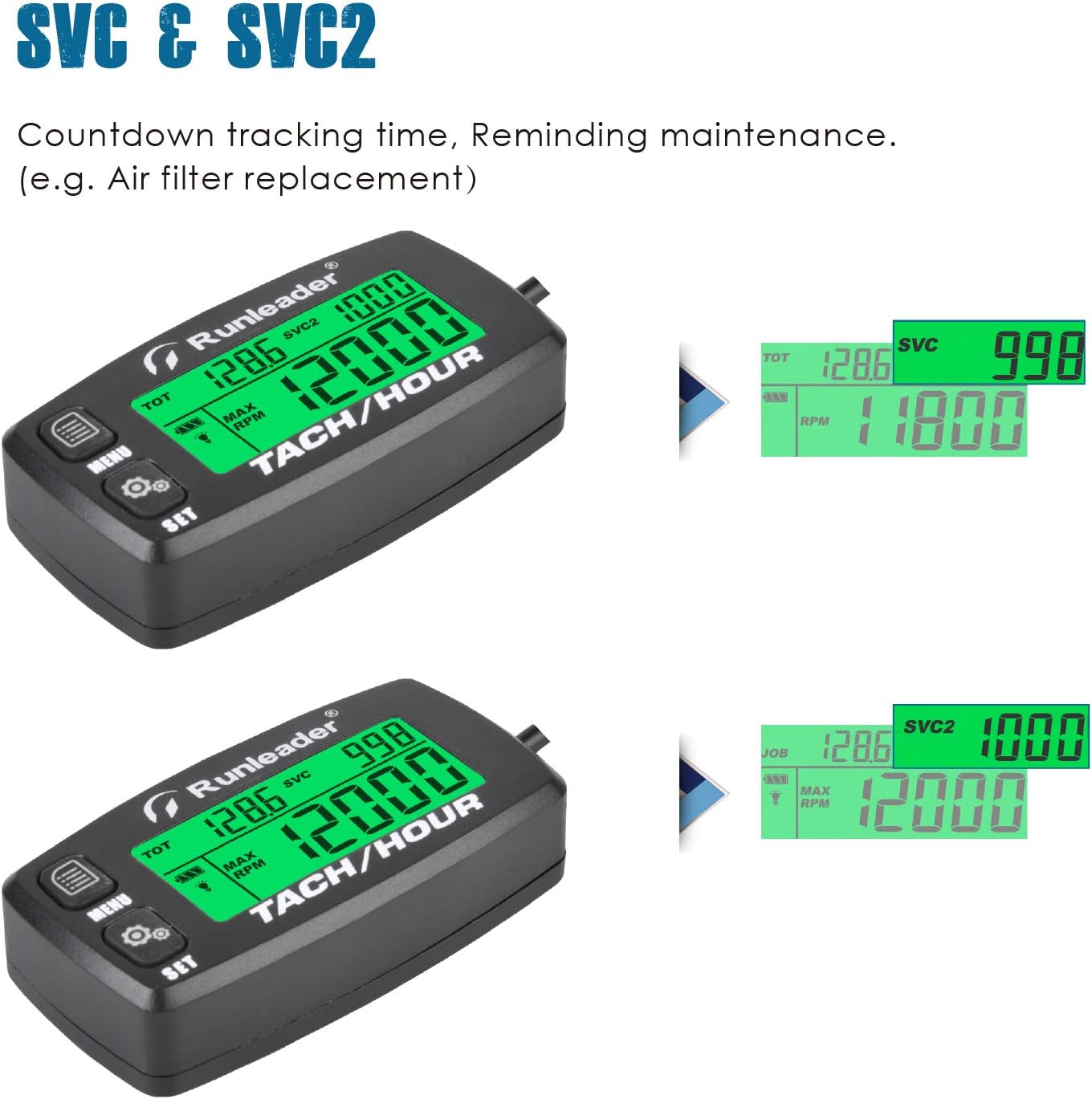
Service reminder displays (SVC and SVC2).

Job timer display.

Max RPM and Alert RPM displays.
4.2 Backlight Display
The meter features a programmable backlight that can be set to green for normal operation or shut down. A red backlight will activate to indicate maintenance schedule reminders or when the RPM alert threshold is exceeded.

This image illustrates the green backlight for normal display and the red backlight for alerts or maintenance reminders.
4.3 Initial Time Setting
When replacing an existing hour meter or for initial setup, you can set the starting total hours (TOT) value to match previous records.
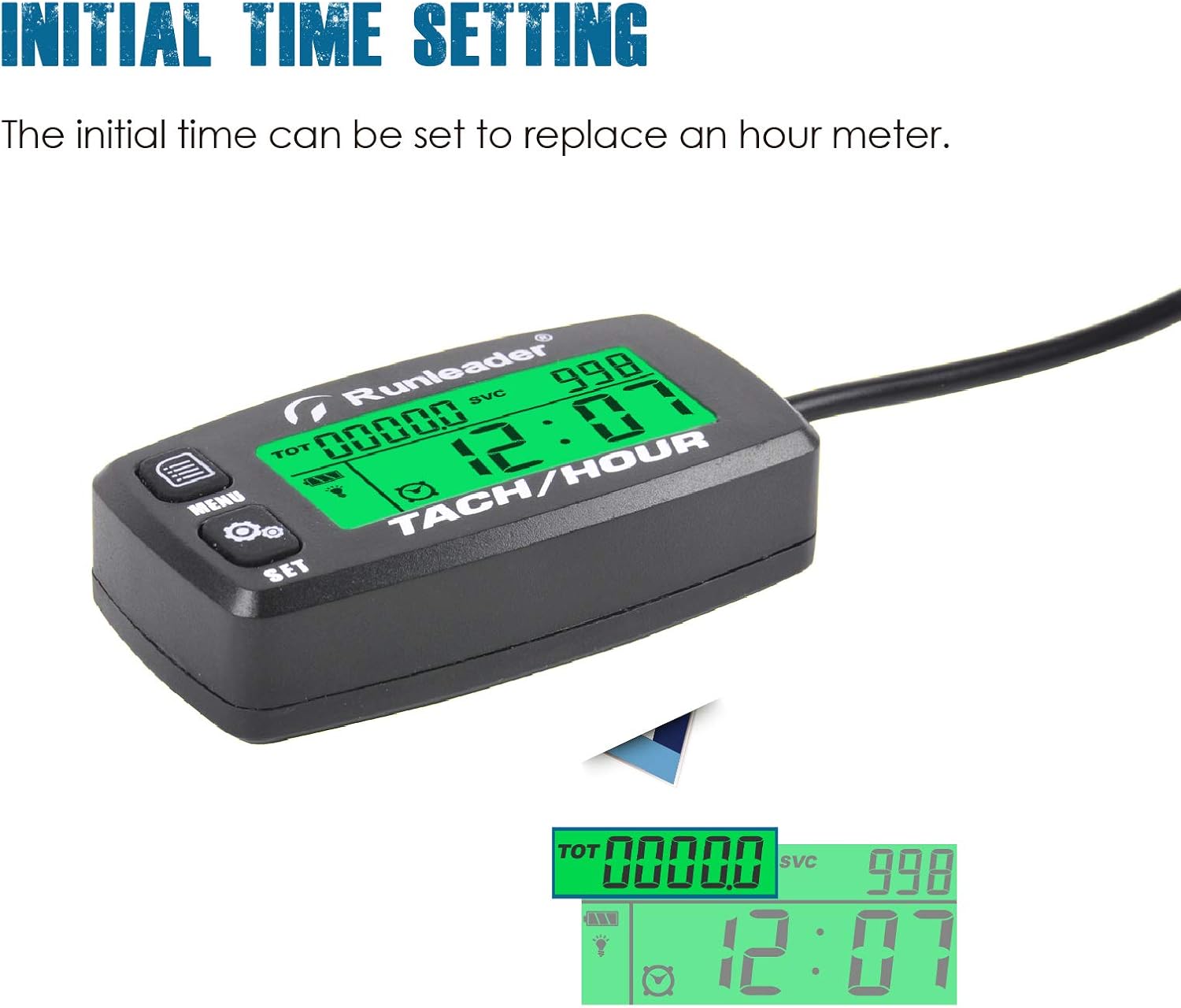
This image shows the display during the initial time setting process, allowing users to input a starting total hour value.
4.4 Turning On/Off
To turn the unit off, press and hold both the 'MENU' and 'SET' buttons simultaneously for a few seconds until the display shows "OFF". To turn it back on, simply press either button.
Refer to the official product video (0:35-0:38) for a demonstration of turning the unit on and off.
5. Maintenance and Care
Regular maintenance ensures the longevity and accuracy of your Runleader Hour Meter.
- Battery Check: The meter provides a low battery capacity reminder. Replace the CR2032 battery promptly when indicated to ensure continuous operation.
- Cleaning: Wipe the unit with a soft, damp cloth. Avoid using harsh chemicals or abrasive cleaners.
- Waterproof Rating: The unit has an IP65 waterproof rating, meaning it is protected against dust ingress and low-pressure water jets from any direction. While durable, avoid submerging the unit.
Refer to the official product video (0:39-0:41) for a demonstration of the unit's waterproof capabilities.
6. Troubleshooting
If you encounter issues with your hour meter, consider the following common troubleshooting steps:
- No Display/Unit Not Turning On:
- Check if the battery insulating sheet has been removed.
- Ensure the CR2032 battery is correctly installed and has sufficient charge. Replace if necessary.
- Press and hold both 'MENU' and 'SET' buttons to attempt to turn the unit on.
- Inaccurate RPM Readings:
- Verify that the sensor wire is securely and correctly wound around the spark plug wire (4-5 turns recommended).
- Ensure the spark plug wire is clean and free from excessive dirt or oil that might interfere with the signal.
- Check the programmable firing patterns setting (P01, P02, P03, P04) to ensure it matches your engine type (e.g., 2-stroke, 4-stroke, number of cylinders). Incorrect settings can lead to inaccurate RPM.
- Hour Accumulation Issues:
- Ensure the unit is receiving a consistent RPM signal from the engine.
- Check for any physical damage to the unit or the sensor wire.
- Display Glitches/Freezing:
- Attempt to turn the unit off and then back on (refer to Section 4.4).
- If issues persist, consider replacing the battery.
If these steps do not resolve the issue, please contact Runleader customer support for further assistance.
7. Product Specifications
| Specification | Detail |
|---|---|
| Brand | Runleader |
| Model Number | RL-HM032B |
| Material | Polycarbonate (PC), Acrylonitrile Butadiene Styrene (ABS) |
| Item Weight | 48 Grams (1.69 ounces) |
| Screen Size | 1.56 Inches |
| UPC | 791328974042 |
| Power Source | 1 Lithium Metal battery (CR2032, included) |
| Waterproof Rate | IP65 |
| RPM Range | 0-25000 RPM |
| Hours Read | Up to 999,99 hours |
| Working Temperature | -40°C to 70°C |
8. Quality Assurance and Applications
8.1 Durability Testing
The Runleader Digital Maintenance Hour Meter undergoes rigorous testing to ensure its durability and reliability in various conditions:
- Anti-Salt Spray Test: Ensures resistance to corrosive environments.
- Temperature Resistance: Certified to operate reliably in extreme temperatures from -40°C to 70°C.
- Drop Test: Verifies the unit's ability to withstand impacts.
Official product video demonstrating various durability tests including anti-salt spray (0:42-0:46), temperature resistance (0:47-0:50), and drop tests (0:51-0:55).
8.2 Applicable Engines and Equipment
This hour meter is suitable for a wide range of gas-powered equipment, including but not limited to:
- Riding Mowers
- Generators
- Chainsaws
- Compressors
- Snowblowers
- ATVs
- Outboard Motors
- Jet Skis
- Motorcycles
The meter is compatible with any 2 or 4-stroke gas engine up to 16 cylinders.
9. Warranty and Support
For warranty information, technical support, or any inquiries not covered in this manual, please refer to the official Runleader website or contact their customer service directly. Keep your purchase receipt for warranty claims.