
SolidRF SR202B
SolidRF Cell Phone Booster User Manual
Model: SR202B | Brand: SolidRF
1. Product Overview
The SolidRF Cell Phone Booster is engineered to enhance cellular signal strength within your home or office, covering up to 8,000 square feet. This system is designed to improve voice quality, data speeds, and eliminate dead zones by amplifying existing weak signals from nearby cell towers. It supports 2G, 3G, 4G LTE, and 5G networks across all major U.S. carriers.

Figure 1.1: SolidRF Cell Phone Booster Kit including booster, antennas, and cables.
What's in the Box:
- Home MultiRoom Booster
- Outside Directional Antenna
- Dual Interior Antennas
- Power Supply
- 3*30 RG6 Cable
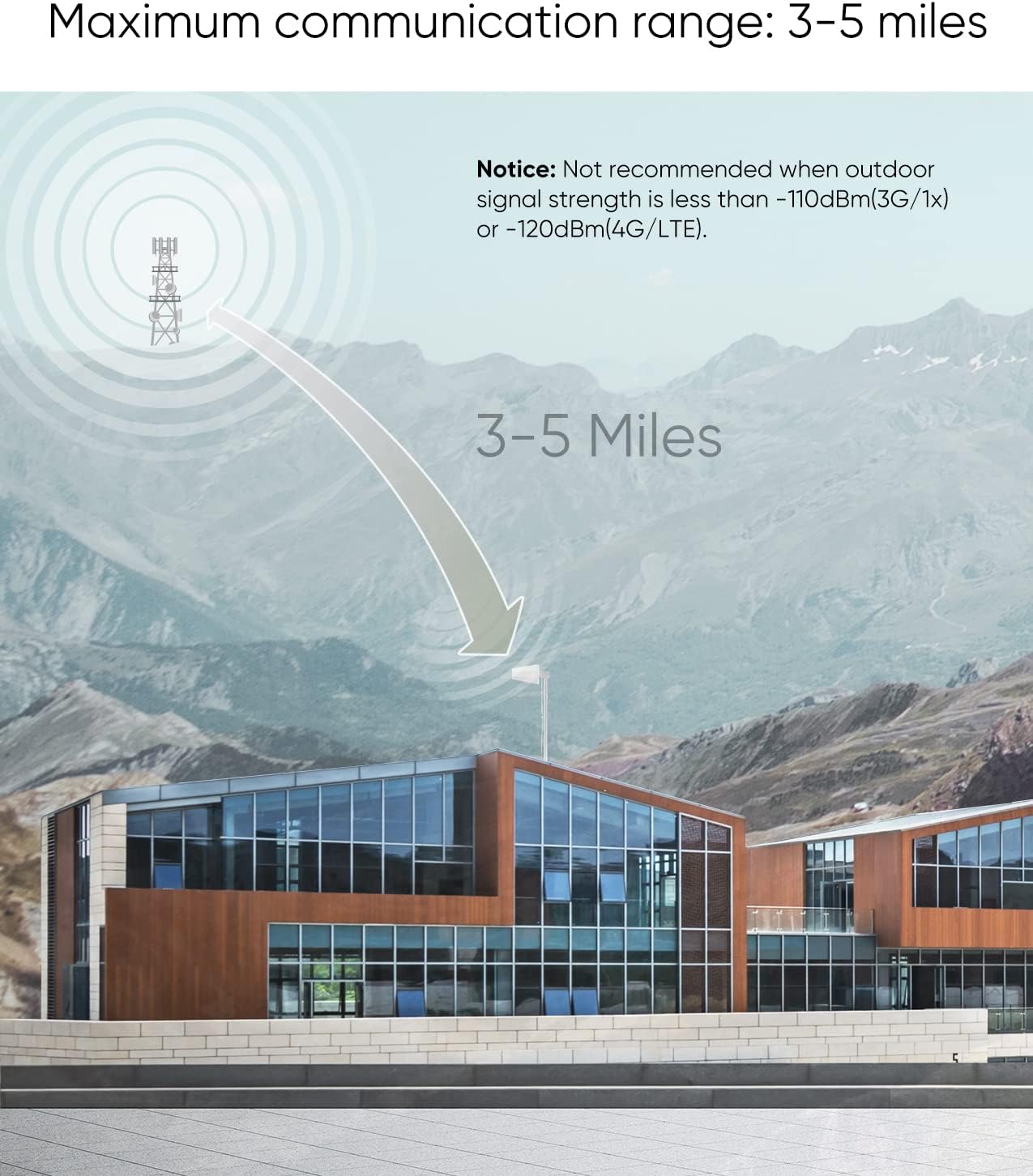
Figure 1.2: Key components of the SolidRF signal booster system.
2. Installation Guide
Proper installation is crucial for optimal performance. Follow these steps carefully to set up your SolidRF Cell Phone Booster.
2.1 Outdoor Antenna Placement
The outdoor antenna captures the cellular signal from the nearest cell tower. It should be mounted in a location with the strongest possible outdoor signal, typically on the roof or an exterior wall, and pointed towards the cell tower.

Figure 2.1: Recommended placement of outdoor antenna, booster, and indoor antennas.
2.2 Indoor Antenna Installation
The kit includes dual indoor antennas to provide coverage across multiple rooms or separate floors. These antennas should be placed in areas where you need improved signal, such as living rooms, bedrooms, or offices. Ensure there is sufficient separation between the indoor and outdoor antennas to prevent oscillation.
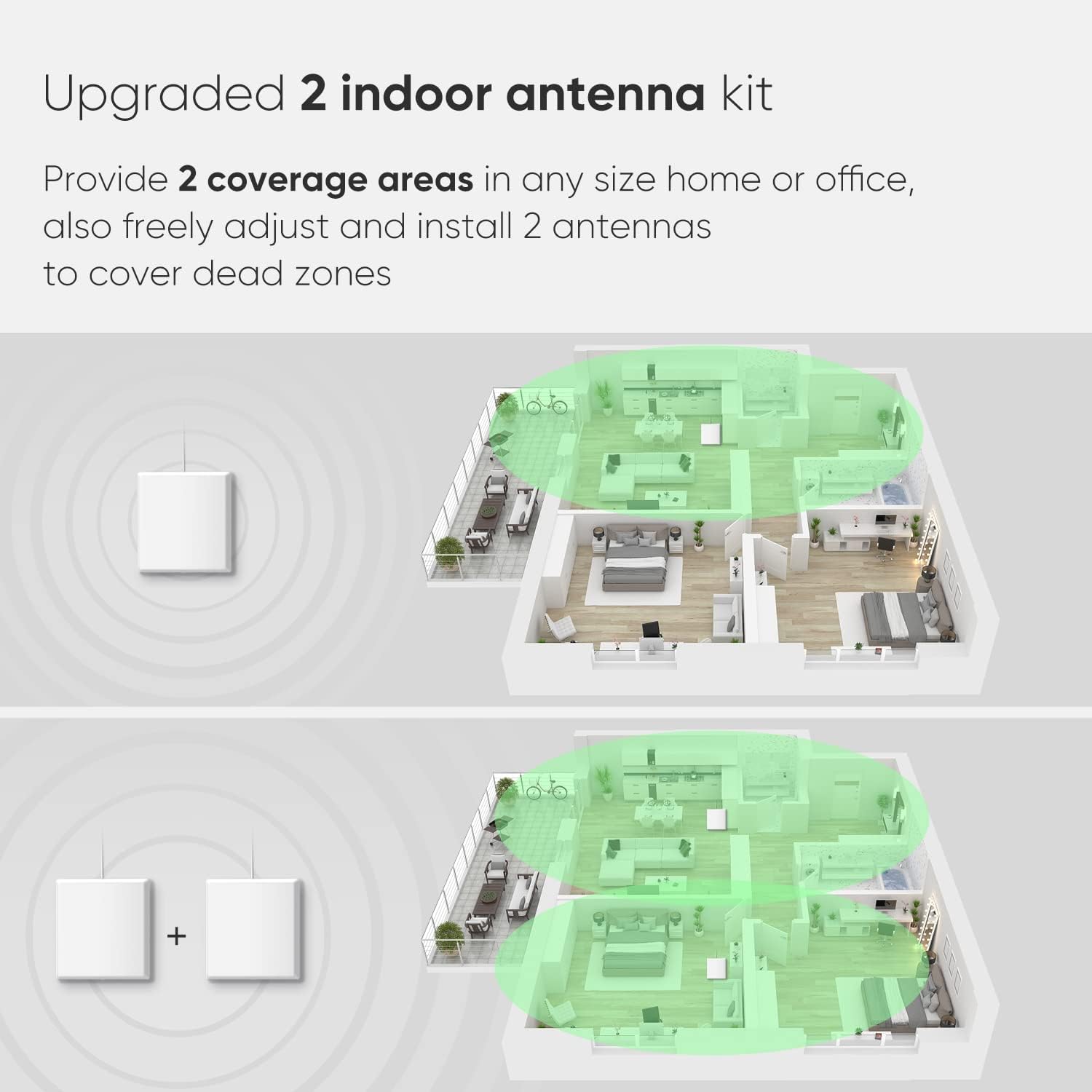
Figure 2.2: Signal coverage improvement with dual indoor antennas.
2.3 Connecting the System
- Connect the outdoor antenna to the 'OUTSIDE' port on the booster using the provided RG6 cable.
- Connect the indoor antennas to the 'INSIDE' port on the booster. If using two indoor antennas, connect them via the splitter provided.
- Plug the power supply into the booster and then into a power outlet.
Important Isolation Distance: Maintain a minimum horizontal distance of 20 feet (6 meters) and a vertical distance of 13 feet (4 meters) between the outdoor antenna and any indoor antenna to prevent signal feedback and ensure optimal performance.
Video 2.3: Detailed installation steps for the SolidRF cell phone booster.
3. Operation and Coverage
Once installed, the SolidRF booster automatically adjusts its gain and power level to optimize signal amplification. It works by receiving weak outdoor signals, amplifying them, and then rebroadcasting the stronger signal indoors.
3.1 Carrier Compatibility
The booster is compatible with all major U.S. carriers and networks, including Verizon, AT&T, T-Mobile, Sprint, and U.S. Cellular. It supports 2G, 3G, 4G LTE, and 5G frequencies (Bands 12/13/17/5/2/4/25).

Figure 3.1: The booster supports all major U.S. cellular carriers.
3.2 Coverage Area
The coverage area depends on the strength of the outdoor signal:
- 1-2 bars (-100dBm): Approximately 1,000 sq ft.
- 3-4 bars (-90dBm): Approximately 4,000 sq ft.
- 5 bars (-80dBm): Up to 8,000 sq ft.
The maximum communication distance range from the cell tower can be up to 3-5 miles, making it suitable for remote areas.

Figure 3.2: Effective signal range from the cell tower to the booster.
Video 3.3: Overview of the SolidRF Cell Signal Booster for Home and Office.
4. Troubleshooting
If you experience issues with your signal booster, consider the following common troubleshooting steps:
- No Signal Improvement: Ensure the outdoor antenna is pointed directly at the nearest cell tower and has at least 1-2 bars of reliable signal. Verify all cable connections are secure.
- Flashing Lights/Alarm: This often indicates insufficient isolation between the outdoor and indoor antennas. Increase the distance between them, both horizontally and vertically. Ensure no direct line of sight exists between the antennas.
- Poor Call Quality/Slow Data: Check the outdoor signal strength. If the outdoor signal is too weak (less than -110dBm for 3G/1x or -120dBm for 4G/LTE), the booster may not be able to provide significant improvement.
- Power Issues: Ensure the power supply is correctly connected and the power outlet is functional.
5. Product Specifications
| Package Dimensions | 14.48 x 9.25 x 7.2 inches |
| Item Weight | 8.78 pounds |
| ASIN | B0811BTDS3 |
| Item Model Number | SR202B |
| Special Features | Dual Interior Panel Antennas |
| Color | Signal Plus |
| Manufacturer | SolidRF |
| Wireless Communication Standard | 802.11ac |
| Data Transfer Rate | 40 Megabits Per Second |
6. Warranty and Support
The SolidRF Signalplus cell booster is backed by a 3-Year Manufacturer Warranty and a 30-Day Money-Back Guarantee. For technical support or warranty claims, please refer to the contact information provided in your product packaging or visit the official SolidRF website.
Ask a question about this manual
Ask about setup, troubleshooting, compatibility, parts, safety, or missing instructions. Manuals+ will review the question and use this page’s manual context to help answer it.