
1. Introduction
Thank you for purchasing the CHINLY Bluetooth 16W RGBW Fiber Optic Curtain Light Kit. This manual provides detailed instructions for the safe and efficient installation, operation, and maintenance of your fiber optic lighting system. Please read this manual thoroughly before use and retain it for future reference.
This kit is designed to create dynamic lighting effects, such as a flash point waterfall or starry sky, suitable for various indoor decorative applications. It features Bluetooth app control and a remote control for versatile operation.
2. Safety Information
- Electrical Safety: Ensure the power adapter is connected to a suitable power outlet. Do not expose the light engine or power adapter to water or excessive moisture.
- Ventilation: Ensure the light engine has adequate ventilation to prevent overheating. Do not cover the ventilation openings.
- Fiber Optic Handling: Handle fiber optic strands with care. Avoid sharp bends or excessive pulling, as this can damage the fibers and reduce light transmission.
- Indoor Use Only: This product is designed for indoor use. While the fibers are waterproof, the light engine and power supply are not.
- Children: Keep the product and its components out of reach of small children to prevent choking hazards or injury.
3. Package Contents
Verify that all components are present in your package:
- 1x 16W RGBW Light Engine
- 1x Fiber Optic Bundle (450pcs*0.03in, 13.1ft length)
- 1x Power Adapter
- 1x Remote Control
- 1x Cigarette Lighter Adapter (for alternative power source)
- 1x User Manual
4. Product Overview
The CHINLY Fiber Optic Curtain Light Kit consists of a light engine and a bundle of fiber optic strands. The light engine houses the RGBW LED light source and control electronics, while the fiber optic strands transmit the light to create various effects.

Figure 4.1: Light Engine Components and Dimensions
This image illustrates the light engine with its dimensions (approximately 10cm/3.9in length, 8cm/3.1in width, 3.5cm/1.4in height) and labels key parts: RGBW LED Chip, Receiver, Signal indicator, Power input, Bluetooth antenna, and Working indicator.
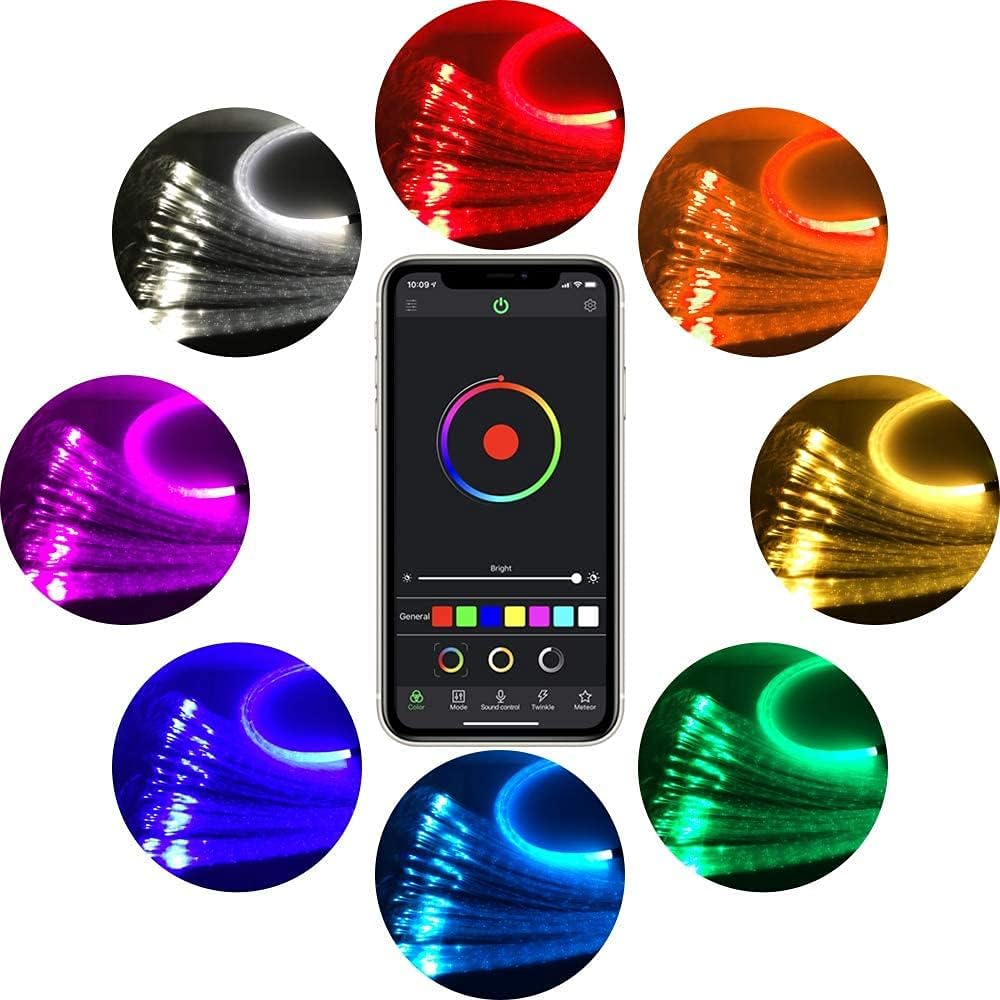
Figure 4.2: Light Engine and Fiber Optic Bundle
This image shows the compact light engine unit with the fiber optic bundle inserted into its output port, ready for installation.
5. Setup
- Prepare Installation Area: Choose a suitable location for your fiber optic curtain. Ensure the light engine can be placed in a dry, well-ventilventilated area, away from direct heat sources.
- Insert Fiber Optic Bundle: Carefully gather all fiber optic strands and insert the end into the light engine's output port. Ensure the fibers are securely seated.
- Secure Fibers: Arrange and secure the fiber optic strands according to your desired design (e.g., curtain, waterfall, starry sky). Use appropriate fasteners or adhesives that do not crimp or damage the fibers.
- Power Connection: Connect the power adapter to the light engine's power input port. Plug the power adapter into a standard electrical outlet. Alternatively, use the provided cigarette lighter adapter for compatible power sources.
- Initial Power On: Once connected, the light engine should power on, and the fibers will illuminate.
6. Operating Instructions
The CHINLY Fiber Optic Light Kit can be controlled via the included remote control or a dedicated Bluetooth smartphone application.
6.1. Remote Control Operation

Figure 6.1: Remote Control and App Interface
This image displays the physical remote control with various color and mode buttons, alongside screenshots of the smartphone application for color, mode, and sound control.
The remote control allows for basic functions:
- ON/OFF: Power the unit on or off.
- Color Selection: Select from a range of static colors (e.g., Red, Green, Blue, White, Yellow, Cyan, Purple).
- Brightness Adjustment: Increase or decrease the light intensity.
- Mode Selection: Cycle through various dynamic modes such as Jump, Fade, or Flash.
- Sound Mode: Activate sound-activated lighting effects.
6.2. Bluetooth APP Control

Figure 6.2: App Color Selection Interface
This image shows the smartphone application's color wheel, allowing precise selection of colors, along with brightness control and preset color options.
- Download App: Scan the QR code provided in the packaging or search for the designated app (e.g., "My Smart LED" or similar, refer to packaging for exact name) on your smartphone's app store (Android/iOS).
- Enable Bluetooth: Ensure Bluetooth is enabled on your smartphone.
- Pair Device: Open the app. It should automatically detect and connect to the CHINLY light engine. If not, follow the app's instructions to add a new device.
- Control Functions: The app offers advanced control options:
- Color Wheel: Select any color from a wide spectrum.
- Brightness/Saturation: Adjust light intensity and color saturation.
- Dynamic Modes: Choose from various pre-programmed modes (fade, jump, flash, etc.) and customize speed.
- Sound Control: The lights can synchronize with music or ambient sounds detected by your phone's microphone.
- Timer Function: Set schedules for the lights to turn on/off.
7. Maintenance
- Cleaning the Light Engine: Disconnect power before cleaning. Use a soft, dry cloth to wipe the exterior of the light engine. Do not use liquid cleaners or abrasive materials.
- Fiber Optic Care: The fiber optic strands require minimal cleaning. If necessary, gently wipe them with a damp cloth. Avoid harsh chemicals.
- Storage: If storing the kit, ensure the fiber optic strands are not tightly coiled or bent. Store in a cool, dry place.
- Remote Control Battery: Replace the remote control battery (typically a CR2025 coin cell) when its range or responsiveness decreases.
8. Troubleshooting
| Problem | Possible Cause | Solution |
|---|---|---|
| Lights do not turn on. | No power, loose connection, faulty power adapter. | Check power outlet, ensure all connections are secure. Test with a different outlet if possible. |
| Remote control not working. | Dead battery, remote out of range, obstruction. | Replace remote battery. Ensure remote is pointed at the light engine's receiver and within range. Remove any obstructions. |
| Bluetooth app cannot connect. | Bluetooth off, app not paired, interference. | Ensure Bluetooth is enabled on your phone. Restart the app and the light engine. Try pairing again. Reduce distance between phone and light engine. |
| Fibers are not lighting evenly or some are dark. | Fibers not fully inserted, damaged fibers, light engine issue. | Ensure all fiber strands are fully and correctly inserted into the light engine's port. Inspect fibers for kinks or breaks. If problem persists, contact support. |
| Light engine is hot. | Poor ventilation, prolonged use. | Ensure adequate airflow around the light engine. Do not cover ventilation holes. If excessively hot, turn off and allow to cool. |
9. Specifications
| Feature | Specification |
|---|---|
| Brand | CHINLY |
| Model Number | QJ-L016 |
| Light Source Type | RGBW LED |
| Wattage | 16 Watts |
| Voltage | 120 Volts |
| Number of Light Sources | 450 (fiber strands) |
| Fiber Optic Length | 13.1 Feet (4 meters) |
| Fiber Optic Diameter | 0.03 inches (0.75mm) |
| Control Method | Bluetooth App, Remote Control |
| Material | Aluminum (light engine), PMMA Plastic (fibers) |
| Indoor/Outdoor Usage | Indoor |
| Item Weight | 0.51 Pounds (approx. 231g) |
| Special Features | Waterproof fibers, Sound-activated, Flash point effect |
10. Warranty and Support
This CHINLY product comes with a 2-year service warranty from the date of purchase. This warranty covers manufacturing defects and ensures satisfactory operation under normal use conditions.
If you encounter any issues or have questions regarding your CHINLY Fiber Optic Curtain Light Kit, please refer to the troubleshooting section first. If the problem persists or you require further assistance, please contact CHINLY customer support through the retailer's platform or the contact information provided with your purchase.
Please have your model number (QJ-L016) and purchase details ready when contacting support.