
Important Safety Instructions
Please read and understand all instructions before beginning installation. Failure to do so may result in electric shock, fire, or other injuries that can be hazardous or even fatal. Keep these instructions for future reference.
- WARNING: To avoid electric shock, ensure power is turned off at the circuit breaker or fuse box before installation.
- All electrical connections must be in accordance with local codes, ordinances, or the National Electric Code (NEC). Consult a qualified electrician if you are unfamiliar with proper electrical wiring.
- This fixture is intended for indoor use only. Do not expose to water or moisture.
- Do not exceed the maximum wattage specified for bulbs.
- Handle glass components with care to prevent breakage.
Package Contents
Carefully unpack the fixture and check that all parts are included. Retain all packing materials until installation is complete to prevent accidental disposal of small parts.

Figure 1: Main view of the Cyan Design Apollo 12-Light Chandelier. This image displays the complete fixture with its black frame and brass-finished candle sleeves, suspended by a chain and rod from a ceiling canopy.
- A. Chandelier Body (1)
- B. Mounting Plate (1)
- C. Canopy (1)
- D. Chain (1)
- E. Rods (various lengths, as needed for assembly)
- F. Wire Nuts (3)
- G. Mounting Screws (2)
- H. Ground Screw (1)
- I. Decorative Nuts (2)
- J. Instruction Manual (1)
Note: Bulbs are not included and must be purchased separately.
Tools Required
- Phillips Head Screwdriver
- Flat Head Screwdriver
- Wire Strippers
- Pliers
- Electrical Tape
- Ladder
- Safety Glasses
Setup and Installation
- Turn Off Power: Before starting, ensure the power to the junction box is turned off at the circuit breaker or fuse box.
- Attach Mounting Plate: Secure the mounting plate (B) to the junction box using the provided mounting screws (G). Ensure the plate is firmly attached.
- Assemble Chandelier Rods: Thread the desired length of rods (E) onto the chandelier body (A) and then onto the canopy (C). Adjust the chain (D) length as needed to achieve the desired hanging height. Use pliers to open and close chain links.
- Wire Connections:
- Connect the bare copper ground wire from the fixture to the ground wire from the junction box (usually bare copper or green). Secure with a wire nut (F) and wrap with electrical tape. Attach the ground wire to the mounting plate with the ground screw (H).
- Connect the ribbed or white wire from the fixture to the white (neutral) wire from the junction box. Secure with a wire nut (F) and wrap with electrical tape.
- Connect the smooth or black wire from the fixture to the black (hot) wire from the junction box. Secure with a wire nut (F) and wrap with electrical tape.
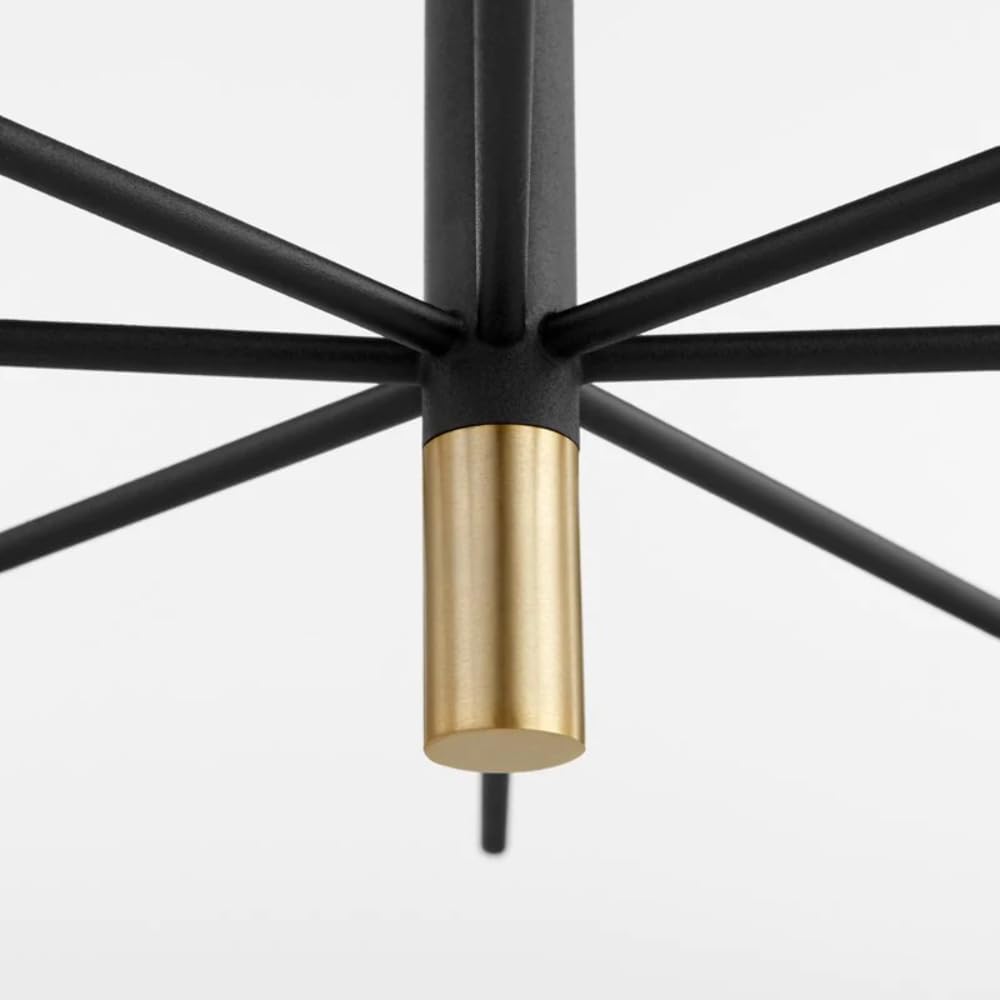
Figure 2: Detail of the central connection point of the chandelier, showing the robust construction where the arms converge. This area is crucial for secure assembly and wiring connections.
- Secure Canopy: Carefully push the canopy (C) up to the ceiling, covering the junction box. Secure it in place using the decorative nuts (I) onto the mounting screws extending from the mounting plate.
- Install Bulbs: Screw in the recommended type and wattage bulbs (not included) into each socket. Refer to the specifications section for bulb requirements.
Operating Instructions
- Power On: Once installation is complete, restore power at the circuit breaker or fuse box.
- Remote Control Operation: The chandelier is designed to be operated with a remote control. Insert batteries into the remote (if not pre-installed). Point the remote at the chandelier and press the ON/OFF button to control the lights. Refer to the remote control's specific instructions for advanced features like dimming, if applicable.
- Bulb Replacement:
- Turn off power to the fixture at the circuit breaker.
- Allow bulbs to cool completely before touching.
- Carefully unscrew the old bulb from the socket.
- Screw in a new bulb of the correct type and wattage.

Figure 3: Close-up view of the chandelier's light sockets, featuring the brass-finished candle sleeves. This image highlights the design of the individual light points where bulbs are installed.
Maintenance
- Cleaning: To clean the fixture, turn off the power and wipe with a soft, dry cloth. Do not use abrasive cleaners or polishes as they may damage the finish.
- Inspection: Periodically check all electrical connections and components for any signs of wear or damage.
Troubleshooting
| Problem | Possible Cause | Solution |
|---|---|---|
| Fixture does not light. | 1. Power is off. 2. Faulty bulb. 3. Incorrect wiring. | 1. Check circuit breaker and remote/wall switch. 2. Replace bulb. 3. Verify wiring connections (consult an electrician if unsure). |
| Flickering lights. | 1. Loose bulb. 2. Loose wiring connection. | 1. Tighten bulb. 2. Check and secure wiring connections (ensure power is off). |
| Fixture hums. | Incompatible dimmer switch. | Ensure dimmer switch is compatible with the bulb type and fixture. |
Specifications
| Brand | Cyan Design |
| Model Number | 10968 |
| Fixture Type | Chandelier |
| Number of Lights | 12 |
| Dimensions (Overall) | 33 x 33 x 33 inches |
| Item Weight | 16 pounds (7257 Grams) |
| Color/Finish | Brass (accents), Black (frame) |
| Shade Material | Brass |
| Power Source | Corded Electric |
| Control Method | Remote Control |
| Controller Type | Remote Control |
| Mounting Type | Ceiling Mount |
| Assembly Required | Yes (Minor assembly) |
| UPC | 190808141903 |
Warranty and Support
For warranty information or technical support, please contact Cyan Design directly. Keep your purchase receipt and model number (10968) handy when contacting support.
You can typically find contact information on the manufacturer's official website: www.cyandesign.com