
1. Product Overview
The Ninja 12-Cup Programmable Brewer CE251 is a drip coffee machine designed for brewing flavorful coffee with customizable options. It features advanced brewing technology to ensure a perfectly hot cup every time. This model includes a 60-ounce removable water reservoir for easy filling and an adjustable warming plate to keep coffee fresh for up to 4 hours.
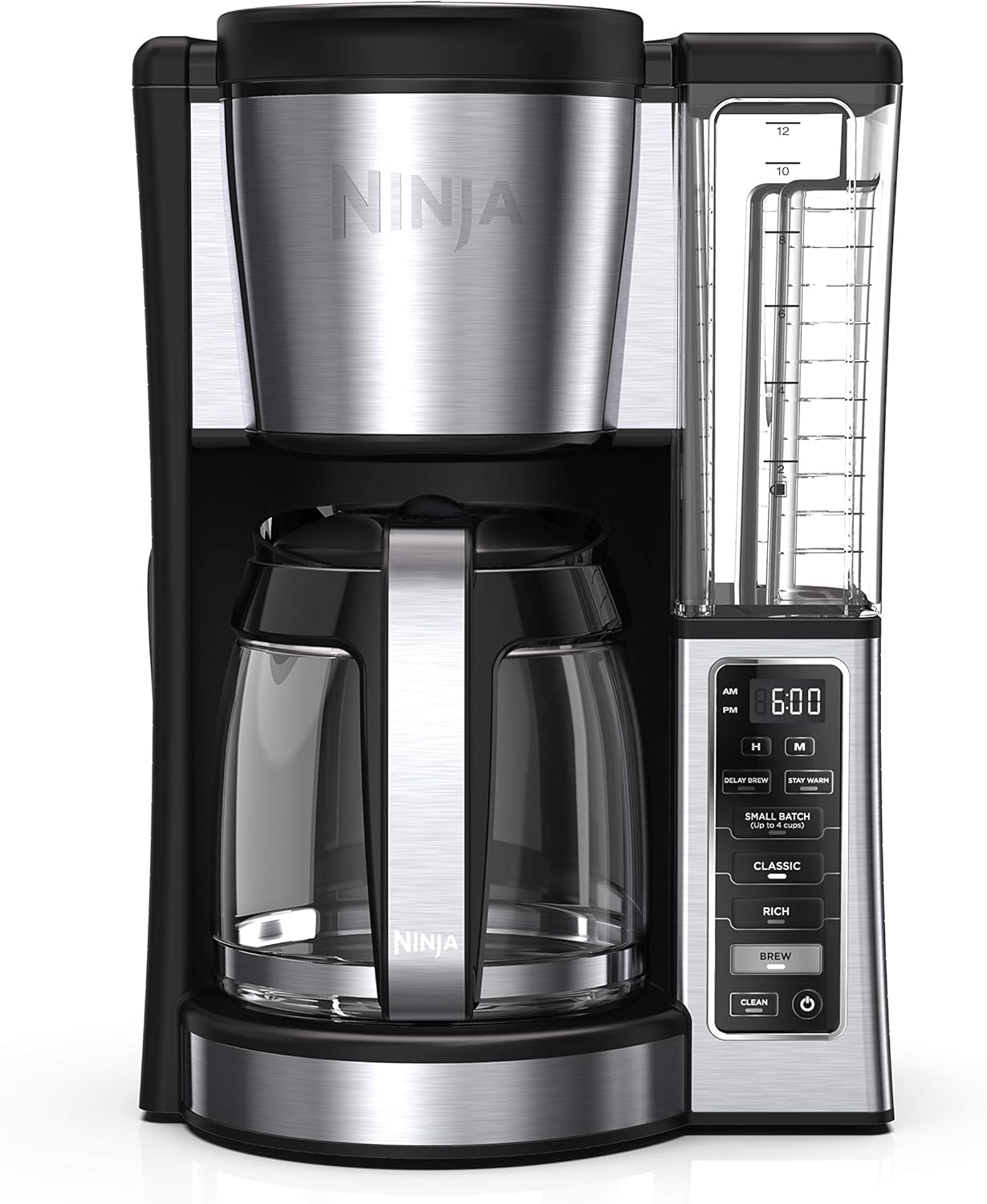
Figure 1: Front view of the Ninja 12-Cup Programmable Brewer CE251 Coffee Maker.
2. Important Safeguards
WARNING: To reduce the risk of fire, electric shock, or injury, always follow basic safety precautions.
- Read all instructions before using the appliance.
- Do not touch hot surfaces. Use handles or knobs.
- To protect against fire, electric shock, and injury to persons, do not immerse cord, plugs, or appliance in water or other liquid.
- Close supervision is necessary when any appliance is used by or near children.
- Unplug from outlet when not in use and before cleaning. Allow to cool before putting on or taking off parts, and before cleaning the appliance.
- Do not operate any appliance with a damaged cord or plug or after the appliance malfunctions or has been damaged in any manner.
- The use of accessory attachments not recommended by the appliance manufacturer may result in fire, electric shock, or injury to persons.
- Do not use outdoors.
- Do not let cord hang over edge of table or counter, or touch hot surfaces.
- Do not place on or near a hot gas or electric burner, or in a heated oven.
- Always attach plug to appliance first, then plug cord into the wall outlet. To disconnect, turn any control to 'off', then remove plug from wall outlet.
- Do not use appliance for other than intended use.
- Extreme caution must be used when moving an appliance containing hot oil or other hot liquids.
3. Components
Familiarize yourself with the parts of your Ninja Coffee Maker:
- Main Unit: Houses the brewing system and control panel.
- 60-oz. Removable Water Reservoir: Clear container with measurement markings for easy filling.
- Glass Carafe: 12-cup capacity for brewed coffee.
- Filter Basket: Holds coffee grounds, compatible with cone-shaped paper filters or reusable filters.
- Control Panel: Digital display and buttons for settings and brewing.
- Adjustable Warming Plate: Keeps brewed coffee warm.
- Integrated Scoop: Conveniently stored on the side for precise coffee measurement.

Figure 2: The removable water reservoir, designed for easy filling and cleaning.
4. Setup and First Use
- Unpack: Carefully remove all components from the packaging.
- Clean: Wash the water reservoir, glass carafe, and filter basket in warm, soapy water. Rinse thoroughly and dry.
- Placement: Place the coffee maker on a clean, dry, and level surface.
- Initial Rinse: Fill the water reservoir to the 12-cup line with fresh water. Place an empty paper filter (or reusable filter) in the filter basket. Run a full brew cycle without coffee grounds to clean the internal components. Discard the water.
5. Operating Instructions
5.1 Basic Brewing
- Fill Water Reservoir: Remove the water reservoir and fill it with fresh, cold water to your desired brew size (up to 12 cups). Return it to the coffee maker.
- Add Coffee Grounds: Place a cone-shaped paper filter or the reusable filter into the filter basket. Use the integrated scoop to add your preferred amount of coffee grounds. A general guideline is one scoop per cup.
- Select Brew Style: Choose between 'CLASSIC' for a smooth, balanced brew or 'RICH' for a more intense flavor.
- Start Brewing: Press the 'BREW' button to begin the brewing cycle.
5.2 Programmable Delay Brew
Set your coffee maker to automatically brew at a specific time.
- Prepare Coffee Maker: Follow steps 1 and 2 of Basic Brewing.
- Set Time: Use the 'H' (Hour) and 'M' (Minute) buttons to set the current time.
- Set Delay Time: Press the 'DELAY BREW' button. Use the 'H' and 'M' buttons to set the desired start time for brewing.
- Confirm: The 'DELAY BREW' indicator will illuminate, confirming the setting. The coffee maker will automatically start brewing at the programmed time.

Figure 3: The control panel highlighting the 'DELAY BREW' button for scheduled brewing.
5.3 Stay Warm Function
The adjustable warming plate keeps your coffee warm for up to 4 hours after brewing.
- The 'STAY WARM' function activates automatically after a brew cycle.
- To manually activate or deactivate, press the 'STAY WARM' button.
5.4 Small Batch Brewing
For brewing 1 to 4 cups without dilution, use the 'SMALL BATCH' setting.
- Follow steps 1 and 2 of Basic Brewing, ensuring water and coffee grounds are measured for 1-4 cups.
- Press the 'SMALL BATCH' button before pressing 'BREW'.
6. Cleaning and Maintenance
Regular cleaning ensures optimal performance and coffee taste.
6.1 Daily Cleaning
- Carafe and Filter Basket: These components are dishwasher safe. Alternatively, wash them in warm, soapy water after each use.
- Water Reservoir: Remove and rinse the water reservoir. It can also be washed in warm, soapy water.
- Exterior: Wipe the exterior of the coffee maker with a soft, damp cloth. Do not immerse the main unit in water.

Figure 4: The carafe and filter basket are dishwasher safe for convenient cleaning.
6.2 Descaling (Clean Cycle)
Over time, mineral deposits can build up in your coffee maker, affecting performance and taste. The 'CLEAN' button indicates when descaling is needed.
- Prepare Solution: Fill the water reservoir to the 12-cup line with a descaling solution (e.g., white vinegar and water, or a commercial descaling agent as per product instructions).
- Start Clean Cycle: Ensure the carafe is empty and in place. Press the 'CLEAN' button. The coffee maker will run a descaling cycle.
- Rinse Cycles: After the descaling cycle is complete, discard the solution. Fill the reservoir with fresh water and run 2-3 full brew cycles with just water to rinse thoroughly.
7. Troubleshooting
| Problem | Possible Cause | Solution |
|---|---|---|
| Coffee not brewing | No water in reservoir; Power not connected; Brew button not pressed. | Fill reservoir; Check power cord; Press 'BREW' button. |
| Weak coffee | Insufficient coffee grounds; Incorrect brew style selected. | Add more coffee grounds; Select 'RICH' brew style. |
| Coffee overflows filter basket | Too many coffee grounds; Filter not properly seated; Clogged filter. | Reduce coffee grounds; Ensure filter is correctly placed; Clean filter basket. |
| 'CLEAN' light illuminates | Mineral buildup. | Run a descaling cycle as per Section 6.2. |
8. Specifications
- Brand: Ninja
- Model Name: CE251 (CRT2NJCE251RB)
- Color: Black/Silver
- Product Dimensions: 9.96"D x 10.55"W x 14.61"H
- Item Weight: 7 pounds
- Coffee Maker Type: Drip Coffee Machine
- Capacity: 12-cup glass carafe (60 oz. water reservoir)
- Operation Mode: Fully Automatic
- Voltage: 110 Volts
- Special Features: 24-hour programmable delay brew, Adjustable warming plate, Dual brew modes (Classic, Rich), Small-batch mode (1-4 cups), Removable water reservoir.
- Manufacturer: SharkNinja
- UPC: 766234294300
9. Warranty and Support
For warranty information and customer support, please refer to the documentation included with your purchase or visit the official Ninja website. Keep your proof of purchase for any warranty claims.


