
ReadyWired USB Charging Cable
ReadyWired USB Charging Cable User Manual
For Polaroid PBT516, PBT590, PBT595, PBT596 Speakers
1. Introduction and Overview
This manual provides essential information for the proper use and care of your ReadyWired USB Charging Cable. This high-quality USB 2.0 cable is specifically designed to provide reliable power delivery and data transfer capabilities for compatible Polaroid PBT516, PBT590, PBT595, and PBT596 speaker models.
The cable features foil and braid shielding to reduce electromagnetic interference (EMI) and radio-frequency interference (RFI), ensuring a stable connection. Its twisted-pair construction further minimizes cross-talk, contributing to high-speed, error-free data transfer. This product supports plug-and-play connections for user convenience.
2. Product Features
- Brand new, high-quality USB 2.0 charging cable.
- Guaranteed compatibility with specified Polaroid speaker models.
- Cable length: 3 feet (approximately 0.91 meters).
- Equipped with foil and braid shielding to reduce EMI/RFI interference.
- Twisted-pair construction for reduced cross-talk and error-free data transfer.
- Supports plug & play connections for ease of use.
3. Setup Instructions
Follow these steps to connect your ReadyWired USB Charging Cable:
- Identify Ports: Locate the micro-USB charging port on your Polaroid PBT516, PBT590, PBT595, or PBT596 speaker. Also, identify a compatible USB power source (e.g., a USB wall adapter, computer USB port, or power bank).
- Connect to Speaker: Gently insert the micro-USB end of the ReadyWired cable into the speaker's charging port. Ensure it is fully seated and secure.
- Connect to Power Source: Insert the standard USB-A end of the ReadyWired cable into the USB power source.
- Verify Connection: Confirm that both connections are firm. The speaker should typically indicate that it is charging (e.g., via an LED indicator light).
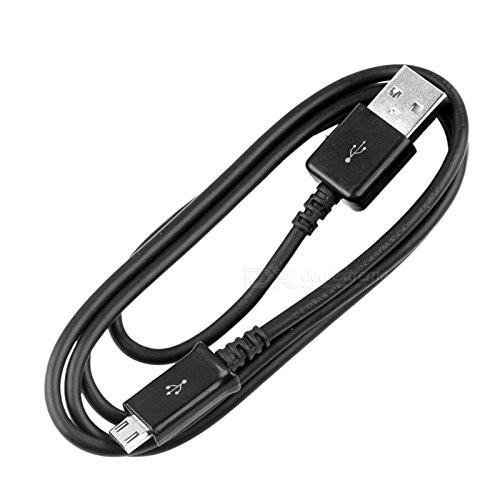
Figure 3.1: ReadyWired USB Charging Cable, coiled, showing both USB-A and micro-USB connectors.

Figure 3.2: Close-up view of the USB-A and micro-USB connectors of the ReadyWired charging cable.
4. Operating Instructions
Once the cable is properly connected between your speaker and a power source, the speaker will begin to charge. Observe the speaker's charging indicator (if available) to monitor the charging status.
Charging times may vary based on the speaker's battery capacity, its current charge level, and the output power of your USB source. For optimal charging, use a USB power adapter that meets the speaker's recommended input specifications.
In addition to charging, this cable supports data transfer. If your Polaroid speaker model allows for firmware updates or other data-related functions via a USB connection, this cable can facilitate those operations when connected to a computer.
5. Maintenance
Proper care will extend the lifespan of your ReadyWired USB Charging Cable:
- Storage: Store the cable in a cool, dry place, away from direct sunlight and extreme temperatures.
- Handling: Avoid sharp bends, kinks, or excessive pulling on the cable. Always grasp the connector housing, not the cable itself, when plugging or unplugging.
- Cleanliness: Keep the connectors clean and free of dust, lint, or debris. A dry, soft cloth can be used to gently wipe the connectors if needed.
- Avoid Liquids: Do not expose the cable to water or other liquids.
6. Troubleshooting
If you encounter issues with your ReadyWired USB Charging Cable, consider the following:
Speaker Not Charging:
- Check Connections: Ensure both the micro-USB end and the USB-A end of the cable are securely and fully inserted into their respective ports.
- Verify Power Source: Try connecting the cable to a different USB power source (e.g., a different wall adapter, a different USB port on your computer) to rule out issues with the power source.
- Inspect Ports: Carefully inspect the charging port on your speaker and the USB port on your power source for any visible damage, debris, or bent pins.
- Test Cable: If possible, test the ReadyWired cable with another compatible device to confirm its functionality. If the cable works with another device, the issue may lie with the speaker's charging port.
Slow Charging:
- Power Source Output: Ensure your USB power source provides sufficient current (e.g., 1A or 2A) for optimal charging speed. Lower current output will result in slower charging.
- Background Usage: Avoid heavy usage of the speaker while it is charging, as this can slow down the charging process.
7. Specifications
| Attribute | Detail |
|---|---|
| Brand | ReadyWired |
| Connector Type | USB Type A (Male) to Micro USB (Male) |
| Cable Type | USB 2.0 |
| Length | 3 Feet (approx. 0.91 meters) |
| Special Features | Braided, Data Transfer, Foil and Braid Shielding, Twisted-Pair Construction |
| Compatible Devices | Polaroid PBT516, PBT590, PBT595, PBT596 Speakers |
8. Warranty Information
This ReadyWired USB Charging Cable is backed by a 1-Year Warranty. This warranty covers defects in materials and workmanship under normal use. It guarantees the compatibility and quality of the cable as described.
For warranty claims or to report any issues with your cable, please retain your proof of purchase and contact the retailer from whom you purchased the product. They will guide you through the warranty claim process.
9. Support
Should you require further assistance or have questions not covered in this manual, please reach out to the ReadyWired customer support team or the retailer where you purchased the cable.
When contacting support, please be prepared to provide the following information:
- Product name: ReadyWired USB Charging Cable
- Date of purchase
- Description of the issue
For the most up-to-date contact information, please refer to the official ReadyWired website or your purchase documentation.
Ask a question about this manual
Ask about setup, troubleshooting, compatibility, parts, safety, or missing instructions. Manuals+ will review the question and use this page’s manual context to help answer it.