
1. Introduction
This manual provides detailed instructions for the installation, operation, and maintenance of your Bticino Easy Connected Video Intercom Kit 318015. This system offers enhanced security and convenience through its Wi-Fi connectivity, allowing for smartphone management and hands-free communication.

Image 1.1: Bticino Easy Connected Video Intercom Kit components and packaging.
2. Kit Contents
The Bticino Easy Connected Video Intercom Kit 318015 includes the following components:
- 1 x External Video Intercom Unit
- 1 x Internal Wi-Fi Video Intercom Monitor (Black)
- 1 x Power Supply Cable

Image 2.1: Detailed view of the kit contents.
3. Setup and Installation
3.1 Wiring and Mounting
The Bticino Easy Connected Video Intercom Kit is designed for a simple 2-wire installation. Ensure all power is disconnected before beginning installation.
- Mount the external video intercom unit in the desired outdoor location, ensuring it is protected from direct weather exposure.
- Mount the internal Wi-Fi video intercom monitor indoors at a convenient height.
- Connect the external unit to the internal monitor using a 2-wire system. Refer to the detailed wiring diagram provided in the separate installation guide for specific connections.
- Connect the power supply cable to the internal monitor and plug it into a suitable power outlet.

Image 3.1: The system supports 2-wire installation for simplified setup.
3.2 Wi-Fi Connection
After physical installation, connect the internal monitor to your home Wi-Fi network to enable smartphone control and remote access. Follow the on-screen prompts on the internal monitor to configure the Wi-Fi connection.
4. Operating Instructions
4.1 Internal Monitor Functions
The internal video intercom monitor features a touch screen and dedicated touch-sensitive buttons for various functions:

Image 4.1: Internal monitor with key functions indicated.
- Lock Release: Activates the electric lock to open the main door.
- Answer Call: Accepts an incoming call from the external unit.
- External Camera Activation: Manually views the external camera feed.
- Gate Opening: Activates the gate opening mechanism.
- External Light/Staircase Light: Controls an external light or staircase lighting.
- Wi-Fi Indicator: Shows the status of the Wi-Fi connection.
- Silent Mode: Mutes the ringtone for a set period.
4.2 Smartphone App Integration (Door Entry App)
The Bticino Door Entry app allows you to manage your video intercom system from your smartphone, whether you are at home or away.

Image 4.2: Answering a call via the Door Entry app on a smartphone.
- Remote Answering: Receive calls from your external unit directly on your smartphone.
- Two-Way Communication: Speak with visitors at your door using your phone's microphone and speaker.
- Remote Control: Open the door lock or gate directly from the app.
- Voice Control: The app supports voice commands for certain functions.

Image 4.3: The Door Entry app provides intuitive control and voice command capabilities.
4.3 Multi-Unit and Multi-Floor Configurations
The system can be expanded to manage multiple residences or floors with additional internal monitors (sold separately).
4.3.1 Two-Family House Management
With an additional internal video intercom, you can manage two separate residences. Each residence requires its own Wi-Fi line for installation.

Image 4.4: Example of a two-family house setup.
4.3.2 Multi-Floor House Management
For multi-floor homes, an additional non-connected internal video intercom can be used to manage calls from both floors.
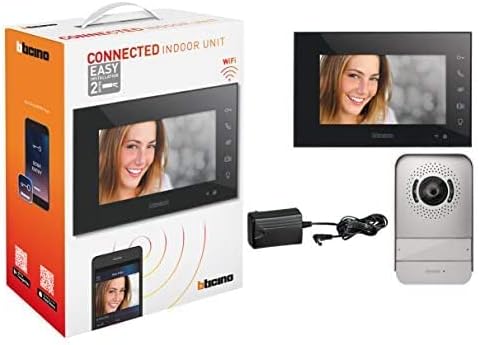
Image 4.5: Example of a multi-floor house setup.
4.4 Netatmo Compatibility
The Bticino Easy Connected Video Intercom Kit is compatible with Netatmo smart home devices, allowing for integrated smart home solutions.

Image 4.6: Netatmo compatibility for integrated smart home management.
5. Maintenance
To ensure optimal performance and longevity of your Bticino Video Intercom Kit, follow these maintenance guidelines:
- Cleaning: Gently wipe the external and internal units with a soft, damp cloth. Avoid abrasive cleaners or solvents.
- Software Updates: Periodically check the Door Entry app for available firmware updates for your internal monitor. Keeping the software updated ensures access to the latest features and security enhancements.
- Environmental Protection: Ensure the external unit remains free from obstructions and excessive debris.
6. Troubleshooting
If you encounter issues with your Bticino Easy Connected Video Intercom Kit, refer to the following common troubleshooting steps:
| Problem | Possible Cause | Solution |
|---|---|---|
| No power to internal monitor | Power cable disconnected or power outage. | Check power cable connection and ensure power outlet is functional. |
| No video or audio from external unit | Wiring issue or unit malfunction. | Verify 2-wire connections. If problem persists, contact support. |
| Smartphone app not connecting | Wi-Fi signal weak, incorrect Wi-Fi password, or app issue. | Check Wi-Fi signal strength, re-enter Wi-Fi password on monitor, restart app, or reinstall app. Ensure your router supports 2.4GHz Wi-Fi. |
| Poor audio quality | Microphone/speaker settings or environmental interference. | Adjust volume settings on the internal monitor or within the app. Ensure no obstructions near microphones/speakers. |
For more complex issues or if the problem persists, please refer to the comprehensive troubleshooting guide on the Bticino official website or contact customer support.
7. Specifications
Detailed technical specifications for the Bticino Easy Connected Video Intercom Kit 318015:
- Model Number: 318015
- Brand: Bticino
- Number of Products: 1 (Kit)
- Number of Channels: 4
- Wireless Communication Technology: Wi-Fi
- Material: Plastic
- Wattage: 10 watts
- Product Dimensions (L x W x H): 21.5 x 2.2 x 14 cm
- Product Weight: 1.11 kg
- Bulb Type: Infrared
- Batteries Required: No
- Recommended Uses: Outdoor Security, Indoor Security
- Connectivity Technology: Wireless
- Indoor/Outdoor Use: Outdoor (External Unit), Indoor (Internal Monitor)
- Compatible Devices: Smartphone
- Power Source: Electric Cable
- Connectivity Protocol: Wi-Fi
- Controller Type: Push Button (External Unit), Touch (Internal Monitor)
- Mounting Type: Wall Mount
- Color: Black (Internal Monitor)
8. Warranty and Support
Bticino products are manufactured to high-quality standards and come with a manufacturer's warranty. For specific warranty terms and conditions, please refer to the documentation included with your product or visit the official Bticino website.
For technical assistance, product support, or to report any issues, please contact Bticino customer service through their official channels. Contact information can typically be found on the Bticino website or in the product packaging.