
1. Important Safety Instructions
Please read and understand all safety instructions before using this product. Keep this manual for future reference.
- Do not expose the unit to rain, moisture, or extreme temperatures.
- Do not block any ventilation openings. Install in accordance with the manufacturer's instructions.
- Only use attachments/accessories specified by the manufacturer.
- Unplug this apparatus during lightning storms or when unused for long periods.
- Refer all servicing to qualified service personnel. Servicing is required when the apparatus has been damaged in any way.
- Ensure the power adapter is compatible with your local power supply.
2. Product Overview
The M MUSIC PUBLIC KINGDOM TT238 is a vintage-style 2-speed wireless turntable designed for playing 7, 10, and 12-inch vinyl records. It features built-in stereo speakers, Bluetooth connectivity, RCA output, and integrated LED lighting modes.
Key Features:
- 2-Speed Turntable: Supports 33 1/3 and 45 RPM records.
- Built-in Stereo Speakers: Provides direct audio playback.
- Wireless Bluetooth Connectivity: Stream audio from compatible devices.
- RCA Output: Connect to external speaker systems for enhanced sound.
- Auto-Stop Function: Automatically stops playback when a record finishes.
- Integrated LED Lighting: Features 6 lighting modes for ambient effects.
- High-Quality AT3600L Moving Magnet Cartridge: For accurate record playback.
Component Identification:
Refer to the diagram below for an overview of the turntable's main components.
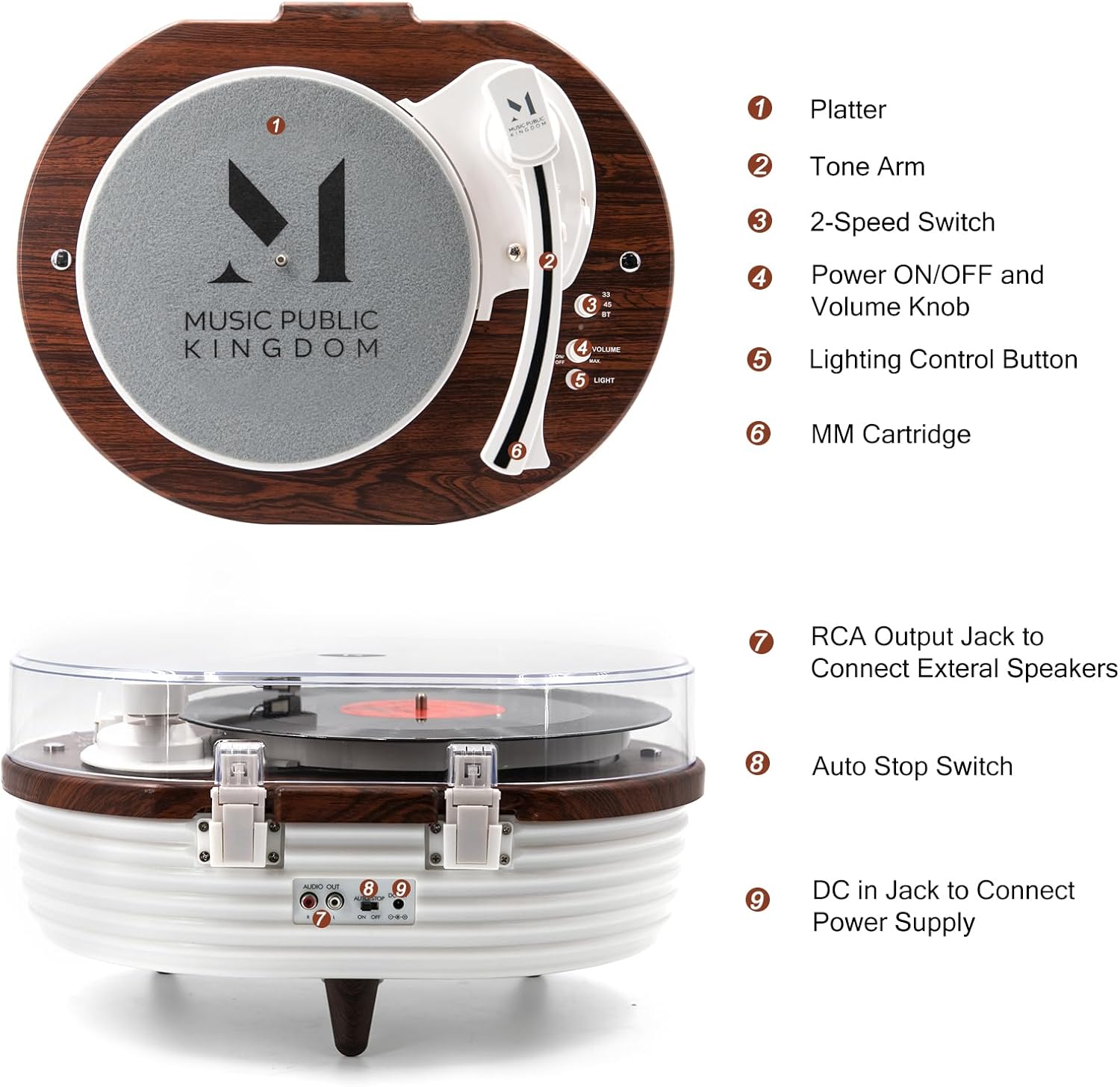
Figure 2.1: Turntable Components
1. Platter, 2. Tone Arm, 3. 2-Speed Switch, 4. Power ON/OFF and Volume Knob, 5. Lighting Control Button, 6. MM Cartridge, 7. RCA Output Jack, 8. Auto Stop Switch, 9. DC in Jack to Connect Power Supply.
3. Package Contents
Ensure all items are present in the package:
- 1 x M MUSIC PUBLIC KINGDOM TT238 Record Player
- 1 x 45 RPM Adapter
- 1 x Dust Cover
- 1 x Slipmat
- 1 x Power Adapter
- 1 x Instruction Manual (this document)
4. Setup
4.1 Unpacking and Placement
- Carefully remove the turntable from its packaging.
- Place the unit on a stable, level surface away from direct sunlight, heat sources, and excessive dust or vibration.
4.2 Installing the Dust Cover
Align the hinges of the dust cover with the slots on the back of the turntable and gently push down until it clicks into place.
4.3 Placing the Slipmat
Place the provided slipmat onto the platter (1) of the turntable. This helps protect your records and provides better grip.
4.4 Connecting Power
Insert the DC plug of the power adapter into the DC in Jack (9) on the back of the turntable. Plug the other end of the power adapter into a suitable wall outlet.

Figure 4.1: Turntable Ready for Use
The TT238 turntable with its dust cover open and a record placed on the platter.
5. Operation
5.1 Playing Vinyl Records
- Power On: Turn the Power ON/OFF and Volume Knob (4) clockwise to power on the unit. The LED lights will illuminate.
- Select Speed: Set the 2-Speed Switch (3) to the appropriate speed (33 or 45 RPM) for your record. Use the 45 RPM adapter for records with a large center hole.
- Place Record: Carefully place a vinyl record on the platter (1).
- Lift Tone Arm: Gently lift the Tone Arm (2) using the cue lever.
- Position Tone Arm: Move the tone arm over the desired starting groove of the record.
- Lower Tone Arm: Slowly lower the tone arm onto the record using the cue lever. Playback will begin.
- Adjust Volume: Adjust the volume using the Power ON/OFF and Volume Knob (4).
- Auto-Stop Function: The Auto Stop Switch (8) can be set to ON or OFF. When ON, the turntable will automatically stop spinning when the record finishes. When OFF, it will continue to spin.
- End Playback: At the end of the record, or when you wish to stop, lift the tone arm, return it to the tone arm rest, and turn the Power ON/OFF and Volume Knob (4) counter-clockwise to power off.

Figure 5.1: Record Placement and Speed Options
The turntable supports 7, 10, and 12-inch vinyl records at 33 1/3 and 45 RPM.
5.2 Bluetooth Mode
- Activate Bluetooth: Turn the Power ON/OFF and Volume Knob (4) clockwise to power on. The turntable will automatically enter Bluetooth pairing mode, indicated by a flashing LED light.
- Pair Device: On your mobile device (smartphone, tablet, etc.), enable Bluetooth and search for 'M MUSIC PUBLIC KINGDOM' or 'TT238'. Select it to pair.
- Play Audio: Once paired, you can play audio from your device through the turntable's built-in speakers.

Figure 5.2: Wireless Bluetooth Connectivity
Stream music from your smartphone or other Bluetooth-enabled devices.
5.3 RCA Output Connection
To connect the turntable to external speakers or an amplifier:
- Locate the RCA Output Jack (7) on the back of the turntable.
- Connect an RCA cable (not included) from the RCA Output Jack (7) to the audio input of your external amplifier or powered speakers.
- Ensure your external audio system is set to the correct input.
5.4 Adjusting LED Lighting Modes
The turntable features multiple LED lighting modes to enhance your listening experience.
- Press the Lighting Control Button (5) to cycle through the available lighting modes.
- Modes include various fixed colors and dynamic color-changing effects.

Figure 5.3: LED Lighting Base
The turntable features several lighting modes and various fixed colors.
6. Maintenance
6.1 Cleaning the Stylus
The stylus (needle) is a delicate component. A dirty stylus can affect sound quality and damage records.
- Use a soft brush designed for stylus cleaning, brushing gently from back to front.
- Do not use excessive force or harsh chemicals.
6.2 Cleaning the Unit
- Wipe the turntable's surface with a soft, dry, lint-free cloth.
- For stubborn marks, lightly dampen the cloth with water. Avoid using abrasive cleaners or solvents.
- Keep the dust cover clean to prevent dust from settling on the platter and records.
7. Troubleshooting
| Problem | Possible Cause | Solution |
|---|---|---|
| No power | Power adapter not connected or faulty outlet. | Ensure power adapter is securely connected and the outlet is functional. |
| No sound from speakers | Volume too low; incorrect mode selected; external speakers connected. | Increase volume. Ensure Bluetooth is not actively paired if playing vinyl. If using RCA, ensure external speakers are powered and selected. |
| Skipping or distorted sound | Dirty or damaged record; dirty or worn stylus; turntable not level; excessive vibration. | Clean record. Clean stylus. Ensure turntable is on a stable, level surface. Replace stylus if worn. |
| Bluetooth not pairing | Turntable not in pairing mode; device too far; interference. | Ensure turntable is powered on and in Bluetooth mode. Move device closer. Restart both devices. |
| Record stops prematurely | Auto-stop function enabled for a record that requires it to be off. | Try setting the Auto Stop Switch (8) to OFF. |
8. Specifications
| Feature | Detail |
|---|---|
| Brand | M MUSIC PUBLIC KINGDOM |
| Model Number | TT238 |
| Product Dimensions | 14.84 x 11.15 x 6.82 inches |
| Item Weight | 11.48 pounds |
| Speeds Supported | 33 1/3 RPM, 45 RPM |
| Cartridge Type | AT3600L Moving Magnet Cartridge |
| Connectivity | Bluetooth, RCA Output |
| Special Features | Adjustable Speed, Built-in Preamp, Built-in Speaker, Wireless, Dust Cover, RCA Output, LED Lighting |
| Material | Metal, Plastic, Wood |
| Motor Type | AC Motor |

Figure 8.1: Product Dimensions
The turntable measures approximately 17 inches in length, 13 inches in width, and 9 inches in height.
9. Warranty and Support
This product is covered by a manufacturer's warranty. For specific warranty details, please refer to the warranty card included with your purchase or contact M MUSIC PUBLIC KINGDOM customer support.
For technical assistance, troubleshooting, or replacement parts, please visit the official M MUSIC PUBLIC KINGDOM website or contact their customer service department.