
Whizmrchen Facai
Universal Remote Control for Samsung TV
Model: Facai
Brand: Whizmrchen
Introduction
This manual provides essential information for the proper use and maintenance of your new Whizmrchen Universal Remote Control. This remote is designed to be a direct replacement for most Samsung TV models, offering immediate functionality without complex programming.
Key Features
- Universal infrared remote designed for compatibility with most new and old Samsung TVs.
- Supports 2K, 4K UHD, LED, LCD, HDTV, 3D, and Smart TV functionalities.
- Specifically compatible with Samsung remote models BN59-01199F, AA59-00666A, AA59-00741A, including smart hub buttons.
- Offers farther transmitting distance and stable performance.
- Replaces damaged or old remotes, covering all original remote functions.
- Compact and ergonomic design for easy grip and to prevent slipping.
- No programming or setup required; ready to use with batteries.
- Powered by two AAA batteries (not included).
- Compatible with Samsung series TVs from 2017 to 2024 and older models.
Package Contents
- 1 x Universal Remote Control
Setup
This remote control is designed for immediate use with compatible Samsung TVs and does not require complex pairing or programming. Simply install the batteries to begin operation.
Battery Installation
- Locate the battery compartment on the back of the remote control.
- Slide the battery cover downwards or outwards to open it.
- Insert two AAA batteries (not included) into the compartment, ensuring the positive (+) and negative (-) terminals align correctly with the indicators inside.
- Slide the battery cover back into place until it clicks securely.

Figure 1: Battery compartment of the remote control.
Operating Instructions
Once batteries are installed, the remote is ready to control your Samsung TV. Point the remote directly at the TV's infrared receiver.
Basic Functions
- Power Button (Power Symbol): Turns the TV on or off.
- Number Buttons (0-9): Directly select channels.
- VOL +/-: Adjusts the volume up or down.
- CH +/-: Changes the channel up or down.
- MUTE: Mutes or unmutes the TV sound.
- SOURCE: Selects input sources (HDMI, AV, etc.).
- MENU: Accesses the TV's main menu.
- SMART HUB: Opens the Smart Hub for smart TV features.
- GUIDE: Displays the electronic program guide.
- INFO: Shows information about the current program or input.
- Navigation Buttons (Up, Down, Left, Right, Enter): Navigate through menus and confirm selections.
- RETURN: Goes back to the previous screen or menu.
- EXIT: Exits the current menu or application.
- Colored Buttons (A, B, C, D): Perform specific functions depending on the TV's context or application.
- Media Control Buttons (Play, Pause, Stop, Fast Forward, Rewind): Control media playback.
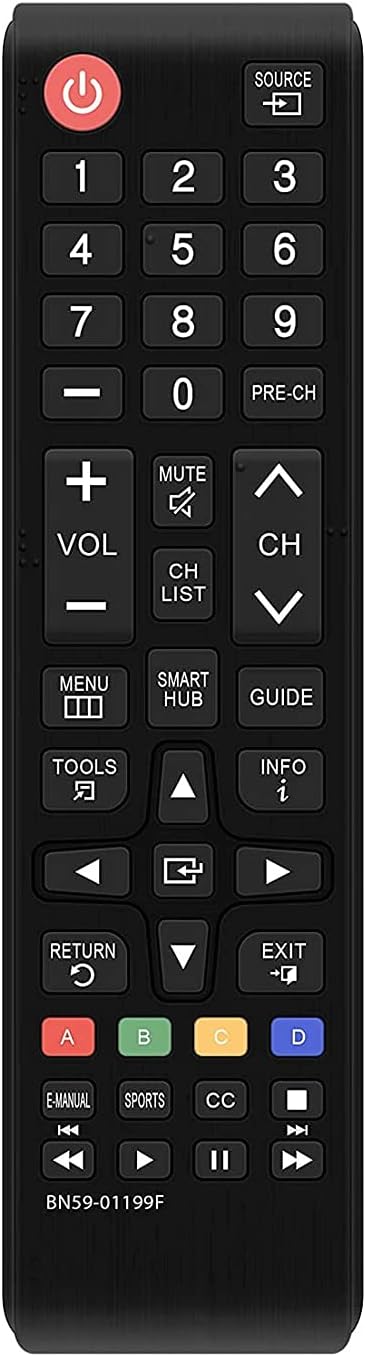
Figure 2: Front view of the remote control with all buttons.

Figure 3: Angled view of the remote control.

Figure 4: Infrared emitter of the remote control.
Compatibility
This universal remote control is compatible with a wide range of Samsung TV models, including but not limited to:
- UN32J4500AF, UN32J5205AF, UN32J525DAF
- UN40J5200AF, UN40J520DAF, UN40J6200, UN40J6200AF, UN40JU6400F, UN40JU640DF
- UN43J5200AF, UN43JU640DF
- UN48J5200AF, UN48J5201AF, UN48J520DAF, UN48J520DAFDXN, UN48J6200AF, UN48JU6400, UN48JU6400F, UN48JU640DF
- UN50J5200, UN50J5200AF, UN50J520DAF, UN50J6200, UN50J6200AF
- UN55J6200, UN55J6200AF, UN55J6201, UN55J6201AF, UN55J620DAF
- UN60J6200, UN60J6200AF, UN60J6200AF/XZA, UN60J6200AF/XZC, UN60J620DAF, UN60JU6390F, UN60JU6400, UN60JU6400F
- UN65J620, UN65J6200, UN65J6200AF, UN65J620DAF, UN65JU640, UN65JU6400, UN65JU6400F, UN65JU640D, UN65JU640DAF, UN65JU640DF
FXZA models are also compatible.
Maintenance
- Clean the remote control regularly with a soft, dry cloth. Do not use abrasive cleaners or solvents.
- Avoid exposing the remote to extreme temperatures, humidity, or direct sunlight.
- Do not drop the remote or subject it to strong impacts.
- If the remote will not be used for an extended period, remove the batteries to prevent leakage.
Troubleshooting
| Problem | Possible Cause | Solution |
|---|---|---|
| Remote not responding. | Dead or incorrectly installed batteries. | Replace batteries with new AAA batteries, ensuring correct polarity. |
| Remote not controlling TV. | Obstruction between remote and TV's IR sensor. | Ensure a clear line of sight between the remote and the TV. |
| Remote range is reduced. | Low battery power. | Replace batteries. |
| Specific buttons not working. | Button stuck or damaged. | Gently press the button multiple times. If still unresponsive, the remote may be damaged. |
Specifications
| Attribute | Value |
|---|---|
| Shell Material | ABS |
| Product Dimensions | 7 x 1.5 x 1 inches |
| Item Weight | 2.08 ounces |
| Battery Required | 2 x AAA (Not Included) |
| Remote Range | More than 8 Meters |
| Color | Black |
| Max Number of Supported Devices | 1 |
| Manufacturer | Whizmrchen |
| Country of Origin | China |
Warranty and Support
Please refer to the product packaging or the retailer's website for specific warranty information. For technical support or inquiries, please contact Whizmrchen customer service through the platform where the product was purchased.
Ask a question about this manual
Ask about setup, troubleshooting, compatibility, parts, safety, or missing instructions. Manuals+ will review the question and use this page’s manual context to help answer it.