
1. Product Overview
The BIGTREETECH TMC2209 V1.3 is an advanced stepper motor driver module designed for 3D printers and other motion control applications. It offers ultra-quiet operation, enhanced heat dissipation, and supports both UART and STEP/DIR communication modes. This module is engineered to provide precise and smooth motor control, improving the overall performance of your 3D printer.

Image 1.1: The BIGTREETECH TMC2209 V1.3 Stepper Motor Driver Module with its blue heatsink.

Image 1.2: Key features of the TMC2209 V1.3 driver, highlighting its quiet operation and advanced functionalities.
2. Key Features
- Ultra-quiet Stepper Driver: Utilizes StealthChop2 technology for silent motor operation. Supports continuous current up to 2.0A and peak currents of 2.8A, with a voltage range of 4.75V to 28V.
- Sensorless Homing: Incorporates Stallguard4 technology to detect motor current alterations, enabling end-of-axis detection without physical limit switches.
- Excellent Heat Dissipation: Features CoolStep current dynamic control, which can save up to 75% energy and reduce heat generation, minimizing cooling requirements.
- Supports UART and STEP/DIR Modes: Flexible operation modes, requiring firmware modification for selected mode.
- Enhanced Durability: Upgraded with an ESD diode to improve drive resistance and prevent damage from power ripple, surge, or static electricity.

Image 2.1: StealthChop™ and StealthCycle™ modes.

Image 2.2: Quiet operation below 10dB.

Image 2.3: Improved print quality with TMC2209 V1.3.

Image 2.4: ESD diode upgrade for improved drive resistance.
3. Installation and Setup
Proper installation is crucial for the optimal performance of your TMC2209 V1.3 driver. Ensure correct orientation and secure connection to your 3D printer's motherboard.
3.1 General Installation Guidelines
- Orientation: Always verify the correct pin orientation before inserting the driver into the motherboard. Incorrect insertion can cause damage to both the driver and the motherboard.
- Pin Modification: Some CNC shields or motherboards may require the removal of specific pins (e.g., diagnostic pins) if they interfere with the board's layout. This can typically be done by carefully heating the solder joints and pulling the pins.
- Heat Sinks: Always attach the provided heatsinks to the driver chip before operation. Ensure good contact for effective heat transfer.
- Cooling: Active cooling (e.g., a fan directed at the drivers) is highly recommended, especially for prolonged operation or high current settings, to prevent thermal shutdown and ensure longevity.
4. Operating Modes
The TMC2209 V1.3 supports two primary operating modes: UART and STEP/DIR. The chosen mode requires specific hardware configuration and corresponding firmware adjustments.
4.1 UART Mode Configuration
In UART mode, the driver communicates with the mainboard via a serial interface, allowing for dynamic control of various parameters such as current, microstepping, and StealthChop settings directly from the firmware. This mode typically requires a specific pin on the driver to be configured as the UART pin.

Image 4.1: UART Mode configuration. The 5th pin is used as the UART pin, requiring a resistor modification.
To enable UART mode, if the 5th pin is designated as the UART Pin, a specific resistor on the driver board must be removed and re-welded to two designated pads. Refer to the diagram above for precise locations.
4.2 STEP/DIR Mode Configuration
STEP/DIR mode is a traditional method where the driver receives step and direction signals from the mainboard. Microstep resolution is set via the MS1 and MS2 pins on the driver board.
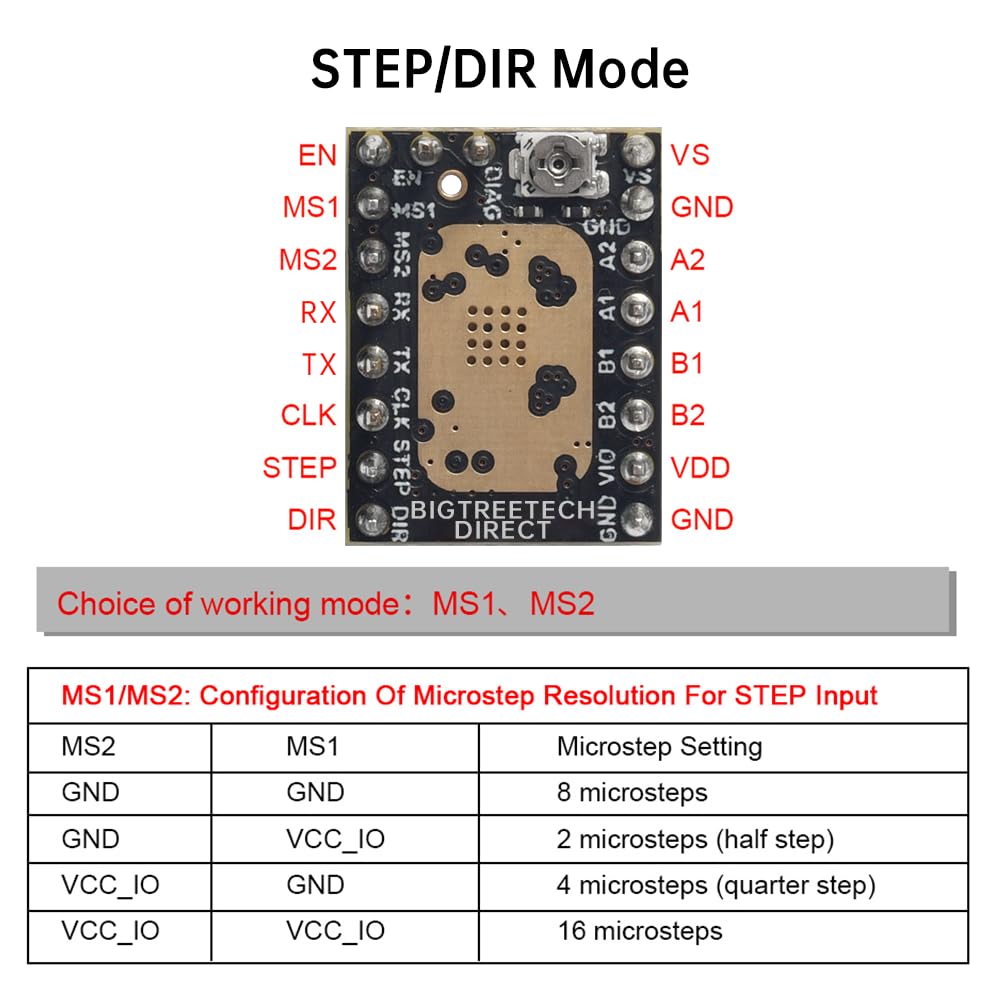
Image 4.2: STEP/DIR Mode pinout and microstep resolution settings.
The microstep resolution can be configured by connecting the MS1 and MS2 pins to either Ground (GND) or VCC_IO according to the table provided in Image 4.2.
5. Potentiometer Adjustment (Vref)
The potentiometer on the TMC2209 V1.3 driver allows for manual adjustment of the Vref (reference voltage), which directly controls the motor driver current. Proper Vref setting is essential for motor performance and to prevent overheating.
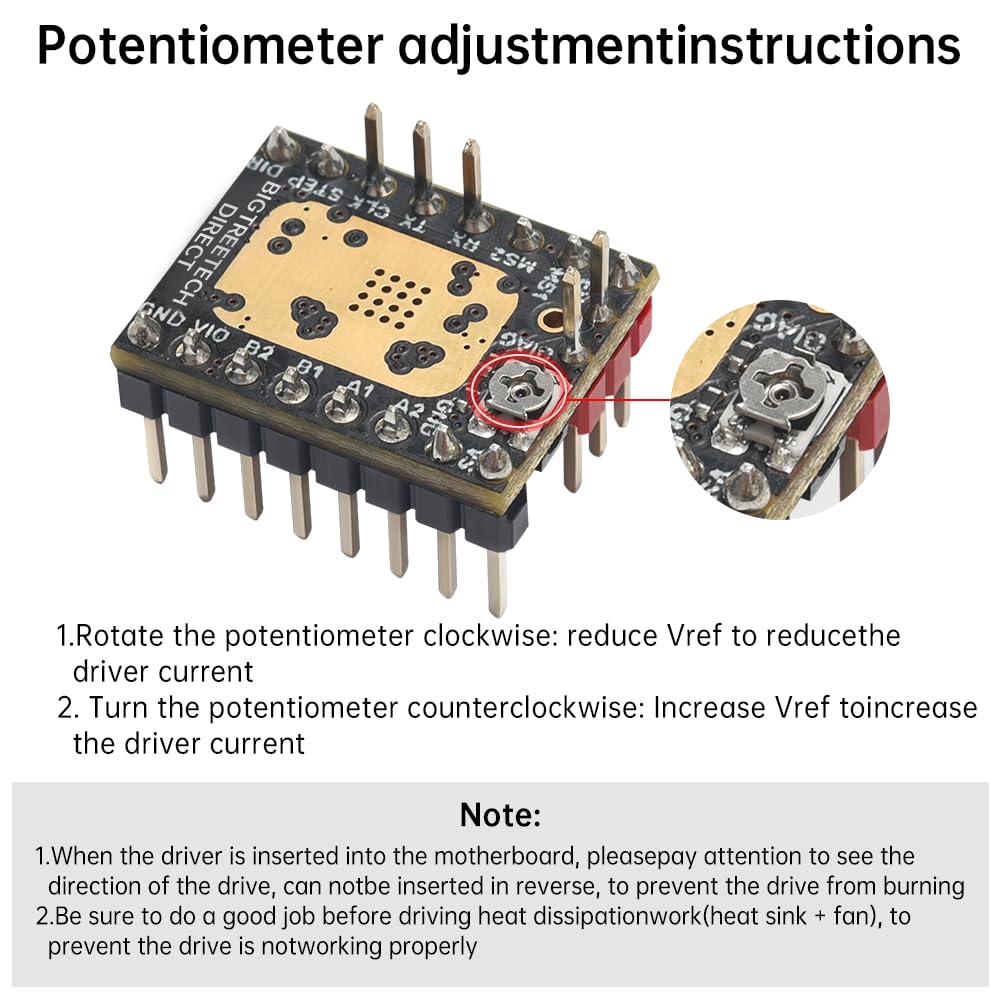
Image 5.1: Potentiometer adjustment instructions.
- Rotate Clockwise: Reduces Vref to decrease the driver current.
- Rotate Counter-clockwise: Increases Vref to increase the driver current.
Important Notes:
- When inserting the driver into the motherboard, ensure correct orientation to prevent damage.
- Always ensure proper heat dissipation (heatsink + fan) is in place before operating the driver to prevent overheating and malfunction.
6. Heat Management
Effective heat management is critical for the longevity and stable operation of the TMC2209 V1.3 driver. The module is designed with features to reduce heat, but additional cooling is often beneficial.

Image 6.1: Thermal performance comparison highlighting the effectiveness of the large-area thermal pad.
The TMC2209 V1.3 incorporates a large-area thermal pad and CoolStep technology to dynamically control current and reduce heat. However, for demanding applications or enclosed environments, supplementing with a dedicated fan blowing over the heatsinks is highly recommended to maintain optimal operating temperatures and prevent thermal shutdown.
7. Compatibility
The BIGTREETECH TMC2209 V1.3 stepper motor driver is widely compatible with many popular 3D printer motherboards.

Image 7.1: Wide compatibility with BIGTREETECH and other 3D printer motherboards.
Compatible motherboards include, but are not limited to:
- BIGTREETECH Octopus V1.1 / Octopus Pro
- BIGTREETECH SKR V1.4 Turbo / SKR 3
- BIGTREETECH Manta M4P / M5P / M8P
- MKS Gen L
- Most other 3D printer motherboards supporting A4988/DRV8825 style drivers.
8. Specifications
Below are the key specifications for the TMC2209 V1.3 driver, including a comparison with the TMC2208.

Image 8.1: Comparison of TMC2208 and TMC2209 specifications.
| Feature | Specification |
|---|---|
| Item Model Number | TMC2209 V1.3 |
| Brand | BIGTREETECH Direct |
| Material | PCB |
| Logic Supply Voltage (VIO) | 3-5V |
| Motor Supply Voltage (VM) | 4.75-28V |
| Phase Current max (RMS) | 2.0A |
| Peak Current | 2.8A |
| RDson | 0.2ohm |
| Microsteps | Up to 1/256 |
| Features | StealthChop2, SpreadCycle, CoolStep, StallGuard4 |
9. Troubleshooting
This section addresses common issues encountered during the installation and operation of the TMC2209 V1.3 driver.
- Motor Running Backward: If your stepper motor rotates in the wrong direction, this is typically a firmware configuration issue. You will need to adjust the motor direction setting in your 3D printer's firmware (e.g., Marlin, Klipper).
- Missed Steps or Inaccurate Movement:
- Vref Adjustment: Ensure the Vref is correctly set for your motor's current requirements. An insufficient current can lead to missed steps.
- StealthChop vs. SpreadCycle: While StealthChop provides quiet operation, some users report better accuracy and torque with SpreadCycle, especially at higher speeds or loads. Consider switching to SpreadCycle in your firmware if accuracy is a concern.
- Driver Overheating / Thermal Shutdown:
- Verify that heatsinks are properly attached and making good contact with the chip.
- Ensure adequate airflow over the drivers, preferably with an active cooling fan.
- Check Vref setting; excessively high current can cause overheating.
- Driver Not Functioning After Installation:
- Incorrect Orientation: Double-check that the driver is inserted into the motherboard with the correct pin orientation.
- Stray Solder/Pin Issues: Inspect the driver pins and motherboard sockets for any stray solder bridges or bent pins that might prevent proper contact. Some users have reported minor workmanship issues requiring cleanup.
- MS1/MS2 Configuration: If using STEP/DIR mode, ensure MS1 and MS2 pins are correctly configured (e.g., tied to ground for address 0) and not left floating.
- Firmware Mismatch: Confirm that your firmware is configured for the correct driver type (TMC2209) and operating mode (UART or STEP/DIR).
10. Support and Warranty
BIGTREETECH Direct is committed to providing excellent customer service and support for its products.
If you encounter any issues or have questions regarding your BIGTREETECH TMC2209 V1.3 driver, please do not hesitate to contact us:
- Amazon Message: Reach out to us directly through the Amazon messaging system for prompt assistance.
- GitHub Resources: For technical documentation, firmware examples, and community support, search for 'BIGTREETECH' on GitHub. Many resources and solutions are available from the open-source community.
Please retain your proof of purchase for any warranty claims. Specific warranty terms and conditions may apply and are available upon request or through the official BIGTREETECH website.