Introduction
This manual provides essential instructions for setting up, operating, and maintaining your Panasonic KX-TGH710 cordless phone. Please read this manual thoroughly before using the phone to ensure proper operation and to take full advantage of its features.
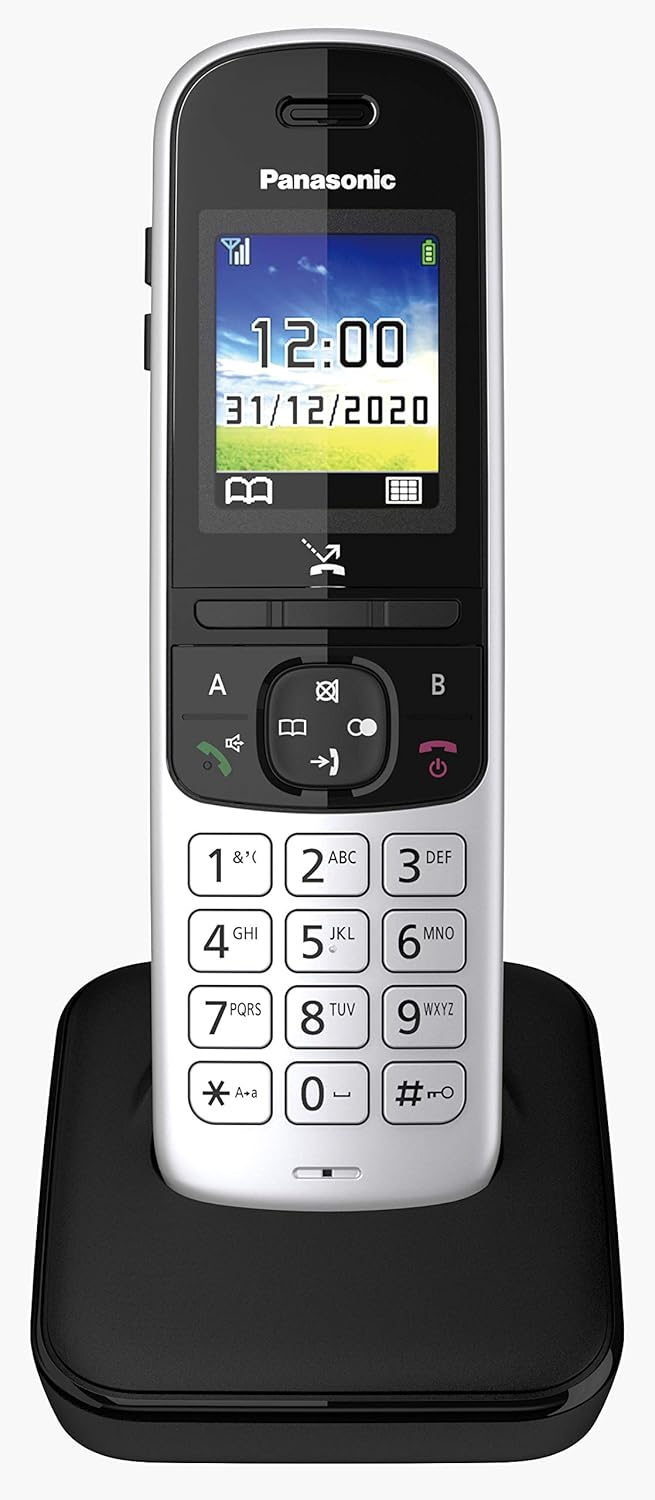
Figure 1: Panasonic KX-TGH710 Cordless Phone with Base Unit
This image shows the Panasonic KX-TGH710 cordless phone handset resting in its black charging cradle. The phone features a color display, a numeric keypad, and function buttons. The handset is silver and black.
Package Contents
Verify that your package contains the following items:
- Cordless Handset (KX-TGH710)
- Base Unit
- AC Power Adapter for Base Unit
- Telephone Line Cord
- Rechargeable Battery (Lithium-ion)
- User Manual (this document)
Setup
1. Battery Installation and Charging
- Open the battery compartment cover on the back of the handset.
- Insert the supplied Lithium-ion battery, ensuring correct polarity.
- Close the battery compartment cover.
- Place the handset on the base unit to charge. The charging indicator on the handset display will show charging status.
- Allow the handset to charge for at least 7 hours before initial use to ensure full battery capacity.
2. Connecting the Base Unit
- Connect the AC power adapter to the base unit and plug it into a standard electrical outlet.
- Connect one end of the telephone line cord to the base unit and the other end to your telephone wall jack.
- Ensure all connections are secure.
Operating Instructions
Making and Receiving Calls
- To Make a Call: Dial the number and press the Call button (green handset icon).
- To Receive a Call: When the phone rings, press the Call button.
- To End a Call: Press the End Call button (red handset icon).
Hands-Free (Speakerphone) Function
The phone supports Full Duplex hands-free communication, allowing for clear conversations without holding the handset.
- During a call, press the Speakerphone button (speaker icon) to activate hands-free mode.
- Press the Speakerphone button again to switch back to handset mode.

Figure 2: Handset Display in Speakerphone Mode
This image shows the phone's color screen displaying "SP-Phone" and a timer, indicating that the speakerphone function is active during a call.
Volume Adjustment
Adjust the call volume using the dedicated buttons on the side of the handset.

Figure 3: Side Volume Control Buttons
This image provides a side view of the Panasonic KX-TGH710 handset, highlighting the '+' and '-' buttons located on the left side, used for adjusting call volume.
- During a call, press the + button to increase the volume.
- Press the - button to decrease the volume.
Do Not Disturb Mode
The Do Not Disturb (DND) mode allows you to silence incoming calls during specific periods while still allowing important calls to come through (requires caller ID subscription from your service provider).

Figure 4: Handset Display in Do Not Disturb Mode
This image shows the phone's color screen with "ECO" and "Do Not Disturb" displayed, indicating that the DND feature is active.
Refer to the on-screen menu for detailed instructions on setting up and managing DND schedules and exceptions.
Eco Mode Plus
Eco Mode Plus completely eliminates radio wave transmission when the handset is in standby mode. The base unit remains off until an incoming call is received or a handset is activated, reducing power consumption and radiation.
To activate/deactivate Eco Mode Plus, navigate through the phone's menu settings. An "ECO" indicator will typically appear on the display when active.
Maintenance
Cleaning
- Wipe the phone and base unit with a soft, damp cloth.
- Do not use abrasive cleaners or solvents.
Battery Care
- Use only the specified rechargeable Lithium-ion battery.
- If the phone will not be used for an extended period, remove the battery.
- Dispose of old batteries according to local regulations.
Shock Resistance
The Panasonic KX-TGH710 handset is designed to be shock-resistant, having passed the MIL-STD-810G, 516.6 drop/shock test for accidental drops from approximately 1.2 meters. While durable, avoid intentional drops or severe impacts to prevent damage.
Troubleshooting
| Problem | Solution |
|---|---|
| No dial tone |
|
| Handset does not charge |
|
| Poor call quality / Static |
|
| Display is blank |
|
Specifications
| Feature | Detail |
|---|---|
| Brand | Panasonic |
| Model Number | KX-TGH710JTS |
| Color | Silver |
| Screen Size | 1.8 Inches |
| Operating System | Proprietary |
| Special Features | Convenient volume adjustment button, Eco Mode Plus, Do Not Disturb mode, Shock-resistant |
| Compatible Devices | Fixed telephone network |
| Battery Composition | Lithium-ion |
| Power Source | AC adapter |
| Material | Acrylonitrile Butadiene Styrene (ABS) |
| Item Dimensions (L x W x H) | 8.7 x 7.8 x 21.7 centimeters |
Warranty and Support
For warranty information and customer support, please refer to the warranty card included with your product or visit the official Panasonic website for your region.
Online Resources:
- Panasonic Official Website: www.panasonic.com
- Product Support Page: (Check Panasonic website for specific model support page)