
1. Introduction
Thank you for choosing the Oasser P2A Cordless Air Compressor. This manual provides essential information for the safe and efficient operation, maintenance, and troubleshooting of your device. Please read this manual thoroughly before use and retain it for future reference.
The Oasser P2A is a portable, rechargeable electric air compressor designed for inflating tires on cars, motorcycles, bicycles, and other inflatable items. It features a built-in 2000 mAh lithium battery, a maximum pressure of 120 PSI, an LED light for dark conditions, and an LCD screen for precise pressure monitoring.
2. Safety Instructions
To ensure safe operation, always follow these precautions:
- Read all instructions carefully before using the device.
- Keep the device out of reach of children.
- Do not operate the compressor in wet conditions or near flammable liquids or gases.
- Ensure the air hose is securely connected to both the compressor and the item being inflated before starting.
- Do not over-inflate items. Always refer to the manufacturer's recommended pressure for the item being inflated.
- Monitor the pressure gauge during inflation to prevent over-inflation. The device features automatic shut-off, but manual monitoring is still recommended.
- Do not leave the compressor unattended while in operation.
- Avoid directing the air stream at people or animals.
- Charge the battery in a well-ventilated area. Do not charge if the device or charger is damaged.
- If the device becomes unusually hot during use or charging, discontinue use immediately and contact customer support.
- Always disconnect the air hose and store the device properly after use.
3. Package Contents
Verify that all items are present in your package:
- 1 x Oasser P2A Air Pump
- 1 x Short Air Hose
- 1 x Long Air Hose
- 1 x Ball Needle
- 1 x Plastic Nozzle
- 1 x Presta Valve Adapter
- 1 x USB Charging Cable (USB charger not included)
- 1 x Storage Bag
- 1 x User Manual

Image: Oasser P2A Cordless Air Compressor with all included accessories, such as air hoses, nozzles, and charging cable.
4. Product Overview
Familiarize yourself with the components of your Oasser P2A air compressor:

Image: Diagram illustrating the main components of the Oasser P2A, including the LED light, digital LCD display, and rechargeable lithium battery.
- LED Light: Provides illumination for use in low-light conditions.
- Digital LCD Display: Shows real-time and preset pressure values.
- Control Buttons: Power, unit selection, and pressure adjustment (+/-).
- Air Hose Connection: Point for attaching the air hose.
- Trigger/Start Button: Initiates the inflation process.
- Rechargeable Lithium Battery (2000 mAh): Provides cordless power.
- USB Charging Port: For recharging the device.
5. Charging the Device
Before first use, fully charge the air compressor. It takes approximately 4 hours for a complete charge.
- Connect the provided USB charging cable to the USB charging port on the compressor.
- Connect the other end of the USB cable to a compatible USB power adapter (not included) or a USB port.
- The charging indicator light will illuminate. Once fully charged, the light may change color or turn off depending on the model.
Important: Please charge the battery completely within 3 days after each use to maintain battery health.
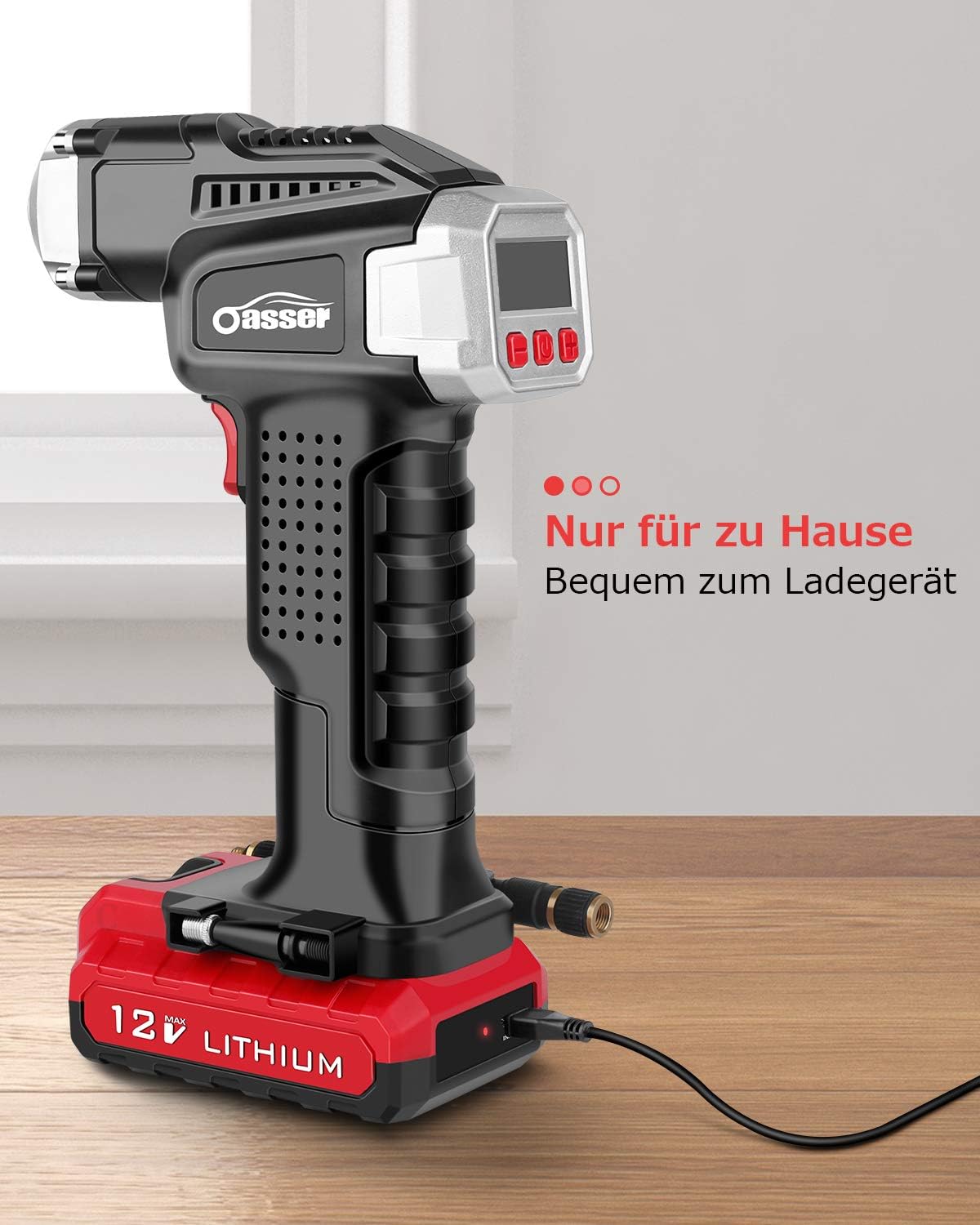
Image: The Oasser P2A air compressor connected to a USB charging cable, indicating the charging process.
6. Setup
Prepare your air compressor for inflation:
- Attach the Air Hose: Screw the desired air hose (short or long) onto the air hose connection port at the front of the compressor until secure.
- Select the Correct Adapter: Choose the appropriate nozzle or adapter for the item you wish to inflate (e.g., Presta valve adapter for bicycles, ball needle for sports balls, plastic nozzle for inflatable toys). Attach it to the end of the air hose.
7. Operating Instructions
Follow these steps to inflate an item:
- Power On: Press the middle button on the control panel to turn on the device. The LCD display will illuminate.
- Connect to Valve: Securely connect the air hose adapter to the valve of the item you intend to inflate. The current pressure will be displayed on the LCD screen.
- Set Desired Pressure: Use the '+' and '-' buttons to adjust the target pressure. You can cycle through pressure units (PSI, BAR, KPA, kg/cm²) by pressing the unit selection button (often the power button briefly).
- Start Inflation: Press the red trigger/start button on the handle to begin inflation. The compressor will operate, and the real-time pressure will be shown on the display.
- Automatic Shut-off: The compressor will automatically stop once the preset target pressure is reached.
- Disconnect: Carefully disconnect the air hose from the item's valve.
- Power Off: Press and hold the middle button to turn off the device.
Using the LED Light: Press the dedicated LED light button (if available, often integrated with another button) to turn the light on or off for visibility in dark environments.
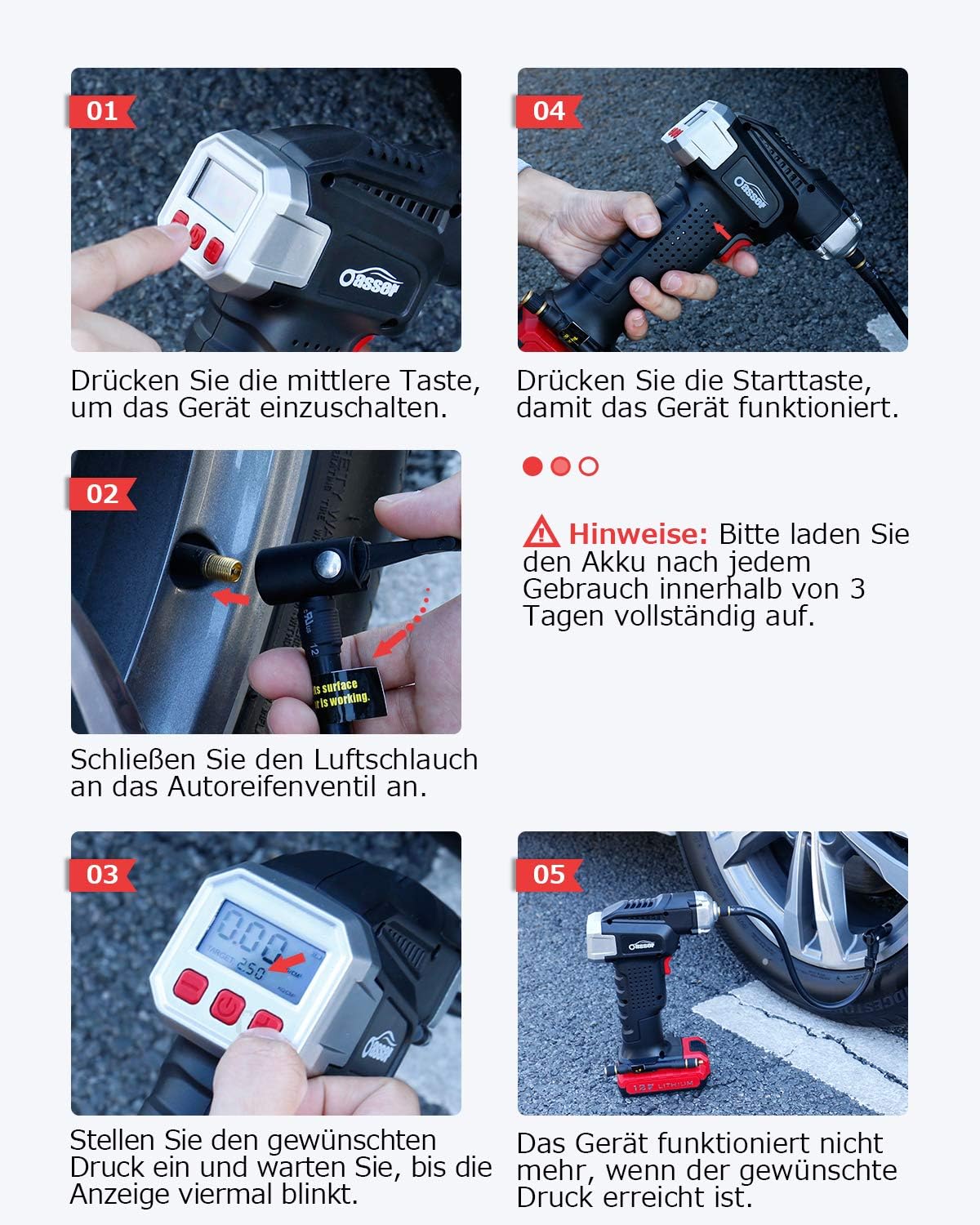
Image: Visual guide demonstrating the operational steps: powering on, connecting the hose, setting pressure, and starting inflation.

Image: The Oasser P2A air compressor actively inflating a car tire, demonstrating its practical application.

Image: A detailed view of the Oasser P2A's digital LCD display, clearly showing pressure readings and unit selection.
8. Maintenance
Proper maintenance ensures the longevity and performance of your air compressor:
- Cleaning: Wipe the device with a soft, damp cloth. Do not use harsh chemicals or abrasive cleaners. Ensure the device is dry before storage.
- Storage: Store the compressor in a cool, dry place, away from direct sunlight and extreme temperatures. Use the provided storage bag to protect it from dust and damage.
- Battery Care: Recharge the battery regularly, especially if the device has not been used for an extended period. Avoid completely draining the battery frequently to prolong its lifespan.
- Hose and Nozzle Inspection: Periodically check the air hoses and nozzles for any signs of wear, cracks, or damage. Replace them if necessary to ensure a proper seal and efficient inflation.
9. Troubleshooting
If you encounter issues with your Oasser P2A, refer to the following common problems and solutions:
| Problem | Possible Cause | Solution |
|---|---|---|
| Device does not turn on. | Battery is depleted. | Charge the device fully. |
| Device turns on but does not inflate. | Air hose not securely connected. Incorrect pressure setting. | Ensure air hose is tightly screwed on. Check that the target pressure is set above the current pressure. |
| Inaccurate pressure reading. | Loose connection to valve. | Ensure the nozzle is firmly attached to the item's valve without air leaks. |
| Device stops prematurely. | Target pressure reached. Battery low. | This is normal if target pressure is met. If not, recharge the battery. |
| Device is very loud during operation. | Normal operation noise. | Air compressors generate noise during operation. This is generally normal. |
10. Specifications
| Feature | Specification |
|---|---|
| Model Number | P2A |
| Brand | Oasser |
| Battery Type | 1 Lithium-ion (included) |
| Battery Capacity | 2000 mAh |
| Maximum Pressure | 120 PSI |
| Voltage | 12 Volts |
| Power Source | Battery Powered |
| Item Weight | 1.08 Kilograms |
| Package Dimensions | 26 x 17.6 x 8.4 cm |
| Display Type | 1.5" Digital LCD |
| Inflation Units | PSI, BAR, KPA, kg/cm² |
11. Warranty and Support
Oasser is committed to providing high-quality products and excellent customer service. If you have any questions, concerns, or require assistance with your Oasser P2A Cordless Air Compressor, please refer to the contact information provided with your purchase or visit the official Oasser website for support.