
1. Overview
The CRAFTSMAN 20V MAX Impact Driver Kit (CMCF800C1) is a powerful and versatile tool designed for fastening applications, including driving screws, lag bolts, and large fasteners. It features a high-performance motor, quick-release chuck, and an integrated LED work light for enhanced visibility.
2. Package Contents
Verify that all items listed below are included in your kit:
- 1 x CMCF800 Impact Driver
- 1 x V20 20-volt MAX 1.3-amp hour Lithium Ion Battery
- 1 x V20 20-volt MAX Lithium Ion Charger
- 1 x PH #2 Screwdriving Bit

Figure 2.1: Contents of the CRAFTSMAN 20V MAX Impact Driver Kit.
3. Key Features
- High Performance: Delivers 1,460 in-lbs. of torque and a maximum of 3,800 RPMs/3,100 IPMs for efficient fastening.
- Quick Release 1/4 Inch Hex Chuck: Enables easy one-handed bit changes, improving workflow efficiency.
- Integrated LED Work Light: Provides illumination in dark work areas, enhancing visibility and precision.
- VersaTrack™ Clip Compatible: Allows for convenient storage and accessibility (clip and accessories sold separately).
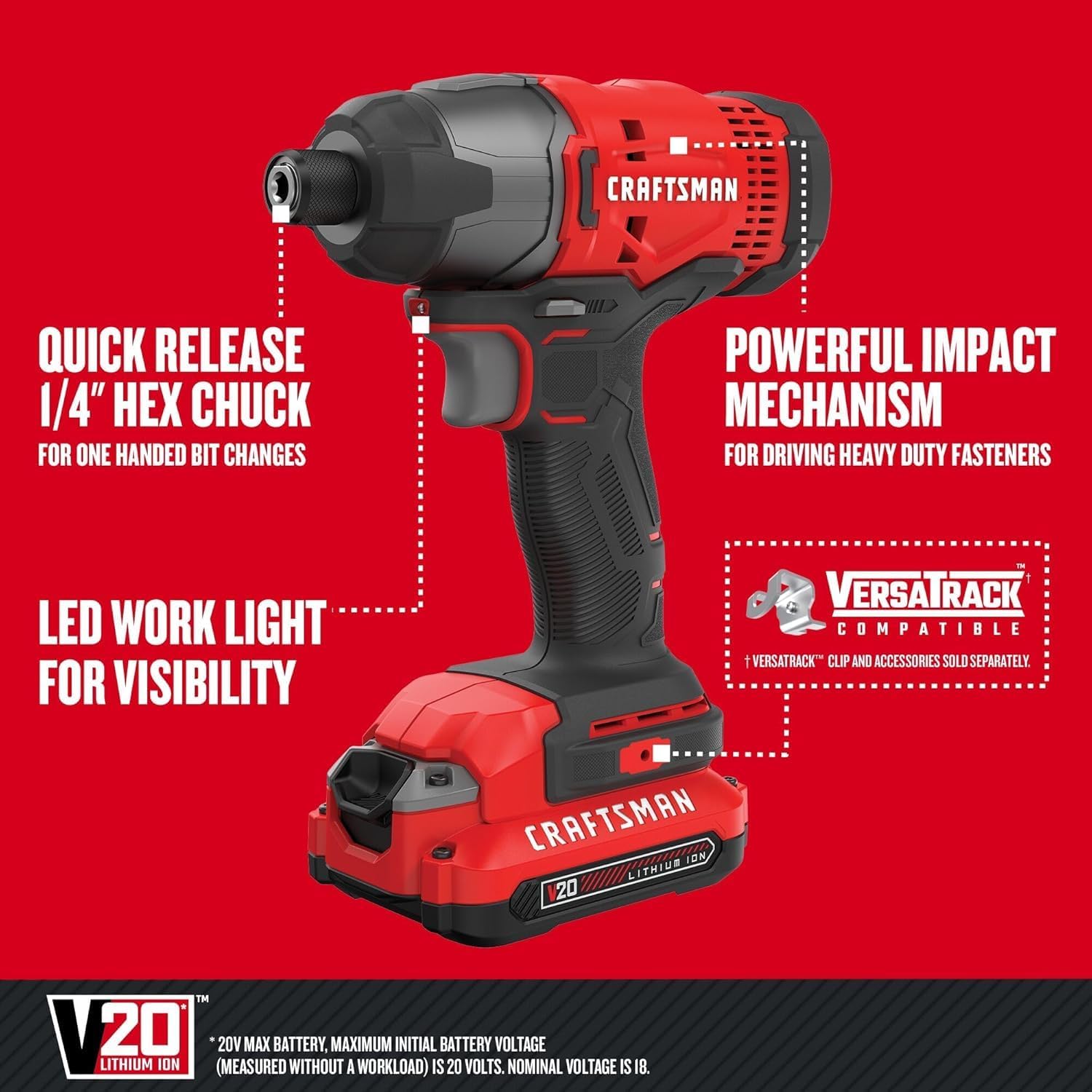
Figure 3.1: Labeled features of the CRAFTSMAN Impact Driver.

Figure 3.2: Quick Release Chuck for easy one-handed bit changes.

Figure 3.3: LED light helps illuminate dark work areas.

Figure 3.4: Powerful impact mechanism for driving heavy-duty fasteners.
4. Specifications
| Attribute | Value |
|---|---|
| Brand | CRAFTSMAN |
| Model Number | CMCF800C1 |
| Power Source | Battery Powered |
| Voltage | 20V MAX |
| Maximum Rotational Speed | 3800 RPM |
| Maximum Impacts Per Minute (IPM) | 3100 IPM |
| Torque | 1460 in-lbs |
| Chuck Size | 1/4 Inch Hex |
| LED Work Light | Yes |
5. Setup
5.1 Charging the Battery
- Connect the V20 20-volt MAX Lithium Ion Charger to a standard electrical outlet.
- Slide the V20 20-volt MAX 1.3-amp hour Lithium Ion Battery onto the charger until it clicks into place.
- The charger's indicator light will show the charging status. A solid green light indicates a full charge.
Video 5.1: Demonstration of battery charging and installation.
5.2 Battery Installation and Removal
- To install the battery, align the battery with the base of the impact driver and slide it in until it clicks securely into place.
- To remove the battery, press the gray release button located on the front of the battery pack and slide the battery out.
5.3 Bit Installation and Removal
- To install a bit, pull the quick-release chuck collar forward and insert the 1/4 inch hex bit fully into the chuck. Release the collar to lock the bit in place. Ensure the bit is securely seated.
- To remove a bit, pull the quick-release chuck collar forward and pull the bit out.
Video 5.2: Quick demonstration of bit installation and removal.
6. Operating Instructions
6.1 General Operation
- Forward/Reverse Selector: Locate the selector switch above the trigger. Push it to the left for forward rotation (driving screws) and to the right for reverse rotation (removing screws). Center position locks the trigger.
- Variable Speed Trigger: The tool's speed is controlled by the amount of pressure applied to the trigger. Press lightly for slower speeds and fully for maximum speed.
- LED Work Light: The integrated LED light activates when the trigger is pressed, illuminating the work area. It remains on for a short period after the trigger is released.
6.2 Applications
The CRAFTSMAN Impact Driver is ideal for:
- Fastening screws into various materials.
- Driving lag bolts and other large fasteners.
- Assembly of furniture, decks, and other structures.
6.3 Safety Precautions
- Always wear appropriate personal protective equipment (PPE), including safety glasses, hearing protection, and gloves.
- Ensure the workpiece is stable and secured before operating the tool.
- Keep hands and loose clothing away from moving parts.
- Do not operate the tool in wet conditions or in the presence of flammable liquids or gases.
- Disconnect the battery before performing any adjustments, changing accessories, or storing the tool.
7. Maintenance
7.1 Cleaning
Regularly clean the tool's ventilation openings to prevent overheating. Use a soft, damp cloth to wipe down the exterior. Do not use harsh chemicals or abrasive cleaners.
7.2 Storage
Store the impact driver, battery, and charger in a cool, dry place, away from direct sunlight and extreme temperatures. Ensure the battery is removed from the tool before storage.
7.3 Battery Care
To maximize battery life, avoid fully discharging the battery before recharging. Store batteries with a partial charge if not in use for extended periods. Do not expose batteries to water or extreme heat.
8. Troubleshooting
| Problem | Possible Cause | Solution |
|---|---|---|
| Tool does not start | Battery not installed correctly; Battery is discharged; Forward/reverse selector is in the locked (center) position. | Ensure battery is fully seated; Charge the battery; Move selector to forward or reverse position. |
| Reduced power/torque | Low battery charge; Worn or incorrect bit. | Recharge battery; Replace bit or ensure it is appropriate for the task. |
| Bit falls out of chuck | Bit not fully inserted; Incorrect bit type (must be 1/4 inch hex with retention groove). | Re-insert bit fully, ensuring collar locks; Use only compatible 1/4 inch hex bits with the retention groove. |
9. Warranty and Support
9.1 Warranty Information
This CRAFTSMAN 20V MAX Impact Driver Kit (CMCF800C1) is covered by a 3 Year Limited Warranty. This warranty covers defects in material or workmanship. Proof of purchase is required. The warranty is not transferable. For full details, please refer to the official CRAFTSMAN website or contact customer support.

Figure 9.1: CRAFTSMAN 3 Year Limited Warranty.
9.2 Customer Support
For further assistance, technical support, or warranty claims, please visit the official CRAFTSMAN website or contact their customer service department. Keep your product model number (CMCF800C1) and proof of purchase readily available.