
Motorola Voice CD5011
Motorola CD5011 DECT 6.0 Cordless Phone User Manual
Model: CD5011
Introduction
The Motorola CD5011 DECT 6.0 Cordless Phone is designed to provide clear and reliable communication for your home or office. This manual will guide you through the setup, operation, and maintenance of your new phone system, ensuring you can utilize all its features effectively.
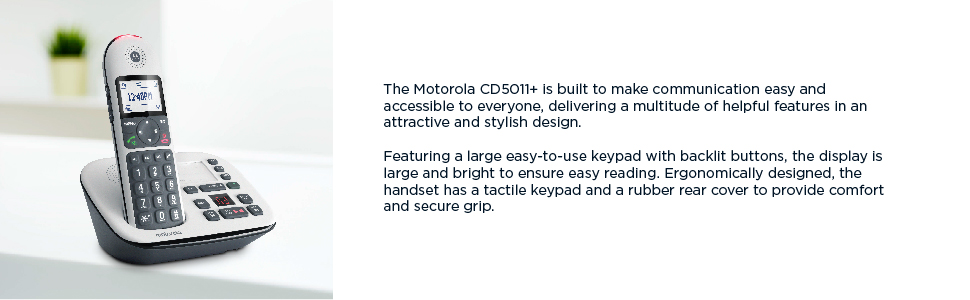
The Motorola CD5011+ is built to make communication easy and accessible to everyone, delivering a multitude of helpful features in an attractive and stylish design.
What's in the Box
Before you begin, please ensure all components are present:
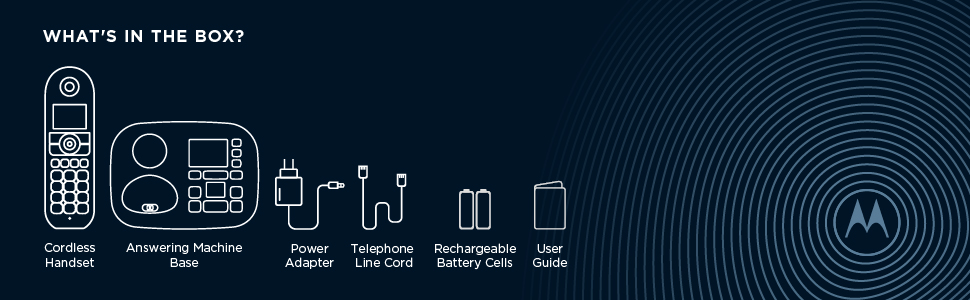
Illustration of the items included with your Motorola CD5011 phone system.
- Cordless Handset
- Answering Machine Base
- Power Adapter
- Telephone Line Cord
- Rechargeable Battery Cells (2 AAA)
- User Guide (this manual)
Setup
1. Connecting the Base Unit
- Plug the small end of the power adapter into the POWER jack on the back of the base unit.
- Plug the large end of the power adapter into a standard electrical outlet.
- Plug one end of the telephone line cord into the LINE jack on the back of the base unit.
- Plug the other end of the telephone line cord into a telephone wall jack.
2. Installing Handset Batteries
- Open the battery compartment cover on the back of the handset.
- Insert the two supplied AAA rechargeable batteries, observing the correct polarity (+ and -).
- Close the battery compartment cover.
- Place the handset on the base unit or charger to charge for at least 16 hours before first use. The battery icon on the handset display will indicate charging status.
Operating Your Phone
Making and Receiving Calls
- To Make a Call: Press the TALK button, then dial the number.
- To Receive a Call: When the phone rings, press the TALK button.
- To End a Call: Press the END button or place the handset back on the base/charger.
Key Features

Overview of the Motorola CD5011's key features.
- Call Blocking: Block unwanted calls. The phone allows you to block up to 1000 numbers. Refer to the detailed instructions in your user guide for programming blocked numbers.
- Volume Boost: Enhance the listening volume for clearer conversations, especially beneficial for users with hearing impairments. This feature is compatible with hearing aids.
- Hands-free Speakerphone: Use the integrated speakerphone for convenient hands-free conversations.
- Backlit Keypad: The large, bright backlit keypad ensures easy visibility and dialing even in low-light conditions.
- Answering Machine: The integrated digital answering machine offers up to 30 minutes of recording time. You can play back messages, skip, delete, and record your own outgoing message.
- Phone Book: Store up to 150 names and numbers in the phone book for quick dialing.

The large keys and bright backlit keypad ensure ease of use for all users.
Intercom Function (for multiple handsets)
If you have multiple handsets, you can use the intercom feature to communicate between them:
- Press the INT button on the handset.
- Select the desired handset number to call.
- The other handset will ring, and you can begin speaking once answered.

Easily transfer calls between multiple handsets when purchasing additional units.
Maintenance
Cleaning Your Phone
To keep your phone in good condition, wipe it regularly with a soft, damp cloth. Do not use cleaning sprays or abrasive cleaners, as these can damage the phone's surface or internal components.
Battery Care
The handset uses rechargeable AAA batteries. To ensure optimal battery life:
- Always return the handset to the base or charger when not in use.
- Avoid exposing batteries to extreme temperatures.
- If the phone will not be used for an extended period, remove the batteries.
Troubleshooting
If you experience issues with your Motorola CD5011, try the following solutions:
| Problem | Solution |
|---|---|
| No dial tone | Check that the telephone line cord is securely connected to both the base unit and the wall jack. Ensure the power adapter is plugged in. |
| Handset not charging | Ensure the handset is correctly seated in the base or charger. Verify the power adapter is connected. Clean the charging contacts on both the handset and base. |
| Cannot make/receive calls | Check for a dial tone. Ensure the handset batteries are charged. If using a landline, check if other phones on the same line are working. |
| Poor sound quality/static | Move closer to the base unit. Ensure no other electronic devices are interfering with the signal. Check the telephone line cord for damage. |
| Answering machine not recording | Check if the answering machine is turned ON. Ensure there is enough recording time available. |
For more complex issues, please refer to the comprehensive troubleshooting section in the full user guide or contact customer support.
Specifications
| Feature | Detail |
|---|---|
| Model Number | CD5011 |
| Technology | DECT 6.0 |
| Answering System Type | Digital (up to 30 minutes recording time) |
| Call Blocking Capacity | Up to 1000 numbers |
| Phone Book Capacity | 150 names and numbers |
| Batteries | 2 AAA rechargeable batteries (included) |
| Color | Black, White |
| Material | Rubber (for grip) |
| Item Weight | 1.4 pounds |
| Product Dimensions | 7.8 x 6.6 x 3.8 inches |
Warranty and Support
Your Motorola CD5011 Cordless Phone comes with a manufacturer's warranty. Please refer to the warranty card included in your product packaging for specific terms and conditions.
For technical support, replacement parts, or further assistance, please contact Motorola Voice customer service. Contact information can typically be found on the Motorola Voice website or in the full user guide provided with your product.
Ask a question about this manual
Ask about setup, troubleshooting, compatibility, parts, safety, or missing instructions. Manuals+ will review the question and use this page’s manual context to help answer it.