
Introduction
Thank you for purchasing the Lifelf Car Radio Bluetooth USB Receiver. This manual provides essential information for the safe and efficient use of your device. Please read it thoroughly before installation and operation, and keep it for future reference.
Safety Information
- Ensure proper installation by a qualified professional to prevent damage to the unit or vehicle.
- Do not operate the device in a way that distracts you from driving. Always prioritize road safety.
- Avoid exposing the unit to extreme temperatures, direct sunlight, or moisture.
- Use only specified voltage (12V DC) for power supply.
- Do not attempt to disassemble or modify the unit. This may void the warranty and cause damage.
Package Contents
Verify that all items are present in the package:
- 1 x Lifelf Car Radio Unit
- 1 x Wireless Remote Control
- 2 x Wiring Harnesses (Power and Speaker)
- 1 x User Manual
- 1 x 3.5mm Audio Cable Adapter
- 1 x Antenna Adapter

Image: Contents of the Lifelf Car Radio package, including the main unit, remote, cables, and manual.
Product Overview
Front Panel Controls
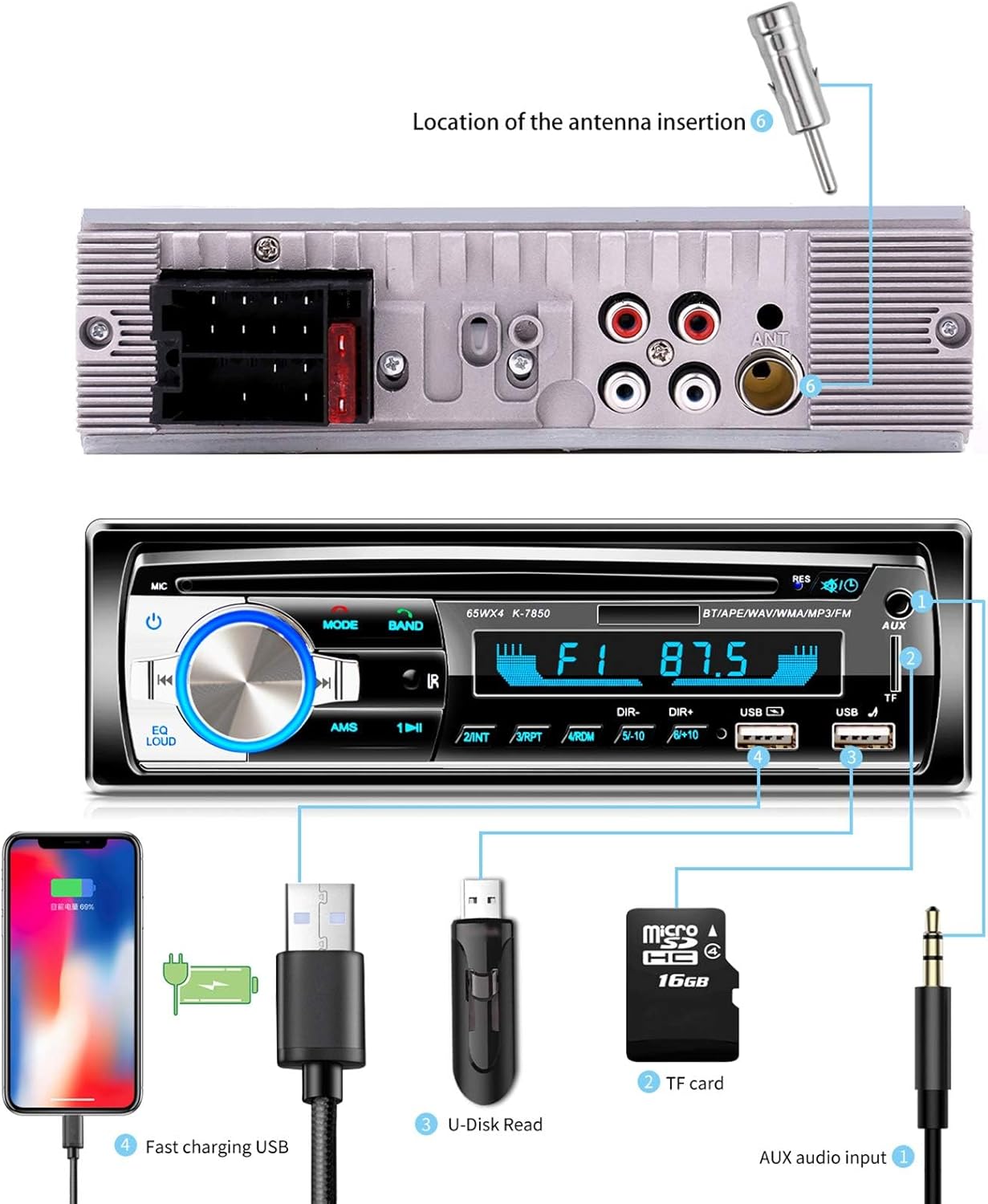
Image: Front panel of the car radio with various buttons, a rotary knob, display, USB ports, and TF card slot. The rear panel shows power, speaker, and antenna connections.
- Power/Mode Button: Turns the unit on/off and switches between input modes (FM, Bluetooth, USB, AUX, TF).
- Volume Knob: Adjusts audio volume. Press to access EQ settings.
- Band Button: Selects FM radio bands (FM1, FM2, FM3).
- AMS Button: Automatic memory store for radio stations.
- USB Ports: Two USB ports. One for media playback (U-Disk Read) and one for fast charging (2.1A).
- TF Card Slot: For playing music from a TF (MicroSD) card (up to 32GB).
- AUX Input: 3.5mm jack for connecting external audio devices.
- Display: Shows current mode, frequency, track information, etc.
Rear Panel Connections
- Power Connector: For connecting the main power harness.
- Speaker Connectors: For connecting speaker harnesses.
- Antenna Input: For connecting the car's FM antenna.
- RCA Outputs: For connecting external amplifiers.
Setup and Installation
This unit is designed for 1 DIN car radio slots. Professional installation is recommended.
Wiring Diagram
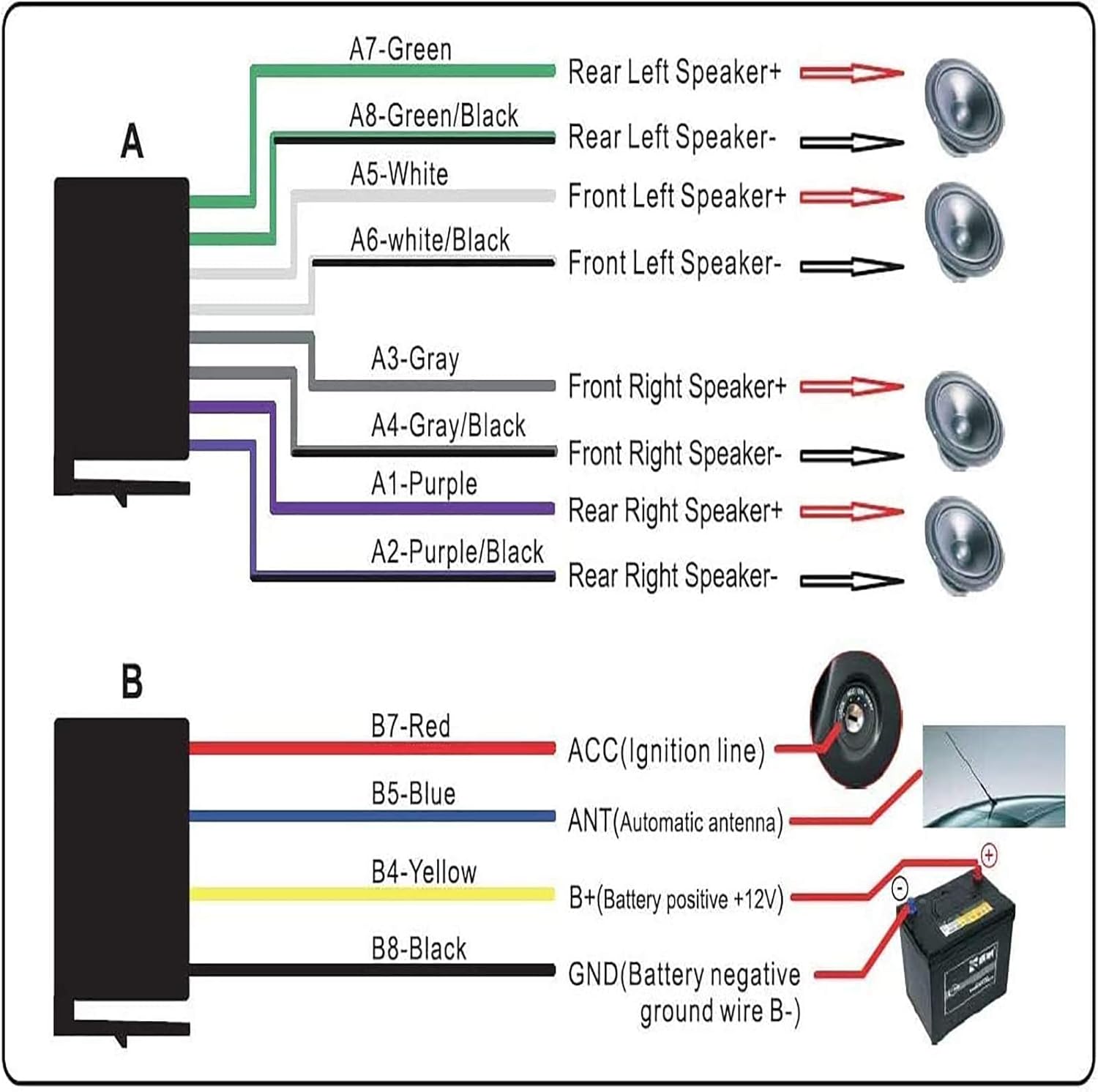
Image: Detailed wiring diagram illustrating connections for speakers (front left/right, rear left/right) and power (ACC, B+, GND, ANT).
- Power Harness (Connector B):
- B7-Red: ACC (Ignition line)
- B5-Blue: ANT (Automatic antenna)
- B4-Yellow: B+ (Battery positive +12V)
- B8-Black: GND (Battery negative ground wire B-)
- Speaker Harness (Connector A):
- A7-Green: Rear Left Speaker+
- A8-Green/Black: Rear Left Speaker-
- A5-White: Front Left Speaker+
- A6-White/Black: Front Left Speaker-
- A3-Gray: Front Right Speaker+
- A4-Gray/Black: Front Right Speaker-
- A1-Purple: Rear Right Speaker+
- A2-Purple/Black: Rear Right Speaker-
Important: Ensure correct polarity for all speaker connections to avoid audio issues. Connect the yellow wire (B+) to a constant 12V power source and the red wire (ACC) to a switched 12V ignition source. The black wire (GND) must be connected to a good chassis ground.
Remote Control Installation

Image: Step-by-step guide for attaching the remote control to the steering wheel using straps, and a detailed diagram of each button's function.
The wireless remote control can be attached to your steering wheel for convenient operation. Use the provided straps to secure it firmly. Ensure it does not obstruct your view or interfere with steering.
Operating Instructions
Power On/Off and Mode Selection
- Press the Power/Mode button to turn the unit on. Press and hold to turn off.
- Briefly press the Mode button to cycle through available sources: FM Radio, Bluetooth, USB, TF Card, AUX Input.
FM Radio Operation
- Select FM mode using the Mode button.
- Press the BAND button to switch between FM1, FM2, and FM3 bands.
- Press the AMS button to automatically scan and store strong stations. Up to 12 stations can be stored.
- Use the Tune Up/Down buttons (or remote) to manually tune or seek stations.
- Stored stations will be retained if the power connection is not interrupted.
Bluetooth Connectivity

Image: A car radio displaying "BT" for Bluetooth, with a phone showing an incoming call, demonstrating the hands-free calling feature.
- Select Bluetooth mode using the Mode button. The display will show "BT".
- On your smartphone (iOS or Android), enable Bluetooth and search for available devices.
- Select "CAR BT" or a similar name from the list to pair. No password is typically required.
- Once paired, you can stream audio from your phone or make/receive hands-free calls using the integrated microphone.
- Use the remote control or front panel buttons to answer/hang up calls.
USB/TF Card Playback

Image: A smartphone connected to the car radio's USB port, illustrating music playback from a connected device.
- Insert a USB flash drive into the "U-Disk Read" USB port or a TF card into the TF card slot.
- The unit will automatically switch to USB/TF mode and begin playing compatible audio files (MP3, WMA, WAV, FLAC).
- Use the Next/Previous Track buttons on the front panel or remote to navigate.
- The other USB port is for 2.1A fast charging of mobile devices.
AUX Input
- Connect an external audio device (e.g., MP3 player) to the 3.5mm AUX input jack on the front panel using the provided audio cable.
- Select AUX mode using the Mode button.
- Control playback from the connected device. Volume can be adjusted on the car radio.
Equalizer Settings
- Press the Volume Knob to cycle through preset equalizer settings: Pop, Rock, Classic.
Remote Control Functions

Image: A close-up view of the wireless remote control mounted on a car's steering wheel.
- Vol+ / Vol-: Increase/decrease volume.
- Next Song / Previous Song: Skip tracks or change radio stations.
- Answer Call / Hang Up Call: Manage phone calls in Bluetooth mode.
- Mode: Change input source.
- Mute: Mute/unmute audio.
Maintenance
- Clean the unit's front panel with a soft, dry cloth. Do not use abrasive cleaners or solvents.
- Keep the USB ports and TF card slot free from dust and debris.
- Ensure all connections are secure and free from corrosion.
Troubleshooting
| Problem | Possible Cause | Solution |
|---|---|---|
| No power | Incorrect wiring; Blown fuse; Loose connection. | Check power wiring (B+, ACC, GND). Inspect vehicle's fuse box and the unit's fuse. Ensure all connections are secure. |
| No sound | Incorrect speaker wiring; Volume too low; Mute function active; Incorrect source selected. | Verify speaker wiring polarity. Increase volume. Deactivate mute. Select the correct audio source. |
| Bluetooth not pairing | Bluetooth not enabled on phone; Unit not in Bluetooth mode; Device already paired. | Ensure phone's Bluetooth is on. Switch unit to Bluetooth mode. Forget previous pairings on phone and retry. |
| Poor FM reception | Antenna not connected; Weak signal; Damaged antenna. | Check antenna connection. Try scanning for stations again. Consider an antenna booster if signal is consistently weak. |
| USB/TF card not playing | Unsupported file format; Corrupted files; Card/drive not inserted correctly; Max capacity exceeded. | Ensure files are MP3, WMA, WAV, or FLAC. Reinsert card/drive. Check for file corruption. Ensure TF card is max 32GB. |
| Remote control not working | Battery depleted; Obstruction; Remote out of range. | Replace battery. Ensure no objects block the signal path to the unit's IR receiver. Use within close range. |
Specifications
| Brand | Lifelf |
| Model Number | N1901 |
| Connectivity Technology | Bluetooth |
| Controller Type | Android/iOS/Remote control |
| Compatible Devices | Smartphone |
| Connector Type | USB 2.0 |
| Total USB Ports | 2 (1 for media, 1 for 2.1A charging) |
| Audio Formats Supported | MP3, WMA, WAV, FLAC |
| TF Card Capacity | Max 32GB |
| FM Frequency Range | 87.5 MHz - 108 MHz |
| Output Power | 260 W (4 x 65 W) |
| Product Dimensions | 18.8 x 5.9 x 5.8 cm |
| Color | Blue |
| Surround Sound Channel Configuration | 5.1 |
Warranty and Support
This product comes with a 2-year manufacturer's warranty. For warranty claims or technical support, please contact your retailer or the manufacturer directly. Keep your proof of purchase for warranty validation.
For further assistance, refer to the official Lifelf website or contact their customer service.