
Leifheit 11914
Leifheit Regulus Aqua PowerVac 2-in-1 Cordless Vacuum Cleaner and Floor Wiper
Model: 11914 | Brand: Leifheit
Introduction
The Leifheit Regulus Aqua PowerVac is a versatile 2-in-1 cordless cleaning device designed to efficiently vacuum and wipe hard floors simultaneously. This manual provides essential information for the safe and effective operation, maintenance, and troubleshooting of your new appliance.
Key Features:
- 2-in-1 Cleaning: Vacuums coarse dirt and wipes floors at the same time.
- Cordless Freedom: Powered by a 24V Lithium-Ion battery for unrestricted movement.
- Lightweight Design: Weighs only 3.3 kg for easy maneuverability.
- Dual Cleaning Modes: Eco-Mode for standard cleaning and Turbo-Mode for maximum power.
- High-Speed Rollers: Rotating microfibre rollers with up to 3000 rpm for effective dirt removal.
- Adjustable Water Supply: Control water flow for different floor types.
- Self-Cleaning System: Ensures rollers remain clean during operation.
- Tank Control Technology: Notifies when the dirty water tank is full.
- Easy-to-Empty Tanks: Separate fresh and dirty water tanks for hygienic disposal.
- Stand Function: Convenient upright storage.
- Long Runtime: Up to 26 minutes of cleaning, covering approximately 77m² on a single charge.
Product Components
Familiarize yourself with the main components of your Leifheit Regulus Aqua PowerVac:

Figure 1: Leifheit Regulus Aqua PowerVac main unit, charging base, cleaning roller, and cleaning brush.
Included in the Box:
- Leifheit Regulus Aqua PowerVac Main Unit
- Charging Base
- Microfibre Cleaning Roller
- Cleaning Brush
- Power Adapter
- User Manual (this document)
Setup and Initial Use
1. Unpacking
Carefully remove all components from the packaging. Retain the packaging for future storage or transport.
2. Assembly
The main unit typically comes pre-assembled. Ensure the handle is securely clicked into place if it was detached for packaging.
3. Initial Charging
Before first use, fully charge the battery. Place the device on the charging base and connect the power adapter to a suitable electrical outlet. The charging indicator light will show the charging status.
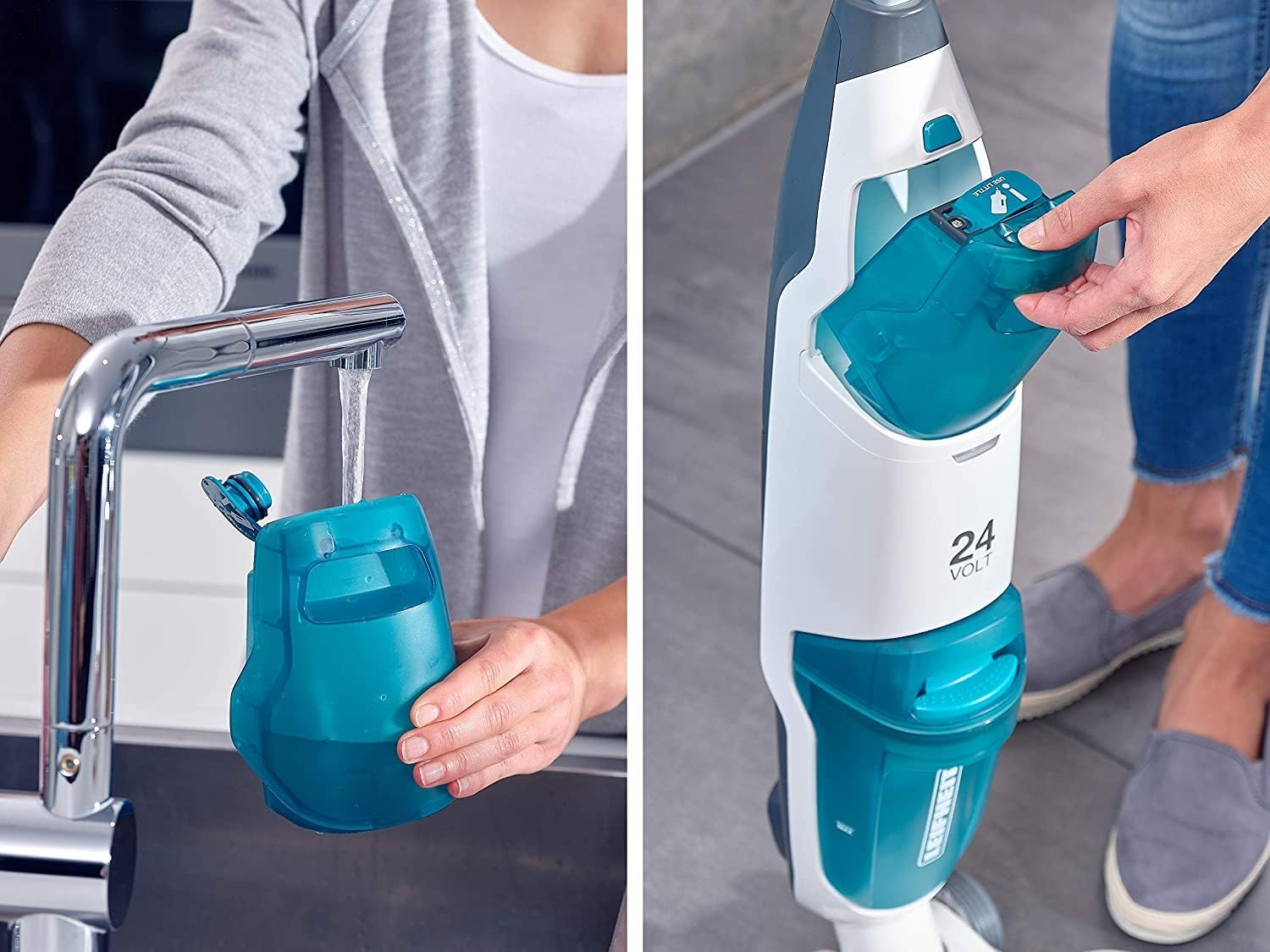
Figure 2: Filling the clean water tank. The tank is easily removable for convenient filling.
4. Filling the Clean Water Tank
Locate the clean water tank (usually marked "MAX" or with a water icon). Remove it from the device and fill it with clean tap water. For optimal cleaning results, you may add a small amount of suitable floor cleaning solution as per the solution's instructions. Do not overfill.
5. Installing the Dirty Water Tank
Ensure the dirty water tank is correctly installed and empty before operation. This tank collects the dirty water and debris during cleaning.
Operating Instructions
1. Starting the Device
Press the power button on the handle to turn on the device. The device will typically start in Eco-Mode.
2. Selecting Cleaning Mode
Use the mode selection button (if available) to switch between Eco-Mode (for light cleaning and longer runtime) and Turbo-Mode (for stubborn dirt and maximum suction/wiping power).
3. Controlling Water Supply
The Leifheit Regulus Aqua PowerVac allows you to control the water supply. Press the lever on the handle to release water onto the floor for wiping. Release the lever to stop the water flow and allow the rollers to dry the floor.

Figure 3: The device effectively vacuums and wipes away dirt and footprints.
4. Cleaning Technique
Move the device slowly and steadily across the floor. For best results, push the device forward to apply water and clean, then pull it back to vacuum up the dirty water and dry the floor. Overlapping passes will ensure thorough cleaning.
5. Tank Control Technology
The device is equipped with Tank Control Technology, which will alert you (e.g., via an indicator light or sound) when the dirty water tank is full and needs to be emptied.
6. Self-Cleaning Function
The integrated self-cleaning system continuously removes dirty water from the microfibre rollers, ensuring they remain clean during operation for consistent cleaning performance.
7. Parking and Storage
The device features a practical stand function, allowing it to be parked upright during breaks or for storage.
Official Product Video:
Video 1: An overview of the Leifheit Regulus Aqua PowerVac, demonstrating its 2-in-1 vacuuming and wiping capabilities, water control, and self-cleaning features. This video highlights the ease of use and effective cleaning performance.
Maintenance and Care
Regular maintenance ensures optimal performance and extends the lifespan of your Leifheit Regulus Aqua PowerVac.
1. Emptying and Cleaning the Dirty Water Tank
After each use, or when the Tank Control Technology indicates, remove the dirty water tank and empty its contents. Rinse the tank thoroughly with clean water. It is recommended to clean the tank with a mild detergent periodically to prevent odors and residue buildup.
2. Cleaning the Microfibre Rollers
The microfibre rollers should be cleaned regularly. They can be easily removed from the device. Rinse them under running water until clean. For deeper cleaning, they can be washed with mild soap. Allow them to air dry completely before reattaching.

Figure 4: The microfibre roller can be easily removed and rinsed under running water for cleaning.
3. Cleaning the Device Exterior
Wipe the exterior of the device with a damp cloth. Do not use abrasive cleaners or solvents.
4. Filter Maintenance
Check the filter (if applicable, usually located near the dirty water tank) regularly for debris and clean as per instructions. A clogged filter can reduce suction performance.
5. Storage
Store the device in a dry place, preferably on its charging base, to ensure it is ready for the next use.
Troubleshooting
If you encounter issues with your Leifheit Regulus Aqua PowerVac, refer to the following common problems and solutions:
| Problem | Possible Cause | Solution |
|---|---|---|
| Device does not turn on. | Battery is not charged. | Place the device on the charging base and ensure it is fully charged. |
| Poor suction performance. | Dirty water tank is full or clogged. Filter is dirty. Rollers are clogged. | Empty and clean the dirty water tank. Clean or replace the filter. Clean the microfibre rollers. |
| Leaves streaks on the floor. | Rollers are dirty. Too much cleaning solution. Dirty water tank is full. | Clean the microfibre rollers. Reduce the amount of cleaning solution. Empty and clean the dirty water tank. |
| Water is not dispensed. | Clean water tank is empty. Water nozzle is clogged. | Refill the clean water tank. Check and clear any blockages in the water dispensing system. |
| Device stops unexpectedly. | Battery is low. Overheating. Dirty water tank is full. | Recharge the battery. Allow the device to cool down. Empty the dirty water tank. |
If the problem persists after trying these solutions, please contact customer support.
Technical Specifications
| Feature | Detail |
|---|---|
| Model Name | Regulus Aqua PowerVac |
| Model Number | 11914 |
| Power Source | 24V Lithium-Ion Battery |
| Runtime | Up to 26 minutes (approx. 77m²) |
| Weight | 3.3 kg (7.28 lbs) |
| Clean Water Tank Capacity | 0.5 Liters |
| Roller Speed | Up to 3000 rpm |
| Dimensions (L x W x H) | 35.28 x 8.74 x 12.52 inches |
| Color | Teal |
| Wattage | 120 watts |
| Noise Level | 84 dB |

Figure 5: Detailed dimensions of the Leifheit Regulus Aqua PowerVac and its charging base.
Warranty Information
Leifheit products are manufactured to high-quality standards and come with a manufacturer's warranty. Please refer to the warranty card included with your product or visit the official Leifheit website for detailed warranty terms and conditions specific to your region.
Typically, the warranty covers defects in materials and workmanship under normal use. It does not cover damage resulting from misuse, neglect, accidents, alteration, or unauthorized repair.
Customer Support
For technical assistance, spare parts, or further inquiries, please contact Leifheit customer support:
- Website: www.leifheit.com
- Email: Refer to the official website for regional contact information.
- Phone: Refer to the official website for regional contact information.
When contacting support, please have your product model number (11914) and purchase date available.
Ask a question about this manual
Ask about setup, troubleshooting, compatibility, parts, safety, or missing instructions. Manuals+ will review the question and use this page’s manual context to help answer it.