
1. Introduction
Thank you for choosing the SEBSON IR_OUT_D Outdoor Motion Detector. This device is designed to provide reliable motion detection for outdoor lighting applications, offering enhanced security and convenience. This manual provides essential information for the safe installation, operation, and maintenance of your motion detector. Please read these instructions carefully before installation and retain them for future reference.
2. Safety Instructions
- Installation must be performed by a qualified electrician in accordance with national wiring regulations.
- Ensure the power supply is disconnected before installation, maintenance, or repair.
- Do not open or modify the device. Unauthorized modifications may compromise safety and void the warranty.
- This product is designed for outdoor use with an IP65 rating, protecting against dust and water jets. Ensure proper sealing during installation.
- Avoid installing the detector near heat sources, air conditioning units, or objects that may cause rapid temperature changes, as this can lead to false triggers.
- Do not point the sensor directly at sunlight or reflective surfaces.
3. Product Overview
3.1 Key Features
- Integrated infrared sensor for targeted detection of people, large animals, and vehicles.
- IP65 protection rating for outdoor use.
- Ceiling surface mount design.
- Adjustable ambient brightness (LUX) and lighting duration (TIME).
- Wide detection area of 20x4m with a 360° angle.
- Compatible with LED lamps and other energy-saving bulbs up to 1000W, and incandescent lamps up to 2000W.
3.2 Product Components
The SEBSON IR_OUT_D motion detector consists of a main housing, an infrared sensor dome, and internal wiring terminals. Adjustment dials for TIME and LUX settings are located on the unit.

Image 1: Front view of the SEBSON IR_OUT_D motion detector, highlighting its 360° detection, IP65 rating, LED compatibility up to 1000W, 10 sec - 30 min time setting, 3-2000 LUX brightness range, and 230V operation.

Image 2: The motion detector showing its maximum detection range of 20m and maximum detection height of 4m. The image also indicates the location of the TIME and LUX adjustment dials.
4. Specifications
| Model Number | IR_OUT_D |
| Dimensions (L x W x H) | 10.1 x 10.1 x 5.5 cm |
| Weight | 170 grams |
| Color | White |
| Material | Plastic |
| Power Type | AC |
| Voltage | 230 Volts |
| Max Load (Incandescent) | 2000 Watts |
| Max Load (LED/Energy-saving) | 1000 Watts |
| Installation Method | Ceiling Mount |
| Detection Coverage | max. 20x4m / 360° |
| Installation Height | 4m (min) to 10m (max) |
| Time Setting | 10 seconds to 30 minutes |
| Brightness Setting (LUX) | 3-2000 LUX |
| Protection Rating | IP65 |
| Operating Temperature | Up to 40°C |

Image 3: Technical drawing showing the dimensions of the motion detector: 101mm x 101mm x 55mm.
5. Installation
5.1 Mounting Location
The motion detector is designed for ceiling surface mounting. Choose a location that provides the desired detection coverage and is free from obstructions. The optimal installation height is between 4 meters and 10 meters to achieve the specified 20x4m detection area.
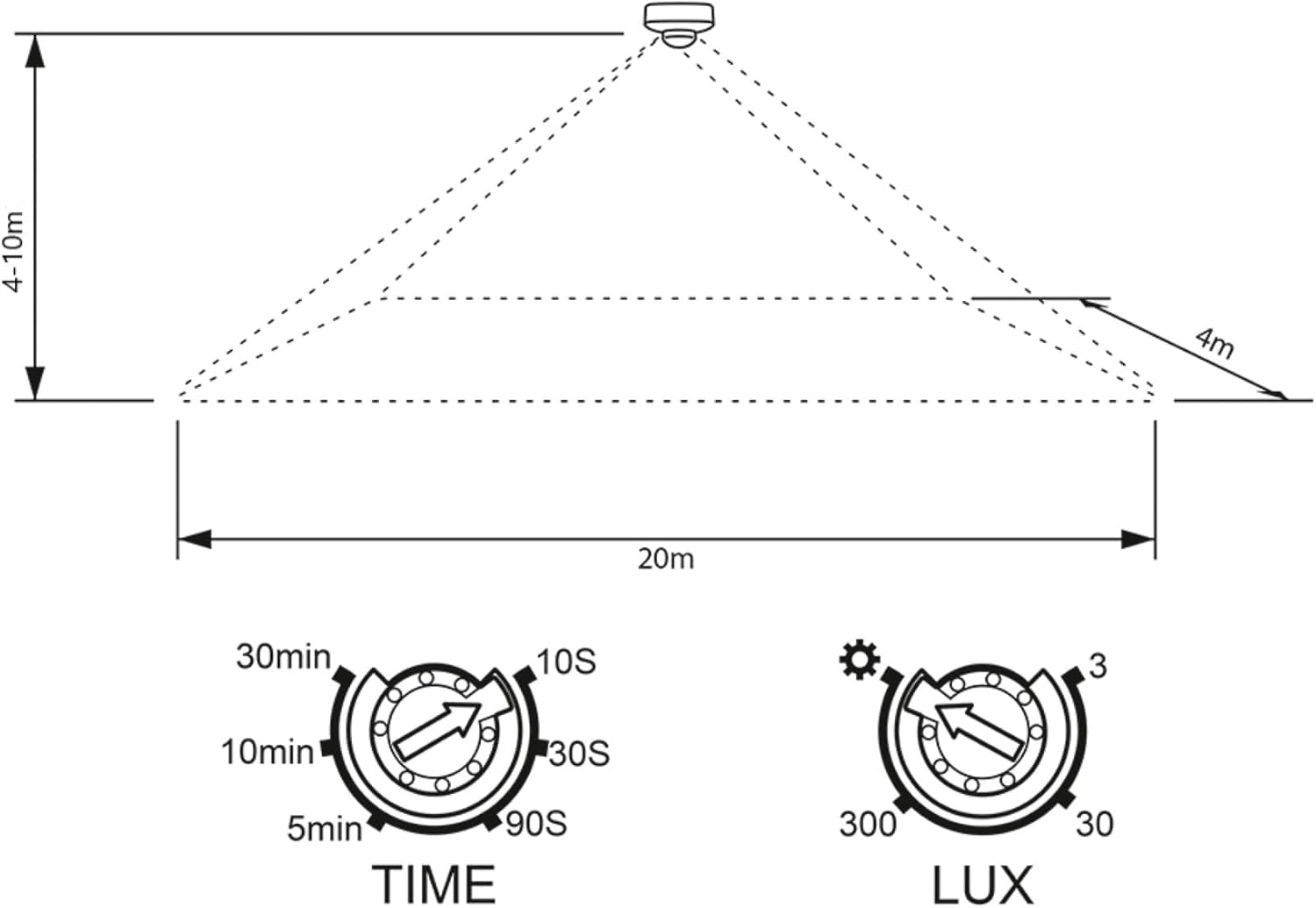
Image 4: Diagram showing the recommended installation height of 4-10m and the detection area of 20m width and 4m depth from the sensor.
5.2 Wiring
WARNING: Ensure the main power supply is switched off before commencing any wiring work.
- Open the housing of the motion detector carefully.
- Connect the power supply wires to the appropriate terminals as shown in the wiring diagram below.
- Connect the load (e.g., light fixture) wires to the designated output terminals.
- Ensure all connections are secure and properly insulated.
- Close the housing, ensuring a tight seal to maintain the IP65 rating.

Image 5: Rear view of the motion detector, illustrating the wiring terminals for power input and load output. Typically, blue is neutral, brown is live, and red is the switched live to the load.
6. Operation and Settings
After successful installation and power-up, the motion detector will enter a warm-up phase for approximately 30-60 seconds. During this time, it may trigger randomly. Once the warm-up is complete, you can adjust the settings using the two dials:
6.1 TIME Setting (Lighting Duration)
The TIME dial controls how long the connected light remains on after motion is detected and no further motion is sensed. You can adjust it from approximately 10 seconds to 30 minutes.
- Turn the dial clockwise for a longer duration.
- Turn the dial counter-clockwise for a shorter duration.
6.2 LUX Setting (Ambient Brightness)
The LUX dial determines the ambient light level at which the detector will activate the connected light. This setting allows the light to only turn on when it's dark enough. The range is from 3 LUX (darkness) to 2000 LUX (daylight).
- Turn the dial towards the moon symbol (lower LUX value) for activation only in darker conditions.
- Turn the dial towards the sun symbol (higher LUX value) for activation even in brighter conditions (e.g., during the day for testing).
7. Maintenance
The SEBSON motion detector requires minimal maintenance. To ensure optimal performance:
- Regularly clean the sensor lens with a soft, damp cloth to remove dust, dirt, or spiderwebs that may obstruct detection. Do not use abrasive cleaners.
- Periodically check the mounting and wiring connections for any signs of wear or damage.
- Ensure the area around the sensor remains clear of moving objects (e.g., tree branches) that could cause false triggers.
8. Troubleshooting
| Problem | Possible Cause | Solution |
|---|---|---|
| Light does not turn on when motion is detected. |
|
|
| Light stays on continuously. |
|
|
| False triggers (light turns on without apparent motion). |
|
|
9. Warranty and Support
Information regarding specific warranty terms and customer support contact details was not available in the provided product data. For warranty claims or technical assistance, please refer to the product packaging or contact your retailer or the manufacturer directly via their official website.
