
1. Introduction
The VENIIBOT N1 Max is a fully automatic vacuum robot cleaner designed for household sweeping and mopping. It features a self-cleaning mop fabric system, real mopping with pressure, strong 2000Pa suction, and automatic re-charging capabilities. Equipped with high-performance hardware and artificial intelligence technology, the N1 Max offers efficient and intelligent cleaning for your home. Its software system can be upgraded via Over-The-Air (OTA) updates for continuous improvement.
This manual provides essential information on setting up, operating, maintaining, and troubleshooting your VENIIBOT N1 Max robot cleaner to ensure optimal performance and longevity.
2. Package Contents
Before you begin, please verify that all components are present in the package:
- VENIIBOT N1 Max Robot Cleaner
- Self-Cleaning Base Station
- Water Tank
- Battery (pre-installed)
- Power Adapter
- Disposable Dust Bag (pre-installed)
- Mop Fabric (pre-installed)
- User Manual (this document)

Image: VENIIBOT N1 Max Robot Cleaner docked with its self-cleaning base station, illustrating the main components.
3. Key Features
- Self-Washing System: The Wash Base contains a clean sewage separation system, ensuring the mop always uses clean water. After cleaning 10-15 square meters, the robot automatically returns to the base for mop washing, scraping, spraying, and dehydration before resuming cleaning. The 800ML large capacity water tank supports over 120 square meters of household cleaning.
- Pressurized Mopping: Utilizes a patented Lift-Mop mopping mechanism that transmits the fuselage's gravity to the mop via torque and spring action. This multi-force application ensures the mop maintains close contact with the ground for effective stain removal, unlike traditional sweepers that merely 'gently touch the ground'.
- Lidar SLAM Navigation: Employs advanced laser radar and Simultaneous Localization and Mapping (SLAM) technology to build accurate indoor environment maps. Integrated with various sensors like infrared and inertial navigation, it efficiently divides indoor spaces into block areas, allowing for optimized zigzag or fixed-point cleaning patterns.
- Automatic Charging: When the battery level drops below 15% during operation, the machine automatically returns to its base for charging. It will resume cleaning once the battery reaches 80%.
- Disposable Dust Bag: Features Veniibot's patented large-capacity disposable dust bag, eliminating the need for manual cleaning of a dirty dust box. When full, simply remove and replace with a new bag. Recyclable dust bags are also available.
- 2000Pa Strong Suction: Provides powerful suction to easily pick up large particles, dust, hair, and food debris from various floor types.

Image: Diagram illustrating the self-cleaning cycle with separate clean and dirty water tanks within the base station.

Image: Underside view of the robot cleaner highlighting the mopping mechanism and its pressure application system.

Image: Graphic illustrating the 5200 mAh battery capacity, 120 minutes of cleaning time, and 1291 square feet of cleaning area.

Image: Visual representation of the robot's 2000Pa suction power effectively collecting various types of debris.
4. Setup Guide
4.1 Initial Charging
- Place the self-cleaning base station on a hard, flat surface against a wall, ensuring there are no obstacles within 1 meter to the front and 0.5 meters to the sides.
- Connect the power adapter to the base station and plug it into a wall outlet.
- Place the VENIIBOT N1 Max robot onto the charging contacts of the base station. Ensure the robot is properly aligned. The indicator lights on the robot will show charging status.
- Allow the robot to fully charge before its first use (approximately 3-5 hours).
4.2 Mobile App Installation and Connection
For full functionality and intelligent control, download the Veniibot mobile application.
- Scan the QR code provided in the quick start guide or search for 'Veniibot' in your mobile app store (iOS App Store or Google Play Store).
- Install the application on your smartphone.
- Open the app and follow the on-screen instructions to create an account and add your VENIIBOT N1 Max device. This typically involves connecting the robot to your home Wi-Fi network.
- Once connected, you can access features like scheduled cleaning, spot cleaning, zone cleaning, one-click recharge, one-click mop washing, and mode switching.

Image: Screenshot of the Veniibot mobile application interface, showing various control options and cleaning modes.
5. Operation
5.1 Starting a Cleaning Cycle
- Manual Start: Press the power button on the robot or the 'Clean' button on the base station to start a general cleaning cycle.
- App Control: Use the Veniibot app to initiate cleaning, select specific cleaning modes, or set cleaning schedules.
5.2 Cleaning Modes
The VENIIBOT N1 Max offers intelligent switching between three primary cleaning modes:
- Cleaning and Mopping: This is the default mode, providing a comprehensive clean by simultaneously vacuuming and mopping the floor. Ideal for daily maintenance.
- Vacuuming Only: In this mode, the robot focuses solely on vacuuming, suitable for carpets or areas where mopping is not desired.
- Mopping Only: The robot will only perform mopping, ideal for hard floors that require a wet clean without vacuuming.
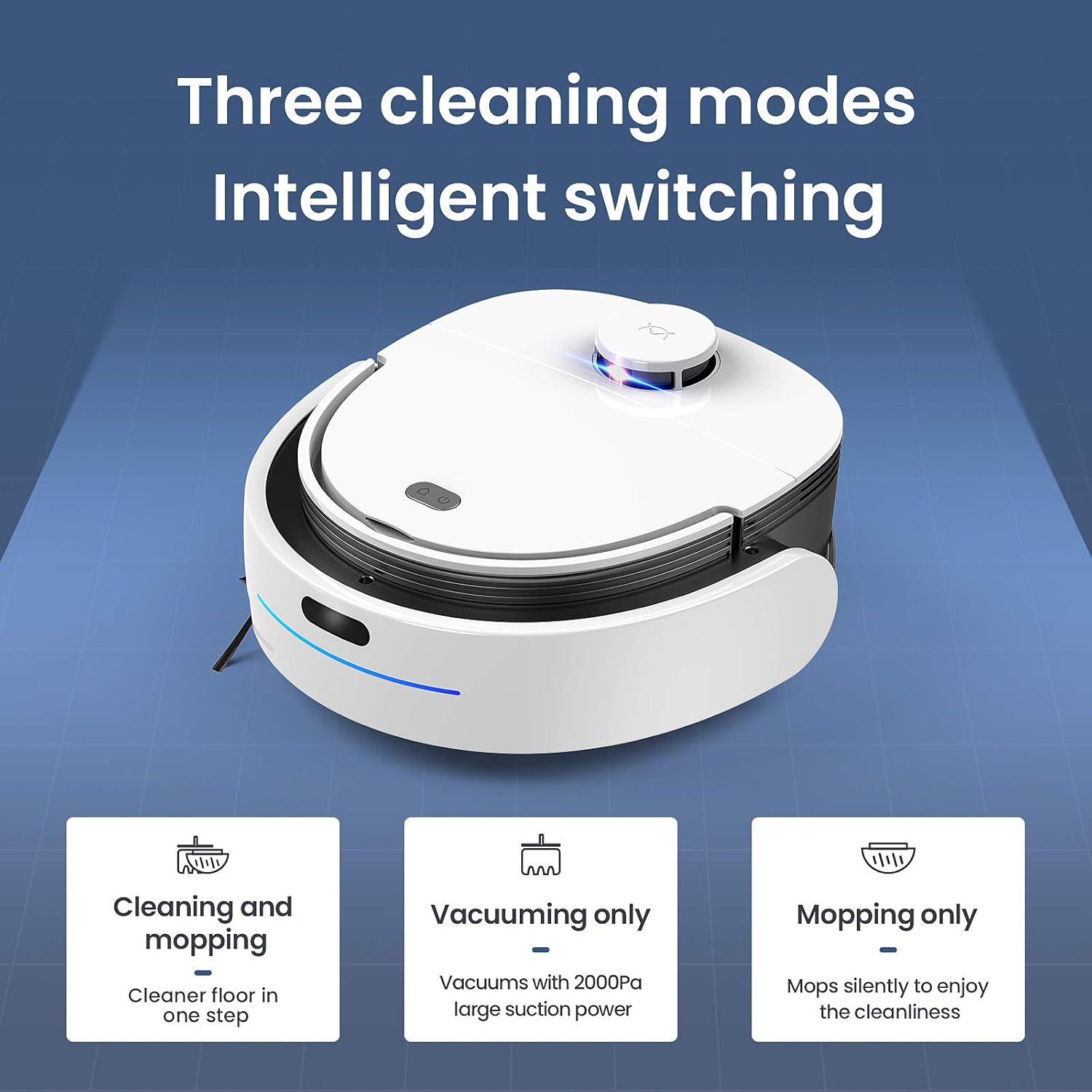
Image: Visual representation of the three intelligent cleaning modes: Cleaning and Mopping, Vacuuming Only, and Mopping Only.
5.3 Pausing and Resuming
Press the power button on the robot or use the app to pause a cleaning cycle. Press again to resume. If paused for an extended period, the robot may return to its base.
5.4 Returning to Base
To send the robot back to its charging base, press the home button on the robot or select the 'Recharge' option in the mobile app.
6. Maintenance
Regular maintenance ensures your VENIIBOT N1 Max operates efficiently and extends its lifespan.
6.1 Self-Cleaning Base Maintenance
- Water Tanks: Regularly empty the dirty water tank and refill the clean water tank in the base station. Use clean tap water.
- Mop Washing Area: Periodically clean the mop washing area within the base station to prevent residue buildup.
6.2 Dust Bag Replacement
- The robot uses a large-capacity disposable dust bag. The app will notify you when the dust bag is full.
- Open the dust bag compartment on the robot.
- Carefully remove the full dust bag and dispose of it.
- Insert a new disposable dust bag, ensuring it is properly seated.
6.3 Mop Fabric Care
- While the system self-cleans the mop, it is recommended to occasionally remove and hand-wash the mop fabric with mild detergent to ensure thorough cleaning and prevent odors.
- Allow the mop fabric to air dry completely before reattaching.
6.4 Sensor Cleaning
- Wipe the robot's sensors (Lidar, infrared, cliff sensors) with a clean, dry cloth to remove dust and debris. This ensures accurate navigation and obstacle detection.
7. Troubleshooting
If you encounter issues with your VENIIBOT N1 Max, refer to the table below for common problems and solutions.
| Problem | Possible Cause | Solution |
|---|---|---|
| Robot does not start or respond. | Low battery; Power switch off; Robot stuck. | Charge the robot; Ensure power switch is ON; Clear any obstructions. |
| Robot cannot return to charging base. | Base station obstructed; Robot too far from base; Charging contacts dirty. | Clear area around base; Manually place robot near base; Clean charging contacts on robot and base. |
| Poor cleaning performance. | Dust bag full; Mop fabric dirty; Brushes tangled; Sensors dirty. | Replace dust bag; Clean/replace mop fabric; Clean main brush and side brushes; Clean all sensors. |
| Robot gets stuck frequently. | Obstacles in path; Uneven surfaces; Cables/rugs. | Clear floor of small objects; Use virtual walls/no-go zones; Secure loose cables and thin rugs. |
| App connection issues. | Incorrect Wi-Fi password; Robot out of Wi-Fi range; Router issues. | Verify Wi-Fi password; Move robot closer to router; Restart router and robot. |
8. Technical Specifications
| Specification | Detail |
|---|---|
| Brand | Veniibot |
| Model Name | N1 |
| Item Model Number | N1 MAX |
| Colour | White |
| Special Feature | Bag (for dust collection) |
| Filter Type | Bag |
| Control Method | Touch, Mobile App |
| Form Factor | Robotic |
| Battery Life | Approximately 120 Minutes |
| Battery Type | 5200mAh Lithium battery |
| Charging Time | 3-5 hours |
| Water Tank Capacity | 0.8 litres (800ml) |
| Item Weight | 7 kg |
| Item Dimensions (LxWxH) | 35 x 34 x 45 Centimeters |
| CPU | 4-core 1.3GHz Cortex A35 chip |
9. Warranty and Support
For warranty information and customer support, please refer to the warranty card included with your product or visit the official Veniibot website. Keep your purchase receipt as proof of purchase for warranty claims.