
1. Introduction
This instruction manual provides comprehensive guidance for the installation and use of your BRIKSMAX LED Lighting Kit, specifically designed to illuminate the LEGO Winter Village Fire Station (LEGO Model 10263). This kit enhances the visual appeal of your LEGO model by adding realistic lighting effects. Please read these instructions carefully before beginning installation to ensure proper setup and operation.

Image 1: The LEGO Winter Village Fire Station 10263 illuminated by the BRIKSMAX LED Lighting Kit.
2. Package Contents
Before starting the installation, please verify that all components listed below are present in your package. If any parts are missing or damaged, please contact BRIKSMAX customer service.
- Dot Lights (various colors and lengths)
- Expansion Boards (6-port and 8-port)
- Connecting Cables (various lengths)
- Battery Holder (for AA batteries, batteries not included)
- CR2032 Battery Holder (battery not included)
- Adhesive Squares
- USB Power Cable
- White Strip Lights
- Warm White Strip Lights
- Multi-Color Changing Light String
- LEGO Plates (random colors, for integration)
- Instruction Manual

Image 2: Example of various components included in the lighting kit.
3. Safety Information
Please observe the following safety precautions:
- This product contains small parts and is not suitable for children under 3 years of age due to choking hazards. Recommended age for installation is 8 years and up.
- Handle LED lights and wires with care to avoid damage. Do not pull excessively on wires.
- Ensure power is disconnected before making or changing any connections.
- Do not expose components to water or excessive moisture. This product is not waterproof.
- Use only the provided power cables and battery holders. Do not attempt to power the kit with incompatible sources.
4. Setup and Installation
Installation requires careful handling of small components. It is recommended to have tweezers for precise placement. Follow the step-by-step instructions provided in the kit's dedicated guide for your specific LEGO model. The general steps are outlined below:
- Prepare Your LEGO Model: Partially disassemble sections of your LEGO Winter Village Fire Station 10263 as indicated in the detailed instruction guide to allow access for wire routing and light placement.
- Install Dot Lights: Carefully place individual dot lights into designated areas. These often fit under or between LEGO bricks. Ensure wires are not pinched or stressed.
- Install Strip Lights: Attach strip lights using the provided adhesive squares to illuminate larger areas or specific rooms.
- Connect to Expansion Boards: Route the wires from the lights to the expansion boards. Connect the small plugs into the ports on the expansion boards. Ensure connections are firm.
- Connect Expansion Boards: Use connecting cables to link multiple expansion boards if your setup requires it.
- Integrate LEGO Plates: Use the provided LEGO plates to secure wires or lights within the model, ensuring a neat and stable installation.
- Power Connection:
- Battery Holder: Insert AA batteries (not included) into the AA battery holder or a CR2032 battery (not included) into the CR2032 holder. Connect the battery holder to the main expansion board.
- USB Power: Connect the USB power cable to the main expansion board and plug the other end into a 5V USB power source (e.g., USB wall adapter, power bank, computer USB port).
- Reassemble LEGO Model: Carefully reassemble the LEGO model, ensuring all wires are neatly tucked away and not visible or pinched.

Image 3: Interior lighting detail after installation.
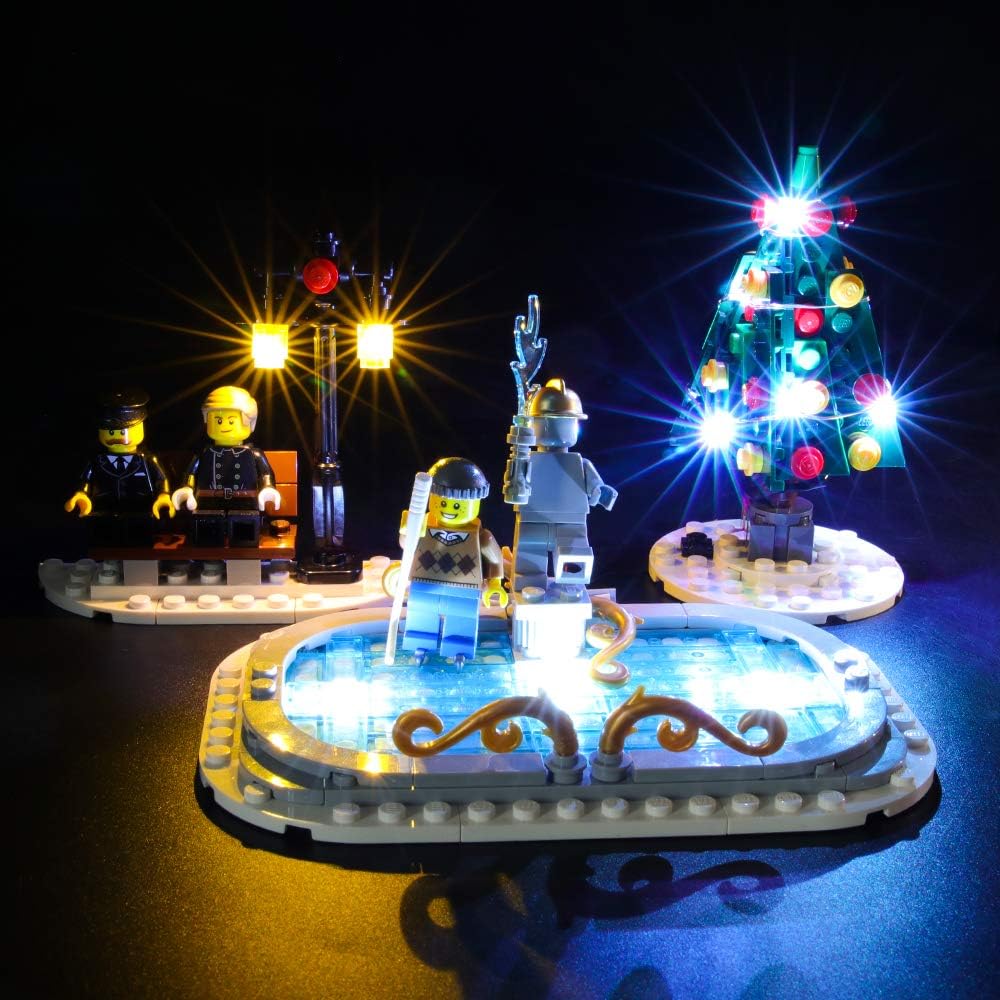
Image 4: Detailed view of exterior lighting on the fountain and Christmas tree.
5. Operating Instructions
Once the lighting kit is fully installed and connected to a power source:
- Power On: If using a battery holder, ensure batteries are correctly inserted and the switch (if present) is in the "ON" position. If using USB power, simply connect the USB cable to an active power source.
- Power Off: Disconnect the USB cable from the power source or switch the battery holder to the "OFF" position.
The multi-color changing light string will cycle through colors automatically when powered on.
6. Maintenance
- Cleaning: Gently dust the lights and wires with a soft, dry cloth. Do not use liquid cleaners.
- Battery Replacement: If using battery power, replace batteries when lights dim or cease to function. Ensure correct polarity when inserting new batteries.
- Wire Inspection: Periodically check wires for any signs of wear or damage. If damage is found, discontinue use and contact customer support.
7. Troubleshooting
| Problem | Possible Cause | Solution |
|---|---|---|
| Lights do not turn on. |
|
|
| Some lights are not working. |
|
|
| Lights are flickering. |
|
|
8. Specifications
- Brand: BRIKSMAX
- Model Number: 10263 (Compatible with LEGO Winter Village Fire Station)
- Base Material: Plastic
- Light Source Type: LED
- Number of Light Sources: 17
- Power Source: Battery Powered (AA or CR2032, not included), Corded Electric (USB 5V)
- Voltage: 1.5 Volts (for battery operation)
- Indoor/Outdoor Usage: Indoor
- Water Resistance Level: Not Water Resistant
- Recommended Age: 8 years and up
- Item Weight: Approximately 5.3 ounces (150 grams)
9. Warranty and Support
BRIKSMAX products are designed for quality and performance. If you encounter any difficulties with your product, or if you have questions regarding installation or operation, please do not hesitate to contact our customer service team. We are committed to providing assistance and ensuring your satisfaction.
For support, please visit the official BRIKSMAX website or refer to the contact information provided in your product packaging.


