
Introduction
The DigitaLinx IPEX5001-D is an advanced AV Over IP Encoder designed for transmitting HDMI video and audio over a 1 Gigabit network infrastructure. It utilizes JPEG2000 encoding and features integrated Dante audio capability, allowing for seamless integration of video and audio signals onto a single Ethernet cable. This manual provides essential information for the proper setup, operation, maintenance, and troubleshooting of your IPEX5001-D encoder.
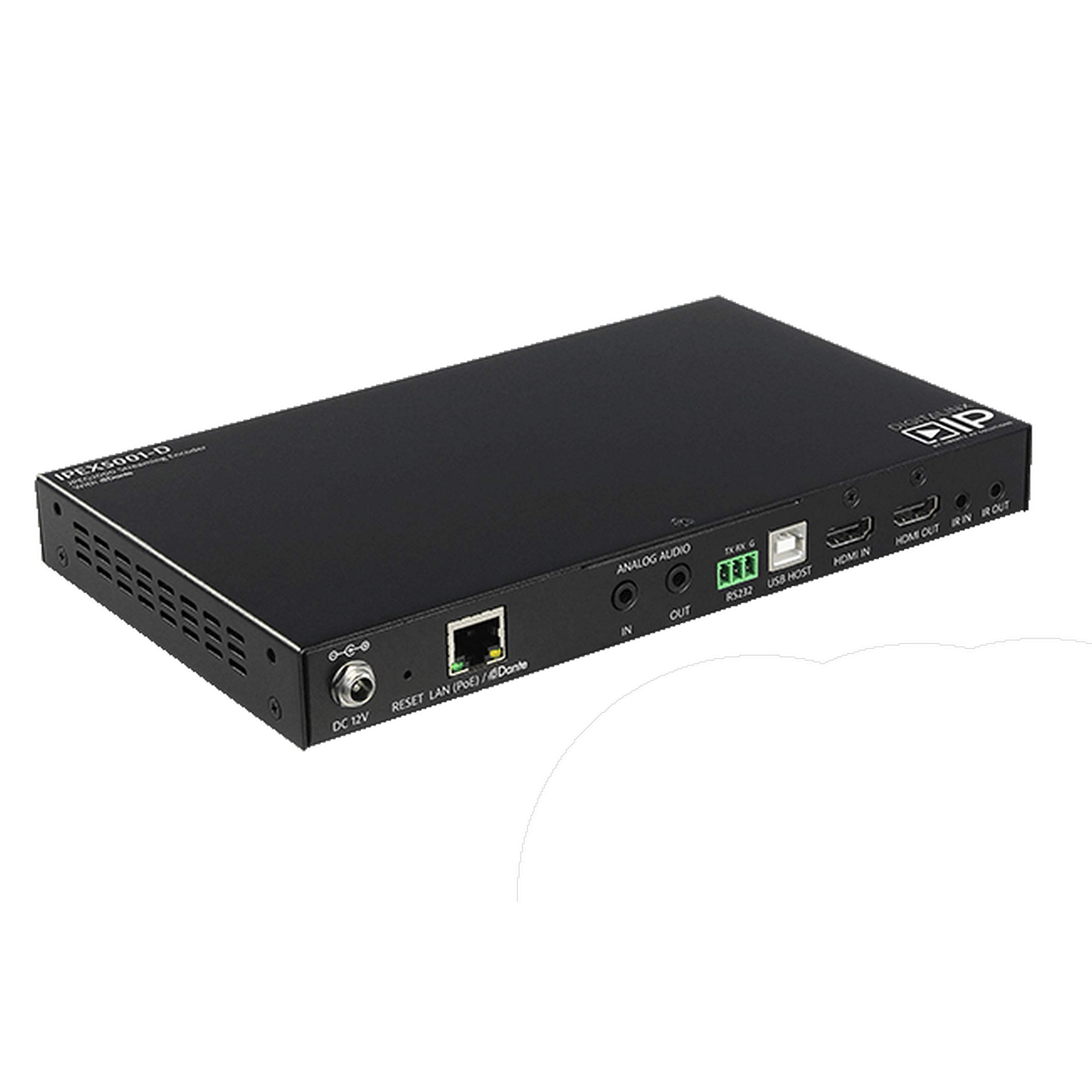
Figure 1: DigitaLinx IPEX5001-D AV Over IP Encoder. This image shows the overall design of the encoder, highlighting its compact form factor.
Setup
1. Unpacking and Inspection
Carefully unpack the IPEX5001-D encoder and verify that all components are present and undamaged. Retain the packaging for future transport or storage.
2. Physical Connections
Refer to Figure 2 for the rear panel connections. Ensure all cables are securely connected before powering on the device.
- DC 12V: Connect the provided 12V DC power adapter.
- RESET: Press to reset the device.
- LAN (PoE)/Dante: Connect to your 1 Gigabit Ethernet network switch. This port supports Power over Ethernet (PoE) and carries both video and Dante audio data.
- ANALOG AUDIO IN/OUT: 3.5mm stereo jacks for analog audio input and output. The input can be on-ramped to the Dante network, and the output de-embeds stereo audio from the HDMI stream.
- RS232 (TX, RX, G): 3-pin terminal block for serial control.
- USB HOST: USB Type-A port for connecting USB devices.
- HDMI IN: Connect your HDMI source device.
- HDMI OUT: Connect to an HDMI display or another AV device.
- IR IN/OUT: 3.5mm jacks for infrared signal extension.

Figure 2: Rear Panel Connections. This image details the various input and output ports on the back of the IPEX5001-D encoder, including HDMI, LAN, analog audio, and control interfaces.
3. DIP Switch Configuration
The IPEX5001-D features a 4-position DIP switch on the top panel for mode selection. Refer to Figure 3 for the location of the DIP switches.

Figure 3: Top Panel with DIP Switches and Indicators. This image shows the DIP switch block, along with the Power, Status, and Mode LEDs.
The DIP switches control the operating mode of the encoder. Typically, the device operates in NORMAL mode. Consult the advanced configuration guide for specific DIP switch settings related to network addressing or special operational modes. Ensure the desired mode is set before applying power.
4. Network Configuration
The IPEX5001-D requires a dedicated 1 Gigabit Ethernet network. Ensure your network switch supports IGMP snooping for efficient multicast traffic management. The encoder transmits video using JPEG2000 encoding with a variable data rate, averaging 250 Mbps and peaking up to 850 Mbps. Dante audio streams are integrated over the same network connection.
Operating Instructions
1. Powering On/Off
Connect the 12V DC power adapter to the DC 12V port or ensure the LAN port is connected to a PoE-enabled switch. The POWER LED on the top panel will illuminate when the device receives power. To power off, disconnect the power source.
2. Video Transmission
Connect your HDMI source to the HDMI IN port. The encoder supports video signals up to 4K at 60 Hz with 4:2:0 color sampling and 8-bit color depth, including HDR10. It also supports HDCP 2.2 for protected content. The encoded video stream is transmitted over the network to a compatible DigitaLinx IP receiver (sold separately).
3. Audio Handling
- Embedded HDMI Audio: The encoder processes the 2-channel stereo audio embedded in the HDMI input signal. This audio is passed through to the HDMI OUT and can also be de-embedded via the ANALOG AUDIO OUT.
- Analog Audio Input: Connect an analog stereo audio source to the ANALOG AUDIO IN port. This audio can be on-ramped onto the Dante audio network.
- Dante Audio Network: The IPEX5001-D integrates 2-channel stereo audio onto a Dante network. Use Dante Controller software (available from Audinate) to route audio streams within your Dante network.
4. Control
The encoder can be controlled via RS232 commands. Refer to the DigitaLinx IPEX5001-D control protocol documentation for specific commands and baud rate settings.
Maintenance
1. Cleaning
Clean the unit with a soft, dry cloth. Do not use liquid or aerosol cleaners, as they may damage the enclosure or internal components.
2. Firmware Updates
Periodically check the DigitaLinx website for firmware updates. Firmware updates can improve performance, add features, or resolve issues. Follow the instructions provided with the firmware update package carefully.
3. Environmental Considerations
Ensure the encoder is operated within its specified temperature and humidity ranges. Avoid placing the unit in direct sunlight, near heat sources, or in areas with excessive dust or moisture. Adequate ventilation is crucial for optimal performance and longevity.
Troubleshooting
If you encounter issues with your IPEX5001-D, refer to the following common troubleshooting steps:
- No Power: Verify the 12V DC power adapter is correctly connected and functional, or that the PoE switch is providing power to the LAN port. Check the POWER LED.
- No Video Output:
- Ensure the HDMI source is active and connected to HDMI IN.
- Verify the network connection to the receiver is stable and configured correctly.
- Check the STATUS LED for network activity.
- Confirm the DIP switch settings are in NORMAL mode.
- No Audio:
- For HDMI audio, ensure the source is outputting audio and the HDMI cable is functional.
- For analog audio, verify the source is connected to ANALOG AUDIO IN and is active.
- For Dante audio, use Dante Controller to check audio routing and device status.
- Network Connectivity Issues:
- Ensure the LAN cable is securely connected to a 1 Gigabit network switch.
- Verify the network switch supports IGMP snooping.
- Check network settings and IP addresses if configured manually.
- Device Unresponsive: Press the RESET button on the rear panel to restart the encoder.
Specifications
| Feature | Specification |
|---|---|
| Model Number | IPEX5001-D |
| Video Encoding | JPEG2000 |
| Video Resolution | Up to 4K@60Hz 4:2:0 / 8-bit |
| HDR Support | HDR10 |
| HDCP Compliance | HDCP 2.2 |
| Network Interface | 1 Gigabit Ethernet (PoE enabled) |
| Video Data Rate | Variable, average 250 Mbps, peak up to 850 Mbps |
| Audio Capability | Dante Audio (2-channel stereo), Analog Audio In/Out, HDMI Embedded Audio |
| Control Ports | RS232, IR In/Out, USB Host |
| Power Supply | 12V DC or PoE |
| Brand | DigitaLinx |
Warranty and Support
DigitaLinx products are designed for reliability and performance. This product is covered by a manufacturer's warranty against defects in materials and workmanship. For specific warranty terms and conditions, please refer to the warranty card included with your product or visit the official DigitaLinx website.
For technical support, product inquiries, or service requests, please contact DigitaLinx customer support through their official website or the contact information provided with your purchase documentation. Please have your model number (IPEX5001-D) and purchase details ready when contacting support.