
1. Introduction and Overview
This manual provides essential information for the safe and efficient installation, operation, and maintenance of your Marsrock 1000W Grid Tie Solar Inverter. This inverter is designed to convert direct current (DC) from solar panels into alternating current (AC) for feeding into the utility grid, suitable for US standard 1/2 phase grids (110V/240V AC auto switch).
The Marsrock 1000W Grid Tie Solar Inverter features Maximum Power Point Tracking (MPPT) technology, an LCD display for monitoring, and a power limiter function to optimize energy output and prevent over-generation.

Figure 1.1: Marsrock 1000W Grid Tie Inverter installed in a home solar power system.
2. Safety Information
Read all safety instructions carefully before installation and operation. Failure to follow these instructions may result in electric shock, fire, or serious injury.
- Electrical Safety: All electrical work must be performed by qualified personnel in accordance with local electrical codes and regulations.
- DC Input: Ensure the DC input voltage from solar panels is within the specified range of 45-90V. Solar panel power should be no less than 200W, and Voc (open circuit voltage) must be within 45-90V.
- Battery Compatibility: This inverter is exclusively compatible with 48V battery banks. When using battery power, a circuit breaker must be installed.
- AC Output: The inverter must only be connected to a utility grid output. It is not designed to directly power AC loads.
- Connections: Always ensure accurate and secure connection of positive and negative DC terminals. Tighten all DC terminals to prevent loosening and potential short circuits.
- Solar Controller: Do not connect the inverter to a solar controller’s load port.
- Operating Environment: Install the inverter in a well-ventilated, dry area, away from direct sunlight, heat sources, and flammable materials. The operating temperature range is -20°C to +50°C.
- Protections: The inverter includes built-in protections against over current, over temperature, reverse polarity, and anti-island operation.
3. What's in the Box
Upon unpacking, verify that all components are present:
- Marsrock 1000W Grid Tie Inverter Body
- Setup Toolkit
- Limiter Sensor
- Instruction Manual (this document)
- AC Output Cable
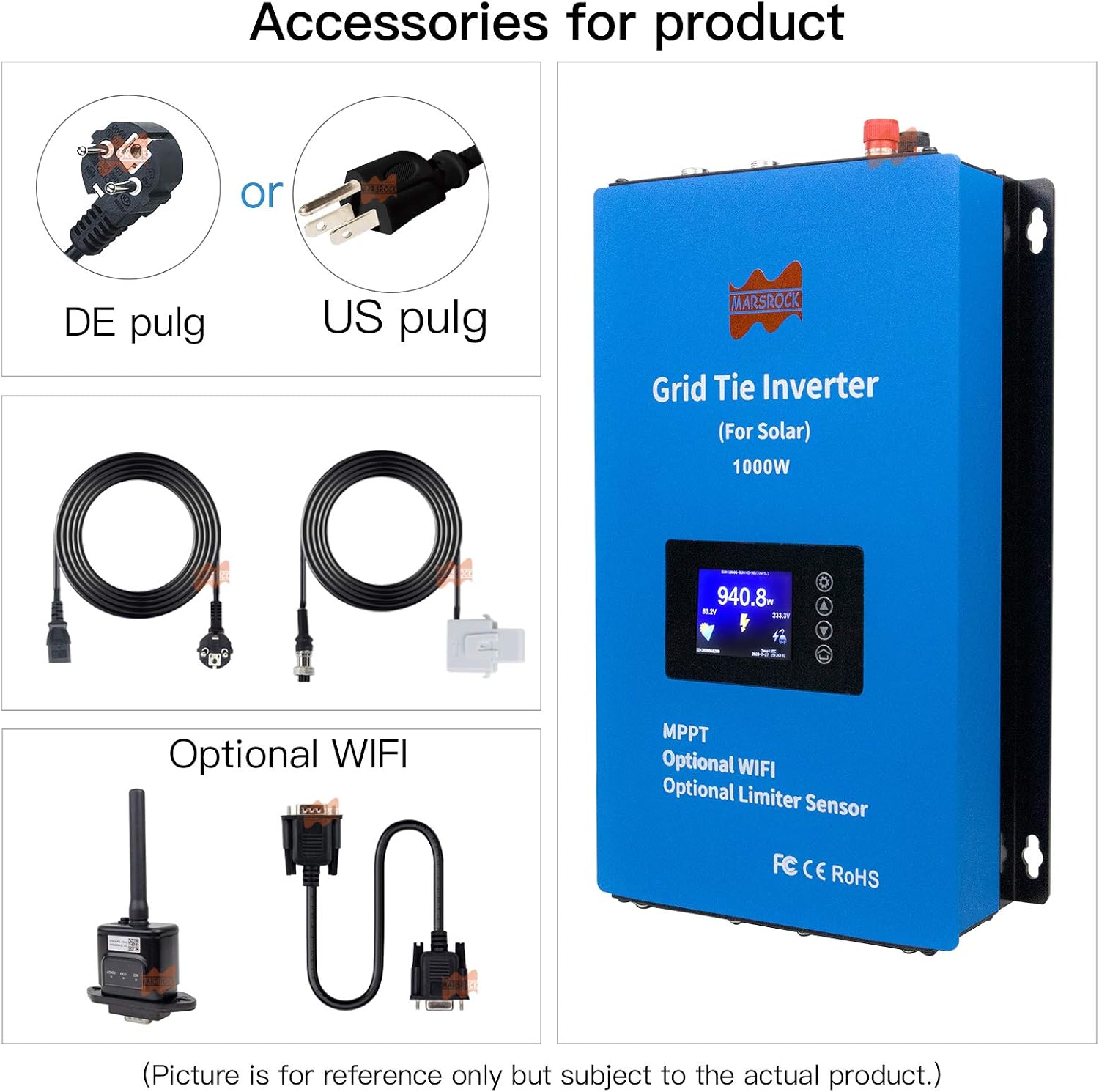
Figure 3.1: Inverter and included accessories.
4. Product Features
- High Efficiency MPPT: Utilizes Maximum Power Point Tracking technology for up to 99% efficiency and 80% peak conversion ratio, maximizing solar energy harvest.
- Integrated Power Limiter: Includes a limiter sensor to ensure the inverter delivers only the necessary power to the load, preventing excess energy export to the grid if not desired.
- Comprehensive LCD Display: Provides real-time monitoring of daily and total power generation, grid waveform, solar system voltage and current, instantaneous power, internal temperature, date, and time.
- Battery Discharge Mode: Features an intelligent battery discharge power mode that adjusts discharge depth based on the 48V battery bank's condition.
- Stackable Design: Supports stacking of multiple inverters for higher power applications. For example, four 1000W units can achieve a combined output of up to 4000W.
- Multiple Protections: Equipped with over current, over temperature, reverse polarity, and anti-island protection for enhanced safety and reliability.
- Auto AC Voltage Switching: Automatically adapts to 110V or 240V AC grid standards.
5. Specifications
| Feature | Specification |
|---|---|
| Brand | Marsrock |
| Model Name | Mars Rock 1000W Solar Grid Tie Inverter |
| Recommended Use | Home Solar Power Systems |
| Power Source | Solar Powered |
| Rated Output Power | 1000 Watts |
| Peak Output Power | 1000 Watts |
| DC Input Voltage Range | 45-90 Volts DC |
| Compatible Solar Panel Power | ≥ 200W (Voc 45-90V) |
| Compatible Battery Bank | 48 Volts DC (requires circuit breaker) |
| AC Output Voltage | 110V/240V AC (Auto Switch) |
| Electrical Output Waveform | Pure Sine Wave |
| Frequency | 50Hz/60Hz (Auto Switch, based on grid) |
| MPPT Efficiency | Up to 99% |
| Peak Conversion Ratio | 80% |
| Display Type | LCD |
| Item Dimensions (L x W x H) | 12.68" x 7.72" x 3.46" (32.2cm x 19.5cm x 8.5cm) |
| Item Weight | 9.46 Pounds |
| Certifications | CE, UL |

Figure 5.1: Marsrock 1000W Grid Tie Inverter dimensions.
6. Setup and Installation
6.1 Mounting the Inverter
Choose a suitable location for mounting the inverter. It should be:
- Well-ventilated to ensure proper heat dissipation.
- Dry and protected from direct moisture or rain.
- Away from direct sunlight and heat sources.
- Mounted vertically on a non-flammable surface.
6.2 DC Input Connection (Solar Panels)
- Ensure your solar panels meet the input specifications: DC voltage 45-90V, and total power no less than 200W.
- Connect the positive (+) and negative (-) cables from your solar panel array to the corresponding DC input terminals on the inverter. Double-check polarity to prevent damage.
- Tighten the DC terminals securely to prevent loose connections, which can cause arcing or short circuits.
6.3 Battery Connection (Optional)
If using a battery bank:
- This inverter is compatible only with 48V battery banks.
- Install a circuit breaker between the battery bank and the inverter for safety.
- Connect the battery cables to the designated battery input terminals on the inverter, observing correct polarity.
6.4 AC Output Connection (Grid)
- Connect the AC output cable from the inverter to your utility grid connection point.
- Important: This inverter is designed to feed power into the grid and should not be connected directly to AC loads.
- Ensure the AC connection is secure and compliant with local electrical standards.
6.5 Limiter Sensor Connection
Connect the provided limiter sensor to the designated port on the inverter. The controller wiring for the limiter sensor should not exceed 66 feet (20 meters) in length for optimal performance.

Figure 6.1: Typical wiring diagram for the Marsrock Grid Tie Inverter.

Figure 6.2: Limiter Sensor details.
6.6 Optional WiFi Module Installation
If you have the optional WiFi module, connect it to the inverter's communication port. This allows for remote monitoring and configuration via a mobile application or web interface.

Figure 6.3: Inverter with optional WiFi module and monitoring interface.
7. Operating Instructions
7.1 Initial Power-Up
Once all connections are secure, switch on the DC input (from solar panels or battery) and then the AC output to the grid. The inverter will initiate its startup sequence and begin feeding power to the grid once conditions are met.
7.2 LCD Display and Navigation
The LCD display provides real-time information and allows for configuration. Use the buttons (Setting/Confirm, Up, Down, Home) to navigate through the menus.

Figure 7.1: LCD Screen Display and Navigation.
- Power View: Displays instantaneous power output, voltage, and current.
- Energy Menu: Shows daily and total power generation.
- Grid Waveform: Visualizes the real-time grid AC waveform.
- Clock/Date: Displays current time and date.
- Error Reporting: Indicates any operational faults or warnings.
7.3 Battery Discharge Power Mode
When connected to a 48V battery bank, the inverter's intelligent battery discharge power mode will automatically adjust the discharge depth to optimize battery health and performance.
7.4 Stacking Multiple Inverters
For systems requiring higher power output, multiple Marsrock 1000W inverters can be stacked. Ensure proper wiring and configuration according to the system design. For example, four 1000W inverters can be combined for a total output of 4000W.
7.5 Monitoring via WiFi (Optional)
If the optional WiFi module is installed, you can monitor the inverter's performance and adjust settings remotely using the dedicated mobile application or web portal. Refer to the WiFi module's separate instructions for setup and usage.
Video 7.1: Demonstration of the Marsrock inverter's operation and display readings in a solar power setup.
Video 7.2: Power test video for the Marsrock 1000W/2000W G2 series micro inverter, showing performance metrics.
8. Maintenance
Regular maintenance ensures the longevity and optimal performance of your inverter.
- Visual Inspection: Periodically inspect all electrical connections for tightness and signs of corrosion or damage.
- Cleaning: Keep the inverter's ventilation openings clear of dust and debris to ensure proper airflow and prevent overheating. Use a soft, dry cloth for cleaning the exterior. Do not use liquid cleaners.
- Environmental Check: Ensure the operating environment remains within the specified temperature range (-20°C to +50°C) and is free from excessive humidity.
- Firmware Updates: If using the optional WiFi module, check for available firmware updates to ensure the inverter operates with the latest features and improvements.
9. Troubleshooting
This section addresses common issues you might encounter with your Marsrock 1000W Grid Tie Solar Inverter.
9.1 General Issues
- No Power Output:
- Check all DC and AC connections for proper seating and tightness.
- Verify that solar panels are receiving sufficient sunlight and producing adequate voltage (45-90V DC).
- Ensure the AC grid connection is active.
- Inverter Overheating:
- Check for obstructions around the inverter's ventilation openings.
- Ensure the ambient temperature is within the operating range (-20°C to +50°C).
- Relocate the inverter if it is in direct sunlight or a poorly ventilated area.
- Incorrect Voltage/Frequency Readings:
- Verify that the inverter is correctly connected to the grid.
- Consult the LCD display for any error codes.
9.2 LCD Error Reporting
The LCD display will show specific error codes or messages if a fault occurs. Refer to the display and consult the following general guidance:
- Over Current Protection: Indicates excessive current draw. Disconnect input, check wiring, and restart.
- Over Temperature Protection: Inverter is too hot. Allow it to cool down, check ventilation.
- Reverse Polarity Protection: DC input polarity is reversed. Immediately disconnect DC input and correct wiring.
- Anti-Island Protection: Inverter detected a grid outage and safely shut down. It will restart automatically when grid power is restored.
9.3 WiFi Configuration Issues
If you encounter issues with WiFi setup (e.g., "Configuration failed many times"):
- Ensure the inverter is close to the router for a strong signal.
- Double-check the WiFi password for accuracy.
- Try switching to an alternative configuration mode if available in the app.
10. Warranty and Support
10.1 Warranty Information
The Marsrock 1000W Grid Tie Solar Inverter comes with a 1-Year Manufacturer Warranty from the date of purchase. This warranty covers defects in materials and workmanship under normal use. It does not cover damage caused by improper installation, misuse, accidents, unauthorized modifications, or natural disasters.
Please retain your proof of purchase for warranty claims.
10.2 Technical Support
For technical assistance, troubleshooting beyond this manual, or warranty claims, please contact Marsrock customer support or your authorized dealer. Provide your product model number and a detailed description of the issue to expedite service.