
1. Introduction
This manual provides essential information for the safe and effective operation, maintenance, and troubleshooting of the NSKI ZKJ-3 Dental Lab Vacuum Mixer. This equipment is designed for mixing and vibrating investment materials and molded materials in a dental laboratory setting. Operating the machine in a vacuum state ensures bubble-free workpieces, enhancing the firmness and compactness of molds.
2. Safety Precautions
Read all instructions carefully before operating the machine to prevent damage and ensure user safety.
- Instruction Review: Prior to using the mixer, thoroughly read and understand these instructions, including all operational steps and precautions.
- Vacuum Pump Refueling: Before initial use, the vacuum pump must be refueled. For Type 3 models, the unit needs to be opened for refueling. Strict prohibition against operating the pump without oil.
- No-Load Operation: The vacuum pump must not be operated in a no-load state, as this can significantly reduce the machine's service life.
- Professional Repair: In case of machine malfunction, seek repair services from an experienced professional. Do not attempt unauthorized repairs.
- Safety Grounding: Regularly inspect the machine's safety grounding. Ensure the protective grounding in the power supply plug switch between the power grid and the equipment is properly connected and grounded.
- Mixing Tank Capacity: The embedding material in the mixing tank must not exceed half of its total volume. Overfilling can lead to blockage of the gas pathway.
3. Product Overview
The NSKI ZKJ-3 Dental Lab Vacuum Mixer is an essential piece of equipment for dental laboratories, designed for efficient and high-quality mixing and vibrating of dental materials. Its key features include high vacuum power, strong mixing capabilities, and adjustable vibration amplitude, all contributing to the production of homogeneous, high-density, and bubble-free casting rings.

Figure 3.1: Front view of the NSKI ZKJ-3 Dental Lab Vacuum Mixer, showcasing its compact design and control panel.
Key Features:
- Vacuum mixing process ensures bubble-free workpieces.
- High vacuum power for efficient material preparation.
- Strong mixing power for thorough material integration.
- Adjustable vibration amplitude for versatile application.
- Integrated vibrator for multi-functionality.
Components:
The standard package includes the following components:
- Main Engine Unit
- Vacuum Pump (built-in for Type 3 models)
- Power Cord
- Mixing Tube
- Set of Stirring Shovels
- Insurance Tubes (2 units)
- Instruction Manual (this document)

Figure 3.2: The main unit with the mixing cup detached, illustrating the connection point for the mixing vessel.
4. Specifications
| Parameter | Value |
|---|---|
| Voltage | 220V/110V 50/60Hz |
| Power | 150W |
| Sub Pressure | ≤0.08Mpa |
| Manual Vibration | A, C (Stepless speed change) |
| Weight | 25 kg (55 pounds) |
| Manufacturer | NSKI |
| ASIN | B07Z4J36H5 |
| Date First Available | October 14, 2019 |

Figure 4.1: Detailed view of the vacuum gauge and control panel, indicating operational status and pressure levels.
5. Setup
- Unpacking: Carefully remove all components from the packaging. Retain packaging materials for future transport or storage.
- Component Verification: Check the packing list against the received items to ensure all parts are present and undamaged.
- Placement: Position the main engine unit on a stable, level, and clean workbench. Ensure adequate space around the unit for ventilation and operation.
- Power Connection: Connect the power cord to the machine and then to a grounded electrical outlet matching the specified voltage (220V/110V). Verify proper grounding as per safety precautions.
- Vacuum Pump Refueling (Type 3): If your model is Type 3 with a built-in vacuum pump, ensure the pump is refueled before first use. Refer to the specific instructions for accessing and refueling the pump.
- Mixing Tube Assembly: Securely attach the mixing tube and stirring shovel set to the designated area on the main unit.

Figure 5.1: The mixer with the transparent mixing cup correctly positioned on the vibrating platform.
6. Operating Instructions
Follow these steps for proper operation of the NSKI ZKJ-3 Vacuum Mixer:
- Prepare Materials: Measure and prepare your dental investment or molded materials according to their specific instructions.
- Load Mixing Tank: Pour the prepared materials into the mixing tank. Ensure the material volume does not exceed half of the tank's capacity to prevent blockages.
- Secure Mixing Tank: Place the mixing tank onto the machine's platform and ensure it is securely sealed to allow for vacuum operation.
- Activate Vacuum: Turn on the vacuum pump. Monitor the vacuum gauge to ensure the desired sub-pressure (≤0.08Mpa) is achieved. The vacuum state is crucial for eliminating air bubbles.
- Start Mixing: Activate the mixing function. The machine will begin to mix the materials under vacuum.
- Adjust Vibration (Optional): If vibration is required, activate the manual vibration function. The vibration amplitude can be adjusted (stepless speed change) to achieve optimal material consistency and eliminate any remaining air.
- Monitor Process: Observe the mixing process. The duration will depend on the material type and manufacturer's recommendations.
- Deactivate Functions: Once mixing is complete, first turn off the mixing and vibration functions, then release the vacuum.
- Remove Materials: Carefully remove the mixing tank and pour the mixed material into your casting rings or molds.
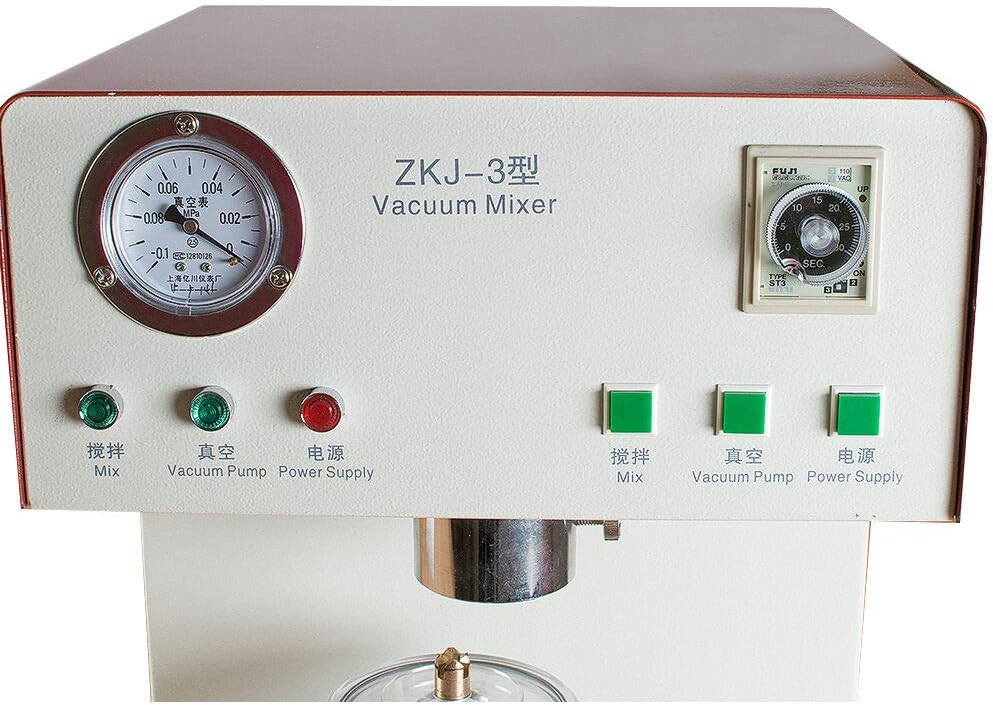
Figure 6.1: The control panel with buttons for mixing, vacuum pump, and power supply, along with a timer for precise operation.
7. Maintenance
Regular maintenance ensures the longevity and optimal performance of your NSKI ZKJ-3 Vacuum Mixer.
- Cleaning: After each use, thoroughly clean the mixing tank, stirring shovels, and the machine's platform. Use appropriate cleaning agents recommended for dental equipment. Ensure no material residue remains.
- Vacuum Pump Oil Check: Periodically check the oil level of the vacuum pump. Refill or replace the oil as necessary, following the manufacturer's guidelines for the specific pump type.
- Safety Grounding Inspection: Conduct regular visual inspections of the power cord and grounding connections to ensure they are intact and secure.
- General Inspection: Routinely inspect the machine for any signs of wear, damage, or loose components. Address any issues promptly.
- Storage: When not in use for extended periods, store the machine in a clean, dry environment, protected from dust and extreme temperatures.

Figure 7.1: Detailed view of the mixing cup lid, highlighting the sealing mechanism critical for maintaining vacuum during operation.
8. Troubleshooting
This section provides guidance for common issues. For complex problems, contact a qualified technician.
| Problem | Possible Cause | Solution |
|---|---|---|
| Machine does not power on | No power supply; Blown fuse; Faulty power cord | Check power connection; Replace fuse; Inspect power cord for damage. |
| Vacuum not achieved or maintained | Mixing tank not sealed properly; Vacuum pump oil low/empty; Vacuum pump malfunction | Ensure mixing tank is securely sealed; Refill vacuum pump oil; Contact professional for pump inspection. |
| Mixing motor not operating | Motor overload; Internal wiring issue | Reduce material load; Contact professional for repair. |
| Excessive noise during operation | Loose components; Worn bearings; Vacuum pump issue | Inspect for loose parts and tighten; Contact professional for internal inspection. |
9. Warranty and Support
For warranty information, technical support, or service inquiries, please contact your authorized NSKI dealer or the manufacturer directly. Keep your purchase receipt and product serial number readily available when contacting support.