
1. Introduction
This manual provides instructions for the YQMAJIM YQ1014 Backup Camera Video Cable. This adapter cable is designed to facilitate the connection of a rearview camera with an RCA connector to a dash camera or mirror camera that utilizes a 4-pin input.
Please read these instructions carefully before installation to ensure correct setup and optimal performance.
2. Product Overview
The YQMAJIM YQ1014 cable converts a CVBS RCA connector from a reversing camera to a 4-pin connector compatible with many dash cams and mirror cams. This allows for seamless integration of an existing RCA-type backup camera with a newer 4-pin display unit.

Image 2.1: Connection diagram illustrating the YQMAJIM adapter cable connecting a backup camera to a mirror display unit.
The product package includes the main adapter cable, a spare cable for potential wiring modifications, and an RCA male-to-female adapter connector.
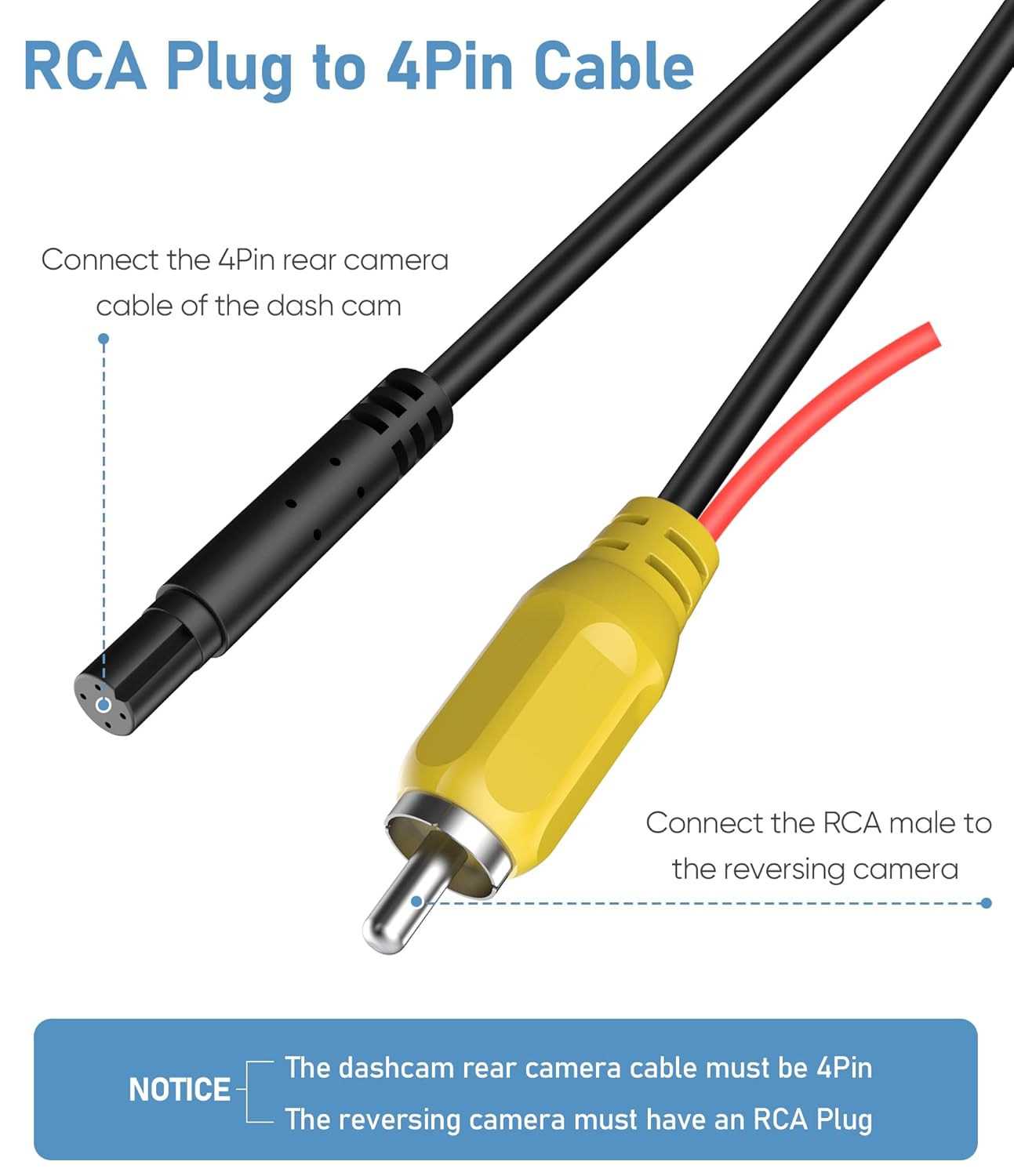
Image 2.2: Detailed view of the RCA plug and 4-pin connector, highlighting the connection points for the rear camera and dash cam.

Image 2.3: A spare cable is provided, which can be used for custom wiring modifications if required for specific installations.

Image 2.4: An additional RCA male-to-female adapter connector is included for enhanced compatibility.
3. Compatibility Requirements
Before purchasing and installing this cable, ensure your equipment meets the following requirements:
- The dash camera or mirror camera's rear camera input cable must be a 4-pin type.
- The reversing camera you intend to connect must have an RCA plug.
- The CVBS RCA plug backup camera power cord requires a 12V power supply.
It is recommended to confirm the number of pins on your dash cam's backup camera input before proceeding with installation.
4. Setup Instructions
Follow these steps to connect your backup camera using the YQMAJIM YQ1014 adapter cable:
- Test Compatibility: Before permanent installation, temporarily connect the cable to verify compatibility with your specific camera and dash cam setup.
- Connect Reversing Camera: Connect the RCA plug from your reversing camera to the RCA female connector of the YQMAJIM adapter cable.
- Connect to Dash Cam: Connect the 4-pin male connector of the YQMAJIM adapter cable to the 4-pin female input of your dash camera or mirror camera.
- Power Supply: Ensure the CVBS RCA plug backup camera power cord is connected to a stable 12V power supply.
- Trigger Wire (Optional): The adapter cable includes a red trigger wire. This wire can be connected to the positive and negative terminals of your vehicle's backup light.
- For most dash cams, connecting this red wire is not strictly necessary for basic functionality.
- If connected, the dash cam will typically display the rear view image on the full screen automatically when the vehicle is in reverse.
Ensure all connections are secure to prevent signal loss or intermittent operation.
5. Operating Instructions
Once correctly installed, the YQMAJIM YQ1014 adapter cable functions passively to transmit the video signal from your RCA backup camera to your 4-pin dash camera or mirror camera. When the vehicle is placed in reverse (and the trigger wire is connected, if applicable), the dash cam display should automatically switch to show the rearview image.
Refer to your dash camera's instruction manual for specific settings related to backup camera display and functionality.
6. Maintenance
To ensure the longevity and reliable performance of your YQMAJIM YQ1014 cable, consider the following maintenance guidelines:
- Cable Routing: Route the cable away from sharp edges, moving parts, and areas of extreme heat or cold. Avoid kinking or excessively bending the cable.
- Connection Security: Periodically check all connections to ensure they remain secure and free from corrosion.
- Cleaning: If necessary, gently wipe the cable and connectors with a dry, soft cloth. Avoid using harsh chemicals or abrasive materials.
- Environmental Protection: While designed for automotive use, protect exposed sections of the cable from direct prolonged exposure to harsh weather conditions if possible.
7. Troubleshooting
If you encounter issues with your YQMAJIM YQ1014 adapter cable, consider the following troubleshooting steps:
- No Video Signal:
- Verify that both the reversing camera and the dash cam are powered on and functioning correctly independently.
- Ensure all cable connections (RCA, 4-pin, and 12V power) are secure and properly seated.
- Confirm that your reversing camera has an RCA output and your dash cam has a 4-pin input.
- Check the 12V power supply to the CVBS RCA plug backup camera power cord.
- Intermittent Signal:
- Inspect the cable for any visible damage, kinks, or frayed wires.
- Ensure connectors are clean and free of debris or corrosion.
- Dash Cam Not Switching to Rear View:
- If you intend for the dash cam to automatically switch, ensure the red trigger wire is correctly connected to the vehicle's backup light circuit.
- Consult your dash cam's manual for settings related to automatic rearview display.
- Incorrect Wiring (Advanced): In rare cases, some systems may require a different pin configuration. The included spare cable can be used for custom wiring modifications if you possess the necessary technical expertise. Refer to the specific wiring diagrams of your camera and dash cam if attempting this.
If troubleshooting steps do not resolve the issue, please refer to the support section for further assistance.
8. Specifications
| Feature | Detail |
|---|---|
| Brand | YQMAJIM |
| Model Number | YQ1014 |
| Connector Type | RCA Male to 4-pin Female |
| Compatible Devices | Cameras (RCA output) to Dash Cams/Mirror Cams (4-pin input) |
| Voltage Requirement | 12 Volts (for camera power cord) |
| Installation Type | Rear View |
| UPC | 784851343713 |
| Package Dimensions | 7.4 x 5.79 x 0.55 inches |
| Item Weight | 1.41 ounces |
9. Warranty Information
Specific warranty details for the YQMAJIM YQ1014 Backup Camera Video Cable are not provided within the product information. For warranty inquiries, please refer to the seller's policy on the platform where the product was purchased or contact YQMAJIM directly through their official channels if available.
10. Support Information
No direct support contact information is provided in the product details. For technical assistance or customer service, please refer to the support options available on the platform where you purchased the product, or visit the YQMAJIM brand page for potential contact methods.