1. Introduction
Thank you for choosing the BALDR PIONEER330 Portable Power Station. This device is designed to provide reliable power for your electronic devices during outdoor activities, emergencies, or as a backup power source. Please read this manual carefully before use to ensure safe and optimal operation.
What's Included:
- 1x BALDR PIONEER330 Portable Power Station
- 1x 65W USB-C Adapter
- 1x USB-C Charge Cable
- 1x User Manual

Figure 1: The BALDR PIONEER330 Portable Power Station, featuring a sturdy handle and multiple input/output ports on the front panel.
2. Safety Instructions
To ensure safe operation, always follow these guidelines:
- Do not disassemble, repair, or modify the unit.
- Keep the device away from fire, water, and extreme temperatures.
- Avoid dropping or subjecting the device to strong impacts.
- Ensure proper ventilation during use and charging.
- Keep out of reach of children.
Comprehensive Battery Protection:
The BALDR PIONEER330 is equipped with a Battery Management System (BMS) that protects against overcharging, inconsistent voltage, current overload, short circuits, and overheating. It also features a low battery alarm, fireproof shell, and shock-proof socket design for enhanced safety.
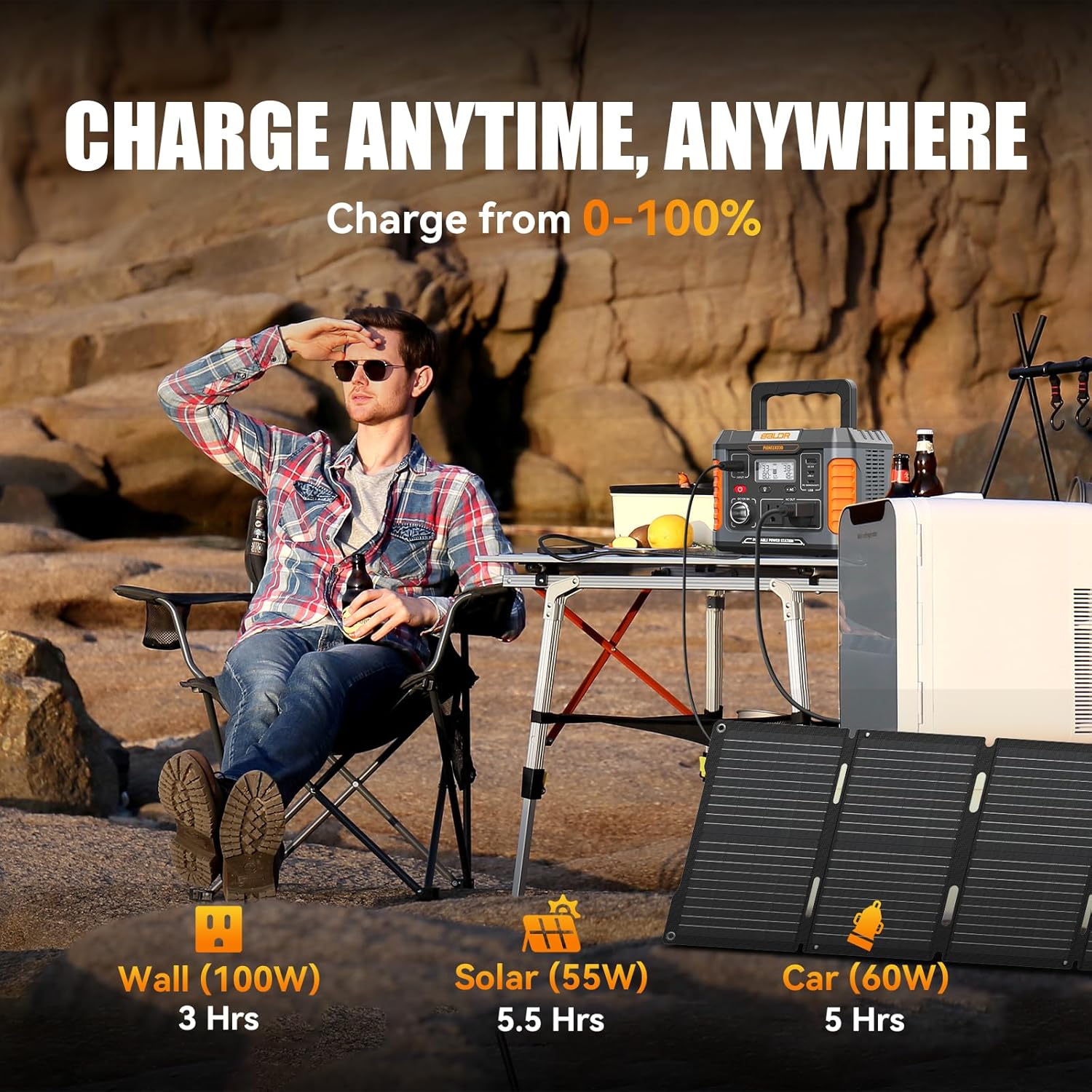
Figure 2: Internal view of the power station, illustrating the integrated Battery Management System (BMS) which provides multiple layers of protection including temperature control, low battery alarm, overload, overcharging, short circuit, over current, and voltage control.
3. Product Overview
The BALDR PIONEER330 features a user-friendly design with various ports and functions for versatile power delivery.
Front Panel Features:
- Power Button: Turns the unit on/off.
- LCD Display: Shows battery percentage, input/output wattage, and active ports.
- DC Output Ports: Two 12V 5A ports and one 12V 10A car outlet.
- USB Ports: Three USB 3.0 Quick-Charge ports and two USB Type-C ports.
- AC Output Ports: One 120V Pure Sine Wave AC outlet.
- LED Light Button: Activates the built-in LED light and SOS mode.
- DC Input Port: For charging the power station.
Top Panel Features:
- Wireless Charging Pad: For Qi-compatible devices.
- Foldable Handle: For easy portability.

Figure 3: Detailed view of the BALDR PIONEER330's front panel, illustrating the layout of the DC, USB, and AC output sections, along with the main power button and LCD screen.
4. Setup
Before first use, fully charge your BALDR PIONEER330. The unit comes partially charged, but a full charge is recommended for optimal battery health.
Initial Charging:
Connect the provided 65W USB-C adapter or a compatible 12V car charger cable to the DC input port (DC IN 12-24V) on the front panel. Plug the adapter into a standard wall outlet or the car charger into your vehicle's 12V socket. The LCD display will indicate charging status.
Video 1: This video provides a general overview of the BALDR Portable Power Station, demonstrating its various features and potential uses in different scenarios, highlighting its powerful and handy nature.
5. Operating Instructions
The BALDR PIONEER330 offers multiple ways to power your devices.
Using AC Outlets:
Press the AC button to activate the 120V Pure Sine Wave AC outlet. Plug your device into the AC outlet. The LCD display will show the output wattage. Remember to turn off the AC output when not in use to conserve battery.
Using USB Ports:
The USB ports (3x USB 3.0 Quick-Charge, 2x USB Type-C) are always active when the unit is powered on. Simply plug your USB-compatible devices into the appropriate ports for charging.
Using DC Outlets:
Press the DC button to activate the 12V 5A ports and the 12V 10A car outlet. Plug your 12V devices into these ports. Turn off the DC output when not in use.
LED Light & SOS Mode:
Press the LED light button once to turn on the built-in LED light. Press and hold the button to switch to SOS flashing mode for emergencies. Press again to turn off.
Wireless Charging:
Place your Qi-compatible device on the wireless charging pad located on the top of the power station. Ensure the device is centered for optimal charging. The wireless charging feature is active when the unit is powered on.

Figure 4: The BALDR PIONEER330 effectively powers a range of essential devices, including smartphones, laptops, CPAP machines, drones, cameras, LED lights, and mini-fridges, showcasing its 288Wh capacity and 330W output.
6. Charging the Power Station
The BALDR PIONEER330 offers flexible charging options to keep it ready for use.
AC Wall Outlet Charging:
Connect the provided AC adapter to the DC input port and plug it into a standard 100-240V wall outlet. Charging time is approximately 3 hours.
12V Car Outlet Charging:
Use the provided 12V car charger cable to connect the power station to your vehicle's cigarette lighter socket. Charging time is approximately 5 hours.
Solar Panel Charging:
Connect a compatible 120W solar panel (sold separately) to the DC input port. The built-in MPPT controller maximizes energy extraction and optimizes charging rates. Charging time with a 55W solar panel is approximately 5.5 hours.

Figure 5: Comparison of charging methods and speeds for the BALDR PIONEER330, showing approximate times for wall (100W), solar (55W), and car (60W) charging.
7. Maintenance
Storage:
Store the power station in a cool, dry place away from direct sunlight and corrosive materials. For long-term storage, charge the unit to 50-80% every 3-6 months to maintain battery health.
Cleaning:
Use a soft, dry cloth to clean the exterior of the device. Do not use abrasive cleaners or immerse the unit in water.
8. Troubleshooting
- No Output: Ensure the power station is turned on and the specific output port (AC/DC) is activated. Check if the device being charged is functioning correctly.
- Not Charging: Verify that the charging cable and adapter are securely connected and undamaged. Ensure the power source (wall outlet, car, solar panel) is active.
- Overload Protection: If the device draws more power than the station's rated output, the overload protection may activate. Disconnect the device and restart the power station.
- Overheating: If the unit becomes excessively hot, it may shut down automatically due to overheating protection. Allow it to cool down in a well-ventilated area before resuming use.
9. Specifications
| Feature | Detail |
|---|---|
| Brand | Baldr |
| Model Name | PIONEER330 |
| Wattage | 330 watts (660W Peak) |
| Running Wattage | 330 Watts |
| Fuel Type | Solar |
| Power Source | Battery Powered (Lithium Ion) |
| Battery Capacity | 288Wh / 78000mAh |
| Voltage | 110 Volts |
| AC Output | 1x 120V Pure Sine Wave AC Outlet |
| DC Output | 2x 12V 5A, 1x 12V 10A Car Outlet |
| USB Output | 3x USB 3.0 Quick-Charge, 2x USB Type-C |
| Total Power Outlets | 9 |
| Item Weight | 7.5 Pounds |
| Product Dimensions | 11.6"L x 8.27"W x 7.68"H |
| Special Feature | Portable |
| Included Components | Connector Cable, AC Wall Plug Power Adapter, 12v Car Charger Cable, User manual |
10. Warranty and Support
BALDR provides excellent 24-hour customer service for any inquiries or issues you may encounter. Your BALDR PIONEER330 Portable Power Station comes with a 1-year warranty and a 30-day money-back guarantee on all purchases.
For support, please refer to the contact information provided in your product packaging or visit the official BALDR website.