Welcome to Clean Air
The Molekule Air Large Room Air Purifier utilizes advanced PECO technology to destroy a wide range of airborne pollutants, providing cleaner air for your home or business. This manual provides essential information for setup, operation, and maintenance of your device.
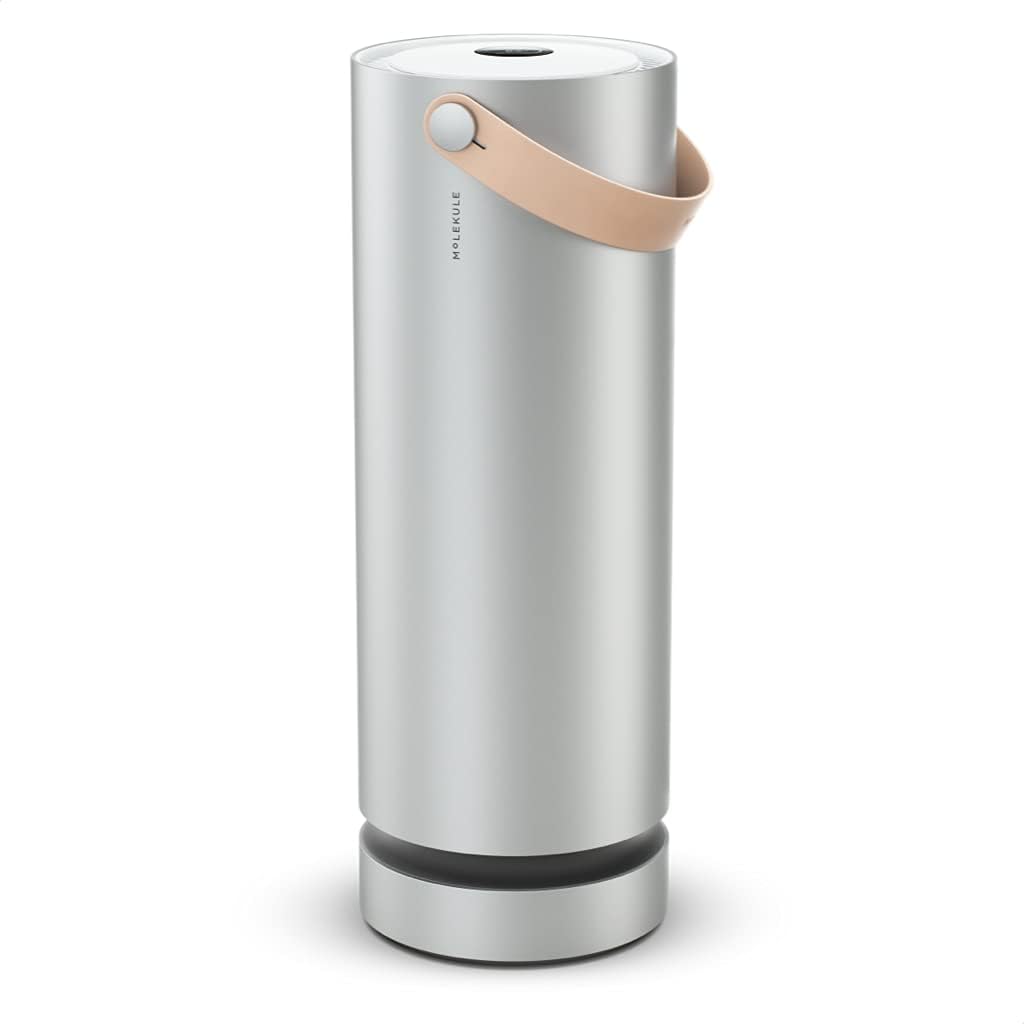
A tall, cylindrical silver air purifier with a light brown leather handle, standing on a wooden floor.
Understanding Your Molekule Air Purifier
Photo Electrochemical Oxidation (PECO) Technology
Unlike traditional filters that merely capture pollutants, Molekule's patented PECO technology uses light-activated nanotechnology to destroy viruses, volatile organic compounds (VOCs), allergens, bacteria, and mold at a molecular level.
Official Molekule video explaining how the PECO technology works to purify air.

A cutaway diagram of the Molekule Air Purifier, illustrating the 360-degree air intake, particle capture, PECO process, and clean air output.

A graphic depicting various airborne pollutants like viruses, bacteria, mold, and allergens, indicating their destruction by Molekule's PECO technology.

A graph illustrating the reduction of formaldehyde concentration over time by the Molekule Air Purifier.

A table comparing the effectiveness of Molekule's PECO technology against traditional HEPA and carbon filters in destroying or collecting various pollutants.
Large Room Coverage
Designed to effectively purify air in large rooms up to 600 square feet, such as living rooms, family rooms, and large bedrooms.

A Molekule Air Purifier positioned next to a chair in a bright living room, demonstrating its aesthetic integration into a home environment.
Intuitive Control and Connectivity
The device features an easy-to-use touch-screen interface for direct control. For added convenience, connect your Molekule Air Purifier to your Wi-Fi network and manage it remotely using the dedicated iPhone or Android application.

A smartphone screen showing the Molekule app interface with options to control the air purifier, next to the actual device.

A close-up view of the purifier's top touchscreen, showing filter status and fan speed selection.
Portable Design
Equipped with a natural leather handle, the Molekule Air Purifier can be easily moved and placed wherever clean air is needed most in your home or office.

A detailed view of the purifier's vegan leather handle, emphasizing its thoughtful design for portability.
Initial Setup
- Unpacking: Carefully remove the Molekule Air Purifier from its packaging. Ensure all components, including the PECO filter and pre-filter, are present.
- Placement: Place the purifier on a flat, stable surface in the desired room. Ensure there is adequate space around the unit for optimal airflow.
- Power Connection: Plug the power cord into a grounded electrical outlet.
- Filter Installation:
The device comes with a PECO filter and a pre-filter. Ensure they are correctly installed before first use. Refer to the maintenance section for detailed filter replacement instructions.
Official Molekule video demonstrating the process of changing the filter.
- Power On: Press the power button on the top of the device or use the mobile app to turn on the purifier.
- Wi-Fi Setup (Optional): Follow the on-screen prompts or app instructions to connect your device to your home Wi-Fi network for remote control features.
Operating Your Molekule Air Purifier
Control Panel
The touch-screen display on the top of the unit allows you to select fan speeds and view filter status.
Fan Speed Modes
- Silent Mode: Operates at the lowest fan speed for quiet purification, ideal for bedrooms or quiet environments.
- Auto Mode: The purifier automatically adjusts its fan speed based on detected air quality (if equipped with a particle sensor, otherwise it maintains a balanced purification level).
- Boost Mode: Activates the highest fan speed for rapid air purification, useful when air quality is poor or after cooking/cleaning.
Mobile App Control
Download the Molekule app from the App Store or Google Play. Once connected to Wi-Fi, you can remotely control fan speeds, monitor filter life, and receive notifications.
Maintenance and Filter Replacement
Filter Life Indicators
The device's display and mobile app will indicate the remaining life of your PECO filter and pre-filter.
Replacing the PECO Filter
The PECO filter typically lasts for 6 months.
- Power off and unplug the device.
- Twist the top section of the purifier counter-clockwise and lift it off.
- Carefully remove the used PECO filter.
- Insert the new PECO filter, ensuring it is seated correctly.
- Replace the top section and twist clockwise to secure.
- Plug in and power on the device. Reset the filter life indicator via the app or device controls.
Replacing the Pre-Filter
The pre-filter typically lasts for 3 months.
- Power off and unplug the device.
- Locate the pre-filter compartment near the base of the unit.
- Remove the old pre-filter.
- Insert the new pre-filter.
- Close the compartment.
- Plug in and power on the device. Reset the filter life indicator via the app or device controls.
Official Molekule video demonstrating the process of changing the filter.

The cylindrical PECO filter and two rectangular pre-filters for the Molekule Air Purifier, ready for replacement.
Troubleshooting Common Issues
| Issue | Possible Cause | Solution |
|---|---|---|
| Device not turning on | Not plugged in or power outage | Check power connection; ensure outlet is functional. |
| Poor airflow | Clogged filters | Check and replace PECO and/or pre-filters. |
| Wi-Fi connectivity issues | Incorrect password or network interference | Re-enter Wi-Fi password in the app; ensure device is within Wi-Fi range. |
| Unusual noise | Obstruction or loose filter | Check for any foreign objects; ensure filters are securely installed. |
For further assistance, please contact Molekule customer support.
Product Specifications
| Feature | Detail |
|---|---|
| Model Number | MH1-BBB-1 |
| Color | Silver |
| Product Dimensions | 8.25"D x 8.25"W x 32"H |
| Item Weight | 24.8 pounds |
| Noise Level | 41 Decibels (lowest setting) |
| Controller Type | Android, iOS App, Touchscreen |
| Included Components | 1 PECO Filter (recommended 6 month life), 1 Pre-Filter (recommended 3 month life), Molekule Air Purifier |
| UPC | 818701020087 |
Note: Specifications are subject to change without notice.
Warranty and Customer Support
Warranty Information
Your Molekule Air Purifier comes with a limited warranty covering defects in materials and workmanship. Please refer to the warranty card included in your product packaging or visit the official Molekule website for full terms and conditions.
Customer Support
For technical support, troubleshooting, or inquiries about replacement filters, please visit the Molekule Store on Amazon or the official Molekule website.


