
Introduction
This manual provides essential information for the safe and effective installation, operation, and maintenance of your Seentech WR60X10220 Condenser Fan Motor. This component is designed as a direct replacement for the original part in compatible GE and Hotpoint refrigerators. Please read these instructions thoroughly before beginning any work on your appliance.
Safety Information
WARNING: Before attempting any repair or installation, always disconnect power to the refrigerator by unplugging it or turning off the circuit breaker. Failure to do so can result in serious injury or electrical shock.
- Wear appropriate personal protective equipment, such as gloves and safety glasses.
- Ensure the work area is well-lit and clear of obstructions.
- If you are unsure about any step, consult a qualified appliance technician.
- Keep children and pets away from the work area.
Product Overview
The Seentech WR60X10220 Condenser Fan Motor is a critical component in your refrigerator's cooling system. It is responsible for circulating air over the condenser coils, which helps dissipate heat from the refrigerant. A malfunctioning condenser fan motor can lead to inefficient cooling, increased energy consumption, and potential damage to other refrigerator components.

Image: The Seentech WR60X10220 Condenser Fan Motor, showing its compact design and wiring.
This replacement part is manufactured from durable, high-quality materials to ensure long-lasting and effective performance. It addresses common refrigerator issues such as:
- Noisy operation from the condenser area.
- Freezer section being too warm.
- Refrigerator section being too warm.
- Refrigerator not starting or running properly.
Compatibility
The WR60X10220 Condenser Fan Motor is an exact fit for many GE and Hotpoint refrigerator models. It replaces several part numbers, ensuring broad compatibility. Always verify your appliance's model number and the required part number before purchase.
Compatible Part Numbers: AP4298602, 1257132, AH1766247, EA1766247, PS1766247, WR60X10133, WR60X10171, WR60X10192.
Known Compatible Brands: GE, Hotpoint.

Image: Detailed view of the motor, highlighting its connector, shaft, and identification label.
Setup and Installation
This repair is considered a DIY fix and typically takes 30 to 60 minutes. Basic tools required include a 5/16-inch nut driver and a 1/4-inch nut driver.
Required Tools:
- 5/16-inch nut driver
- 1/4-inch nut driver
Installation Steps:
- Disconnect Power: Unplug the refrigerator from the wall outlet or turn off the circuit breaker supplying power to the appliance. This is a critical safety step.
- Access the Condenser Area: Depending on your refrigerator model, you may need to remove a rear access panel or tilt the refrigerator forward to access the condenser coils and fan motor located at the bottom rear of the unit.
- Locate the Old Motor: Identify the existing condenser fan motor and its mounting bracket. Note how it is connected and oriented.
- Remove Fan Blade: Carefully remove the fan blade from the shaft of the old motor. This may involve unscrewing a retaining clip or nut.
- Disconnect Wiring: Disconnect the electrical connector(s) from the old motor.
- Remove Old Motor: Unscrew the mounting screws holding the motor or its bracket in place. It is often easier to remove the entire mounting frame with the fan still attached, then separate the motor from the frame.
- Install New Motor: Secure the new Seentech WR60X10220 motor to the mounting bracket using the appropriate nut drivers. Ensure it is firmly seated.
- Reattach Fan Blade: Carefully slide the fan blade onto the shaft of the new motor and secure it. Ensure the blade spins freely without hitting any obstructions.
- Reconnect Wiring: Connect the electrical connector(s) to the new motor. Ensure a secure connection.
- Reassemble: Reinstall the motor assembly into the refrigerator and replace any access panels removed earlier.
- Restore Power: Plug the refrigerator back into the wall outlet or turn on the circuit breaker. Listen for the fan motor to operate.
Video: A detailed overview of the WR60X10220 Condenser Fan Motor, showcasing its features and design. This video can assist in visual identification during installation.
Operating Instructions
Once correctly installed, the Seentech WR60X10220 Condenser Fan Motor operates automatically as part of your refrigerator's cooling cycle. It will turn on and off as needed to maintain the proper temperature and ensure efficient heat exchange at the condenser coils. No manual intervention is required for its operation.
Maintenance
Regular maintenance of your refrigerator's condenser area can prolong the life of the fan motor and improve overall appliance efficiency.
- Clean Condenser Coils: At least once every 6-12 months, disconnect power to the refrigerator and use a vacuum cleaner with a brush attachment to gently clean dust and debris from the condenser coils and the fan blades. Accumulation of dust can hinder airflow and overwork the motor.
- Inspect Fan Blades: Periodically check the fan blades for any damage or obstructions. Ensure they are securely attached to the motor shaft.
- Listen for Unusual Noises: Pay attention to any new or unusual noises coming from the condenser area, which could indicate a developing issue with the fan motor or other components.
Troubleshooting
If your refrigerator is experiencing issues related to cooling or noise, the condenser fan motor may be a contributing factor. Here are common symptoms and potential solutions:

Image: The condenser fan motor shown alongside a list of common refrigerator symptoms it can resolve.
| Symptom | Possible Cause | Solution |
|---|---|---|
| Noisy Operation | Worn motor bearings, fan blade hitting an obstruction, loose mounting. | Disconnect power, inspect fan blade for obstructions, ensure motor is securely mounted. If noise persists, the motor may need replacement. |
| Freezer/Fridge Too Warm | Condenser fan motor not running, restricted airflow due to dirty coils. | Disconnect power, check if the fan motor is spinning. Clean condenser coils. If the motor is not running, it likely needs replacement. |
| Refrigerator Will Not Start | Faulty condenser fan motor (less common as a sole cause, but can contribute to compressor overload). | Ensure power is connected. If other components are working but the compressor isn't, check the fan motor. If it's seized, it could prevent the compressor from starting. |
If troubleshooting steps do not resolve the issue, professional assistance may be required.
Specifications
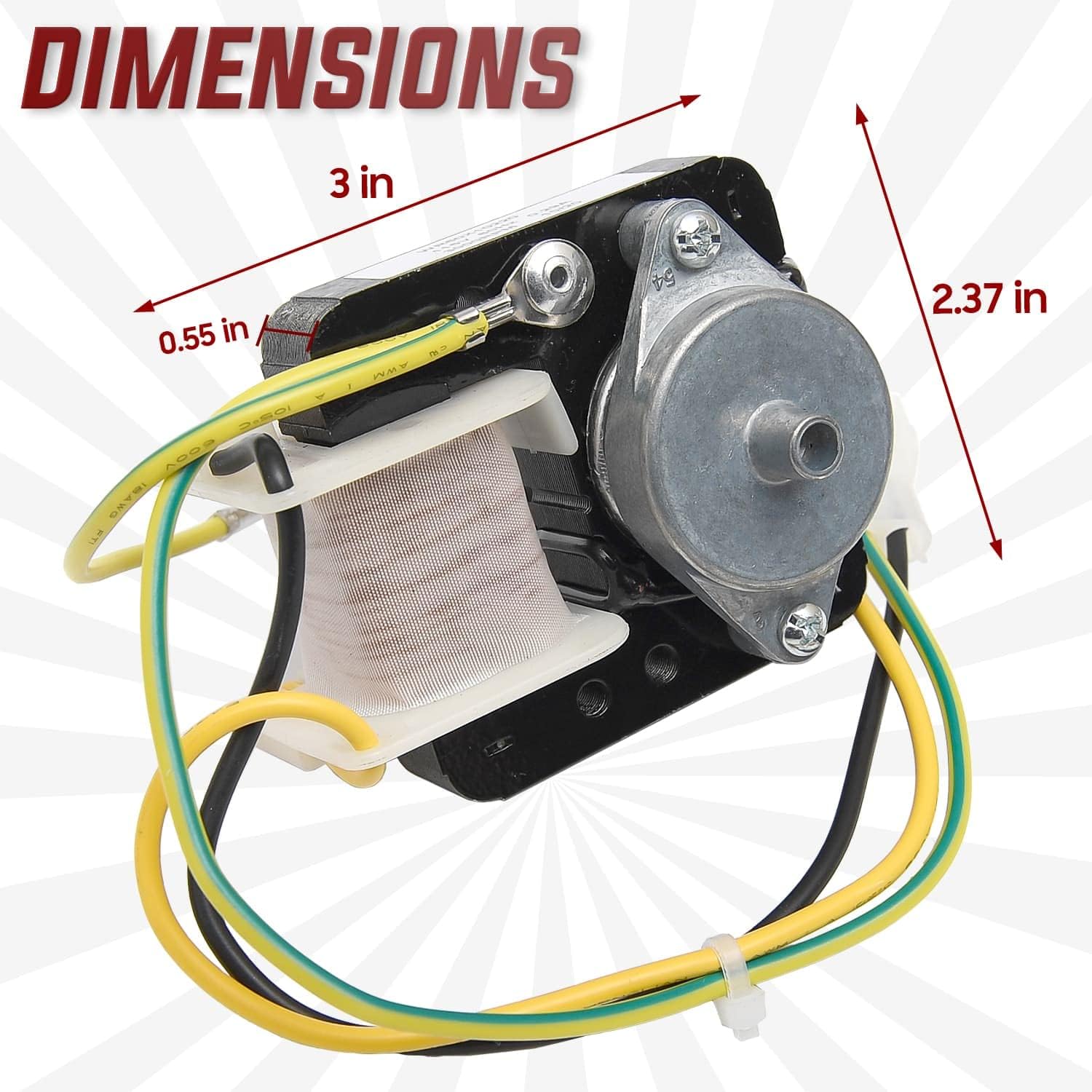
Image: Visual representation of the motor's dimensions, including length, width, and shaft length.
| Feature | Detail |
|---|---|
| Model Number | WR60X10220 |
| Brand | Seentech |
| Voltage | 12 Volts (Note: Product image label shows 115V, 60Hz, 0.2A. The JSON specification might be a generic value. Always refer to the product label for precise electrical specifications.) |
| Manufacturer (Original Appliance) | GE Refrigerators |
| Unit Count | 1 Count |
| Part Number | WR60X10220 |
Warranty and Support
Seentech offers a money-back guarantee for this product. If you are not completely satisfied for any reason, you may request a replacement or a full refund, no questions asked.
For questions regarding compatibility or any other product inquiries, please reach out to Seentech directly. You can typically find contact information on the Seentech storefront or by utilizing the customer questions and answer section where the product was purchased.
Video: A general overview of Seentech's commitment to providing quality DIY appliance parts and supporting customers in maintaining their home appliances.