
1. Introduction
This manual provides instructions for the SoundPEATS Dual Dynamic Drivers Wireless Earbuds. Please read this manual thoroughly before use to ensure proper operation and to maintain the product's longevity.

Image 1.1: SoundPEATS Dual Dynamic Drivers Wireless Earbuds with their charging case.
2. Package Contents
Verify that all items are present in your package:
- SoundPEATS Dual Dynamic Drivers Wireless Earbuds (L/R)
- Charging Case
- USB Charging Cable
- Eartips (S/M/L sizes)
- User Manual (this document)
3. Product Diagram
Familiarize yourself with the components of your SoundPEATS earbuds and charging case.
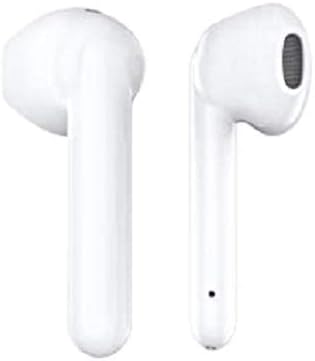
Image 3.1: Close-up view of the individual SoundPEATS wireless earbuds, showing their design.
- Touch Control Area: For managing playback, calls, and voice assistant.
- LED Indicator: Displays charging status and pairing mode.
- Microphone: For voice calls and commands.
- Charging Contacts: Connects with the charging case.
- Charging Case: Stores and charges the earbuds.
- USB Charging Port: For charging the case.
- Case Battery Indicator: Shows the charging case's battery level.
4. Setup
4.1. Initial Charge
Before first use, fully charge the earbuds and the charging case.
- Place the earbuds into the charging case. Ensure the charging contacts align.
- Connect the USB charging cable to the charging port on the case and to a USB power adapter (not included).
- The LED indicators on the earbuds and case will show charging status. They will turn off or change color when fully charged.
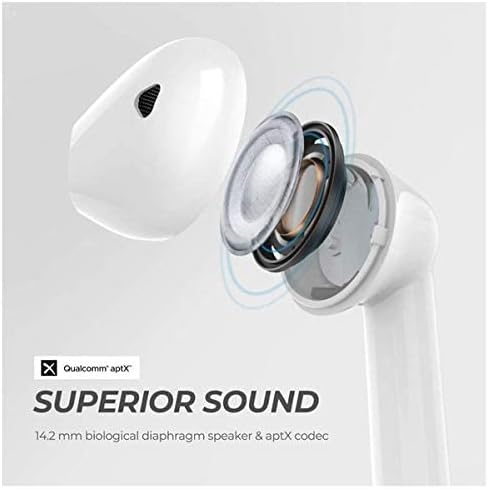
Image 4.1: SoundPEATS earbuds placed inside the open charging case, ready for charging.
4.2. Pairing
Follow these steps to pair your earbuds with a Bluetooth device:
- Ensure both earbuds are in the charging case and the case has power.
- Open the charging case. The earbuds will automatically enter pairing mode. The LED indicator on the master earbud (usually the right one) will flash white and red alternately.
- Activate Bluetooth on your device (e.g., smartphone, tablet).
- Search for "SOUNDPEATS TRUENGINE SE" in the Bluetooth device list and select it to connect.
- If prompted, confirm the pairing. You may see a request to pair the "SOUNDPEATS TRUENGINE SE L" earbud; accept this to enable stereo mode.
- Once connected, the LED indicators on the earbuds will turn off or show a solid white light.
Note: If the earbuds do not pair within 5 minutes, they will exit pairing mode. Place them back in the case and repeat the steps.
4.3. Single Earbud Use
You can use either earbud independently:
- Take out the desired earbud from the charging case. It will automatically connect to your device if previously paired.
- If using the left earbud alone for the first time, you may need to manually select "SOUNDPEATS TRUENGINE SE L" from your device's Bluetooth list.
5. Operating Instructions
5.1. Wearing the Earbuds
For optimal sound quality and comfort, ensure a proper fit:
- Choose the eartips that best fit your ears. Experiment with different sizes.
- Insert the earbud into your ear canal and gently twist it until it feels secure and comfortable.
5.2. Touch Controls
The earbuds feature touch-sensitive controls:
| Function | Left Earbud (L) | Right Earbud (R) |
|---|---|---|
| Power On | Take out of case / Press and hold for 1.5s | Take out of case / Press and hold for 1.5s |
| Power Off | Place into case / Press and hold for 10s | Place into case / Press and hold for 10s |
| Play/Pause | Double tap | Double tap |
| Volume - | Single tap | N/A |
| Volume + | N/A | Single tap |
| Previous Track | Press and hold for 1.5s | N/A |
| Next Track | N/A | Press and hold for 1.5s |
| Answer/Hang Up Call | Double tap | Double tap |
| Reject Call | Press and hold for 1.5s | Press and hold for 1.5s |
| Activate Voice Assistant | Triple tap | Triple tap |
6. Maintenance
Proper maintenance ensures the longevity and performance of your earbuds.
- Cleaning: Regularly clean the earbuds, eartips, and charging contacts with a soft, dry, lint-free cloth. Do not use harsh chemicals or abrasive materials.
- Storage: When not in use, store the earbuds in their charging case to protect them from dust and damage.
- Water Resistance: The earbuds are water-resistant, but not waterproof. Avoid submerging them in water or exposing them to heavy rain. Dry them thoroughly if they get wet.
- Charging: Charge the earbuds and case regularly, even if not in frequent use, to maintain battery health.
7. Troubleshooting
If you encounter issues, try these common solutions:
| Problem | Solution |
|---|---|
| Earbuds not turning on | Ensure they are charged. Place them in the charging case and check the LED indicators. |
| Earbuds not pairing |
|
| Only one earbud working |
|
| Low volume or poor sound quality |
|
8. Specifications
Key technical details of the SoundPEATS Dual Dynamic Drivers Wireless Earbuds:
- Model: SoundPEATS
- Bluetooth Version: 5.0
- Bluetooth Chipset: Qualcomm QCC3020
- Audio Codec: APTX Audio
- Drivers: Dual Dynamic Drivers with Crossovers
- Noise Cancellation: CVC Noise Cancellation (for calls)
- Earbud Playtime: Up to 6 hours per charge
- Total Playtime (with Charging Case): Up to 27 hours
- Water Resistance: Water Resistant
- Control Method: Touch
- Weight: 3.21 ounces (earbuds + case)
- Dimensions: 0.98 x 0.84 x 1.09 inches (earbud)

Image 8.1: Internal diagram illustrating the dual dynamic drivers and aptX audio technology for superior sound.

Image 8.2: The Qualcomm QCC3020 chipset, responsible for efficient power consumption and stable Bluetooth 5.0 connectivity.
9. Warranty & Support
SoundPEATS products are designed and manufactured to the highest quality standards. For detailed warranty information or technical support, please refer to the official SoundPEATS website or contact their customer service directly.
You can also find additional support and frequently asked questions on the SoundPEATS Store on Amazon.
A PDF version of the user manual is available for download: Download User Manual (PDF)