
Electrolux EOD5C50Z
Electrolux EOD5C50Z Oven User Manual
Model: EOD5C50Z
Introduction
Welcome to the user manual for your new Electrolux EOD5C50Z Oven. This manual provides essential information for the safe and efficient use of your appliance. Please read it thoroughly before installation, first use, and maintenance. Keep this manual for future reference.
The Electrolux EOD5C50Z is a 72-liter electric built-in oven designed for modern kitchens, featuring an A-class energy efficiency rating and an interior light for clear visibility during cooking.

Image: Electrolux EOD5C50Z Oven seamlessly integrated into a kitchen cabinet, showcasing its sleek black design.
Safety Information
Always adhere to the following safety guidelines to prevent injury or damage to the appliance.
- Ensure the oven is properly installed by a qualified professional before use.
- Do not touch hot surfaces. Use oven mitts or pot holders.
- Keep children away from the appliance during operation.
- Never use water to extinguish grease fires; turn off the appliance and cover the pan.
- Disconnect the appliance from the power supply before cleaning or maintenance.
- Do not store flammable materials in or near the oven.
Product Overview
The Electrolux EOD5C50Z oven is designed for efficient and versatile cooking. Familiarize yourself with its main components.
Main Components
- Control Panel: Located at the top, featuring dials and a digital display for setting functions and temperature.
- Oven Cavity: The main cooking area with a 72-liter capacity.
- Cooling Fan: Ensures even heat distribution and cools the oven during and after operation.
- Oven Racks: Multiple levels for flexible placement of dishes.
- Baking Trays: Included for various cooking needs.
- Interior Light: Illuminates the oven cavity for clear viewing of food.

Image: The Electrolux EOD5C50Z Oven with its door closed, showing the control panel and food baking inside the illuminated cavity.

Image: Close-up of the oven's interior, highlighting the central cooling fan and the rack supports on the side walls.
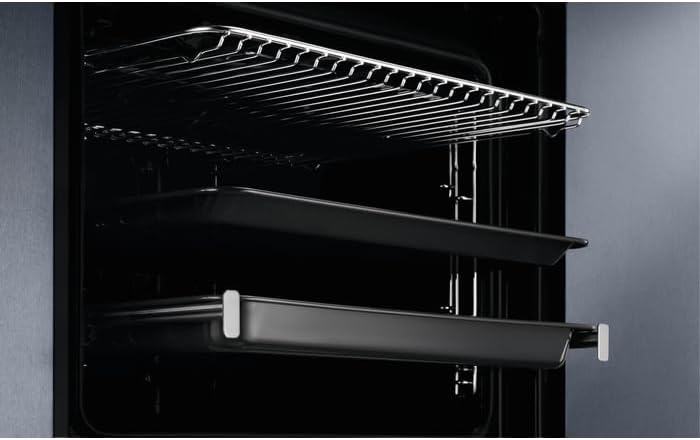
Image: The inside of the oven, showing the adjustable wire racks and two baking trays positioned on different levels.
Setup and Installation
The Electrolux EOD5C50Z is a built-in appliance. Installation should only be performed by a qualified technician in accordance with local regulations and the provided installation instructions.
Before First Use
- Unpacking: Remove all packaging materials and accessories from the oven cavity.
- Initial Cleaning: Wipe the interior and exterior surfaces with a soft cloth and warm soapy water. Dry thoroughly.
- Ventilation: Ensure adequate ventilation around the appliance as per installation guidelines.
- Electrical Connection: Verify the oven is correctly connected to a grounded electrical outlet with the specified voltage (0.81 Volts) and wattage (2990 Watts).
Operating Instructions
This section details how to use the various functions of your oven.
Control Panel Overview

Image: The sleek black control panel of the oven, featuring two rotary dials for function and temperature selection, and a central digital display showing the time.

Image: A detailed view of the temperature control dial on the oven's panel, with temperature markings from 50°C to 275°C.
Setting the Time
- After connecting to power, the display will flash.
- Use the '+' and '-' buttons to set the current time.
- Confirm by pressing the clock symbol or waiting a few seconds.
Selecting a Cooking Function and Temperature
- Turn the left rotary dial to select the desired cooking function (e.g., Convection, Grill).
- Turn the right rotary dial to set the desired temperature. The display will show the set temperature.
- The oven will begin to heat up. An indicator light will turn off when the set temperature is reached.
Cooking Functions
- Convection (Fan-assisted): Ideal for baking and roasting on multiple levels, ensuring even heat distribution.
- Grill: For browning and toasting, suitable for thin cuts of meat, toast, or gratins.
- Defrost (Power-upptining): Uses the fan to circulate air at room temperature, gently defrosting food.
- Conventional Cooking: Heat from top and bottom elements, suitable for single-shelf baking and roasting.
First Use (Burn-off)
Before cooking food, it is recommended to perform an initial burn-off to eliminate any manufacturing residues or odors.
- Remove all accessories from the oven cavity.
- Set the oven to a high temperature (e.g., 250°C) using a conventional or fan-assisted function.
- Run the oven for approximately 60 minutes. Ensure the kitchen is well-ventilated during this process.
- After cooling, wipe the interior with a damp cloth.
Maintenance and Cleaning
Regular cleaning and maintenance will ensure the longevity and optimal performance of your oven.
General Cleaning
- Exterior: Clean the exterior surfaces with a soft cloth and mild detergent. Avoid abrasive cleaners.
- Interior: For light soiling, wipe the interior with a damp cloth after each use once the oven has cooled. For stubborn stains, use a specialized oven cleaner according to its instructions.
- Oven Door: Clean the glass panels with a glass cleaner. Do not use harsh abrasive cleaners or sharp metal scrapers.
- Accessories: Oven racks and baking trays can be washed in warm soapy water or in a dishwasher.
Interior Light Replacement
If the interior light needs replacement, ensure the oven is disconnected from the power supply. Unscrew the protective cover, replace the bulb with a new one of the same type (heat-resistant, specific to oven use), and reattach the cover.
Troubleshooting
Before contacting service, consult the following table for common issues and their solutions.
| Problem | Possible Cause | Solution |
|---|---|---|
| Oven does not heat up. | No power supply. | Check the circuit breaker or fuse box. Ensure the oven is plugged in correctly. |
| Oven light does not work. | Bulb is faulty. | Replace the oven light bulb (see Maintenance section). |
| Food is not cooking evenly. | Incorrect temperature or function selected; improper dish placement. | Verify temperature and function settings. Use the fan-assisted function for multi-level cooking. Ensure proper air circulation around dishes. |
| Oven produces smoke during first use. | Residues from manufacturing. | This is normal. Ensure good ventilation. The smoke will dissipate after the initial burn-off. |
Technical Specifications
Detailed specifications for the Electrolux EOD5C50Z Oven.
| Specification | Value |
|---|---|
| Brand | Electrolux |
| Model | EOD5C50Z |
| Product Dimensions | 56.9 x 59.6 x 59.4 cm |
| Item Weight | 31.8 kg |
| Capacity | 72 litres |
| Energy Efficiency Class | A |
| Energy Consumption Hot Air | 0.81 Kilowatt Hours |
| Installation Type | Built-In |
| Form Factor | Single Oven |
| Special Features | Interior Light |
| Heating Method | Conduction |
| Colour | Black |
| Voltage | 0.81 Volts |
| Wattage | 2990 Watts |
| Fuel Type | Electric |
| Defrost System | Power-upptining |
| Material Type(s) | Stainless Steel |
Warranty and Support
For warranty information and technical support, please refer to the warranty card included with your product or visit the official Electrolux website. You can also contact Electrolux customer service directly for assistance with your EOD5C50Z oven.
Date First Available: 9 October 2020