1. Introduction
This manual provides essential instructions for the safe and effective use of your Pioneer FH-6500DVD 6.8-inch Display Audio System. Please read this manual thoroughly before operating the unit and keep it for future reference. The FH-6500DVD is a versatile 2DIN car audio system featuring a 6.8V wide VGA display, CD/DVD playback, USB connectivity, Bluetooth, and advanced sound processing capabilities.
2. Safety Information
Always prioritize safety. Do not operate the unit in a way that distracts you from driving. Ensure all connections are secure and correctly installed to prevent electrical hazards or damage. Consult a professional for installation if you are unsure about any steps. Keep the volume at a level that allows you to hear outside traffic sounds.
3. Package Contents
Verify that all items are present in the package:
- Pioneer FH-6500DVD Main Unit
- Cord Unit (set)
- Mounting Screws (set)
- USB Connection Cable
- Hands-Free Calling Microphone
- Remote Control
- Lithium Battery (CR2025) for remote control
- Instruction Manual (this document)
- Warranty Card
4. Setup and Installation
4.1. Installation
The FH-6500DVD is designed for 2DIN installation slots. Ensure your vehicle has a compatible slot. Proper installation is crucial for optimal performance and safety. Refer to your vehicle's manual and the included installation guide for detailed steps. Incorrect wiring can cause damage to the unit or your vehicle's electrical system.
4.2. Connections
Connect the necessary cables for power, speakers, and external devices. The unit supports various connections:
- USB: For connecting USB devices and portable HDDs.
- 3.5mm Jack (AUX): For connecting external audio players.
- Optical: For digital audio output (if applicable).
- Bluetooth: For wireless connection with compatible smartphones.
Ensure the hands-free calling microphone is positioned correctly for clear voice capture.
5. Operating Instructions
5.1. Basic Operations
The unit features a 6.8-inch wide VGA display with touch screen functionality. You can interact with the interface using touch, flick, and slide gestures.

Figure 5.1: Front view of the Pioneer FH-6500DVD unit, showing the display interface with time and music information.
5.2. Media Playback
The FH-6500DVD supports a wide range of media formats and sources:
- CD/DVD: Insert discs into the designated slot for audio and video playback.
- USB Devices/Portable HDDs: Connect via the USB port to play Full HD video and high-resolution audio files (e.g., FLAC).
- iPod/iPhone: Connect your Apple device for direct music playback and control.
- AUX: Use the 3.5mm jack to connect other portable audio players.

Figure 5.2: Illustration of the FH-6500DVD's media compatibility, including USB, Portable HDD, Full HD, CD, DVD, and FLAC audio.
5.3. Bluetooth Connectivity
Pair your smartphone with the unit via Bluetooth for wireless audio streaming and hands-free calling. Refer to the unit's on-screen menu for pairing instructions.
5.4. Sound Adjustments
The unit offers detailed sound customization options to achieve high-quality audio:
- DSP (Digital Signal Processor): Fine-tune audio characteristics.
- Equalizer: Adjust frequency bands to match your preferences or vehicle acoustics.
- Time Alignment: Optimize sound staging by adjusting the delay for each speaker.
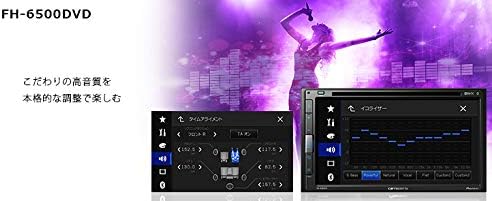
Figure 5.3: Screenshot of the FH-6500DVD's sound adjustment interface, showing options for Time Alignment and Equalizer settings.

Figure 5.4: Visual representation of touch, flick, and slide gestures for operating the FH-6500DVD's high-definition display.
6. Maintenance
To ensure the longevity and optimal performance of your FH-6500DVD unit, follow these maintenance guidelines:
- Keep the display clean using a soft, dry cloth. Avoid abrasive cleaners.
- Ensure the disc slot is free from dust and debris.
- Periodically check cable connections for security.
- Avoid exposing the unit to extreme temperatures or direct sunlight for extended periods.
7. Troubleshooting
If you encounter issues with your FH-6500DVD, refer to the following common troubleshooting steps:
- No Power: Check power connections and vehicle's fuse box.
- No Sound: Verify speaker connections, volume level, and audio source selection.
- Disc Playback Error: Ensure the disc is clean and free from scratches. Try a different disc.
- Bluetooth Connection Issues: Ensure Bluetooth is enabled on both devices and try re-pairing.
- USB Device Not Recognized: Check the USB connection and ensure the device is formatted correctly and contains supported file types.
For persistent issues, consult the Pioneer support website or contact customer service.
8. Specifications
| Feature | Specification |
|---|---|
| Manufacturer | Pioneer |
| Brand | Pioneer |
| Model Name | FH-6500DVD |
| Product Dimensions | 7 x 14 x 11 cm |
| Item Weight | 1.92 Kilograms |
| Batteries | 1 Product-specific battery (included) |
| Installation Size | 2DIN |
| Color | Black |
| Connectivity Technology | USB |
| Controller Type | Remote Control |
| Special Features | Portable |
| Compatible Devices | Smartphone |
| Connector Type | 3.5mm Jack, Optical |
| Number of Channels | 8 |
| Control Method | Remote |
9. Warranty and Support
The Pioneer FH-6500DVD comes with a 1-year manufacturer warranty. Please retain your proof of purchase for warranty claims. For technical support, product registration, or further assistance, visit the official Pioneer website or contact their customer service department.

Figure 9.1: The Pioneer FH-6500DVD product packaging, showing the unit and remote control.


