
MCP Supply CT02
MCP Supply 52" Double 2 Door Side By Side Stainless Steel Reach In Commercial Freezer User Manual
Model: CT02
Introduction
This manual provides essential information for the safe and efficient operation, installation, and maintenance of your MCP Supply 52" Double 2 Door Side By Side Stainless Steel Reach In Commercial Freezer. This commercial-grade freezer is designed for demanding kitchen environments, offering ample storage and reliable performance.
The refrigeration system maintains temperatures between -10°F to 0°F (-22°C to -18°C), controlled by a digital interface with adjustable temperature set points and defrost frequency. It features a white painted aluminum interior, self-closing doors, and a "no stoop" lower shelf for convenience.

Image: Front view of the MCP Supply 52" Double Door Commercial Freezer, showcasing its stainless steel exterior and two large doors.
Safety Information
Always adhere to local and national electrical and plumbing codes when installing this appliance. Disconnect power before performing any maintenance or cleaning. Do not store explosive substances such as aerosol cans with a flammable propellant in this appliance. This appliance is intended for commercial use only.
- Ensure proper grounding to prevent electrical shock.
- Keep ventilation openings clear of obstruction.
- Do not damage the refrigerant circuit.
- Only qualified personnel should service the appliance.
Setup and Installation
Uncrating and Placement
The freezer arrives in a robust wooden crate. Carefully remove the sides and top of the crate. The unit sits on a custom pallet with casters inset. Due to its significant weight (approximately 410 pounds), it is recommended to use appropriate lifting equipment or multiple personnel for safe removal from the pallet and positioning.
Once on its standard heavy-duty casters, the unit is easy to move. Ensure the chosen location has sufficient space for the unit's dimensions (32.2"D x 52"W x 82.5"H) and allows for proper air circulation around the condenser coil.
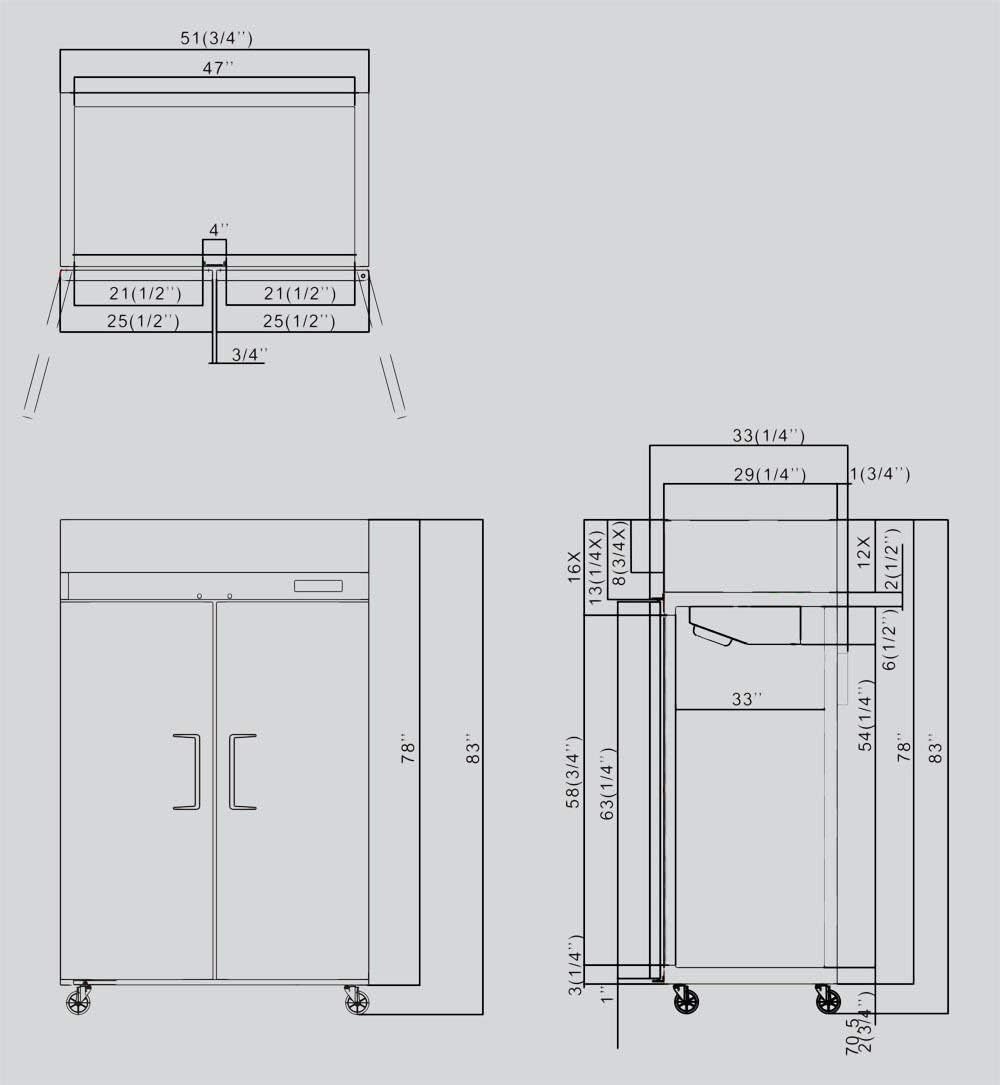
Image: Technical drawing showing the detailed dimensions of the 52" Double Door Commercial Freezer, including height, width, and depth measurements.
Electrical Connection
Connect the freezer to a standard US 110V electrical outlet. Ensure the outlet is properly grounded and dedicated to the appliance to prevent overloading circuits.
Initial Power-Up
After positioning and connecting power, allow the unit to stabilize for a few hours before loading with product. The digital controller will display the internal temperature, which can be adjusted to the desired setting between -10°F and 0°F (-22°C and -18°C).
Operating Instructions
Temperature Control
The freezer is equipped with a digital controller for precise temperature management. Refer to the controller's specific instructions for setting the desired temperature and defrost frequency. The recommended operating range is -10°F to 0°F (-22°C to -18°C).
Shelving Adjustment
The freezer includes 6 adjustable, heavy-duty PVC coated shelves. These shelves can be repositioned to accommodate various product sizes and quantities. To adjust, lift the shelf slightly and slide the shelf clips to the desired height along the interior rails. Ensure all clips are securely fastened before placing items on the shelf.
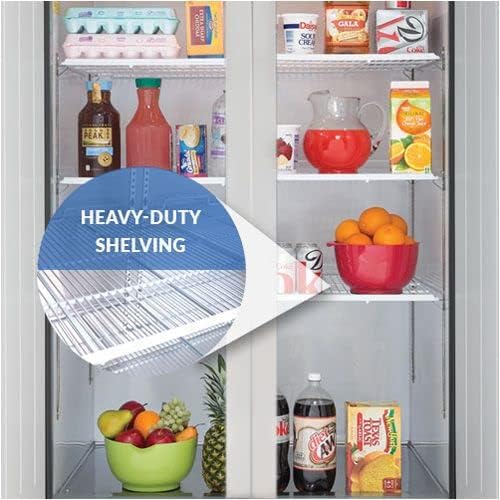
Image: Interior view of the freezer showing the heavy-duty PVC coated shelves filled with various food items, highlighting their capacity.
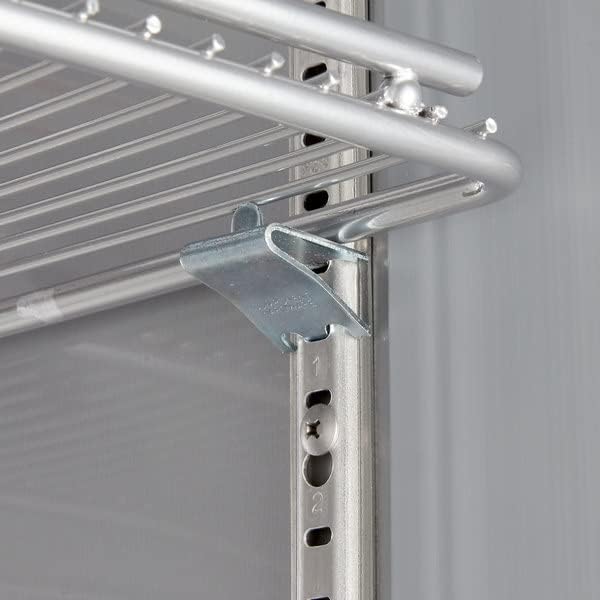
Image: Close-up view of a metal shelf clip securely holding a PVC coated shelf in place within the freezer, demonstrating the adjustment mechanism.
Self-Closing Doors
The doors are designed to self-close, ensuring optimal temperature retention and energy efficiency. Always ensure the doors are fully closed after accessing the freezer.
Maintenance
Cleaning the Interior
Regularly clean the white painted aluminum interior with a mild detergent and warm water. Avoid abrasive cleaners or sharp objects that could damage the surface. Ensure the unit is unplugged before cleaning.
Condenser Coil Cleaning
The condenser coil is easily accessible for cleaning and service. A clean condenser coil is crucial for efficient operation and longevity of the unit. Periodically clean the coil using a brush or vacuum cleaner to remove dust and debris. Frequency of cleaning depends on the operating environment.

Image: Diagram illustrating the built-in fan system within the freezer, showing how cold air is evenly distributed throughout the interior for consistent temperature.
Exterior Care
Clean the stainless steel exterior with a soft cloth and a non-abrasive stainless steel cleaner. Wipe in the direction of the grain to prevent streaks.
Troubleshooting
The digital controller is designed to display error codes to assist in diagnosing service issues. If an error code appears, consult the specific error code guide (usually provided with the controller documentation) or contact customer support.
- Unit not cooling: Check power supply, ensure doors are fully closed, and condenser coil is clean.
- Excessive noise: Verify unit is level, check for obstructions around the fan or compressor.
- Temperature fluctuations: Ensure proper door seals, check for excessive door openings, or consult error codes.
For issues not resolved by basic troubleshooting, contact a certified technician or MCP Supply customer service.
Specifications
| Feature | Detail |
|---|---|
| Brand | MCP Supply |
| Model Number | CT02 |
| Capacity | 47 Cubic Feet |
| Dimensions (D x W x H) | 32.2" x 52" x 82.5" |
| Item Weight | 410 pounds |
| Voltage | 110 Volts |
| Temperature Range | -10°F to 0°F (-22°C to -18°C) |
| Shelves | 6, Adjustable PVC Coated |
| Door Material | Stainless Steel |
| Certification | ETL, NSF Certified |
Warranty and Support
For warranty information and technical support, please refer to the documentation included with your purchase or contact MCP Supply customer service directly. Ensure you have your model number (CT02) and purchase date available when contacting support.
Online resources and FAQs may also be available on the manufacturer's website.