
Caffitaly S07
Caffitaly S07 White/Grey Coffee Capsule Machine
User Manual
Introduction
Welcome to the user manual for your new Caffitaly S07 White/Grey Coffee Capsule Machine. This machine is designed for ease of use, allowing you to prepare perfect coffees and delicious hot drinks with a single, simple action. Its minimalist design integrates seamlessly into any kitchen environment. This manual provides essential information on setting up, operating, maintaining, and troubleshooting your machine to ensure optimal performance and longevity.

Figure 1: Front view of the Caffitaly S07 coffee machine, showcasing its compact and minimalist design with control buttons at the top.
Setup
- Unboxing: Carefully remove the coffee machine and all packaging materials from the box. Retain the packaging for future transport or storage.
- Initial Cleaning: Before first use, wipe the exterior of the machine with a damp cloth. Remove the water tank, drip tray, and capsule drawer and wash them with warm, soapy water. Rinse thoroughly and dry.
- Fill Water Tank: Locate the removable water tank at the back of the machine. Fill it with fresh, cold drinking water up to the 'MAX' level indicator. Place the water tank securely back into its position.
- First Use (Priming): Plug the machine into a grounded electrical outlet. Place a cup under the dispenser. Without inserting a capsule, press any beverage button to run a cycle of hot water through the system. This primes the pump and cleans the internal components. Repeat this process 2-3 times.

Figure 2: Side view of the Caffitaly S07 coffee machine, showing the transparent 1-liter water tank at the rear.
Operating
- Power On: Ensure the machine is plugged in and the water tank is filled. Press the power button (if available, otherwise the machine powers on when a beverage button is pressed after plugging in). The indicator lights will illuminate.
- Insert Capsule: Lift the lever to open the capsule compartment. Insert a Caffitaly compatible capsule into the slot. Close the lever firmly until it clicks into place.
- Place Cup: Position your desired cup on the drip tray directly under the coffee dispenser.
- Select Beverage: Press one of the beverage buttons corresponding to your desired drink size or type. The machine features automatic portioning, dispensing the correct amount of liquid for the selected button.
- Brewing: The machine will begin brewing. Once the brewing cycle is complete, the flow will stop automatically.
- Remove Capsule: Lift the lever again to automatically eject the used capsule into the internal capsule drawer. Close the lever.
- Empty Capsule Drawer: Regularly empty the used capsule drawer to prevent overflow. The machine has a larger capsule drawer capacity.
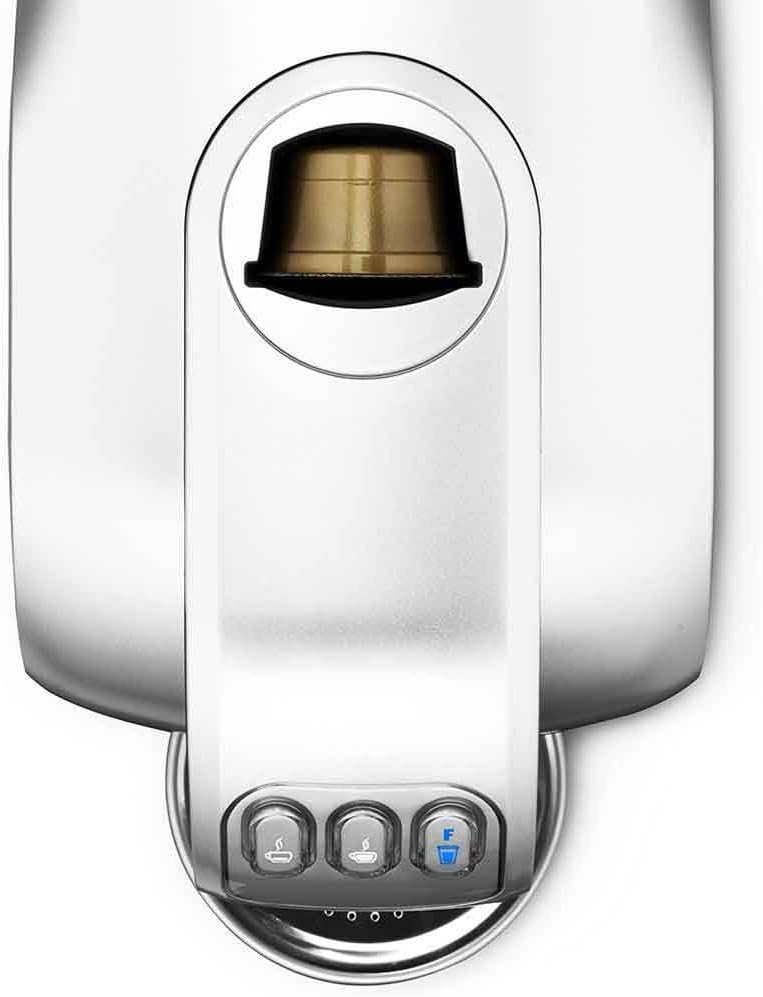
Figure 3: Top-down view of the Caffitaly S07, highlighting the capsule insertion area and the three beverage selection buttons.

Figure 4: Side view of the Caffitaly S07, illustrating the integrated capsule collection drawer where used capsules are stored.
Maintenance
- Daily Cleaning: After each use, remove and empty the drip tray and used capsule drawer. Wash them with warm, soapy water and rinse thoroughly. Wipe the coffee dispenser area with a damp cloth.
- Water Tank Cleaning: Clean the water tank weekly with warm, soapy water. Rinse well to remove any soap residue.
- Descaling: The Caffitaly S07 features automatic descaling. The machine will indicate when descaling is required (refer to the machine's indicator lights for specific signals). Follow the instructions provided with your descaling solution or refer to the full descaling procedure in the comprehensive manual available on the Caffitaly website. Regular descaling is crucial for maintaining machine performance and coffee quality.
Troubleshooting
| Problem | Possible Cause | Solution |
|---|---|---|
| Machine does not turn on. | Not plugged in; power outlet issue. | Ensure power cord is securely plugged into a working outlet. |
| No coffee dispenses. | Water tank empty; air bubble in system; machine needs descaling. | Fill water tank. Run a priming cycle without a capsule. Perform descaling if indicated. |
| Coffee is not hot enough. | Machine not preheated; electronic temperature control issue. | Allow machine to fully preheat. If problem persists, contact support. |
| Capsule not piercing. | Capsule not inserted correctly; lever not fully closed. | Ensure capsule is correctly seated and lever is firmly closed. |
Specifications
| Feature | Detail |
|---|---|
| Brand | Caffitaly |
| Model Number | S07 |
| Colour | White |
| Product Dimensions | 33.4 x 15.5 x 26.5 cm |
| Item Weight | 5.69 kg |
| Water Tank Capacity | 1 Liters |
| Power/Wattage | 950 watts |
| Voltage | 110 Volts |
| Material | Stainless Steel, Acrylonitrile Butadiene Styrene |
| Special Features | Programmable, Automatic Portioning, Automatic Descaling, Electronic Temperature Control |
Warranty and Support
For warranty information and technical support, please refer to the documentation included with your purchase or visit the official Caffitaly website. You can also contact Caffitaly customer service directly for assistance with any issues not covered in this manual.
Ask a question about this manual
Ask about setup, troubleshooting, compatibility, parts, safety, or missing instructions. Manuals+ will review the question and use this page’s manual context to help answer it.