
DOKIO FFSP-110M
DOKIO 100W 12V Foldable Monocrystalline Solar Panel Charger User Manual
Model: FFSP-110M
Brand: DOKIO
Product Overview
The DOKIO 100W 12V Foldable Monocrystalline Solar Panel Charger is a portable and efficient power solution designed for various outdoor and mobile applications. It features high-efficiency monocrystalline silicon solar cells, providing excellent performance even in low-light conditions. The panel is lightweight, easy to transport, and comes with a 10A 12V solar controller and necessary cables for immediate use.

Image: The DOKIO 100W foldable solar panel shown with its accompanying 10A controller, various connection cables, and a carrying bag.
- High Efficiency: Equipped with high-efficiency monocrystalline silicon solar cells, offering 1.2 times higher electricity production efficiency compared to traditional panels.
- Portable Design: Features a portable foldable pocket design, making it lightweight and easy to carry. The thickness is only 6 millimeters.
- Integrated Controller: Includes a 10A 12V solar controller and alligator clip cable for direct connection.
- Durable and Safe: Designed with high light transmittance, ensuring safety and reliability without fire or explosion risks.
- Versatile Application: Ideal for golf carts, yachts, boats, caravans, electric cars, travel tourism, trucks, rooftops, camping, portable generator kits, and more, providing power for 12V batteries.
Setup and Connection
The DOKIO 100W solar panel offers two primary methods for charging, catering to different power needs: direct charging for 12V batteries and connection to power stations.
1. Charging a 12V Battery
This method is suitable for charging various 12V battery types, including Lead-acid, Lithium, AGM, LiFePO4, and those found in cars or RVs. The included 10A controller manages the charging process efficiently.
- Connect the alligator clips to your 12V battery terminals (positive to positive, negative to negative).
- Connect the alligator clip cable to the 10A solar charge controller.
- Connect the SAE connector from the solar panel to the controller.
- Ensure all connections are secure. The controller's LCD screen will display charging status.

Image: A visual guide illustrating the two primary connection methods for the DOKIO solar panel: directly to a 12V battery via the controller, and to a power station using various DC adapters.
2. Charging a Power Station
For charging portable power stations, the panel comes with various DC adapters to ensure compatibility with different input ports.
- Connect the SAE connector from the solar panel to the appropriate adapter cable (e.g., XT60).
- Attach the correct DC adapter tip (8mm, 6.4x4mm, 5.5x2.5mm, 5.5x2.1mm, 3.5x1.35mm) to the adapter cable.
- Plug the DC adapter into your power station's input port.
- Position the solar panel in direct sunlight.
The panel's lightweight and foldable design (approximately 2.4kg / 5lb) makes it highly portable for various applications.

Image: The DOKIO solar panel in its folded state, highlighting its compact dimensions (48cm x 66cm x 1.2cm) and light weight (2.4kg), emphasizing its portability.
Operating Instructions
To maximize the charging efficiency of your DOKIO solar panel, proper placement and angle adjustment are crucial.
Optimal Panel Positioning
The power output of a solar panel is directly related to the amount of direct sunlight it receives. Adjusting the angle of the panel throughout the day can significantly increase its current output.
- Morning (9:00 am): Angle the panel to face the rising sun.
- Noon (12:00 pm): Position the panel directly towards the overhead sun for maximum direct exposure.
- Afternoon (3:00 pm): Adjust the panel to face the setting sun.
Always ensure the panel is free from shadows from trees, buildings, or other obstructions, as even partial shading can drastically reduce efficiency.

Image: A visual representation demonstrating how to adjust the solar panel's angle at different times of the day (morning, noon, afternoon) to optimize sunlight absorption and maximize current output.
Typical Usage Scenarios
The DOKIO 100W solar panel is designed for portability and versatility, making it suitable for a wide range of outdoor and mobile power needs.

Image: A collage showcasing the DOKIO solar panel in practical use across different environments, including camping, RV travel, and marine applications, highlighting its adaptability.
- Camping: Powering lights, small appliances, and charging devices at your campsite.
- RV/Caravan: Maintaining charge on leisure batteries for extended off-grid living.
- Boating: Providing auxiliary power for marine electronics and battery charging on yachts and boats.
- Emergency Backup: A reliable power source during outages or in remote locations.
Maintenance and Care
Proper maintenance ensures the longevity and optimal performance of your DOKIO solar panel.
- Cleaning: Regularly wipe the surface of the solar panel with a soft, damp cloth to remove dust, dirt, and debris. Avoid abrasive cleaners or harsh chemicals that could damage the ETFE coating.
- Water Resistance: The panel features an IP65 waterproof rating, meaning it is protected against dust ingress and low-pressure water jets from any direction. While it can withstand rain, avoid submerging the panel in water.
- Storage: When not in use, fold the panel and store it in its carrying bag in a cool, dry place away from direct sunlight and extreme temperatures.
- Connection Check: Periodically inspect all cables and connectors for any signs of wear, corrosion, or damage. Ensure connections are secure before each use.
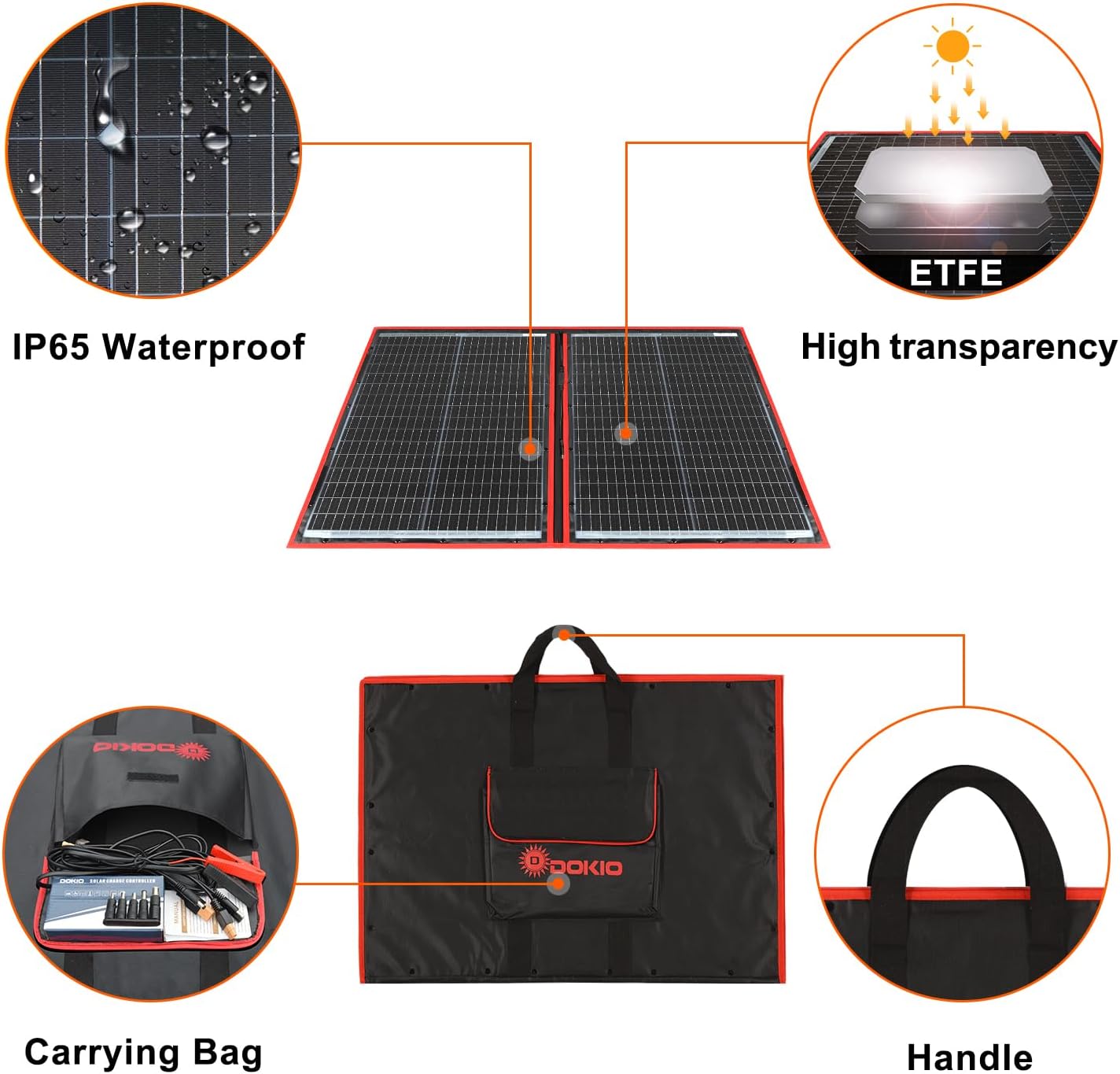
Image: Close-up views of the DOKIO solar panel emphasizing its IP65 waterproof rating and the high-transparency ETFE protective layer, along with details of the carrying bag and handle.
Troubleshooting
If you encounter issues with your DOKIO solar panel, consider the following common troubleshooting steps:
- No Power Output:
- Ensure the panel is in direct sunlight and not shaded.
- Check all cable connections for looseness or damage.
- Verify the solar controller is properly connected and functioning (check its display).
- Confirm the battery or power station is correctly connected and not fully charged (some devices stop drawing power when full).
- Low Power Output:
- Adjust the panel's angle to face the sun directly.
- Clean the panel surface to remove any dirt or dust obstructing sunlight.
- Check for partial shading from nearby objects.
- Consider weather conditions; cloudy days will result in lower output.
- Controller Not Displaying:
- Ensure the controller is correctly connected to both the battery and the solar panel.
- Check the battery voltage; if the battery is completely drained, the controller might not power on.
For persistent issues, refer to the detailed English manual included in the packing list or contact DOKIO customer support.
Specifications
Below are the key technical specifications for the DOKIO 100W Foldable Monocrystalline Solar Panel.
| Feature | Specification |
|---|---|
| Manufacturer | DOKIO |
| Model Number | FFSP-110M |
| Product Dimensions (Folded) | 53.34 x 50.8 x 2.54 cm (21 x 20 x 1 inches) |
| Product Dimensions (Unfolded) | 700 x 500 x 12 mm (approx. 27.5 x 19.7 x 0.5 inches) |
| Weight | 2.7 Kilograms (approx. 5.95 lbs) |
| Material | Monocrystalline Silicon |
| Power | 100 Watts |
| Amperage | 6.1 Amps |
| Maximum Power Voltage (Vmp) | 18.00 V |
| Open Circuit Voltage (Voc) | 22.50 V |
| Short-Circuit Current (Isc) | 6.35 A |
| Maximum Power Current (Imp) | 6.12 A |
| Special Features | High efficiency, integrated solar regulator |
| Included Components | Controller, Cable, Storage Bag, various adapter cables |
| IP Rating | IP65 Waterproof |
The packing list includes the 100W folding solar panel, DOKIO 12V 10A controller, 3M cable, 1M cable with crocodile clip, JY60 short connector, and an English manual.
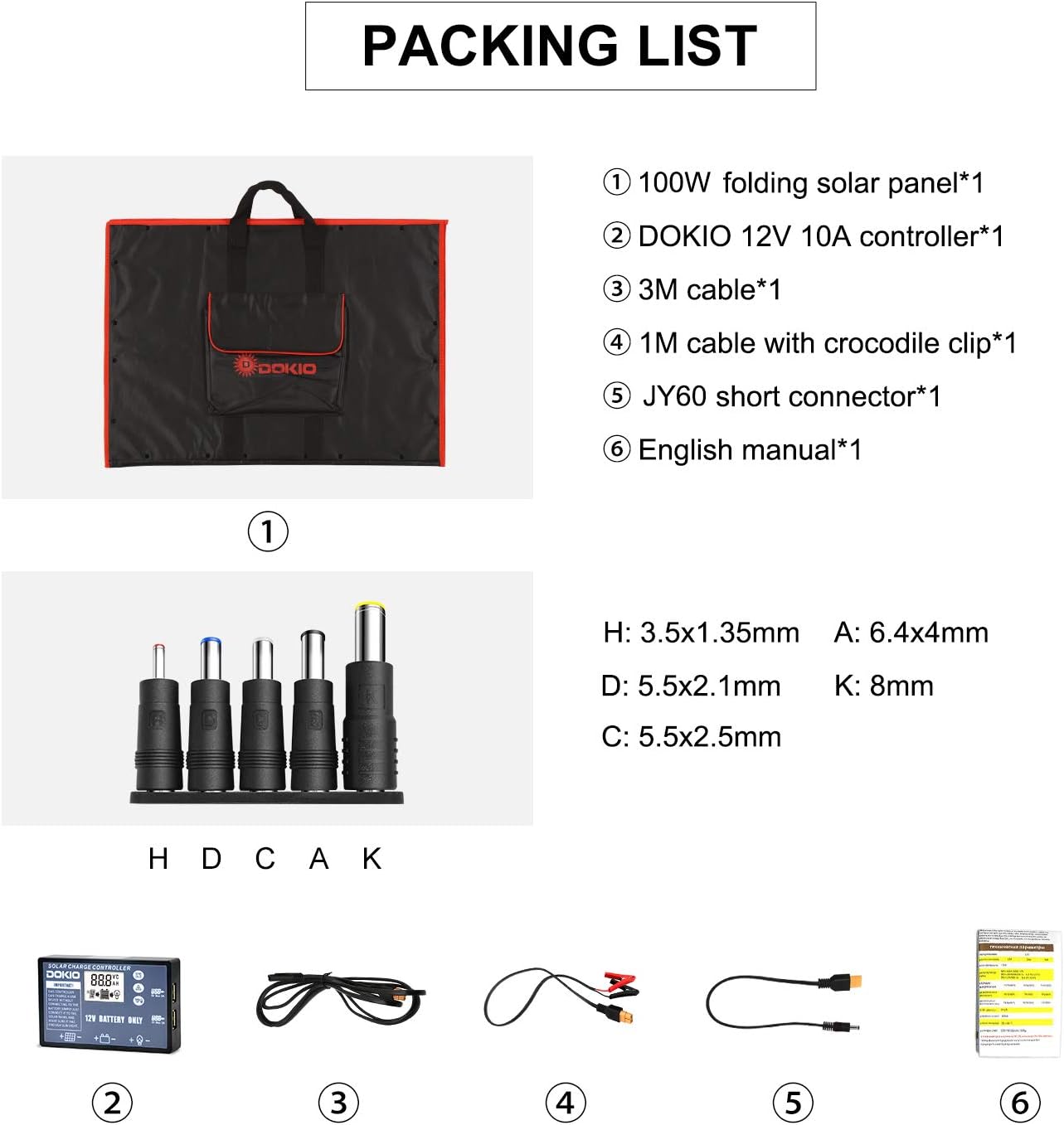
Image: A detailed view of the DOKIO 100W folding solar panel's packing list, showing all included components such as the panel, controller, various cables, and adapters.
Warranty and Support
For information regarding the product warranty, please refer to the warranty card included with your purchase or visit the official DOKIO website. Warranty terms and conditions may vary by region.
If you require technical assistance, have questions about product operation, or need to report an issue, please contact DOKIO customer support through their official channels. Contact information can typically be found on the product packaging or the DOKIO brand store online.
You can visit the DOKIO brand store for more information: DOKIO Official Store