
Introduction
This manual provides essential instructions for the proper installation, operation, and maintenance of the Cornell Dubilier 603-1014V SPDT 2A 24VDC PC Mount Relay. Please read this manual thoroughly before using the product to ensure safe and efficient performance.
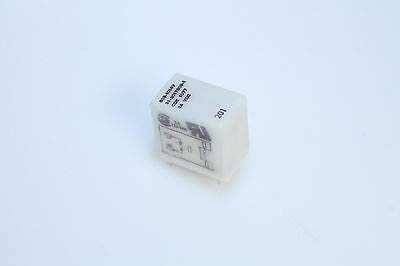
Figure 1: The Cornell Dubilier 603-1014V SPDT 2A 24VDC PC Mount Relay. This image shows the compact, rectangular white casing of the relay, with visible markings indicating its model number and electrical specifications. The pins for PC board mounting are located on the underside.
Safety Information
Always observe the following safety precautions:
- Ensure power is disconnected before installation or maintenance.
- Installation should be performed by qualified personnel only.
- Do not exceed the specified voltage and current ratings.
- Protect the relay from moisture, dust, and extreme temperatures.
Setup and Installation
- Preparation: Ensure the circuit board is clean and free of debris. Verify that the power supply is off.
- Pin Orientation: Identify the correct pin orientation for the relay on the printed circuit board (PCB). Refer to the circuit diagram of your application.
- Mounting: Carefully insert the relay pins into the corresponding holes on the PCB. Ensure all pins are properly seated.
- Soldering: Solder the relay pins to the PCB using appropriate soldering techniques. Avoid excessive heat to prevent damage to the relay or PCB.
- Connection Verification: After soldering, visually inspect all connections to ensure they are secure and free from short circuits.
Operating Instructions
The Cornell Dubilier 603-1014V relay operates automatically based on the control signal applied to its coil. It is a Single Pole Double Throw (SPDT) relay, meaning it has one common contact that can switch between two other contacts (normally open and normally closed).
- Coil Voltage: Apply 24VDC to the relay coil terminals. The relay will switch its contacts when the coil is energized.
- Contact Switching: When the coil is energized, the common contact will switch from the normally closed (NC) position to the normally open (NO) position. When the coil is de-energized, the common contact will return to the NC position.
- Load Connection: Connect the load circuit to the appropriate contacts (Common, NO, or NC) as required by your application. Ensure the load current does not exceed 2 Amps.
Maintenance
The 603-1014V relay is designed for reliable, long-term operation with minimal maintenance. However, periodic checks can help ensure optimal performance.
- Visual Inspection: Periodically inspect the relay and its connections for any signs of damage, corrosion, or loose solder joints.
- Environmental Conditions: Ensure the operating environment remains within the specified temperature and humidity ranges to prevent premature wear.
- Cleaning: If necessary, gently clean the exterior of the relay with a dry, soft cloth. Do not use solvents or abrasive cleaners.
Troubleshooting
| Problem | Possible Cause | Solution |
|---|---|---|
| Relay does not switch | No coil voltage; Incorrect coil voltage; Damaged coil; Loose connections. | Verify 24VDC is applied to the coil; Check coil resistance; Inspect connections; Replace relay if coil is damaged. |
| Intermittent switching | Unstable coil voltage; Loose connections; Contaminated contacts. | Ensure stable 24VDC supply; Re-solder connections; Replace relay. |
| Load not receiving power | Incorrect wiring; Damaged contacts; Overload condition. | Check load circuit wiring; Verify load current is within 2A; Replace relay if contacts are damaged. |
Specifications
| Feature | Specification |
|---|---|
| Model Number | 603-1014V |
| Brand | Cornell Dubilier |
| Contact Type | SPDT (Single Pole Double Throw) |
| Coil Voltage | 24 VDC |
| Coil Resistance | 1014 Ohms |
| Contact Current Rating | 2 Amps |
| Maximum Switching Current | 2 Amps |
| Maximum Switching Voltage | 24 Volts |
| Operation Mode | Automatic |
| Mounting Type | PC Mount |
| ASIN | B07YK3SD6Z |
| Date First Available | September 29, 2019 |
Warranty and Support
For warranty information or technical support regarding your Cornell Dubilier 603-1014V relay, please refer to the official Cornell Dubilier website or contact their customer service department. Keep your purchase receipt for warranty claims.
Note: This manual is for informational purposes only. Specifications are subject to change without notice. Always refer to the latest product documentation from the manufacturer.