
1. Introduction
This manual provides detailed instructions for the installation, operation, and maintenance of your ZOSI 16-Channel H.265+ Hybrid DVR Recorder. This DVR supports 16 channels and is compatible with Analog, AHD, TVI, and CVI camera types, offering a versatile solution for your security surveillance needs. The system includes a pre-installed 2TB hard disk drive for immediate recording capabilities.
2. Package Contents
Verify that all items listed below are included in your package:
- 1 x 16CH 1080p DVR
- 1 x 12V/3A Power Supply
- 1 x Mouse
- 1 x 2TB Hard Drive (pre-installed)
- 1 x Quick Start Guide

Image: Contents of the ZOSI DVR package, showing the DVR unit, USB mouse, power supply, and a quick start guide.
3. Product Overview
The ZOSI DVR is designed for efficient and reliable video surveillance. Familiarize yourself with the front and rear panels for proper connection and operation.

Image: Front and rear views of the ZOSI 16-Channel DVR. The front panel features status indicators and a USB port. The rear panel includes video input ports (1-16), audio input/output, HDMI, VGA, Ethernet, USB 2.0, and power input.
3.1. Supported Camera Types
This DVR is a 4-in-1 hybrid system, supporting various camera technologies:
- Analog (CVBS): Standard definition cameras.
- AHD (Analog High Definition): High-definition analog cameras.
- TVI (Transport Video Interface): High-definition analog cameras over coaxial cable.
- CVI (Composite Video Interface): High-definition analog cameras over coaxial cable.
It is important to note that this DVR is not compatible with WiFi cameras, IP cameras, or PoE cameras.

Image: Illustration demonstrating the compatibility of the ZOSI DVR with TVI, AHD, CVI, and CVBS camera types, highlighting its 4-in-1 capability.

Image: A detailed chart indicating that the ZOSI DVR supports AHD, CVI, CVBS, and TVI cameras, but explicitly states it is not compatible with SDI, PoE, or IP cameras.
4. Setup
Follow these steps for initial setup of your ZOSI DVR system:
- Connect Cameras: Connect your compatible security cameras to the video input ports on the rear of the DVR.
- Connect Monitor: Connect a monitor to the DVR using either the HDMI or VGA port.
- Connect Mouse: Plug the included USB mouse into a USB port on the DVR.
- Connect Network: Connect an Ethernet cable from your router to the DVR's LAN port for remote access features.
- Power On: Connect the 12V/3A power supply to the DVR and plug it into a power outlet.
- Initial Configuration: Follow the on-screen prompts to complete the initial setup, including setting up a password and configuring network settings.

Image: A visual guide illustrating the simple three-step setup process: 1. Connect ZOSI CCTV System, 2. Download the free ZOSI Smart App, and 3. Enjoy Live View on your devices.
4.1. Hard Drive Installation (if not pre-installed or for replacement)
If your DVR did not come with a hard drive or if you need to replace it, follow these instructions. Always ensure the DVR is powered off before performing any hardware changes.
Video: This video demonstrates the process of installing a hard drive into the ZOSI DVR. It shows how to open the casing, connect the power and data cables to the hard drive, secure the hard drive, and reassemble the unit. Remember to format the hard drive after installation for proper recording.
5. Operation
5.1. H.265+ Video Compression
The ZOSI DVR utilizes advanced H.265+ video compression technology. This technology significantly improves the compression ratio compared to H.264, saving approximately 80% of storage space while maintaining high image quality. This results in more efficient storage resource usage and a smoother viewing experience.

Image: A comparison graphic illustrating the benefits of H.265+ compression over H.264, showing reduced storage space and bandwidth usage, and improved loading speed.
5.2. Local and Remote Access
You can access and control your security system in two ways:
- Local Access: Connect the DVR directly to a monitor for local viewing and control without an internet connection.
- Remote Access: Use the free ZOSI Smart mobile application (for smartphones and tablets) or the ZOSI Client software (for PC) to view and control your system remotely from anywhere with an internet connection. You can also playback recorded footage by searching specific dates and times.

Image: A user viewing live and recorded security footage from their ZOSI system across multiple devices, including a smartphone, laptop, and desktop computer, demonstrating remote access capabilities.
5.3. Motion Detection and Alerts
The DVR features advanced motion detection capabilities:
- Customizable Detection Areas: Define specific motion detection zones for each camera to minimize false alerts from non-critical movements like tree branches or small animals.
- Privacy Masking: Block out selected areas within the camera's view to ensure privacy where needed.
- Instant Notifications: Receive immediate notifications and email alerts with screenshots directly to your phone when motion is detected.

Image: A visual representation of the smart human and vehicle detection feature, showing a person and a car highlighted within the camera's view, with options for email and app push notifications.
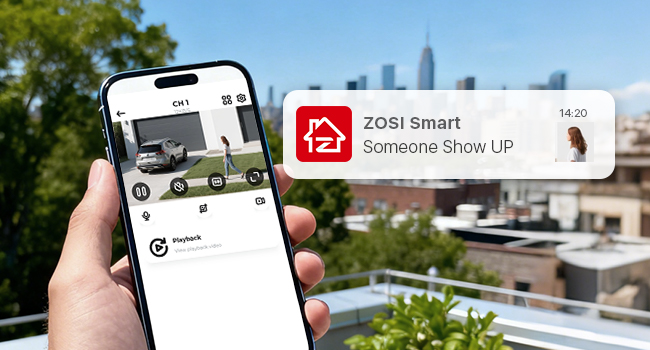
Image: A smartphone screen displaying a ZOSI Smart App notification, indicating that 'Someone Show UP' with a small preview image, demonstrating instant alerts.
5.4. Customizable Record Modes
The ZOSI DVR offers four recording modes to suit your preferences:
- Continuous Recording: Records footage constantly.
- Scheduled Recording: Records only during specified time periods.
- Motion Detection Recording: Records only when motion is detected.
- Recycle Recording: Overwrites the oldest footage when the hard drive is full (ensure this function is enabled).
You can customize the recording mode for each camera individually. Recorded files can be downloaded for USB backup.

Image: A timeline interface showing recorded events at specific times, with a focus on smart recording and playback features, including customizable motion detection areas.
6. Maintenance
To ensure optimal performance and longevity of your ZOSI DVR, regular maintenance is recommended:
- Hard Drive Management: Regularly check the hard drive status. If replacing the hard drive, ensure it is formatted after installation for proper recording.
- Software Updates: Periodically check for firmware updates on the ZOSI official website to ensure your system has the latest features and security patches.
- Cleaning: Keep the DVR unit clean and free from dust to prevent overheating. Use a soft, dry cloth for cleaning.
7. Troubleshooting
If you encounter issues with your ZOSI DVR, consider the following common troubleshooting steps:
- No Video Output: Check all cable connections (power, HDMI/VGA, camera cables). Ensure the monitor is set to the correct input source.
- No Recording: Verify that the hard drive is correctly installed and formatted. Check recording schedules and motion detection settings. Ensure 'Recycle Record' is enabled if you want continuous overwriting.
- Remote Access Issues: Confirm the DVR is connected to the internet. Check network settings on the DVR and your router. Ensure the ZOSI Smart App or Client software is updated to the latest version.
- False Motion Alerts: Adjust the sensitivity of motion detection and refine the detection areas for each camera.
- Password Reset: If you forget your password, refer to the ZOSI support resources for password recovery procedures.
For further assistance, please contact ZOSI customer support.
8. Specifications
| Feature | Specification |
|---|---|
| Model Number | 1AR-16CK20-US |
| Video Compression | H.265+ |
| Channels | 16 |
| Supported Camera Types | Analog, AHD, TVI, CVI (4-in-1 Hybrid) |
| Video Resolution | 1080P Lite |
| Hard Disk Size | 2 TB (Included) |
| Memory Storage Capacity | 2000 GB |
| Connectivity Technology | Ethernet |
| Compatible Devices | Camera |
| Package Dimensions | 17.56 x 11.42 x 4.17 inches |
| Item Weight | 5.02 pounds |
9. Warranty and Support
ZOSI is committed to providing reliable products and excellent customer service.
- Return Policy: Enjoy a 30-day hassle-free return policy.
- Technical Support: Benefit from lifetime technical support for your product.
- Coverage: Your product is covered by a 2-year warranty.
For any inquiries or support, please visit the official ZOSI website or contact their customer service team.