
LIGHTEU LT-PLED-PL5
LIGHTEU® Milight Miboxer 40W RGBCCT LED Lighting Driver User Manual
Model: LT-PLED-PL5
1. Product Overview
The LIGHTEU® Milight Miboxer 40W RGBCCT LED Lighting Driver (Model: LT-PLED-PL5) is a power module designed for LED panels, ceiling lights, and indicator lights. It offers advanced control features including 16 million color options, adjustable color temperature, brightness, and saturation. This driver supports 2.4 GHz remote control and can be integrated with smartphone applications and voice control systems for enhanced usability.

Figure 1: Top view of the LIGHTEU Milight Miboxer 40W RGBCCT LED Lighting Driver, showing its compact design and labeling.
2. Key Features
- RGBCCT Control: Offers 16 million colors, adjustable color temperature, brightness, and saturation for versatile lighting.
- 2.4 GHz Remote Control: Compatible with Milight remotes (FUT088, FUT089, FUT092, B8, B4, T4) with a control distance of up to 30 meters.
- Smart Control Options: Can be controlled via a smartphone application (requires WiFi iBox2) and Amazon Alexa voice control (requires WiFi remote YT1).
- Auto-Transmitting Signal: Controllers can automatically transfer signals to each other, extending the effective transmission distance up to 30 meters per transfer.
- Synchronous Operation: Multiple lighting drivers can operate synchronously even if started at different times, ensuring consistent lighting across installations.
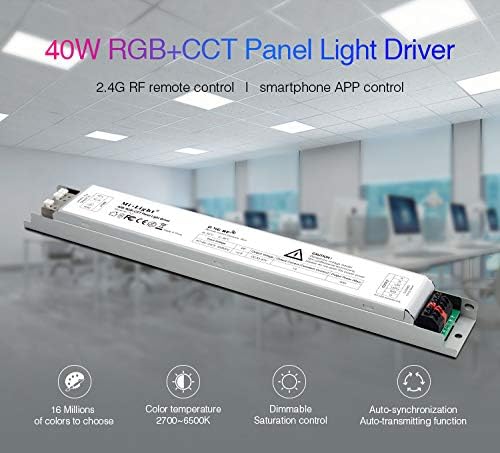
Figure 2: Visual representation of the driver's key features, such as extensive color options and synchronization capabilities.
3. Specifications
| Parameter | Value |
|---|---|
| Model Number | LT-PLED-PL5 |
| Input Voltage | AC180-240V, 50/60Hz |
| Output Voltage | DC30-40V |
| Output Current (Constant) | 1A |
| Output Power (Max) | 40W |
| Power Factor (PF) | > 0.9 |
| Controllable Channels | 5 channels |
| Remote Control Distance | 30m |
| Operating Ambient Temperature (ta) | 50°C |
| Case Temperature (tc) | 85°C |
| Manufacturer | LIGHTEU |
4. Safety Information
WARNING: Dangerous voltage inside! Non-professional technicians, please do not open this power cover.
- Ensure the power supply is disconnected before installation or maintenance.
- Only qualified personnel should perform installation and wiring.
- Do not expose the device to moisture or extreme temperatures.
- Verify correct voltage and current ratings before connecting to LED modules.
5. Installation
The LIGHTEU LED driver is designed for easy installation. Follow the diagram below for proper wiring connections.

Figure 3: Installation Diagram. This diagram illustrates the wiring connections for the LED driver.
Wiring Instructions:
- Input Connection (AC180-240V):
- Connect the Live (L) wire to the 'L' terminal.
- Connect the Neutral (N) wire to the 'N' terminal.
- Connect the Ground (GND) wire to the 'GND' terminal.
- Output Connection (DC30-40V to LED Panel):
- Connect the positive (+) output from the driver to the positive input of your LED panel.
- Connect the negative (-) output from the driver to the negative input of your LED panel.
- Ensure correct polarity to prevent damage to the LED panel.
After wiring, ensure all connections are secure before applying power.
6. Operating Instructions
The LIGHTEU LED driver offers multiple control methods for your convenience.
6.1. Remote Control Operation (2.4 GHz)
The driver is compatible with various Milight 2.4 GHz remote controls. Ensure your remote is paired with the driver according to the remote's specific instructions. The control distance is up to 30 meters.
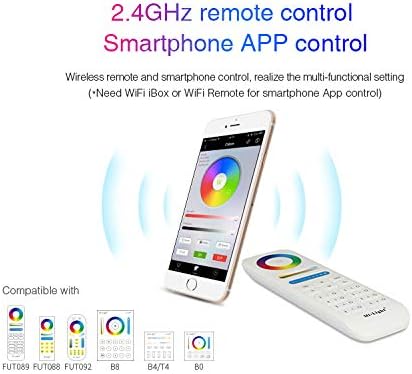
Figure 4: Compatible remote controls and smartphone app interface for controlling the LED driver.
Key Functions (depending on remote model):
- Color Selection: Access 16 million colors.
- Color Temperature Adjustment: Change white light from warm to cool (2700K-6500K).
- Brightness Control: Dim or brighten the light output.
- Saturation Control: Adjust the intensity of colors.
- Dynamic Modes: Activate pre-programmed lighting effects.

Figure 5: The driver allows for a wide range of color and white light adjustments.
6.2. Smartphone App Control
To control the driver via a smartphone app, a Milight WiFi iBox2 is required. Connect the iBox2 to your home network and follow the instructions provided with the iBox2 to link it with your LED driver. The app allows for comprehensive control over all lighting parameters.
6.3. Amazon Alexa Voice Control
For Amazon Alexa voice control, a Milight WiFi remote YT1 is required. Integrate the YT1 with your Alexa setup according to its instructions. Once configured, you can use voice commands to control your LED lighting.
6.4. Auto-Synchronization Function
The driver features an auto-synchronization function. If you have multiple drivers, they can work synchronously even if started at different times, provided they are controlled by the same remote, under the same dynamic mode, and within a 30m distance of each other (due to the auto-transmitting signal feature).

Figure 6: Auto-synchronization allows multiple drivers to operate cohesively.
7. Maintenance
The LIGHTEU LED driver requires minimal maintenance. Follow these guidelines to ensure optimal performance and longevity:
- Cleaning: Gently wipe the exterior with a dry, soft cloth. Do not use abrasive cleaners or solvents.
- Environment: Ensure the driver is installed in a well-ventilated area, away from direct sunlight, high humidity, and extreme temperatures.
- Connections: Periodically check all wiring connections to ensure they remain secure.
- No User-Serviceable Parts: Do not attempt to open the driver casing. There are no user-serviceable parts inside, and opening it poses a risk of electric shock and voids the warranty.
8. Troubleshooting
If you encounter issues with your LIGHTEU LED driver, refer to the following common problems and solutions:
| Problem | Possible Cause | Solution |
|---|---|---|
| LEDs do not light up. | No power supply; incorrect wiring; faulty LED panel. | Check power connection; verify wiring according to Section 5; test LED panel with another driver if possible. |
| Lights flicker or dim unexpectedly. | Unstable power supply; loose connections; incompatible LED panel. | Ensure stable power source; check all wiring connections; confirm LED panel specifications match driver output. |
| Remote control not responding. | Remote battery low; remote not paired; interference. | Replace remote battery; re-pair remote with driver (refer to remote manual); reduce interference sources. |
| Cannot control via smartphone app/voice. | Missing/faulty iBox2/YT1; incorrect network setup; app issues. | Ensure iBox2/YT1 is correctly installed and powered; verify network connection; restart app/device. |
If the problem persists after attempting these solutions, please contact LIGHTEU customer support.
9. Warranty and Support
This product comes with a standard warranty provided by LIGHTEU GmbH. For detailed warranty terms and conditions, please refer to the official invoice included with your purchase or contact LIGHTEU customer support directly.
Contact Information:
- Manufacturer: LIGHTEU
- Seller: LIGHTEU GMBH (as per Amazon listing)
- For support inquiries, please visit the official LIGHTEU website or contact their customer service department.
Please have your model number (LT-PLED-PL5) and purchase details ready when contacting support.
Ask a question about this manual
Ask about setup, troubleshooting, compatibility, parts, safety, or missing instructions. Manuals+ will review the question and use this page’s manual context to help answer it.