
MIUFLY EH15-128G
MIUFLY 1296P Police Body Camera User Manual
Model: EH15-128G
Introduction
This manual provides comprehensive instructions for the operation and maintenance of your MIUFLY 1296P Police Body Camera. Please read this manual thoroughly before using the device to ensure proper functionality and to maximize its lifespan. This body camera is designed for security professionals, offering high-definition video recording, night vision capabilities, and integrated GPS for reliable evidence collection.
Package Contents
- MIUFLY Body Camera (128GB Built-in Memory)
- Universal Metal Clip
- Epaulet Clip
- Charging Dock
- USB Cable
- User Manual
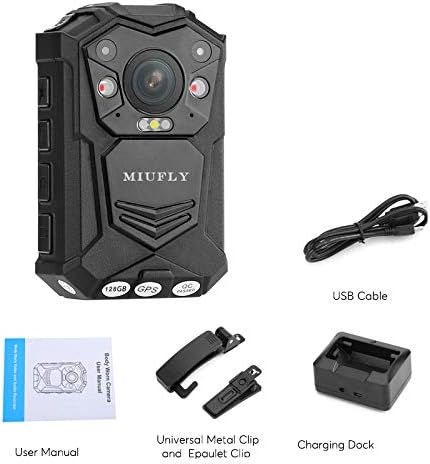
Image: Contents of the MIUFLY Body Camera package, including the camera, clips, charging dock, USB cable, and user manual.
Product Overview
Familiarize yourself with the various components of your MIUFLY Body Camera.
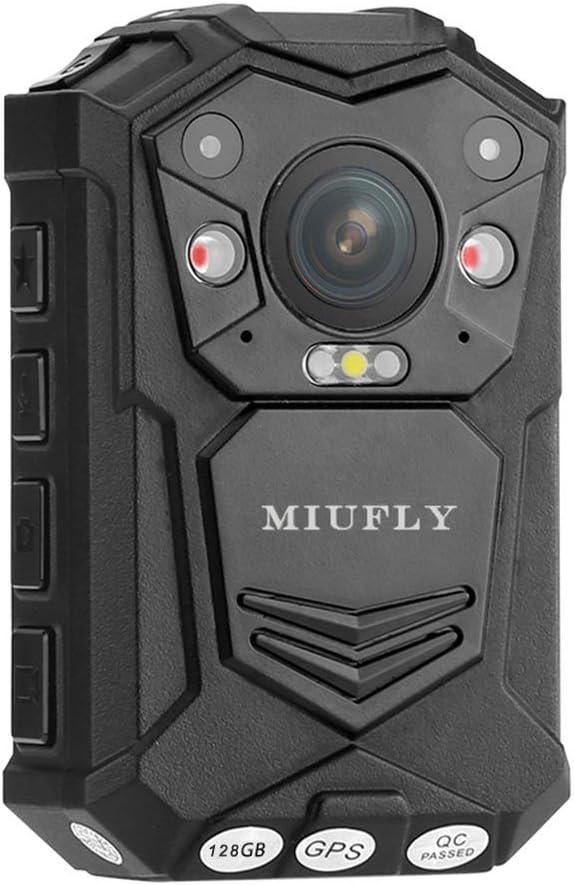
Image: Front view of the MIUFLY Body Camera, showing the main lens, infrared LEDs, and indicator lights. The brand name "MIUFLY" is visible, along with "128GB", "GPS", and "QC PASSED" labels at the bottom.

Image: Side view of the MIUFLY Body Camera, highlighting the USB port cover and control buttons.

Image: Back view of the MIUFLY Body Camera, showing the 2-inch LCD screen and the attached 360-degree rotatable clip for versatile mounting.

Image: The MIUFLY Body Camera placed securely in its dedicated charging dock.
Setup
1. Charging the Device
Before first use, fully charge the camera. Connect the USB cable to the charging dock, then connect the other end to a power adapter or computer USB port. Place the camera into the charging dock. The charging indicator light will show the charging status. A full charge can take several hours.
2. Power On/Off
To power on, press and hold the Power button for approximately 3 seconds until the screen lights up. To power off, press and hold the Power button until the device shuts down.
3. Initial Settings (Date, Time, Language)
Upon first power-on or after a factory reset, you may need to set the date, time, and preferred language. Navigate through the menu using the control buttons and confirm selections. Supported languages include English, Russian, Polish, Spanish, French, Japanese, and Portuguese.
4. Password Protection
For security, it is highly recommended to set a password for the device. This prevents unauthorized access to recorded files and device settings. Refer to the on-screen menu for password setup instructions.
Operating Instructions
1. Video Recording
Press the dedicated Record button to start video recording. Press it again to stop. The camera supports various resolutions including 2304x1296 30fps, 1920x1080 30fps, 1440x1080 30fps, 1280x720 30/60fps, and 848x480 30/60fps. Video encoding is H.264, and the format is MPEG4.
2. Photo Capture
While recording video, you can capture still photos. Press the Photo button to take a snapshot. Images are saved in JPEG format.
3. Audio Recording
The camera has a built-in microphone for audio recording. Audio is saved in WAV format. You can also record audio independently without video.
4. Night Vision
The camera is equipped with 2 infrared LEDs for night vision, providing clear images up to 10 meters, even with visible facial recognition. Activate night vision through the camera's menu settings.
5. GPS Functionality
The integrated GPS module records location data during video recording. This data can be viewed on a GPS player, allowing you to track the movement path associated with the footage.
6. Motion Detection
Enable motion detection to automatically start recording when movement is detected within the camera's field of view. This feature helps conserve battery life and storage space.
7. Car DVR Mode
The camera supports a Car DVR mode with automatic recording upon ignition. This allows the camera to function as a dashcam when mounted in a vehicle.
8. Playback
Use the 2-inch LCD screen to instantly review recorded videos and photos. Navigate through files using the playback controls.
9. Watermark
Recorded footage includes a watermark with user ID, timestamp, and date/time for authenticity and evidence integrity. The unique ID includes a 5-digit device ID and a 6-digit police ID.
Maintenance
1. Cleaning
Wipe the camera body and lens with a soft, dry cloth. Do not use harsh chemicals or abrasive cleaners. Ensure the USB port cover is securely closed to maintain IP65 waterproof rating.
2. Storage
Store the camera in a cool, dry place away from direct sunlight and extreme temperatures. For long-term storage, ensure the battery is partially charged (around 50%) to preserve battery health.
3. Battery Care
The built-in 3200mAh Li-polymer battery provides up to 10 hours of continuous use (with IR closed, screen saver open, and 848x480p 30fps video resolution). Avoid fully discharging the battery frequently. Recharge the camera when the battery level is low.
Troubleshooting
| Problem | Solution |
|---|---|
| Cannot turn on the camera. | Press and hold the power button for approximately 3 seconds to turn it on. Do not release the button even if you see the red and green lights flashing, continue holding until the screen lights up. Ensure the battery is charged. |
| Video playback is choppy or freezes. | Ensure your computer meets the minimum system requirements for playing high-resolution videos. Try using a different media player. Transfer files directly to your computer instead of playing from the camera. |
| GPS data not recording or inaccurate. | Ensure the camera has a clear view of the sky for GPS signal acquisition. Avoid using the camera indoors or in areas with heavy obstruction. Check GPS settings in the camera menu. |
| Camera is not recognized by computer. | Try a different USB cable or USB port. Ensure the camera is powered on and in the correct USB mode (e.g., Mass Storage). Restart both the camera and the computer. |
Specifications
| Feature | Detail |
|---|---|
| Brand | MIUFLY |
| Model | EH15-128G |
| Video Resolution | 2304x1296 30fps, 1920x1080 30fps, 1440x1080 30fps, 1280x720 30/60fps, 848x480 30/60fps |
| Video Encoding | H.264 |
| Video Format | MPEG4 |
| Image Format | JPEG |
| Audio Format | WAV |
| Storage | 128GB Built-in Memory |
| Display Screen | 2-inch LCD (240x320 resolution) |
| Lens Aperture | F2.0 |
| Viewing Angle | 140 degrees |
| Digital Zoom | 16x |
| Night Vision | 2 Infrared LEDs, up to 10 meters with visible face image |
| Battery | Built-in 3200mAh Li-polymer battery |
| Battery Life | Up to 10 hours (fully charged, IR closed, screen saver open, 848x480p 30fps) |
| Auxiliary Light | White flashlight |
| Waterproof Rating | IP65 |
| Unique ID | 5-digit device ID, 6-digit police ID |
| Security | Password Protection |
| Dimensions (L x W x H) | 9.4 x 3.05 x 5.59 cm |
| Weight | 159 Grams |
| Compatible Devices | Laptop |
| Connectivity Technology | Wired (USB) |
| Image Stabilization | Digital |
| Focus Type | Autofocus |
| Supported Languages | English, Russian, Polish, Spanish, French, Japanese, Portuguese |
Warranty and Support
MIUFLY products are designed for reliability and performance. For specific warranty details, please refer to the warranty card included with your product or visit the official MIUFLY website. If you encounter any issues not covered in this manual, or require technical assistance, please contact MIUFLY customer support through their official channels. Keep your purchase receipt as proof of purchase for warranty claims.
Related documentsEH15-128G

Ask a question about this manual
Ask about setup, troubleshooting, compatibility, parts, safety, or missing instructions. Manuals+ will review the question and use this page’s manual context to help answer it.