1. Product Overview
The UNION SAFE COMPANY 1.51 Cu. Ft. Electronic Lock Floor Safe is designed to provide robust security for your valuable possessions. Constructed from heavy gauge steel, this safe offers a secure storage solution for documents, jewelry, and firearms. It features a dual-entry locking mechanism, allowing access via a digital keypad or a traditional key override. The safe is equipped with tamper-proof hinges and heavy gauge bolts for enhanced security. For ease of placement, removable casters are included, and hardware is provided for optional permanent floor or wall mounting.
This safe is certified by the California Department of Justice as a firearm safety device, ensuring it meets specific standards for secure firearm storage.
2. Safety Information
- Always store the override keys in a secure location away from the safe and out of reach of unauthorized individuals.
- Do not store the override keys inside the safe.
- Keep the electronic code confidential and do not share it with unauthorized persons.
- Ensure the safe is securely mounted or placed to prevent tipping or unauthorized removal.
- This safe is designed for security and is not fire or water resistant unless explicitly stated.
- Do not store flammable materials, explosives, or other hazardous items inside the safe.
- Regularly check the battery level of the electronic lock to ensure proper function.
3. Package Contents
Please verify that all components are present before beginning installation or setup:
- 1 x Electronic Lock Floor Safe
- 2 x Override Keys
- Mounting Hardware (Bolts)
- Removable Casters (may be pre-installed or require attachment)
- Removable Shelf
- Instruction Manual
4. Setup
4.1 Battery Installation
- Locate the battery compartment on the back of the electronic keypad.
- Open the battery compartment cover.
- Insert the required batteries (typically AA, refer to the compartment for exact type and quantity), ensuring correct polarity (+/-).
- Close the battery compartment cover securely.
4.2 Setting Your Electronic Code
The electronic lock supports an 8-digit code. Follow these steps to set your personal code:
- With the safe door open, locate the red reset button inside the safe, usually on the back of the door near the lock mechanism.
- Press the red reset button. You will hear a beep, and the yellow light on the keypad will illuminate.
- Within 5 seconds, enter your desired 8-digit code on the keypad.
- Press the "E" or "#" button (depending on model, refer to keypad markings) to confirm your code. You will hear a confirmation beep.
- Test your new code with the door open to ensure it works correctly before closing the safe.
4.3 Attaching Removable Casters (if applicable)
If your safe did not come with casters pre-installed, attach them to the designated points on the bottom of the safe using the provided hardware. This will allow for easier repositioning of the safe.
5. Operating Instructions
5.1 Opening the Safe with Electronic Keypad
- Enter your 8-digit personal code on the keypad.
- If the code is correct, the green light will illuminate, and you will hear a beep.
- Within 5 seconds of entering the correct code, turn the knob or handle clockwise (or as indicated by the safe's design) to disengage the locking bolts.
- Pull the door open.
5.2 Opening the Safe with Override Key
In case of forgotten code, dead batteries, or electronic malfunction, the override key can be used:
- Locate the keyhole cover on the electronic keypad panel.
- Remove the cover to expose the keyhole.
- Insert the override key into the keyhole and turn it clockwise (or as indicated).
- While holding the key in the turned position, turn the main handle to open the safe door.
- Once open, remove the key and replace the keyhole cover.
5.3 Closing and Locking the Safe
- Close the safe door firmly.
- Turn the handle counter-clockwise (or as indicated) to engage the locking bolts.
- To fully secure the safe, turn the small knob on the electronic keypad (usually the one covering the keyhole) to the locked position. This ensures the electronic lock is engaged.
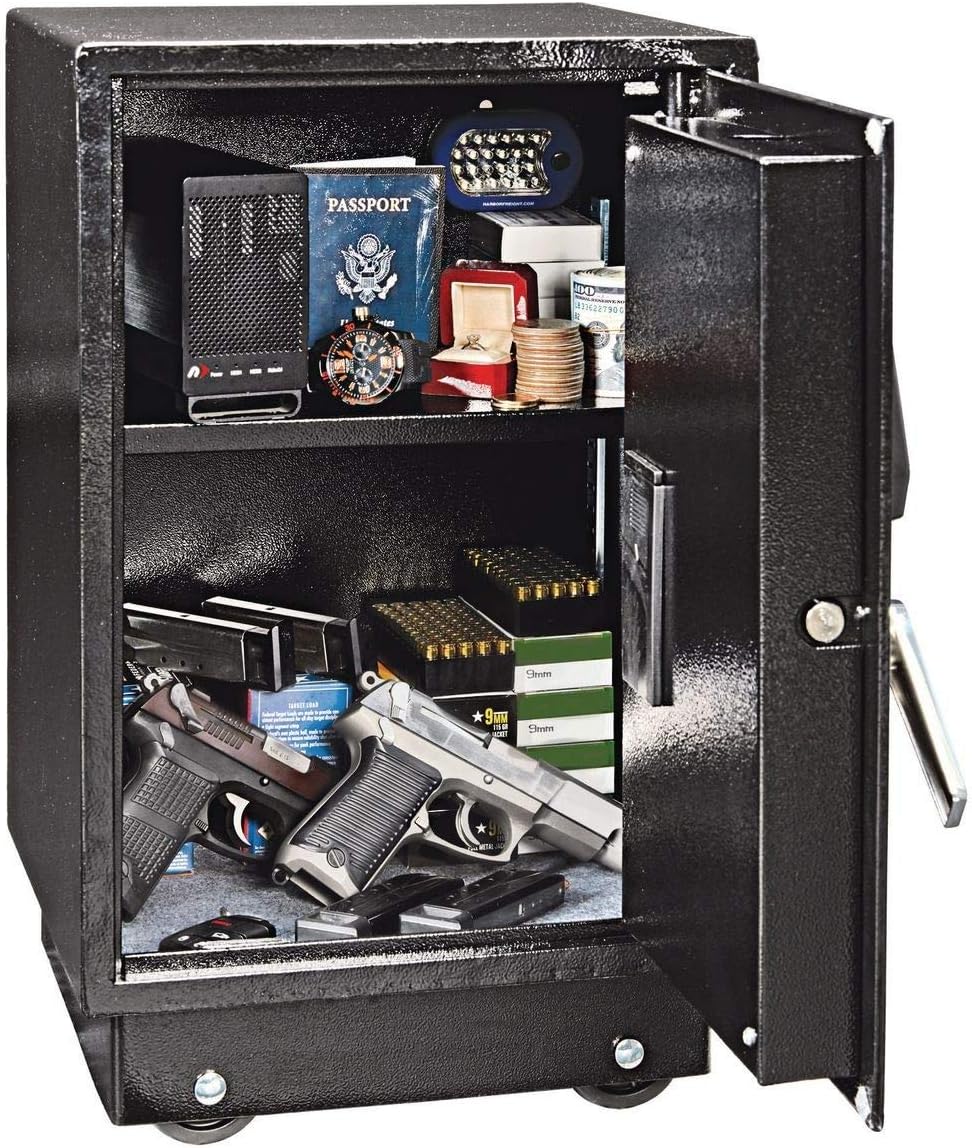
Figure 1: Interior view of the 1.51 Cu. Ft. Electronic Lock Floor Safe, showing a removable shelf and ample space for valuables and firearms.
6. Mounting Instructions
The safe can be optionally mounted to the floor or a wall for added security. Hardware is included for this purpose.
- Choose a suitable location for mounting, ensuring the surface is strong enough to support the safe's weight and contents.
- Open the safe door and locate the pre-drilled mounting holes on the back or bottom of the safe.
- Position the safe in the desired location and mark the drilling points through the mounting holes onto the floor or wall.
- Move the safe aside and drill pilot holes at the marked locations using an appropriate drill bit for your surface (wood, concrete, etc.).
- Reposition the safe over the pilot holes.
- Insert the provided mounting bolts through the safe's mounting holes and into the drilled holes.
- Tighten the bolts securely to anchor the safe in place. Do not overtighten.

Figure 2: Dimensions of the 1.51 Cu. Ft. Electronic Lock Floor Safe, illustrating its height, width, and depth.
7. Maintenance
- Battery Replacement: Replace batteries in the electronic lock annually or when the low battery indicator (if present) illuminates. Use high-quality alkaline batteries.
- Cleaning: Clean the exterior of the safe with a soft, damp cloth. Avoid abrasive cleaners or solvents that could damage the finish or electronic components.
- Lock Mechanism: Do not lubricate the electronic lock or key mechanism. If the lock feels stiff, contact customer support.
8. Troubleshooting
| Problem | Possible Cause | Solution |
|---|---|---|
| Safe does not open with electronic code. | Incorrect code entered; Low batteries; Electronic malfunction. | Re-enter code carefully. Replace batteries. Use override key. |
| Keypad does not respond. | Dead batteries. | Replace batteries. Use override key to open. |
| Handle turns but door does not open/close. | Bolts are jammed; Obstruction in door frame. | Check for obstructions. Gently push/pull door while turning handle. If issue persists, contact support. |
| Cannot set new code. | Reset button not pressed correctly; Time limit expired. | Ensure reset button is fully pressed. Enter code within 5 seconds after pressing reset. |
9. Specifications
| Feature | Detail |
|---|---|
| Brand | UNION SAFE COMPANY |
| Product Dimensions | 13"D x 14"W x 22.75"H |
| Lock Type | Electronic (with Key Override) |
| Capacity | 1.51 Cubic Feet |
| Mounting Type | Floor Mount, Wall Mount (Optional) |
| Included Components | Keys, Bolts, Removable Shelf, Casters |
| Alarm | Anti-theft (implied by electronic lock features) |
| Water Resistance Level | Not Water Resistant |
| Chamber Depth | 12.75 Inches |
| Material | Heavy Gauge Steel |
| Product Weight | 53 lb. |
| Certification | California Department of Justice (Firearm Safety Device) |
10. Warranty and Support
For warranty information, technical support, or to order replacement parts, please contact UNION SAFE COMPANY customer service. Refer to the product packaging or the manufacturer's official website for the most current contact details.
Please have your model number (Electronic Lock Floor Safe) and part number (64009) ready when contacting support.


