
Introduction
Thank you for choosing the Geepas GSI7788 2400W Steam Iron. This manual provides essential information for the safe and efficient operation, maintenance, and troubleshooting of your new appliance. Please read these instructions carefully before first use and keep them for future reference.
Important Safety Instructions
When using electrical appliances, basic safety precautions should always be followed to reduce the risk of fire, electric shock, and personal injury. Read all instructions before using this iron.
- Always ensure the voltage on the rating label corresponds to your mains voltage.
- Do not leave the iron unattended while it is connected to the power supply or on an ironing board.
- Unplug the iron from the outlet when filling with water, emptying, or when not in use.
- Keep the iron and its cord out of reach of children and pets when it is switched on or cooling down.
- Do not immerse the iron, cord, or plug in water or other liquids.
- Use the iron only for its intended purpose, which is ironing clothes.
- Do not operate any appliance with a damaged cord or plug, or after the appliance malfunctions or has been dropped or damaged in any manner.
- Place the iron on a stable, heat-resistant surface when resting.
- Never direct steam at people or animals.
- Do not use chemical descaling products in the iron.
Product Overview
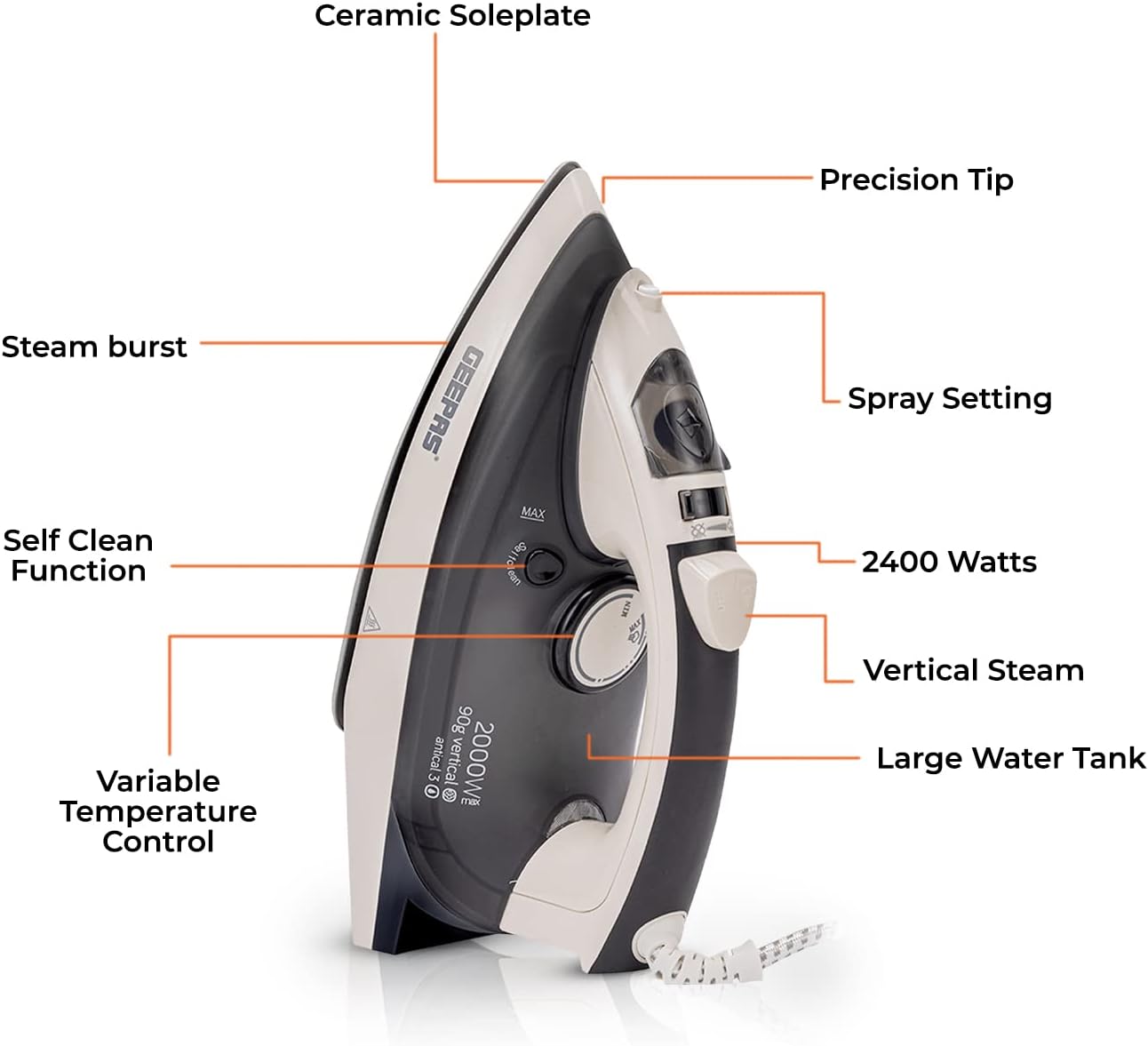
The Geepas GSI7788 steam iron is designed for efficient and comfortable ironing. It features a durable ceramic soleplate, a large water tank, and multiple functions to tackle various fabric types.
Key Features:
- 2400W Power: For rapid heating and powerful steam output.
- Ceramic Soleplate: Ultra-smooth, non-stick surface for effortless gliding across all fabrics.
- Large Water Tank: Allows for extended ironing sessions without frequent refills.
- Variable Temperature Control: Adjustable dial for selecting optimal heat settings for different fabric types.
- Multiple Ironing Modes: Dry, Steam, Spray, Steam Burst, and Vertical Steam functions.
- Self-Clean Function: Helps maintain the iron's performance by removing mineral deposits.
- Anti-Drip System: Prevents water leakage at lower temperatures, protecting fabrics from stains.
- Automatic Shut-off: Enhances safety by turning off the iron when left unattended.
- Precision Tip: Designed to easily reach difficult areas like collars and button plackets.
Parts Diagram:


Setup
Unpacking:
- Carefully remove the iron from its packaging.
- Remove any protective film or stickers from the soleplate.
- Retain the packaging for storage or future transport.
Before First Use:
- It is recommended to iron an old piece of fabric (e.g., a cotton cloth) for a few minutes to clean the soleplate and remove any manufacturing residues.
- Fill the water tank and use the steam function on an old cloth to flush out any impurities from the steam vents.
Operating Instructions
Filling the Water Tank:
- Ensure the iron is unplugged from the power outlet.
- Set the steam control to the 'Dry Ironing' position (no steam).
- Open the water filler cap.
- Using a measuring cup, carefully pour clean tap water into the water tank up to the 'MAX' fill line. Do not overfill.
- Close the water filler cap securely.
Temperature Selection:

- Plug the iron into a suitable power outlet.
- Turn the temperature control dial to the desired setting based on the fabric type. Refer to the fabric guide on the dial or garment care labels.
- The indicator light will illuminate, indicating the iron is heating. It will turn off when the set temperature is reached.
Dry Ironing:
- Ensure the water tank is empty or the steam control is set to 'Dry Ironing'.
- Select the appropriate temperature for your fabric.
- Once the indicator light turns off, begin ironing.
Steam Ironing:

- Fill the water tank as described above.
- Set the temperature control to the 'Steam' range (usually indicated by three dots or a steam symbol). Steam ironing is only effective at higher temperatures.
- Once the indicator light turns off, adjust the steam control to the desired steam level.
- For stubborn wrinkles, press the 'Steam Burst' button for an extra powerful shot of steam. Wait a few seconds between bursts.
Vertical Steaming:
- This function is ideal for removing wrinkles from hanging garments, curtains, or drapes.
- Hold the iron vertically, close to the fabric but not touching it.
- Press the 'Steam Burst' button repeatedly to release steam.
Spray Function:
- Press the 'Spray' button to emit a fine mist of water, which helps to dampen fabrics and ease wrinkle removal.
Automatic Shut-off:
- For safety, the iron will automatically turn off if left motionless for a period of time (e.g., 30 seconds horizontally, 8 minutes vertically).
- To reactivate, simply move the iron, and it will reheat to the selected temperature.
Maintenance and Cleaning
After Each Use:
- Unplug the iron and allow it to cool completely.
- Empty any remaining water from the tank.
Self-Clean Function:
The self-clean function helps remove mineral deposits and impurities from the steam chamber.
- Fill the water tank to the 'MAX' line.
- Plug in the iron and set the temperature to maximum.
- Once the indicator light turns off, unplug the iron.
- Hold the iron horizontally over a sink.
- Press and hold the 'Self-Clean' button. Hot water and steam will be expelled from the soleplate, carrying impurities with them.
- Gently shake the iron back and forth until the water tank is empty.
- Release the 'Self-Clean' button and allow the iron to cool.
Cleaning the Soleplate:
- For minor marks, wipe the soleplate with a damp cloth and a non-abrasive cleaner after the iron has cooled.
- Do not use abrasive scouring pads or harsh chemical cleaners, as these can damage the ceramic coating.
Storage:
- Ensure the iron is completely cool and empty of water before storing.
- Store the iron upright on its heel rest to protect the soleplate.
- Wrap the power cord neatly around the cord wrap area if available.
Troubleshooting
| Problem | Possible Cause | Solution |
|---|---|---|
| Iron does not heat up. | Not plugged in; power outlet fault; temperature dial set to minimum; automatic shut-off activated. | Check power connection; test outlet with another appliance; turn temperature dial to desired setting; move iron to reactivate. |
| No steam or insufficient steam. | Water tank empty; temperature too low for steam; steam control set to dry; steam vents blocked. | Fill water tank; set temperature to steam range; adjust steam control; perform self-clean function. |
| Water leaks from soleplate. | Temperature too low for steam; water tank overfilled; self-clean valve not closed properly. | Increase temperature to steam range; do not overfill water tank; ensure self-clean button is released. |
| White flakes or brown stains on clothes. | Mineral deposits in water tank/steam chamber; dirty soleplate. | Perform self-clean function; clean soleplate as per instructions. Use distilled water in hard water areas. |
Specifications
| Feature | Specification |
|---|---|
| Brand | Geepas |
| Model Number | GSI7788 |
| Power / Wattage | 2400W |
| Voltage | 240V |
| Soleplate Material | Ceramic |
| Product Dimensions | 31.5 x 13.5 x 15.5 cm |
| Item Weight | 1.3 Kilograms |
| Special Features | Automatic Shut-off, Self-Clean, Anti-Drip, Vertical Steam |
Warranty and Support
This Geepas GSI7788 Steam Iron comes with a two-year manufacturer's warranty from the date of purchase. Please retain your proof of purchase for warranty claims.
The warranty covers defects in materials and workmanship under normal use. It does not cover damage resulting from misuse, neglect, accident, alteration, or unauthorized repair.
For warranty service or technical support, please contact your retailer or the authorized Geepas service center in your region. Contact details can typically be found on the Geepas official website or on your product packaging.