
1. Introduction
The LOMVUM LV40 is a precision laser distance meter designed for accurate and efficient measurement of distances, areas, and volumes. This device is suitable for various applications in construction, interior design, and general home improvement. It features multiple measurement modes, a clear display, and a compact design for ease of use.
2. Safety Information
WARNING: This device uses a Class 2 laser. Avoid direct eye exposure to the laser beam. Do not stare into the beam or view directly with optical instruments. Always ensure the laser beam is not directed at people or reflective surfaces that could redirect the beam into eyes.
- Do not attempt to modify or disassemble the device.
- Keep the device out of reach of children.
- Use the device only for its intended purpose as described in this manual.
- Avoid using the device in explosive environments or near flammable materials.
- Protect the device from extreme temperatures, moisture, and strong vibrations.
3. Package Contents

Figure 3.1: Contents of the LOMVUM LV40 package. This includes the laser distance meter, a protective carrying pouch, a wrist strap for secure handling, a user manual, and a reflective target plate for enhanced measurement accuracy over long distances or in bright conditions.
Please check the package contents upon receipt. The standard package should include:
- LOMVUM LV40 Laser Distance Meter
- Protective Carrying Pouch
- Wrist Strap
- User Manual
- Target Plate (for specific measurement conditions)
If any items are missing or damaged, please contact customer support.
4. Product Overview
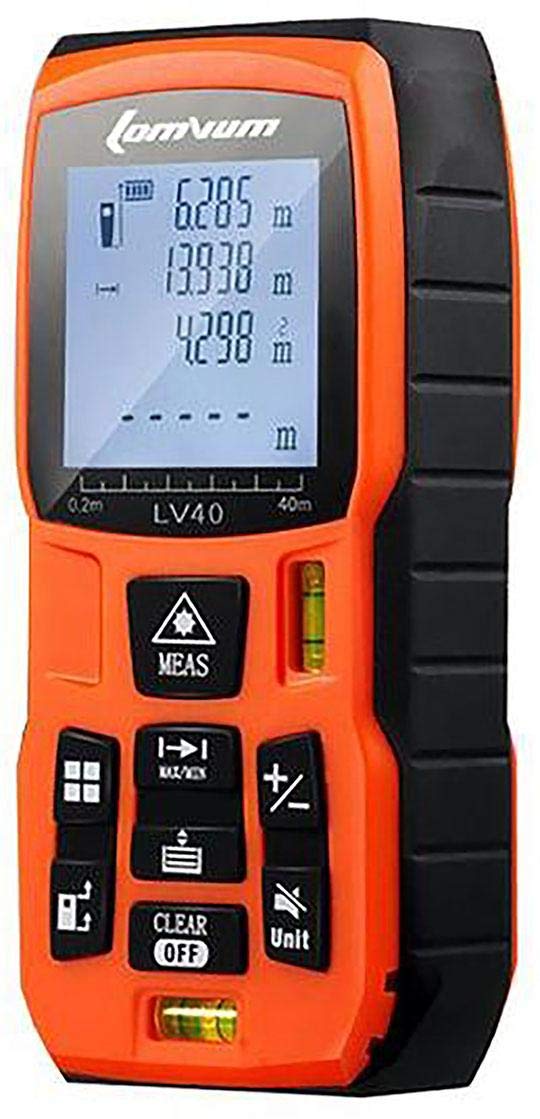
Figure 4.1: The LOMVUM LV40 Laser Distance Meter. This image displays the device's ergonomic design, featuring an orange and black housing, a clear LCD screen for displaying measurements, and an array of buttons for various functions.

Figure 4.2: Key features of the LOMVUM LV40. This illustration highlights the integrated vertical and horizontal bubble levels for accurate alignment, the precision optical lens for laser emission and reception, an HD backlit display for visibility in various lighting conditions, clearly labeled multi-function buttons for intuitive operation, and a mute function for silent operation.
4.1 Device Components
- Laser Emission/Reception Lens: Located at the top of the device.
- LCD Display: Shows measurements, battery status, and mode indicators.
- Measurement Buttons: For activating laser and taking measurements.
- Function Buttons: For changing modes (area, volume, Pythagorean, continuous), unit conversion, and memory.
- Clear/Off Button: To clear current measurement or power off the device.
- Unit Button: To switch between measurement units (m, ft, in).
- Bubble Levels: Integrated for horizontal and vertical alignment.
- Battery Compartment: Located at the bottom or rear of the device.
5. Setup
5.1 Battery Installation
The LOMVUM LV40 requires 2x AAA alkaline batteries (not included). To install the batteries:
- Locate the battery compartment cover on the back or bottom of the device.
- Slide or unclip the cover to open the compartment.
- Insert two AAA batteries, ensuring correct polarity (+ and - terminals).
- Close the battery compartment cover securely.
Note: Remove batteries if the device will not be used for an extended period to prevent leakage.
5.2 Powering On/Off
- To power on: Press the MEAS button briefly. The laser will activate.
- To power off: Press and hold the CLEAR/OFF button for approximately 3 seconds. The device will also automatically power off after a period of inactivity to conserve battery.
6. Operating Instructions
6.1 Changing Measurement Units
Press the Unit button repeatedly to cycle through available measurement units: meters (m), feet (ft), and inches (in).
6.2 Single Distance Measurement
- Power on the device.
- Point the laser at the target surface.
- Press the MEAS button once to activate the laser.
- Press the MEAS button again to take the measurement. The result will be displayed on the screen.
6.3 Continuous Measurement (Tracking)
- Power on the device.
- Press and hold the MEAS button for approximately 2 seconds. The device will enter continuous measurement mode, displaying real-time distance updates as you move the device.
- Press the MEAS button again to stop continuous measurement.
6.4 Area Measurement
- Press the Function button (often labeled with a square icon) until the area measurement icon appears on the display.
- Take the first measurement (e.g., length) by pressing MEAS.
- Take the second measurement (e.g., width) by pressing MEAS.
- The device will automatically calculate and display the area.
6.5 Volume Measurement
- Press the Function button until the volume measurement icon (often a cube) appears.
- Take the first measurement (length) by pressing MEAS.
- Take the second measurement (width) by pressing MEAS.
- Take the third measurement (height) by pressing MEAS.
- The device will automatically calculate and display the volume.
6.6 Pythagorean Measurement (Indirect Measurement)
This mode allows indirect measurement of height or distance using the Pythagorean theorem. There are typically two or three point Pythagorean modes.
- Press the Function button until the Pythagorean measurement icon appears.
- Follow the on-screen prompts to measure the required sides (e.g., hypotenuse, base). Ensure the device remains stationary for each measurement.
- The device will calculate and display the unknown side.
7. Maintenance
- Cleaning: Use a soft, damp cloth to clean the device casing. Do not use abrasive cleaners or solvents. Clean the laser lens with a soft cloth, similar to cleaning camera lenses.
- Storage: Store the device in its protective pouch in a cool, dry place when not in use. Avoid direct sunlight and extreme temperatures.
- Battery Care: Remove batteries if the device is not used for extended periods to prevent corrosion.
8. Troubleshooting
| Problem | Possible Cause | Solution |
|---|---|---|
| Device does not power on. | Dead or incorrectly installed batteries. | Check battery polarity. Replace with new AAA alkaline batteries. |
| Inaccurate measurements. | Unstable measurement surface, obstruction, or environmental factors (e.g., strong sunlight). | Ensure a stable measurement base. Clear obstructions. Use the target plate in bright conditions. Ensure laser lens is clean. |
| Display is dim or blank. | Low battery. | Replace batteries. |
| Laser does not activate. | Device not powered on, or battery issue. | Press MEAS button. Check/replace batteries. |
9. Specifications
| Feature | Detail |
|---|---|
| Brand | LOMVUM |
| Model | LV40 |
| Measurement Range | Up to 40 meters |
| Functions | Distance, Area, Volume, Continuous Measurement, Pythagorean Theorem |
| Measurement Units | Meters (m), Feet (ft), Inches (in) |
| Laser Class | Class 2 |
| Item Weight | 180 g |
| Product Dimensions | 15 x 8 x 6 cm |
| Batteries Required | 2x AAA (not included) |
| Battery Type | Alkaline |
| Water Resistance Level | Water Resistant |
| International Protection Rating | IP54 |
10. Warranty and Support
For warranty information and technical support, please refer to the specific warranty card included in your product package or contact the retailer from whom you purchased the device. Keep your purchase receipt as proof of purchase.
For further assistance, you may also visit the official LOMVUM website or contact their customer service department.