
1. Introduction
The SAILFLO BLB-3000W is a versatile 3000W step-up and step-down voltage converter transformer designed for international use. It allows you to operate electrical appliances with different voltage requirements across various regions. This device supports input voltages of 100V, 110V, 220V, and 230V, enabling conversion between these ranges. It is ideal for using foreign-made appliances (such as kitchen appliances or audio equipment) in countries like Japan, or for using Japanese-made appliances (like gaming consoles or beauty tools) in other countries. Please note that an additional adapter plug may be required depending on the socket type.
2. Safety Instructions
Read all safety instructions carefully before operating the device to prevent damage or injury.
- Appropriate Transformer Selection: For safe and stable operation, the transformer's output capacity should be 1.25 to 1.5 times the power consumption of the appliance you intend to use. For example, a 1500W appliance requires a minimum of 1875W (1500W x 1.25) capacity, with 2250W (1500W x 1.5) being a safer guideline. For short-term use, a 2000W transformer might suffice, but for continuous or long-term operation, a 3000W unit is recommended.
- Inductive Load Appliances: Appliances such as fans, induction cookers (IH cooking heaters), and microwave ovens, which utilize electromagnetic induction principles, can generate an inrush current several times their rated current at startup. This can potentially overload the transformer. For these types of appliances, select a transformer with a capacity several times the appliance's rated power (e.g., for a 1000W microwave oven, a 3000W or higher transformer is recommended).
- Protection Features: The unit is equipped with overcurrent, overload, overheat, and short-circuit protection. In the event of an overload or overheating during prolonged use, the unit will automatically shut down. After the unit has cooled down, press the breaker button to reset and resume operation.
- Breaker Tripping: If the breaker frequently trips, it indicates that the transformer's capacity may be insufficient for the connected appliance. Consider upgrading to a higher capacity transformer for a more stable power supply.
- Ventilation: Do not block the transformer's ventilation openings during operation, especially during prolonged use, to prevent overheating.
- Operating Environment: Ensure the device is used within an operating temperature range of 0°C to 40°C.

3. Product Overview
The SAILFLO BLB-3000W transformer features a robust design with multiple output sockets and essential controls for safe and efficient voltage conversion.
Components:
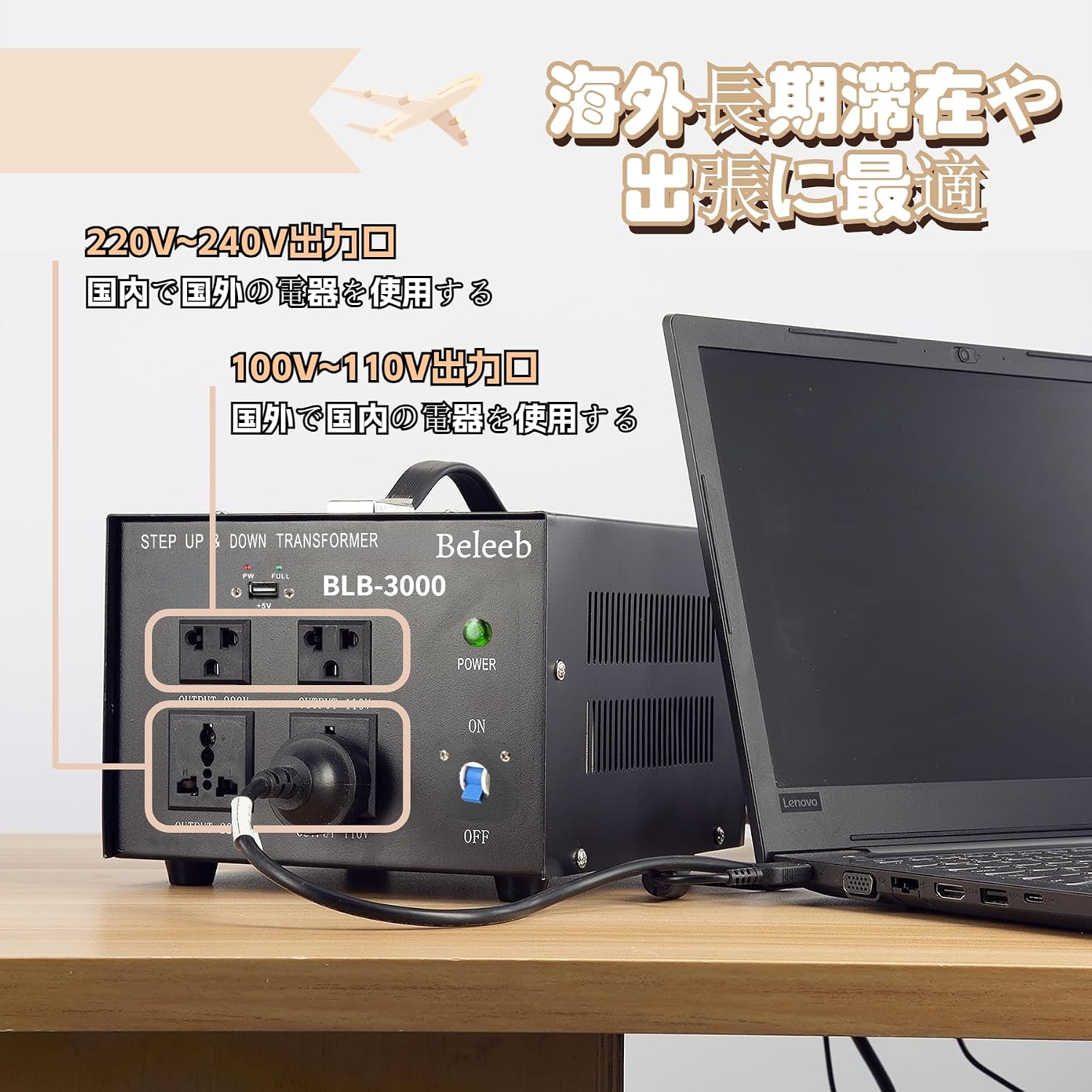
- Front Panel: Features multiple output sockets (100V-110V and 220V-240V), a power indicator light, an ON/OFF switch, and a 5V USB charging port.
- Rear Panel: Includes the input voltage selector, AC input port, and a fuse button for resetting the protection circuit.
- Ventilation: Side vents ensure proper airflow to prevent overheating.

4. Setup
Follow these steps to set up your voltage converter transformer:
- Select Input Voltage: Before connecting the transformer to a power source, identify the local voltage (e.g., 100V, 110V, 220V, or 230V). On the rear panel, use the input voltage selector to match the local voltage. Ensure the selector is firmly inserted into the correct slot.
- Connect to Power Source: Plug the transformer's power cord into a wall outlet.
- Connect Appliance: Plug your appliance into the appropriate output socket on the front panel of the transformer. Use the 100V-110V output for appliances requiring that voltage, or the 220V-240V output for appliances requiring higher voltage.

Caution: Incorrect input voltage selection can lead to device malfunction or damage. Always verify the local voltage and set the selector accordingly.
5. Operation
Once the setup is complete, operating the transformer is straightforward:
- Power On: Flip the ON/OFF switch on the front panel to the 'ON' position. The power indicator light will illuminate.
- Appliance Use: Your connected appliance is now ready for use.
- USB Charging: If your model includes a USB port, you can use it to charge compatible devices (e.g., smartphones, tablets) at 5V.

Note: When using electrical equipment that may generate surge current, if the peak value of the surge current exceeds the transformer's protection circuit setting, the protection circuit will activate and cut off the output. In such cases, turn the transformer OFF, wait a moment, and then restart it.
6. Maintenance
Proper maintenance ensures the longevity and safe operation of your transformer:
- Keep Vents Clear: Regularly check that the ventilation openings on the sides of the unit are not obstructed by dust or other objects. Blocked vents can lead to overheating and reduced performance.
- Cleaning: Disconnect the transformer from the power source before cleaning. Use a dry, soft cloth to wipe the exterior. Do not use liquid cleaners or solvents.
- Storage: Store the transformer in a dry, cool place, away from direct sunlight and extreme temperatures, when not in use.

7. Troubleshooting
If you encounter issues with your transformer, refer to the following common problems and solutions:
| Problem | Possible Cause | Solution |
|---|---|---|
| No power / Unit does not turn on |
|
|
| Breaker trips frequently |
|
|
| Appliance not working after connecting |
|
|
8. Specifications
| Feature | Detail |
|---|---|
| Brand | SAILFLO |
| Model | BLB-3000W |
| Power Capacity | 3000W |
| Input Voltage | 100V / 110V / 220V / 230V (Selectable) |
| Output Voltage | 100V-110V / 220V-240V |
| Protection | Overcurrent, Overload, Overheat, Short-circuit |
| USB Ports | 1 (5V) |
| Dimensions | 36.2 x 29.5 x 19.2 cm |
| Weight | 7.55 kg |
| Operating Temperature | 0°C to 40°C |
| UPC | 673869600645 |
9. Warranty and Support
SAILFLO is committed to providing reliable products and excellent customer service.
- Customer Support: For any inquiries regarding product usage, compatibility, or technical assistance, please contact our expert engineers via email at flexsolar@hotmail.com. We strive to respond to all queries within 24 hours.
- Warranty Service: In the unlikely event of a product defect or malfunction, we offer prompt exchange or repair services. Please contact customer support for assistance.
