
PerfectAire 1PFD35
Perfect Aire 35-Pint ENERGY STAR Dehumidifier
Model: 1PFD35
Brand: PerfectAire
Product Overview
The Perfect Aire 35-Pint ENERGY STAR Dehumidifier is designed to efficiently remove excess moisture from indoor spaces, improving air quality and comfort. This unit is ideal for areas up to 3,000 sq. ft., such as basements, crawlspaces, bathrooms, and laundry rooms. It features ultra-quiet operation, multiple drainage options, and user-friendly controls for precise humidity management.

Figure 1: Front view of the Perfect Aire 35-Pint Dehumidifier.
Setup and Installation
1. Unpacking
Carefully remove the dehumidifier from its packaging. Inspect the unit for any signs of damage during transit. Retain packaging materials for future storage or transport.
2. Placement
Place the dehumidifier on a level surface in the desired location. Ensure there is adequate space around the unit (at least 8 inches) for proper air circulation. This unit is suitable for basements, crawlspaces, bathrooms, and laundry rooms, or any damp areas up to 3,000 sq. ft.

Figure 2: The dehumidifier is designed to fit seamlessly into various home environments, including bedrooms and living spaces.
3. Power Connection
Plug the dehumidifier into a grounded electrical outlet. Ensure the power supply matches the unit's requirements as specified on the product label.
4. Drainage Options
The Perfect Aire dehumidifier offers two convenient drainage methods:
- Manual Bucket Emptying: The unit collects moisture in an easy-to-empty internal bucket. The dehumidifier will automatically shut off when the bucket is full, and an indicator light will illuminate. Simply remove the bucket, empty the collected water, and reinsert it to resume operation.
- Continuous Drainage: For extended, no-maintenance operation, connect a standard garden hose (not included) to the continuous drainage port on the back of the unit. Route the hose to a nearby floor drain or sump pump. This allows water to drain continuously without needing to empty the bucket.
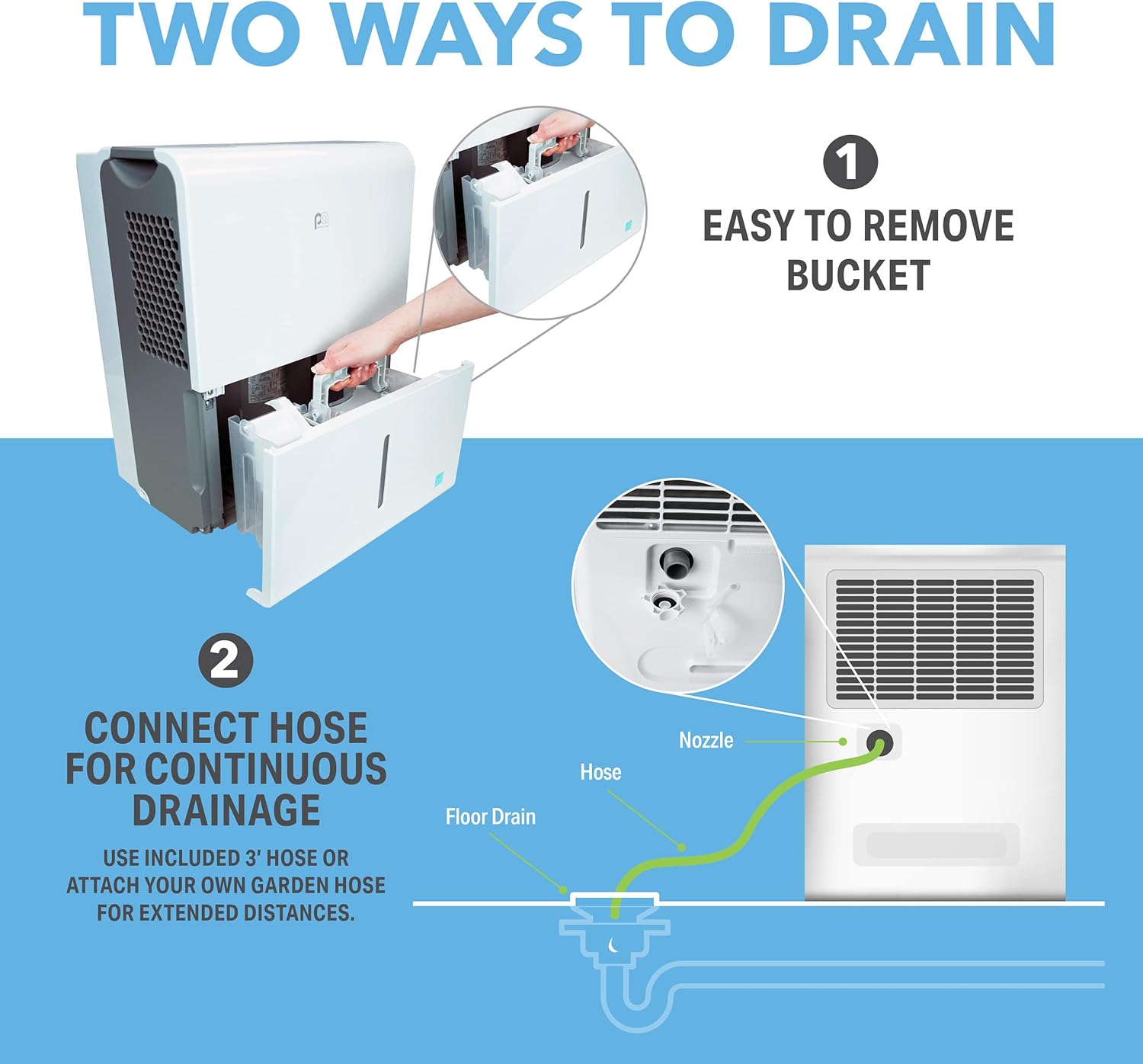
Figure 3: Illustration of the two drainage methods: easy-to-remove bucket and continuous drainage via a garden hose connection.
Video 1: Official product video demonstrating the features and drainage options of the Perfect Aire 35-Pint Dehumidifier.
Operating Instructions
The dehumidifier features a soft-touch electronic control panel for easy operation and precise humidity control.

Figure 4: The digital control panel with various settings and indicators.
- Power On/Off: Press the power button to turn the unit on or off.
- Digital Humidistat: Use the up/down arrows to set your desired humidity level. The unit will operate to maintain this level.
- Comfort Mode: Automatically sets the ideal humidity level based on room temperature, typically maintaining between 50-60% relative humidity.
- Continuous Dehumidification: Activates continuous operation regardless of the set humidity level, ideal for very damp conditions.
- Turbo Mode: Selects the highest fan speed for maximum moisture removal.
- 24-Hour Timer: Program the unit to turn on or off automatically after a set period.
- Automatic Defrost: Built-in feature that protects the evaporator from freezing, ensuring continuous humidity removal even in low temperatures (down to 41°F).
- Automatic Shut-Off: The unit will automatically turn off when the water bucket is full to prevent overflow.
- Filter Indicator: A light will remind you to check and clean the reusable air filter every 250 hours of use.
Maintenance
1. Cleaning the Air Filter
The dehumidifier is equipped with a reusable, washable air filter. When the filter indicator light illuminates, it's time to clean the filter to maintain optimal performance and air quality. Simply remove the filter, wash it with warm, soapy water, rinse thoroughly, and allow it to air dry completely before reinserting.
2. Emptying the Water Bucket
If you are not using the continuous drainage option, the water collection bucket will need to be emptied periodically. When the bucket is full, the unit will stop operating and an indicator light will signal. Carefully slide out the bucket, pour out the water, and slide it back into place. The unit will resume operation automatically.
3. Seasonal Storage
Before storing the dehumidifier for an extended period (e.g., off-season), ensure the water bucket is completely empty and the unit is clean. Follow the detailed storage instructions in the full user manual to prepare the unit for storage, which typically involves cleaning and proper drying to prevent mold or mildew growth.
Troubleshooting
If your dehumidifier is not operating as expected, please refer to the following common issues. For a comprehensive troubleshooting guide, consult the full user manual.
| Problem | Possible Cause | Solution |
|---|---|---|
| Unit does not turn on. | No power, power cord unplugged, bucket full or not properly seated. | Check power connection. Empty and re-seat the water bucket. |
| Dehumidifier runs but room is not dry enough. | Air filter clogged, humidity setting too high, room size too large, doors/windows open. | Clean the air filter. Lower the humidity setting. Ensure room is sealed. |
| Unit is noisy. | Unit not on a level surface, fan speed too high. | Place on a level surface. Reduce fan speed if applicable. |
For more detailed troubleshooting steps and error codes, please refer to the complete Perfect Aire 35-Pint Dehumidifier User Manual (PDF).
Specifications
- Brand: PerfectAire
- Model Number: 1PFD35
- Capacity: 35 Pints per Day
- Floor Area Coverage: Up to 3000 Square Feet
- Color: White
- Product Dimensions: 11.25"D x 11.25"W x 11.25"H
- Item Weight: 132 pounds (60 Kilograms)
- Number of Speeds: 2
- Operation Modes: Continuous, Comfort
- Special Features: Continuous Draining, Quiet Operation, Automatic Defrost, Digital Humidistat, 24-Hour Timer
- Included Components: User Manual, Dehumidifier
- UPC: 842149089405
Warranty and Support
Perfect Aire stands behind the quality and performance of its products. This dehumidifier comes with a 1-year warranty. If your unit proves to be defective in material or workmanship within 1 year of purchase, it will be replaced with an equal or similar model.
For customer support or warranty claims, please contact Perfect Aire directly. You can also refer to the official User Manual (PDF) for contact information and detailed warranty terms.
Ask a question about this manual
Ask about setup, troubleshooting, compatibility, parts, safety, or missing instructions. Manuals+ will review the question and use this page’s manual context to help answer it.