
Important Safety Information
Please read all safety instructions carefully before using this product. Failure to follow these instructions may result in electric shock, fire, or serious injury.
- Do not attempt to disassemble, open, or service the battery pack.
- Do not crush, puncture, short external contacts, or dispose of in fire or water.
- Do not store above 60°C (140°F).
- Replace only with the battery pack designated for this product.
- Keep the battery away from children.
- If the battery leaks, avoid contact with the skin and eyes. If contact occurs, wash with plenty of water and seek medical advice.
1. Setup
1.1 Unpacking and Initial Inspection
Carefully remove the BORNMIO replacement battery from its packaging. Inspect the battery for any visible signs of damage. If any damage is observed, do not use the battery and contact customer support.

Image 1.1: Top view of the BORNMIO CS-MDR200SL replacement battery. This image shows the overall shape and labeling of the battery pack.
1.2 Charging the Battery
The battery may not be fully charged upon arrival. It is recommended to fully charge the battery before its first use. Use the original charger provided with your MEGGER TDR2000 2R Echometer or a compatible charger. Refer to your device's manual for specific charging instructions.
- Connect the battery to the appropriate charging port on your device or external charger.
- Allow the battery to charge until the device's charging indicator shows a full charge.
- Avoid overcharging the battery by disconnecting it once fully charged.
1.3 Installation
Before installing the new battery, ensure your MEGGER TDR2000 2R Echometer is powered off and disconnected from any power source. Refer to your device's user manual for specific battery compartment access and installation procedures.
- Locate the battery compartment on your MEGGER TDR2000 2R Echometer.
- Carefully remove the old battery, if present.
- Align the new BORNMIO battery with the connectors in the compartment. Ensure the polarity is correct.
- Gently push the battery into place until it is securely seated.
- Close the battery compartment cover.

Image 1.2: Angled view of the BORNMIO CS-MDR200SL battery, showing the connector wires. This illustrates how the battery connects to the device.
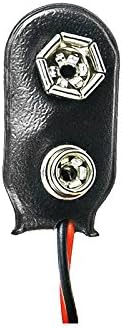
Image 1.3: Close-up of the battery's connector. This detail helps in correctly identifying and connecting the battery to the device.
2. Operating
2.1 General Use
Once installed and charged, the BORNMIO replacement battery will power your MEGGER TDR2000 2R Echometer as per its original specifications. Turn on your device and confirm proper operation. The battery is designed to provide reliable power for your testing needs.
2.2 Battery Life and Performance
The actual battery life will vary depending on the device's power consumption, usage patterns, and environmental conditions. To maximize battery performance:
- Avoid extreme temperatures.
- Fully charge the battery before extensive use.
- If the device will not be used for an extended period, store the battery partially charged (around 50%).
3. Maintenance
3.1 Storage
For optimal battery longevity, store the battery in a cool, dry place, away from direct sunlight and extreme temperatures. If storing for long periods, ensure the battery is charged to approximately 50% capacity.
3.2 Cleaning
Clean the battery's external contacts periodically with a dry, clean cloth to ensure good electrical connection. Do not use liquid cleaners or solvents.
3.3 Disposal
This battery contains materials that require special handling for disposal. Do not dispose of the battery in household waste. Please recycle it at an authorized battery recycling facility. Contact your local authorities for information on recycling options.
4. Troubleshooting
If you encounter issues with your BORNMIO replacement battery, refer to the table below for common problems and solutions.
| Problem | Possible Cause | Solution |
|---|---|---|
| Device does not power on. | Battery not charged, improperly installed, or faulty. | Ensure battery is fully charged. Reinstall the battery, checking for correct alignment. If problem persists, contact support. |
| Battery not charging. | Charger issue, poor connection, or battery fault. | Verify charger is working. Clean battery contacts. Ensure secure connection. Try charging with a different compatible charger if available. |
| Short operating time. | Battery not fully charged, aged battery, or high device power consumption. | Ensure full charge. Reduce device power consumption if possible. If battery is old, consider replacement. |
If troubleshooting steps do not resolve the issue, please contact BORNMIO customer support.
5. Specifications
5.1 Technical Specifications
| Feature | Detail |
|---|---|
| Model Number | CS-MDR200SL |
| Compatible Part Number | TDR2000-C |
| Compatible Device | MEGGER TDR2000 2R Echometer, MEGGER Time Domain Reflectometer |
| Battery Type | Ni-MH (Nickel Metal Hydride) |
| Voltage | 9.6V |
| Capacity | 2000mAh (19.20Wh) |
| Dimensions | 57.90 x 51.30 x 29.10mm (2.28 x 2.02 x 1.15 inches) |
| Weight | 120g (4.23oz) |
| Certifications | ISO9001, RoHS, CE |
6. Warranty and Support
6.1 Warranty Information
This BORNMIO replacement battery comes with a 12-month warranty and a 14-day money-back guarantee from the date of purchase. This warranty covers manufacturing defects. It does not cover damage caused by misuse, accident, unauthorized modification, or normal wear and tear.
6.2 Customer Support
For any questions, technical assistance, or warranty claims, please contact BORNMIO customer support. Refer to your purchase documentation for contact details or visit the official BORNMIO website.
Thank you for choosing BORNMIO.
