
Introduction
The Ion System Control is an advanced wall control unit designed to offer comprehensive command over your communicating comfort system. It provides full control over temperature, humidity, ventilation, comfort scheduling, and energy management. This fully-featured control allows for remote access and control via internet-enabled devices, enhancing comfort and convenience.
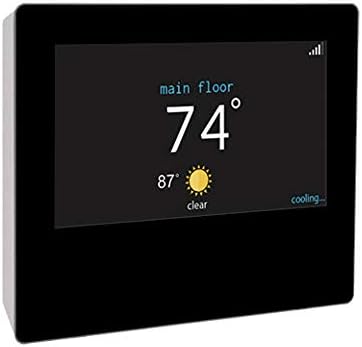
Figure 1: The Ion System Wall Control unit, showing its sleek black design and a digital display indicating indoor and outdoor temperatures.
Key Features
- 7-Day Programming: Customize temperature control throughout the day and week with settings for wake, away, home, and sleep periods.
- System Compatibility: Seamlessly pairs with communicating, modulating gas furnaces, variable-speed fan coils, inverter-driven outdoor units, and zoning systems for a complete Ion Comfort System.
- Zone-by-Zone Control: Capable of controlling temperatures and fan speeds in up to eight distinct zones.
- Energy Management: Provides real-time energy use tracking to help optimize consumption.
- Local Weather Integration: Displays a 5-day local weather forecast directly on the unit.
- Wi-Fi Enabled: Allows for remote access and control from internet-enabled devices.
- High-Resolution Touchscreen: Features a smartphone-like touchscreen for intuitive operation.
Setup
Installation of the Ion System Wall Control should be performed by a qualified HVAC technician to ensure proper wiring and system integration. Once physically installed, the unit will guide you through the initial setup process on its touchscreen display.
Wi-Fi Connectivity
- Access the network settings on the control unit's touchscreen.
- Select your home Wi-Fi network from the list of available networks.
- Enter your Wi-Fi password when prompted.
- Confirm connection. Once connected, the unit will display local weather information and enable remote access via the associated mobile application.
Operating Instructions
The Ion System Wall Control features an intuitive touchscreen interface for easy operation. Navigate through menus by tapping icons and swiping. Key functions include:
Temperature Adjustment
- On the main screen, tap the temperature display to adjust the setpoint.
- Use the up/down arrows or slide the temperature bar to select your desired temperature.
- The system will automatically adjust to maintain the set temperature.
Scheduling
Utilize the 7-day programming feature to create custom comfort schedules. You can set different temperatures for 'Wake', 'Away', 'Home', and 'Sleep' periods for each day of the week. This optimizes energy usage and ensures comfort when you need it.
Zone Control
If your system includes zoning, the control allows you to manage temperatures and fan speeds independently for up to eight zones within your home. Access the zoning menu to select and adjust individual zones.
Energy Tracking
Monitor your real-time energy consumption directly from the unit. This feature provides insights into your HVAC system's performance and helps identify opportunities for energy savings.
Maintenance
The Ion System Wall Control requires minimal user maintenance. Keep the touchscreen clean with a soft, dry cloth. Avoid using abrasive cleaners or solvents. For system-level maintenance, such as filter changes or annual inspections, consult your HVAC technician. The unit may provide alerts for routine maintenance tasks.
Troubleshooting
If you encounter issues with your Ion System Wall Control, consider the following common troubleshooting steps:
- No Power/Blank Screen: Check the circuit breaker for your HVAC system. Ensure the unit is properly seated on its wall plate. If the issue persists, contact a qualified technician.
- Wi-Fi Connectivity Issues: Verify your home Wi-Fi network is active and other devices can connect. Restart your Wi-Fi router. Re-enter your Wi-Fi credentials on the control unit.
- Incorrect Temperature Readings: Ensure the thermostat is not exposed to direct sunlight, drafts, or heat sources that could affect its sensor.
- System Not Responding: Try restarting the control unit by cycling power to your HVAC system at the circuit breaker for a few minutes, then restoring power.
For complex issues or error codes displayed on the screen, refer to the specific error code documentation or contact your authorized service provider.
Specifications
| Feature | Detail |
|---|---|
| Brand | Ion/Comfortmaker/Tempstar/Arcoaire/ Kenmore/Keeprite/Heil |
| Model Name | SYST0101CW |
| Controller Type | Touchscreen |
| Special Feature | Programmable |
| Color | Black |
| Specific Uses | Furnace |
| Temperature Control Type | Digital |
| Connectivity Technology | Wi-Fi |
| Power Source | Electric |
| Item Weight | 1.5 Pounds |
| Voltage | 24 Volts |
| Shape | Rectangular |
| Display Type | LCD |
| Control Method | Remote |
| Mounting Type | Wall Mount |
| Product Dimensions | 1.1 x 4.7 x 5.6 inches |
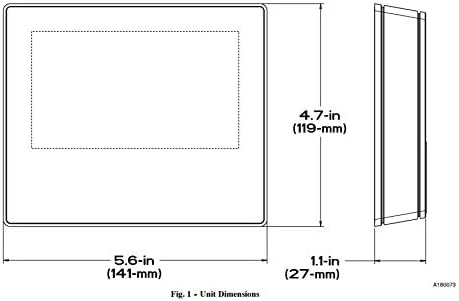
Figure 2: Unit Dimensions for the Ion System Wall Control.
Warranty and Support
For warranty information and technical support, please refer to the documentation provided with your HVAC system or contact your authorized dealer. It is recommended to register your product upon installation to facilitate any future support needs.
For service or inquiries, please contact your installing contractor or the manufacturer's customer service department. Ensure you have your model number (SYST0101CW) and serial number ready when contacting support.