
Introduction
This manual provides detailed instructions for the Pyle PSBT85A Portable Bluetooth PA Speaker. This compact and portable system offers wireless entertainment, digital audio recording, and customizable sound settings for various applications, making it ideal for parties, events, karaoke, and public speeches.
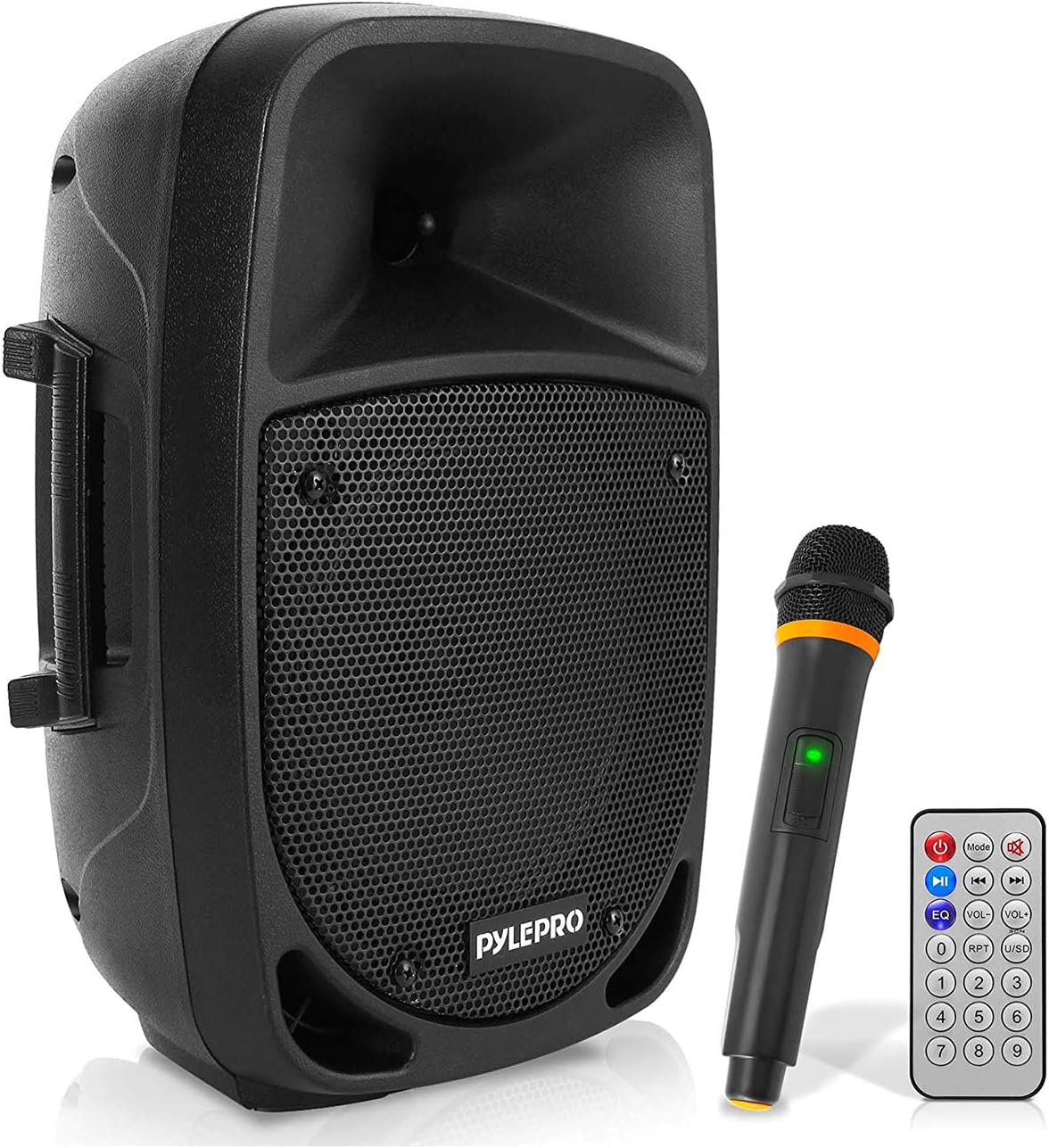
Image: The Pyle PSBT85A Portable Bluetooth PA Speaker, shown with its included wireless microphone and remote control.
Key Features
- 800 Watts Power Supply: This compact and high-powered system is equipped with an 8-inch subwoofer and 3-inch treble speaker for full-range stereo sound reproduction.
- Wireless Audio Streaming: Features built-in Bluetooth with a wireless range of up to 33+ ft, allowing you to stream audio from your favorite devices like smartphones, tablets, and more.
- Audio Configuration and Recording: The speaker and microphone set supports digital audio recording and offers adjustable echo, bass, and treble controls for customized sound.
- Supports USB / SD Card: Equipped with USB Flash Drive Memory Reader, SD Card Reader, and AUX 3.5mm Input for connecting external devices. Compatible with MP3, WMA, and WAV digital audio files.
- Rechargeable Battery: Features a built-in rechargeable battery for convenient portability. It also includes a 3.5mm stand mount for easy setup.

Image: Visual representation of key features including high-quality sound, Bluetooth connectivity, and ultimate portability.
What's in the Box
- Portable PA Speaker
- Wireless Microphone
- Remote Control
- Power Adapter

Image: Contents of the Pyle PSBT85A package, including the speaker, wireless microphone, remote control, and power adapter.
Setup
Initial Charging
Before first use, fully charge the speaker using the provided power adapter. The LED battery indicator lights will show the charging status.
Placement
The speaker can be placed on a flat, stable surface or mounted on a 3.5mm stand. Ensure stable placement to prevent tipping.

Image: Illustrates the compact dimensions (10'' x 8.1'' x 15.4'') and lightweight design (8.6 pounds) of the portable speaker, highlighting its ease of placement.
Operating Instructions
Power On/Off
Locate the power switch on the control panel and turn it to the "ON" position to power on the speaker. Turn it to "OFF" to power down.
Bluetooth Pairing
- Turn on the speaker. It will automatically enter Bluetooth pairing mode.
- On your device (smartphone, tablet, etc.), enable Bluetooth and search for "Pyle PSBT85A".
- Select the speaker from the list to pair. A confirmation sound will indicate successful pairing.
Audio Playback (USB/SD Card)
Insert a USB flash drive or SD card (up to 32GB) containing MP3, WMA, or WAV audio files into the respective slot on the control panel. The speaker will automatically begin playback. Use the control panel or remote for navigation.
Microphone Usage
The included UHF wireless microphone requires (2) x ‘AA’ batteries (not included). Insert batteries and turn on the microphone. Adjust the microphone volume using the dedicated control on the speaker.
Audio Configuration
Use the Echo, Bass, and Treble controls on the speaker's control panel to adjust the sound to your preference.

Image: Rear view of the speaker's control panel, showing various input options including USB, SD card, AUX, and microphone inputs, along with sound adjustment knobs.
Video: Demonstrates the Pyle PSBT85A Portable Bluetooth PA Speaker in use, highlighting its multi-host functionality and sound customization for street performances.
Maintenance
- Keep the speaker clean by wiping it with a soft, dry cloth. Avoid using harsh chemicals or abrasive cleaners.
- Store the speaker in a cool, dry place away from direct sunlight and extreme temperatures.
- If not used for extended periods, charge the battery periodically to maintain its lifespan.
Troubleshooting
| Problem | Solution |
|---|---|
| No Power | Check power adapter connection; ensure battery is charged. |
| No Sound | Check volume levels on both speaker and connected device. Ensure correct input source is selected. |
| Bluetooth Disconnection | Ensure device is within 33ft range. Re-pair the device. |
| Distorted Sound | Reduce volume on speaker or connected device. Check audio source quality. |
| Microphone Not Working | Ensure microphone batteries are installed correctly and charged. Check microphone volume. |
Specifications
| Feature | Detail |
|---|---|
| Mounting Type | Floor Standing |
| Power Source | Battery Powered |
| Connector Type | Aux |
| Material | Acrylonitrile Butadiene Styrene (ABS) |
| Item Weight | 8.6 Pounds |
| Output Wattage | 800 Watts |
| Number of Channels | 2 |
| Audio Input | External microphone, AUX |
| Recommended Uses For Product | Parties, events, karaoke, and public speeches |
| Impedance | 4 Ohm |
| Manufacturer | PyleUSA |
| UPC | 842893118192 |
| Product Dimensions (L x W x H) | 10 x 8.1 x 15.4 inches |
| Item Model Number | PSBT85A |
| Connectivity Technology | Bluetooth, USB |
| Color | Black |
| Compatible Devices | Smartphone |
Warranty and Support
For warranty information or technical support, please refer to the official Pyle website or contact their customer service. Keep your purchase receipt for any warranty claims.


