
Introduction
This manual provides comprehensive instructions for the setup, operation, maintenance, and troubleshooting of your Alfawise S2 Smart Watch. Please read this manual carefully before using the device to ensure proper functionality and to maximize your user experience. Keep this manual for future reference.
Product Overview
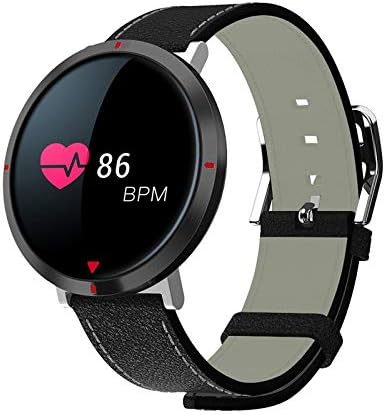
Figure 1: Alfawise S2 Smart Watch. The circular display shows a heart rate of 86 BPM, indicated by a heart icon and numerical value. The watch features a black case and a black mixed-material band with white stitching.
The Alfawise S2 Smart Watch is designed to track various daily activities and provide notifications. It features a circular display, a durable mixed-material band, and integrated sensors for health monitoring.
Key Components:
- Display: Touch-sensitive screen for interaction and information display.
- Watch Case: Houses the internal electronics and sensors.
- Strap: Mixed material band for comfortable wear.
- Charging Contacts: Located on the back of the watch for power input.
- Heart Rate Sensor: Located on the back for continuous heart rate monitoring.
Setup
1. Charging the Device
- Connect the charging cable to a USB power adapter (not included) or a computer's USB port.
- Align the magnetic charging pins of the cable with the charging contacts on the back of the watch. The watch will vibrate and display a charging indicator.
- Charge the watch fully before first use. A full charge typically takes approximately 2 hours.
2. App Installation and Pairing
- Download the Companion App: Search for the official Alfawise S2 companion app in your smartphone's app store (Google Play Store for Android or Apple App Store for iOS). Install the app.
- Enable Bluetooth: Ensure Bluetooth is enabled on your smartphone.
- Open the App: Launch the installed companion app on your smartphone.
- Pair the Device: Follow the in-app instructions to search for and pair your Alfawise S2 Smart Watch. The watch should appear in the list of available devices. Select it to establish a connection.
- Data Synchronization: Once paired, the watch will synchronize time and health data with your smartphone.
Operating Instructions
Basic Navigation
- Wake Screen: Raise your wrist or press the side button (if present) to wake the screen.
- Swipe Up/Down: Navigate through menus and notifications.
- Swipe Left/Right: Access quick functions or different data screens.
- Tap: Select an item or confirm an action.
Key Features
- Incoming Calls: The watch will vibrate and display caller ID for incoming calls when connected to your smartphone. You can typically reject calls from the watch.
- Pedometer: Tracks your daily steps, distance, and estimated calories burned. View data on the watch or in the companion app.
- Heart Rate Monitor: Continuously monitors your heart rate. Access real-time readings on the watch and historical data in the app.
- Blood Pressure Measurement: Provides an estimate of your blood pressure. For accurate medical readings, consult a healthcare professional.
- Blood Oxygen Measurement: Measures your blood oxygen saturation (SpO2). This feature is for reference only and not for medical diagnosis.
- Sleep Monitor: Automatically tracks your sleep patterns, including deep sleep, light sleep, and wake times. Review sleep analysis in the companion app.
- Alarm: Set alarms through the companion app. The watch will vibrate at the set time.
- Health Data Synchronization: All collected health and activity data automatically synchronizes with the companion app on your smartphone, allowing for detailed analysis and tracking over time.
Maintenance
Cleaning
- Regularly clean the watch screen and case with a soft, damp cloth.
- Clean the charging contacts and heart rate sensor on the back of the watch to ensure proper function.
- Avoid using harsh chemicals, abrasive cleaners, or solvents.
Battery Care
- Avoid fully discharging the battery frequently.
- Do not expose the watch to extreme temperatures, as this can affect battery life.
- If storing the watch for an extended period, charge it to approximately 50% and store it in a cool, dry place.
Troubleshooting
| Problem | Possible Solution |
|---|---|
| Watch does not turn on. | Ensure the watch is fully charged. Connect it to the charger for at least 30 minutes. |
| Cannot pair with smartphone. |
|
| Inaccurate health data readings. |
|
| Notifications not received. |
|
Specifications
| Feature | Detail |
|---|---|
| Model Number | S2 |
| Brand | Alfawise |
| Operating System | Multi |
| Connectivity | Bluetooth 4.0, Wireless |
| Compatibility | Android & iOS |
| Band Material | Mixed |
| Color | Black |
| Item Weight | 140 g |
| Package Dimensions | 17 x 7.8 x 3 cm |
Warranty and Support
For warranty information, technical support, or service inquiries, please refer to the warranty card included with your product or visit the official Alfawise website. Keep your purchase receipt as proof of purchase.
Note: Product specifications and features are subject to change without prior notice.