
1. Product Overview
The DiamondBoxx M3 is a portable Bluetooth speaker designed for high-quality audio reproduction. This manual provides essential information for the safe and efficient use of your device.

Figure 1: Front view of the DiamondBoxx M3 speaker, showing the main controls and speaker grilles.
2. Setup
2.1 Unboxing and Initial Inspection
Carefully remove the speaker from its packaging. Inspect the unit for any signs of damage. Ensure all components are present.
2.2 Charging the Battery
Before first use, fully charge the speaker's internal Lithium Ion battery. Connect the provided charger to the 'CHARGER' port on the rear panel and plug it into a power outlet. A full charge can take up to 20 hours.
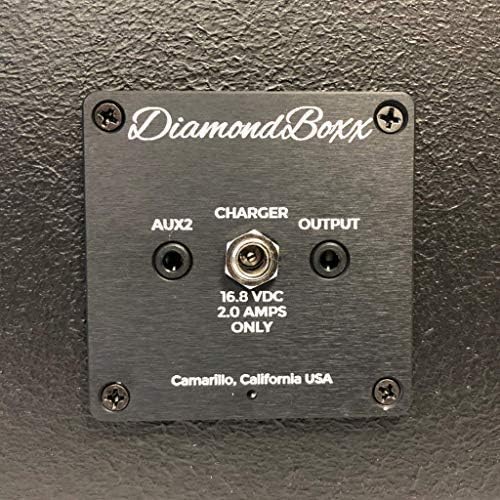
Figure 2: Rear panel of the DiamondBoxx M3, showing the AUX2, CHARGER, and OUTPUT ports.
2.3 Powering On/Off
Press and hold the POWER button located on the front panel to turn the speaker on or off.
3. Operating Instructions
3.1 Bluetooth Pairing
- Ensure the speaker is powered on.
- The speaker will automatically enter Bluetooth pairing mode, indicated by a flashing LED (if applicable).
- On your smartphone or tablet, navigate to the Bluetooth settings and select "DiamondBoxx M3" from the list of available devices.
- Once connected, the speaker will confirm with an audible tone or a solid LED indicator.
The M3 supports Bluetooth 5.0 with TWS aptX HD for high-quality wireless audio streaming.
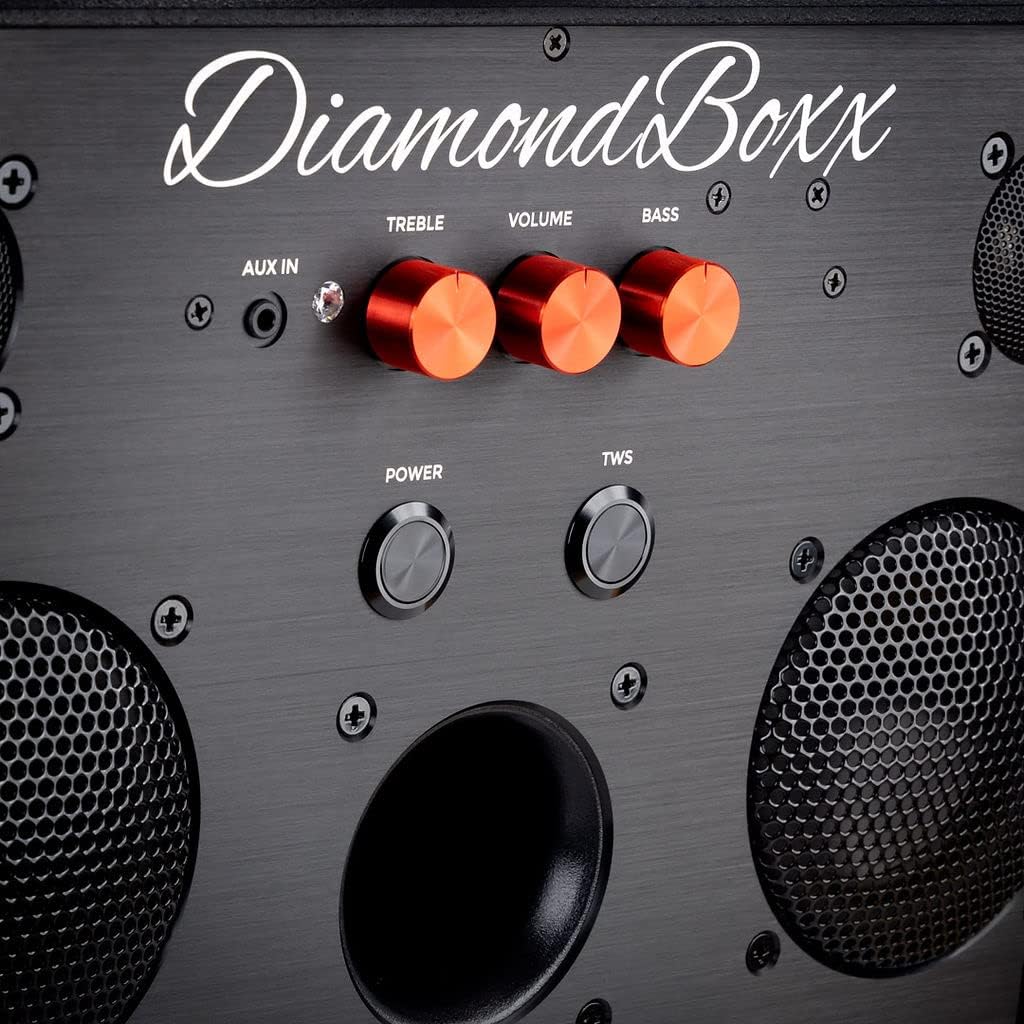
Figure 3: Close-up of the DiamondBoxx M3 control panel, showing Treble, Volume, Bass knobs, and Power/TWS buttons.
3.2 True Wireless Stereo (TWS) Pairing
If you have two DiamondBoxx M3 speakers, you can pair them for a True Wireless Stereo experience:
- Ensure both M3 speakers are powered on and not connected to any Bluetooth device.
- On one speaker, press the TWS button. It will enter TWS pairing mode.
- On the second speaker, press the TWS button.
- The two speakers will automatically connect to each other. A confirmation tone will sound.
- Once TWS is established, connect your Bluetooth device to one of the speakers as described in Section 3.1. Audio will now play in stereo across both units.
3.3 Using the AUX Input
To connect an audio device via a wired connection, use a 3.5mm audio cable (not included) to connect your device to the AUX IN port on the front panel or the AUX2 port on the rear panel. The speaker will automatically switch to AUX input mode when a cable is detected.
3.4 Adjusting Audio
- Volume: Use the VOLUME knob on the front panel to adjust the overall sound level.
- Treble: Use the TREBLE knob to adjust the high-frequency response.
- Bass: Use the BASS knob to adjust the low-frequency response.
The speaker provides a stereo audio output mode.
4. Maintenance
4.1 Cleaning
Wipe the speaker's wood cabinet with a soft, dry cloth. Do not use liquid cleaners or abrasive materials, as they may damage the finish. Ensure no moisture enters the speaker grilles or ports.
4.2 Battery Care
To prolong the life of the Lithium Ion battery, avoid fully discharging it frequently. Recharge the speaker regularly, especially if it will be stored for an extended period. Store in a cool, dry place.
4.3 Water Resistance
The DiamondBoxx M3 is NOT WATERPROOF. Avoid exposure to water, rain, or excessive humidity to prevent damage.
5. Troubleshooting
- No Power: Ensure the battery is charged. Connect the charger and attempt to power on.
- No Sound: Check the volume level on both the speaker and your connected device. Ensure the correct input source (Bluetooth or AUX) is selected.
- Bluetooth Pairing Issues: Make sure the speaker is in pairing mode. Turn off Bluetooth on other nearby devices that may be trying to connect. Try forgetting the device on your phone and re-pairing.
- Distorted Sound: Reduce the volume on both the speaker and your connected device. Ensure the audio source is of good quality. Check for physical obstructions around the speakers.
- Charging Not Working: Verify the charger is properly connected to both the speaker and a working power outlet. Ensure the charger is the correct 16.8 VDC, 2.0 AMPS ONLY charger.
6. Specifications

Figure 4: DiamondBoxx M3 speaker with product dimensions: 8.25"D x 14.75"W x 9.5"H.
| Feature | Detail |
|---|---|
| Model Name | M3231 |
| Brand | DiamondBoxx |
| Material | Wood |
| Product Dimensions | 8.25"D x 14.75"W x 9.5"H |
| Item Weight | 17.06 pounds |
| Wireless Technology | Bluetooth 5.0 with TWS aptX HD |
| Amplifier Power | 200 Watts RMS, Max 400W |
| Frequency Response | 50Hz - 22kHz @+/-3dB |
| Woofers | 4 inch Aluminum Cone |
| Tweeters | 1 inch Titanium Dome |
| Power Source | Battery Powered (1 Lithium Ion battery included) |
| Charging Time | 20 Hours |
| Play Time | Up to 40 hours |
| Waterproof | No |
| Special Features | Bass Boost, Hi Res Audio, Multi Room Audio, Auto Speaker Setup |
| Compatible Devices | Smartphone, Tablet |
| UPC | 680220998389 |
7. Warranty and Support
7.1 Warranty Information
For detailed warranty information, please refer to the official DiamondBoxx website or contact their customer service directly. Warranty terms may vary based on region and purchase date.
7.2 Customer Support
If you encounter any issues not covered in this manual or require further assistance, please visit the DiamondBoxx official website for support resources, FAQs, and contact information.


