Introduction
This manual provides detailed instructions for the installation, operation, and maintenance of your Harbor Breeze Sail Stream 52-inch Brushed Nickel LED Indoor Flush Mount Ceiling Fan. Please read this manual thoroughly before beginning installation or operation to ensure safe and efficient use of your new ceiling fan. Keep this manual for future reference.

Figure 1: Overview of the Harbor Breeze Sail Stream 52-inch Ceiling Fan.
Setup and Installation
Proper installation is crucial for the safe and optimal performance of your ceiling fan. It is recommended that installation be performed by a qualified electrician.
Safety Precautions:
- Ensure power is disconnected at the circuit breaker before installation.
- Mount the fan to a ceiling joist or a fan-rated outlet box capable of supporting the fan's weight (22.8 pounds).
- Maintain proper clearance between fan blades and walls/obstacles.
Installation Steps:
- Mounting Bracket Installation: Secure the mounting bracket to the ceiling outlet box.
- Wiring: Connect the fan's electrical wires to the household wiring according to local electrical codes. Ensure all connections are secure.
- Fan Assembly: Attach the fan motor housing to the mounting bracket.
- Blade Attachment: Securely attach the three fan blades to the motor housing.
- Light Kit Installation: Install the LED light kit to the bottom of the fan motor housing.
- Remote Receiver Installation: Install the remote control receiver within the fan's canopy.
- Power Restoration: Restore power at the circuit breaker and test the fan's functions.

Figure 2: Detail of a fan blade, highlighting its design and attachment points.

Figure 3: Close-up view of the integrated LED light fixture.
Operating Instructions
Your Harbor Breeze Sail Stream ceiling fan comes with a convenient remote control for easy operation of all functions.
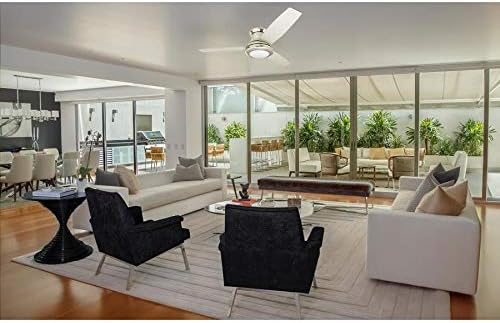
Figure 4: The included remote control and its wall mounting bracket.
Remote Control Functions:
- Fan ON/OFF: Press the main power button to turn the fan on or off.
- Fan Speed Control: Use the dedicated speed buttons (typically indicated by bars or numbers) to cycle through the 3 available fan speeds (low, medium, high).
- Light ON/OFF: Press the light bulb button to turn the LED light on or off.
- Light Dimming: Hold the light bulb button to dim or brighten the LED light.
- Timer Function: Some remotes may include a timer function to automatically turn off the fan after a set period. Refer to your remote's specific markings.
- Reverse Function: A switch on the fan motor housing or a button on the remote (often indicated by snowflake/sun icons) allows you to reverse the blade direction for summer (downward airflow) or winter (upward airflow) operation.
For optimal air circulation, select the fan speed that provides comfortable airflow without creating excessive draft.
Maintenance
Regular maintenance ensures the longevity and efficient operation of your ceiling fan.
Cleaning:
- Always turn off the power to the fan at the circuit breaker before cleaning.
- Use a soft, lint-free cloth to wipe down the fan blades and motor housing.
- For stubborn dirt, a slightly damp cloth with mild soap can be used, followed by a dry cloth.
- Do not use abrasive cleaners or solvents, as they may damage the finish.
Blade Balancing:
If the fan wobbles during operation, check that all blade screws are tightened. A balancing kit (often sold separately) can be used to correct persistent wobbling.
Light Source:
The integrated LED light source is designed for long life and is generally not user-replaceable. If the light fails, contact customer support.
Troubleshooting
Before contacting customer support, please refer to the following common issues and solutions:
| Problem | Possible Cause | Solution |
|---|---|---|
| Fan does not start. | No power, loose wiring, remote battery dead. | Check circuit breaker. Ensure all wiring connections are secure. Replace remote battery. |
| Fan wobbles. | Loose blade screws, unbalanced blades, improper mounting. | Tighten all blade screws. Use a blade balancing kit. Ensure mounting bracket is secure. |
| Light does not work or is dim. | Loose wiring, LED failure, dimming setting. | Check light kit wiring. Ensure light is not dimmed via remote. Contact customer support if LED is faulty. |
| Fan is noisy. | Loose screws, motor issues, blades hitting an obstruction. | Check all screws on fan and mounting. Ensure no obstructions. Contact customer support if motor noise persists. |
Specifications
- Brand: HARBOR BREEZE
- Model Name: 52-in Sail Stream Brushed Nickel 3 Blade Ceiling Fan
- Color: Nickel
- Electric Fan Design: Ceiling Fan
- Power Source: Corded Electric
- Style: Modern
- Room Type: Living Room, Bedroom
- Special Feature: Remote Control
- Wattage: 54 watts
- Speed: 3 RPM (Note: This RPM value seems unusually low for a fan speed. It might be a typo in the source data or represent a different metric. Users should refer to the product's actual performance.)
- Voltage: 120 Volts (AC)
- Included Components: Remote
- Indoor/Outdoor Usage: Indoor
- Control Method: Remote
- Blade Material: Plastic
- Efficiency: High
- Is Cordless?: No
- Number of Power Levels: 3
- Package Dimensions: 24 x 14.3 x 10.75 inches
- Item Weight: 22.8 pounds
- ASIN: B07XTR81JM
- Date First Available: September 15, 2019

Figure 5: The ceiling fan integrated into a living space.

Figure 6: EnergyGuide label showing estimated yearly energy cost and airflow efficiency.
Warranty and Support
For warranty information, please refer to the documentation included with your product at the time of purchase or visit the official HARBOR BREEZE website. For technical support or service inquiries, please contact HARBOR BREEZE customer service directly.
Keep your purchase receipt and model number handy when contacting support.