
Travelpro 4091865-22
Travelpro Platinum Elite 25-Inch Softside Expandable Checked Luggage User Manual
Model: 4091865-22
Introduction
Thank you for choosing the Travelpro Platinum Elite 25-Inch Softside Expandable Checked Luggage. This manual provides essential information for the proper setup, operation, maintenance, and care of your new luggage. Designed for durability and ease of use, this suitcase features premium materials, a PrecisionGlide System, and smart packing solutions to enhance your travel experience.

Image: Front view of the Travelpro Platinum Elite 25-Inch Softside Expandable Checked Luggage in True Navy Blue, showcasing its elegant design and front pockets.
Setup
1. Unpacking
Remove all packaging materials and protective films from your luggage. Inspect the suitcase for any signs of damage that may have occurred during shipping. If any damage is found, please contact customer support immediately.
2. Setting the TSA-Compliant Lock
Your Travelpro Platinum Elite luggage is equipped with an integrated TSA-compliant lock. This allows TSA agents to inspect your bag without damaging the lock. To set your personal combination:
- The lock is preset to 0-0-0.
- Locate the small reset button (usually recessed and requires a pen or pointed object to press).
- Press and hold the reset button while setting your desired 3-digit combination.
- Release the reset button. Your new combination is now set.
- Test your new combination to ensure it works correctly before scrambling the numbers.

Image: Detailed view of the integrated TSA lock, showing the combination dials and the release mechanism.
3. Adjusting the PowerScope Extension Handle
The PowerScope extension handle features a 4-stop adjustment for comfortable maneuvering. To extend or retract the handle, press the button located on the top of the Contour Grip and pull or push the handle to your desired height. Ensure the handle clicks securely into place at each stop.

Image: Diagram highlighting the PowerScope extension handle, Contour Grip with cushioned touch points, and self-aligned magnetic wheels.
Operating Your Luggage
1. Using the PrecisionGlide System (Spinner Wheels)
Your luggage is equipped with eight Magnatrac, self-aligning, 360-degree spinner wheels. This system allows for effortless rolling in any direction. Simply push or pull the luggage, and the wheels will automatically align for smooth movement. The Contour Grip on the handle provides comfort and control.
Video: Demonstrates the smooth, multi-directional movement of the PrecisionGlide System's self-aligning spinner wheels.
2. Expanding the Luggage
For additional packing capacity, your suitcase features a tip-resistant tapered expansion option that provides up to 2 inches of extra space. Locate the expansion zipper around the perimeter of the main compartment and unzip it to expand the bag.

Image: Close-up of the luggage side, illustrating the zippered expansion feature.
3. Packing Features
- Built-in Suiter: The interior includes a built-in suiter designed to keep your garments wrinkle-free. Carefully fold and secure your clothing within the suiter.
- Deluxe Tie-Down System: Utilize the adjustable tie-down straps to compress your belongings and prevent shifting during transit.
- Integrated Accessory Pockets: Multiple interior pockets are available for organizing smaller items, toiletries, and accessories.
- Removable Wet Pocket: A dedicated removable wet pocket is included for storing damp items or liquids, protecting other contents from moisture.

Image: Open view of the luggage interior, highlighting the deluxe tie-down system, built-in suiter, and removable TSA-compliant toiletries bag.
Video: Demonstrates the packing flexibility of the Travelpro Platinum Elite 25-inch luggage, including the fold-out suiter and accessory pockets.
4. Using the USB Charging Port (Power Bank Not Included)
Your luggage may include an external USB port for convenient charging of your electronic devices. To use this feature, you will need to connect your own power bank (not included) to the internal cable located within one of the luggage pockets. Once connected, you can plug your device's charging cable into the external USB port.
Maintenance
1. Cleaning Instructions
The high-density nylon fabric with DuraGuard coating is designed to resist wear, stains, and abrasions. For general cleaning, wipe the exterior with a damp cloth and mild soap. For tougher stains, a soft brush can be used gently. Allow the luggage to air dry completely before storage.
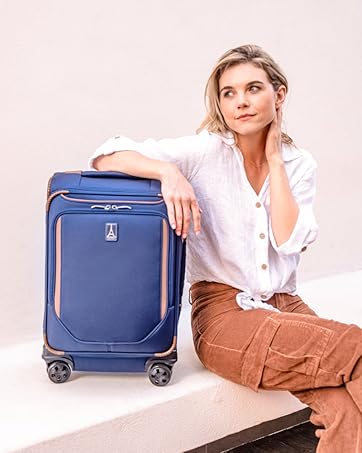
Image: Close-up of the luggage fabric, highlighting the water and stain-resistant DuraGuard coating.
2. Wheel and Zipper Care
- Wheels: Periodically check the spinner wheels for any debris or hair that may impede smooth rolling. Clean as necessary.
- Zippers: The Supra™ zipper heads are designed for durability. To ensure longevity, avoid overfilling your luggage, which can strain the zippers. If a zipper becomes stiff, apply a small amount of zipper lubricant or wax.

Image: Close-up of the Supra™ zipper heads, designed to resist damage from daily use.
Troubleshooting
- Stuck Extension Handle: Ensure no items inside the luggage are obstructing the handle mechanism. Press the release button firmly and try extending/retracting the handle.
- Wheels Not Rolling Smoothly: Check for debris (hair, lint) caught in the wheel axles. Clean thoroughly. If the issue persists, contact customer support.
- TSA Lock Issues: If you forget your combination, there is no master key. You may need to try combinations or contact Travelpro support for guidance. Ensure the reset button is fully released after setting a new combination.
- Zipper Malfunction: If a zipper separates, try to realign the teeth by moving the slider back and forth. Avoid forcing the zipper.
Specifications
| Feature | Detail |
|---|---|
| Model Number | 4091865-22 |
| Overall Dimensions (incl. wheels & handles) | 28"L x 18.5"W x 11.75"H |
| Case Dimensions | 25"L x 18"W x 11.25"H |
| Weight | 9.8 lbs |
| Volume | 97 Liters |
| Wheel Type | 8 Magnatrac™ Self-Aligning 360-Degree Spinner Wheels |
| Handle Type | PowerScope Extension Handle with Patented Contour Grip |
| Lock Type | Integrated TSA-Compliant Lock |
| Material | High-Density Nylon with DuraGuard® Coating |
| Expansion | Up to 2 inches (Tapered) |

Image: Visual representation of the luggage dimensions and key specifications.
Warranty & Support
Your Travelpro Platinum Elite luggage is backed by a Limited Lifetime Coverage plus the Trusted Companion Promise. This covers the cost of repair for damage from airline or common carrier for the original purchaser or gift recipient. This warranty is valid for new purchases after registration.
For warranty claims, product support, or to register your product, please visit the official Travelpro website or contact their customer service department. Keep your proof of purchase for all warranty-related inquiries.
Travelpro Website: www.travelpro.com
Related documents4091865-22


Ask a question about this manual
Ask about setup, troubleshooting, compatibility, parts, safety, or missing instructions. Manuals+ will review the question and use this page’s manual context to help answer it.