
1. Product Overview
The Intex 26680 Krystal Clear Sand Filter Pump with integrated Saltwater System is designed to provide efficient and effective filtration and sanitation for your swimming pool. This system combines the power of sand filtration to remove physical debris with a saltwater chlorine generator to produce natural chlorine, ensuring clean and clear pool water.
Key features include a robust pump with a flow rate of 10,000 L/h, suitable for pools up to 56,800 L, and an integrated saltwater system that eliminates the need for traditional chemical chlorine. The system works by converting salt into chlorine, which then destroys bacteria and algae, providing a more comfortable swimming experience.
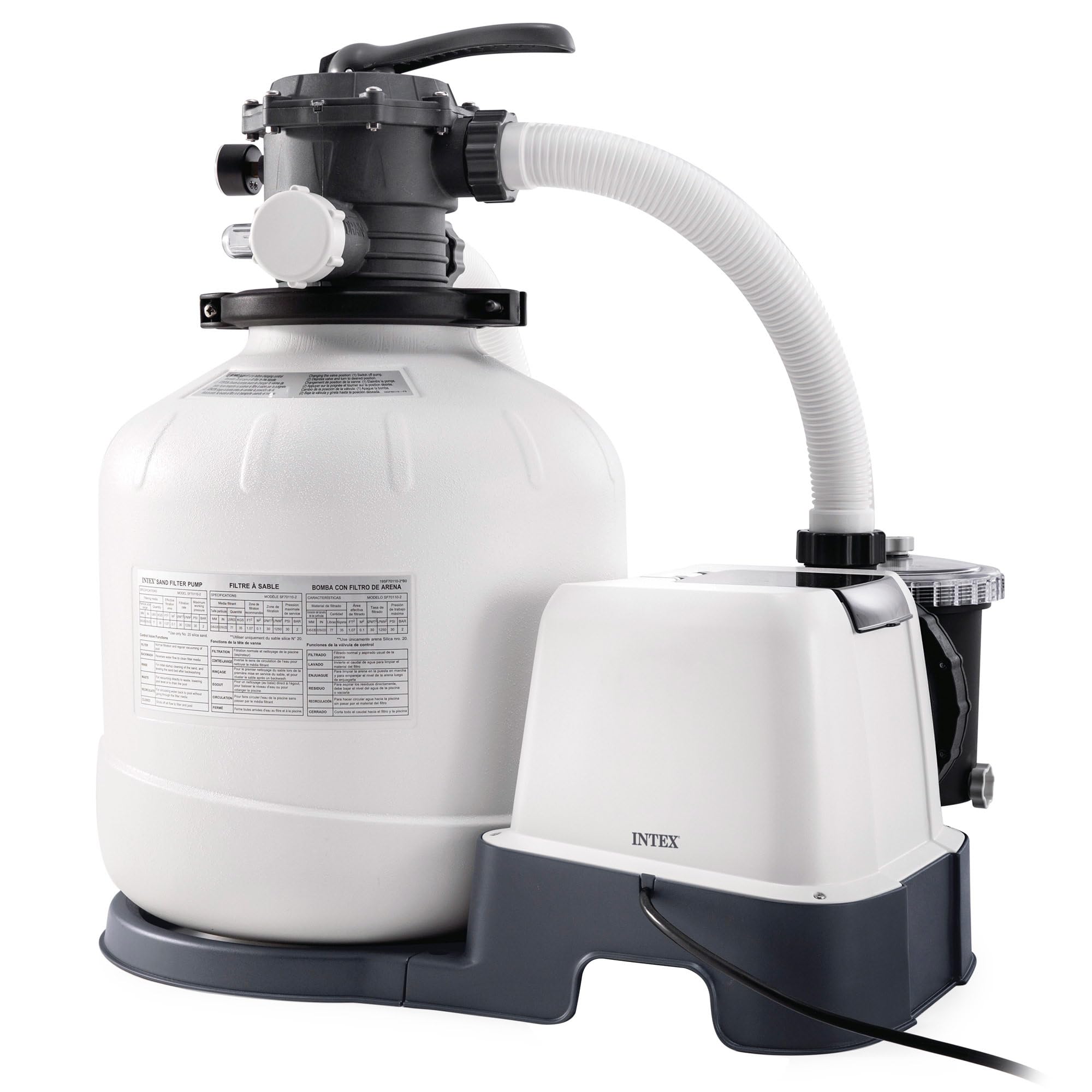
Image 1.1: The Intex 26680 Krystal Clear Sand Filter Pump with Saltwater System.
2. Safety Information
Before installing and operating this product, read and follow all instructions carefully. Failure to do so can result in serious injury or property damage.
- Always disconnect the power cord from the electrical outlet before performing any maintenance or service.
- This appliance is not intended for use by persons with reduced physical, sensory or mental capabilities, or lack of experience and knowledge, unless they have been given supervision or instruction concerning use of the appliance by a person responsible for their safety.
- Children should be supervised to ensure that they do not play with the appliance.
- The pump must be placed on a firm, level surface.
- Ensure all electrical connections are secure and protected from water.
- Do not operate the pump if the power cord or plug is damaged.
- Maintain proper water chemistry and salt levels as specified in the operating instructions.
3. Setup and Installation
3.1 Component Identification
Familiarize yourself with all components before beginning assembly. The system includes the pump, filter tank, saltwater system unit, control panel, and connecting hoses.

Image 3.1: Detailed view of the pump and saltwater system components.
3.2 Placement
Position the filter pump on a solid, level surface, at least 2 meters (6.5 feet) from the pool. Ensure the location is well-drained and protected from direct sunlight and extreme weather conditions. The unit dimensions are approximately 68.9L x 47.9W x 62.5H cm.
3.3 Connecting to the Pool
Connect the hoses from the pump to the pool's inlet and outlet fittings. Ensure all connections are tight to prevent leaks. Refer to your pool's manual for specific connection points.

Image 3.2: The sand filter pump system connected to an above-ground pool.
3.4 Filling the Filter Tank
Fill the filter tank with the recommended amount and type of filter media (e.g., filter sand or glass media). Consult the specific instructions provided with your filter media for exact quantities. Ensure the standpipe is centered during filling.
3.5 Electrical Connection
Connect the power cord to a grounded 120 Volt electrical outlet. Ensure the outlet is protected by a Ground Fault Circuit Interrupter (GFCI) or Residual Current Device (RCD).
4. Operating Instructions
4.1 Control Panel
The control panel allows you to manage the pump's functions, including power, timer settings, and locking the controls.

Image 4.1: The digital control panel for the Intex 26680 system.
4.2 Multi-Port Valve Functions
The multi-port valve on the filter tank has several settings:
- FILTER: Normal filtering operation. Water flows through the filter media and returns to the pool.
- BACKWASH: Cleans the filter media by reversing water flow.
- RINSE: Used after backwashing to settle the filter media and flush out any remaining dirty water.
- WASTE: Bypasses the filter and drains water directly from the pool, useful for vacuuming heavy debris or lowering water level.
- RECIRCULATE: Bypasses the filter and circulates water directly back to the pool, useful for mixing chemicals.
- CLOSED: Shuts off flow to the filter and pump. Do not operate the pump in this position.
Always turn off the pump before changing the multi-port valve setting.
4.3 Saltwater System Operation
The integrated saltwater system generates chlorine from dissolved salt in the pool water. Ensure the correct amount of pool salt is added to achieve the recommended salinity level. The system will automatically produce chlorine during the filtration cycle to sanitize the water.

Image 4.2: Hydro Aeration Technology for improved water circulation and clarity.
5. Maintenance
5.1 Monitoring the Pressure Gauge
The pressure gauge indicates the pressure inside the filter tank. A rising pressure indicates that the filter media is becoming dirty and requires backwashing. The optimal operating pressure is typically in the green zone.

Image 5.1: Pressure gauge indicating filter status.
5.2 Backwashing and Rinsing
When the pressure gauge enters the yellow or red zone, or when water flow decreases, it's time to backwash the filter. Follow these steps:
- Turn off the pump.
- Set the multi-port valve to 'BACKWASH'.
- Turn on the pump and backwash until the water in the sight glass runs clear (approximately 2-3 minutes).
- Turn off the pump.
- Set the multi-port valve to 'RINSE'.
- Turn on the pump and rinse for about 30-60 seconds.
- Turn off the pump.
- Set the multi-port valve to 'FILTER' for normal operation.
5.3 Saltwater Cell Cleaning
Periodically inspect the electrolytic cell for scale buildup. If scale is present, clean the cell according to the specific instructions in the full product manual. Regular cleaning ensures optimal chlorine production.
5.4 Winterization
Before freezing temperatures arrive, drain all water from the pump, filter tank, and hoses. Disassemble and store components in a dry, protected area. Refer to the complete manual for detailed winterization procedures.
6. Troubleshooting
If you encounter issues with your Intex 26680 system, refer to the following common problems and solutions:
| Problem | Possible Cause | Solution |
|---|---|---|
| Low water flow | Clogged skimmer/strainer basket, dirty filter media, air in system. | Clean baskets, backwash filter, check for air leaks and prime pump. |
| Cloudy pool water | Insufficient filtration time, dirty filter, improper water chemistry, low chlorine. | Increase filtration time, backwash filter, test and adjust water chemistry, check salt levels. |
| Saltwater system not producing chlorine | Low salt level, dirty electrolytic cell, system error. | Test and adjust salt level, clean the electrolytic cell, consult full manual for error codes. |
| Pump not starting | No power, tripped GFCI/RCD, motor issue. | Check power connection, reset GFCI/RCD, contact customer service if motor fails. |
For more detailed troubleshooting, refer to the complete Intex 26680 user manual.
7. Specifications
| Feature | Specification |
|---|---|
| Brand | Intex |
| Model Number | 26680 |
| Pump Flow Rate | 10,000 Liters per hour (L/h) |
| System Flow Rate | 8,000 Liters per hour (L/h) |
| Maximum Pool Capacity | 56,800 Liters |
| Materials | PP, PE, STEEL, CU, PC |
| Product Dimensions (L x W x H) | 68.9L x 47.9W x 62.5H cm |
| Item Weight | 23.42 Kilograms |
| Power Source | Electric with cable |
| Voltage | 120 Volt |
| Maximum Lifting Height | 8 Meters |
8. Warranty and Support
8.1 Warranty Information
This product is covered by a manufacturer's warranty. For specific details regarding warranty coverage, duration, and terms, please refer to the warranty card included with your product or visit the official Intex website.
8.2 Customer Support
For technical assistance, replacement parts, or any other inquiries, please contact Intex customer service. Contact information can typically be found on the product packaging, in the full user manual, or on the official Intex website.


