
Denon DCD-600NE
Denon DCD-600NE Compact CD Player User Manual
Model: DCD-600NE
Introduction
The Denon DCD-600NE is a compact CD player designed to deliver high-fidelity audio playback. Featuring Denon's proprietary AL32 Processing technology and a vibration-resistant design, this unit ensures accurate and detailed sound reproduction from your CD collection. It is engineered to provide a pure and immersive listening experience, making it an ideal component for any home audio system.

Figure 1: Denon DCD-600NE Compact CD Player.
Safety Information
Please read these safety instructions carefully before operating the unit. Keep this manual for future reference.
- Power Supply: Connect the unit only to an AC outlet of the voltage specified on the rear panel.
- Ventilation: Ensure adequate ventilation. Do not block ventilation openings. Avoid placing the unit on soft surfaces that may block vents.
- Moisture and Water: Do not expose the unit to rain or moisture. Do not place objects filled with liquids, such as vases, on the unit.
- Heat Sources: Keep the unit away from heat sources such as radiators, heat registers, stoves, or other apparatus (including amplifiers) that produce heat.
- Cleaning: Unplug the unit from the wall outlet before cleaning. Use a dry cloth for cleaning.
- Servicing: Do not attempt to service this product yourself. Refer all servicing to qualified service personnel.
- Laser Product: This product utilizes a laser. To prevent direct exposure to the laser beam, do not open the enclosure or defeat any safety mechanisms.
What's in the Box
Verify that all items listed below are included in the package:
- Denon DCD-600NE Compact CD Player
- Remote Controller
- 2 x AAA Batteries (for remote controller)
- Power Cord
- Audio Cable (RCA)
- Quick Start Guide
- Safety Instructions

Figure 2: Denon DCD-600NE CD Player and included remote control.
Setup
Placement
Place the DCD-600NE on a stable, level surface away from direct sunlight, heat sources, and excessive dust or moisture. Ensure there is sufficient space around the unit for proper ventilation.
Connections
Before making any connections, ensure the CD player and all connected audio components are powered off and unplugged from the wall outlet.
- Audio Output Connection:
- Analog Audio Output (RCA): Connect the AUDIO OUT (L/R) jacks on the DCD-600NE to the analog audio input jacks (e.g., CD, AUX) on your amplifier or receiver using an RCA audio cable. Ensure left (white) and right (red) channels are matched.
- Digital Audio Output (Optical): For digital connection, connect the OPTICAL DIGITAL AUDIO OUT jack on the DCD-600NE to a digital optical input on your amplifier or receiver using an optical cable.
- IR Control (Optional): If you have a compatible Denon amplifier, you can connect the IR CONTROL IN/OUT jacks to enable synchronized power on/off and remote control functionality.
- Power Connection: Once all audio connections are made, connect the power cord to the AC INlet on the rear of the DCD-600NE, then plug the other end into a wall outlet.

Figure 3: Rear panel connections of the DCD-600NE.
Operating Instructions
Basic Playback
- Power On: Press the POWER button on the front panel or the remote control to turn on the unit.
- Load a Disc: Press the OPEN/CLOSE button (▲) to open the disc tray. Place a CD (or CD-R/RW with MP3/WMA files) gently onto the tray with the label side facing up. Press OPEN/CLOSE again to close the tray. The unit will begin reading the disc.
- Start Playback: Once the disc is read, press the PLAY/PAUSE button (►/II) to start playback.
- Pause/Resume: Press PLAY/PAUSE (►/II) during playback to pause, and press it again to resume.
- Stop Playback: Press the STOP button (■) to stop playback.
- Skip Tracks: Use the SKIP buttons (►►I / I◄◄) to skip to the next or previous track.
- Fast Forward/Reverse: Press and hold the SKIP buttons (►►I / I◄◄) during playback to fast forward or reverse through a track.
Pure Direct Mode
The Pure Direct mode enhances sound quality by turning off the digital output and display, which can generate noise. This provides a cleaner analog audio signal.
- To activate Pure Direct mode, press the PURE DIRECT button on the remote control. The display will turn off.
- Press the button again to deactivate Pure Direct mode.
Program Playback
You can create a custom playback order for tracks on a disc.
- Load a disc and press STOP.
- Press the PROGRAM button on the remote.
- Use the number buttons (0-9) to enter the desired track numbers in sequence.
- Press PLAY to start program playback.
Repeat and Random Playback
- Press the REPEAT button to cycle through repeat modes (e.g., repeat one track, repeat all tracks, repeat program).
- Press the RANDOM button to play tracks in a random order. Press again to cancel.
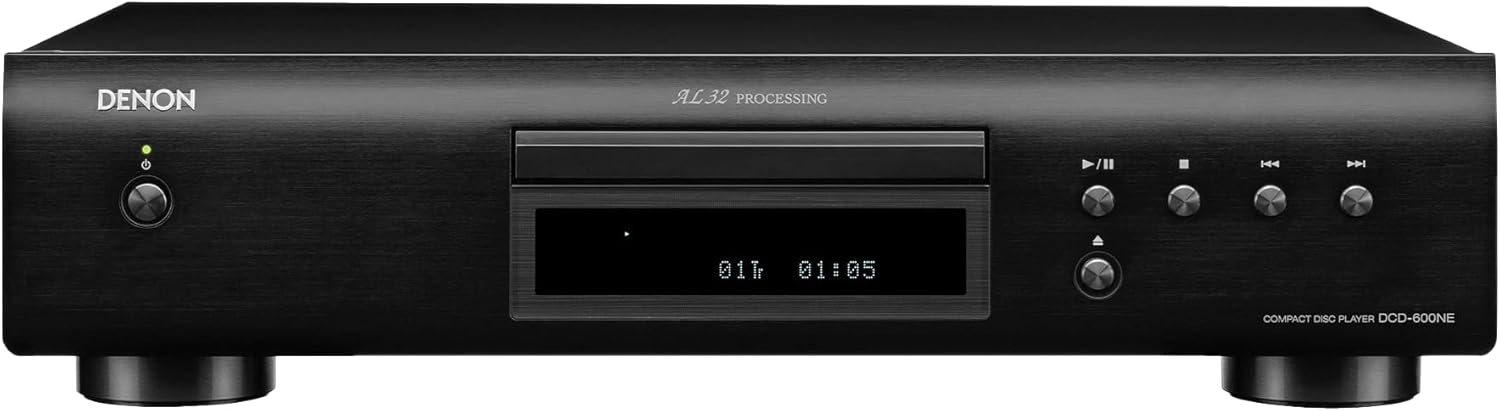
Figure 4: Front panel controls for disc playback.
Video 1: Official Denon DCD-600NE product overview, demonstrating features like AL32 Processing and vibration-resistant design.
Maintenance
Cleaning the Unit
To maintain the appearance and performance of your DCD-600NE:
- Before cleaning, disconnect the power cord from the wall outlet.
- Wipe the exterior surfaces with a soft, dry cloth. Do not use abrasive cloths, thinners, alcohol, or other chemical cleaning agents, as these may damage the finish.
- Avoid spraying insecticides near the unit.
Disc Care
- Handle discs by their edges to avoid fingerprints on the playing surface.
- Keep discs clean. If a disc is dirty, wipe it gently from the center outwards with a soft, lint-free cloth. Do not use solvents or abrasive cleaners.
- Store discs in their cases when not in use to protect them from dust and scratches.

Figure 5: Internal components of the DCD-600NE, highlighting its robust construction for vibration resistance.
Troubleshooting
If you experience problems with your DCD-600NE, refer to the following table for common issues and solutions. If the problem persists, contact Denon customer support.
| Problem | Possible Cause | Solution |
|---|---|---|
| No power | Power cord not connected securely. | Check power cord connection to the unit and wall outlet. |
| No sound | Incorrect audio cable connection; incorrect input selected on amplifier; Pure Direct mode active with digital output. | Verify audio cable connections (analog or digital). Select the correct input on your amplifier. Deactivate Pure Direct mode if using digital output. |
| "CAN'T READ DISC" error or disc not playing | Disc is dirty or scratched; disc inserted incorrectly; unsupported disc format. | Clean the disc. Ensure the disc is inserted correctly (label side up). Verify the disc is a standard CD, CD-R/RW with MP3/WMA files. Try another disc. |
| Remote control not working | Batteries are depleted or inserted incorrectly; obstacle between remote and unit; remote sensor on unit is blocked. | Replace batteries. Ensure correct battery polarity. Remove any obstacles. Clean the remote sensor on the unit. |
| Sound skips or distorts | Disc is dirty or scratched; unit is vibrating; unit is placed on an unstable surface. | Clean the disc. Place the unit on a stable, flat surface. Ensure no external vibrations are affecting the unit. |
Specifications
| Feature | Detail |
|---|---|
| Model | DCD-600NE |
| Disc Compatibility | CD, CD-R/RW (Audio CD, MP3, WMA) |
| Audio Processing | AL32 Processing |
| Digital-to-Analog Converter (DAC) | 32-bit/192kHz |
| Audio Outputs | 1 x Analog RCA (L/R), 1 x Optical Digital |
| Special Features | Pure Direct Mode, Vibration-Resistant Design |
| Power Supply | AC 120V, 60Hz |
| Power Consumption | 12W |
| Dimensions (W x H x D) | 17.09 x 4.21 x 14.57 inches (434 x 107 x 370 mm) |
| Weight | 8.58 lbs (3.9 kg) |
Warranty and Support
Denon products are built with quality and reliability in mind. For detailed warranty information specific to your region and product, please refer to the warranty card included with your purchase or visit the official Denon website.
For technical support, service, or inquiries about your Denon DCD-600NE CD Player, please contact Denon Customer Support through their official website or the contact information provided in your product documentation.
Online Resources: